

This example show the implementation of I2C Slave based Command Dispatcher using the PSoC 4 Pioneer Kit with energy efficiency in mind.
Here is the Application Schematics:
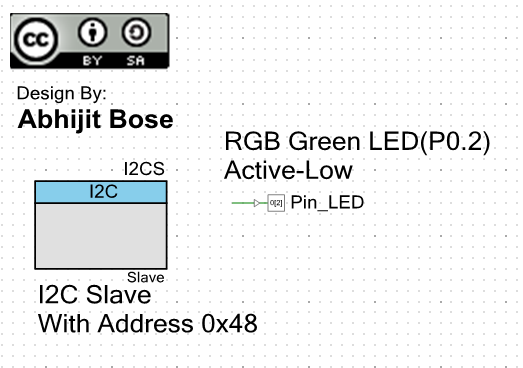

In this example we use the SCB based I2C Slave module to perform communication Via the PSoC 4 Pioneer Kit Bridge Interface.
This is done internally on the Kit as the PSoC5 is connected to the pins P3.0 and P3.1 with I2C Pull-ups to the PSoC4.
Hence no external circuitry in required.
The settings for the I2C Slave module { I2C (SCB mode) [v1.10] } is as follows:
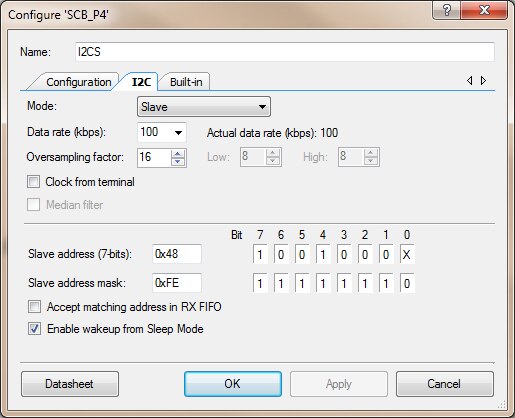
Apart from the I2C Slave we also use a Single pin LED connection for the Green color in the RGB LED P0.2 as shown in the earlier examples.
Now for the source code we plan to have engage the Deep Sleep mode for the PSoC4 when the I2C Slave is not busy.
This is achieved by activating the 'Enable wakeup from Sleep Mode' option in the I2C module and applying proper API sleep for I2C module.
The communication I2C protocol Chosen here is as follows:
- Transmit:
- { 4 Byte } 32-bit Commands
- { 6 Byte } 8-bit Parameters (1byte to 6bytes)
- Receive:
- { 4 Byte } 32-bit Commands
- { 1 Byte } 8-bit Status
- { 5 Byte } 8-bit Return Parameters (optional)
This is also followed while we use the Bridge Interface shown later.
Here is the Source Code:
#include <project.h>
#include <cyPm.h>
#define RESPONSE_LOC    4
volatile uint32_t command;  // 32bit Commands for Command Dispatcher
volatile uint8_t params[6]; // 6byte Parameter Structure
uint8 u8wBuffer[10];        // I2C Write Buffer
uint8 u8rBuffer[10];        // I2C Read  Buffer
void CommandDispatcher()
{
    u8rBuffer[RESPONSE_LOC] = 0x00; // Default there are No Errors initially
    // Depending on the Command Perform Actions
    switch(command)
    {
        case 0x0001:
            u8rBuffer[RESPONSE_LOC+1] = 0xAA;
            break;
        case 0x0002:
            u8rBuffer[RESPONSE_LOC+1] = 0xBB;
            break;
        case 0x0003:
            u8rBuffer[RESPONSE_LOC+1] = 0xCC;
            break;
        default:
            u8rBuffer[RESPONSE_LOC] = 0x01; // In case of Error command not ok
            break;
    }
}
int main()
{
    uint8 i;            // Local counter
    uint32 byteCnt;     // Used to store the size of data written into the I2C Buffer
    CyGlobalIntEnable;  // Enable the Interrupts for I2C Processing
    I2CS_Start();
    Pin_LED_Write(1);
    I2CS_I2CSlaveInitWriteBuf(u8wBuffer,10);    // Setup Slave I2C Buffer
    I2CS_I2CSlaveInitReadBuf(u8rBuffer,10);
    for(;;)
    {
        if(I2CS_I2CSlaveStatus()&I2CS_I2C_SSTAT_RD_CMPLT) // If Buffer was Read by Master
        {
            I2CS_I2CSlaveClearReadBuf();
            I2CS_I2CSlaveClearReadStatus();
        }
        if(!(I2CS_I2CSlaveStatus()&
            (I2CS_I2C_SSTAT_RD_BUSY|I2CS_I2C_SSTAT_RD_BUSY|
                I2CS_I2C_SSTAT_WR_BUSY|I2CS_I2C_SSTAT_WR_CMPLT|
                I2CS_I2C_SSTAT_RD_CMPLT))) // If Not busy
        {
            I2CS_Sleep();       //I2C Module Sleep
            CySysPmDeepSleep(); // Got to Deep Sleep
            I2CS_Wakeup();      // Wakeup on Address Match + Clock Stretch
            CyGlobalIntEnable;  // Enable Interrupts to enable processing
        }
        if(I2CS_I2CSlaveStatus()&I2CS_I2C_SSTAT_WR_CMPLT) // If Buffer was Written by Master
        {
            Pin_LED_Write(0);
            // Get the Write Buffer Size
            byteCnt = I2CS_I2CSlaveGetWriteBufSize();

            // 32bit Command (4)bytes
            command=(u8wBuffer[0]<<24)|(u8wBuffer[1]<<16)|(u8wBuffer[2]<<8)|(u8wBuffer[3]);
            // Get Parameters (6)bytes
            for(i=RESPONSE_LOC;i<byteCnt;i++)
            {
                params[i-RESPONSE_LOC]=u8wBuffer[i];
            }
            // Copy the Last Buffer to Rx
            for(i=0;i<byteCnt;i++)
            {
                u8rBuffer[i]=u8wBuffer[i];
            }
            // Call the Command Dispatcher - Blocking
            CommandDispatcher();
            // Clear the Write Status
            I2CS_I2CSlaveClearWriteStatus();
            I2CS_I2CSlaveClearWriteBuf();
            // Clear Read Buffer to help in Transmission
            I2CS_I2CSlaveClearReadBuf();
            Pin_LED_Write(1);
        }
    }
}
After successfully building and loading this code the Cypress Bridge Control Panel needs to be used.
Here is the Settings for the Bridge Control Panel:

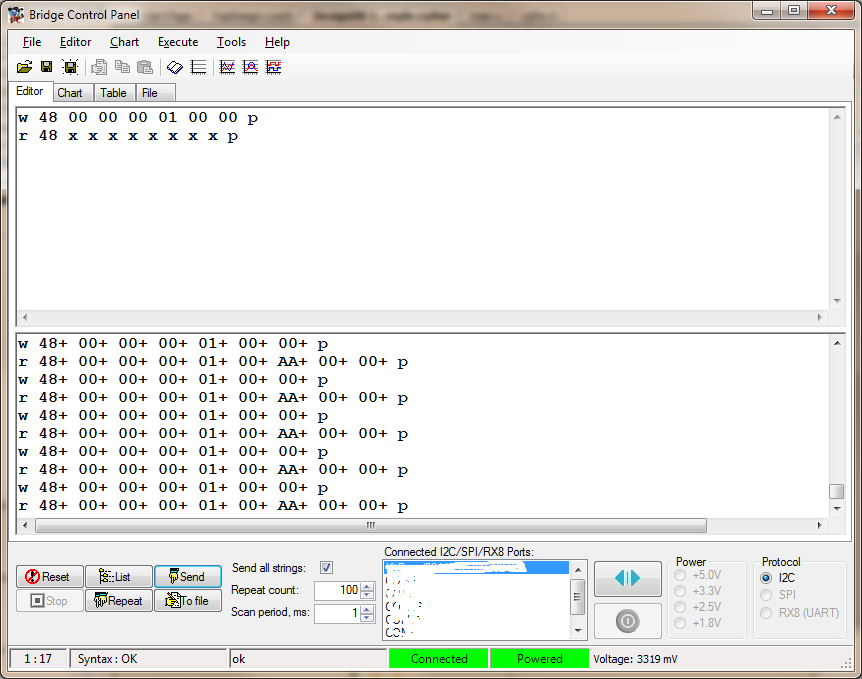
The two commands used to subsequently Write and Read the I2C data are as follows:
w 48 00 00 00 01 00 00 p
r 48 x x x x x x x x p
These commands need be entered in to the Editor plane of the Bridge Control Panel. In order to go to Next line use Ctrl + Enter in the Edition pane of the Bridge Control Panel.
Also make shire that the 'Send all Strings' check-box is selected as ON.
Here is a snapshot of the Communications:
In order to demonstrate the Power efficiency of this example below is a video showing current consumption of PSoC4 in various communication loads (All measurements are in mA) :