element14 Community
element14 Community
    Register Log In
  • Site
  • Search
  • Log In Register
  • Community Hub
    Community Hub
    • What's New on element14
    • Feedback and Support
    • Benefits of Membership
    • Personal Blogs
    • Members Area
    • Achievement Levels
  • Learn
    Learn
    • Ask an Expert
    • eBooks
    • element14 presents
    • Learning Center
    • Tech Spotlight
    • STEM Academy
    • Webinars, Training and Events
    • Learning Groups
  • Technologies
    Technologies
    • 3D Printing
    • FPGA
    • Industrial Automation
    • Internet of Things
    • Power & Energy
    • Sensors
    • Technology Groups
  • Challenges & Projects
    Challenges & Projects
    • Design Challenges
    • element14 presents Projects
    • Project14
    • Arduino Projects
    • Raspberry Pi Projects
    • Project Groups
  • Products
    Products
    • Arduino
    • Avnet & Tria Boards Community
    • Dev Tools
    • Manufacturers
    • Multicomp Pro
    • Product Groups
    • Raspberry Pi
    • RoadTests & Reviews
  • About Us
  • Store
    Store
    • Visit Your Store
    • Choose another store...
      • Europe
      •  Austria (German)
      •  Belgium (Dutch, French)
      •  Bulgaria (Bulgarian)
      •  Czech Republic (Czech)
      •  Denmark (Danish)
      •  Estonia (Estonian)
      •  Finland (Finnish)
      •  France (French)
      •  Germany (German)
      •  Hungary (Hungarian)
      •  Ireland
      •  Israel
      •  Italy (Italian)
      •  Latvia (Latvian)
      •  
      •  Lithuania (Lithuanian)
      •  Netherlands (Dutch)
      •  Norway (Norwegian)
      •  Poland (Polish)
      •  Portugal (Portuguese)
      •  Romania (Romanian)
      •  Russia (Russian)
      •  Slovakia (Slovak)
      •  Slovenia (Slovenian)
      •  Spain (Spanish)
      •  Sweden (Swedish)
      •  Switzerland(German, French)
      •  Turkey (Turkish)
      •  United Kingdom
      • Asia Pacific
      •  Australia
      •  China
      •  Hong Kong
      •  India
      • Japan
      •  Korea (Korean)
      •  Malaysia
      •  New Zealand
      •  Philippines
      •  Singapore
      •  Taiwan
      •  Thailand (Thai)
      • Vietnam
      • Americas
      •  Brazil (Portuguese)
      •  Canada
      •  Mexico (Spanish)
      •  United States
      Can't find the country/region you're looking for? Visit our export site or find a local distributor.
  • Translate
  • Profile
  • Settings
BeagleBoard
  • Products
  • Dev Tools
  • Single-Board Computers
  • BeagleBoard
  • More
  • Cancel
BeagleBoard
Blog BeagleBone Web Server - LED Blinking
  • Blog
  • Forum
  • Documents
  • Quiz
  • Polls
  • Files
  • Members
  • Mentions
  • Sub-Groups
  • Tags
  • More
  • Cancel
  • New
Join BeagleBoard to participate - click to join for free!
  • Share
  • More
  • Cancel
Group Actions
  • Group RSS
  • More
  • Cancel
Engagement
  • Author Author: oneleggedredcow
  • Date Created: 22 Nov 2013 1:21 AM Date Created
  • Views 6732 views
  • Likes 2 likes
  • Comments 42 comments
Related
Recommended

BeagleBone Web Server - LED Blinking

oneleggedredcow
oneleggedredcow
22 Nov 2013

Table of Contents

Setup

LED Blinking

MySQL Installation

Temperature Sensor

Introduction

In the previous article, we set up the BeagleBone to be a webserver running Lighttpd and PHP.


In this article, we are going to build upon that foundation.  We are going to create a web site that lets the user turn on and off an LED on the BeagleBone.  This is a good example of how to create a simple web page that interacts with the BeagleBone and is a step towards our final goal of creating a website to show historical temperature information.


Turning a LED On/Off

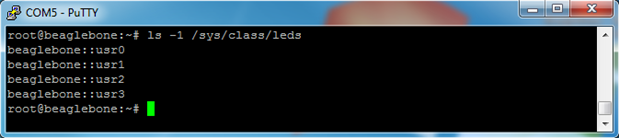
BeagleBone LEDs can be turned on/off through command line, but in order to do this, we need to figure out what they are named.  The names can be found like this:


ls -1 /sys/class/leds
image

So, turning the usr2 LED on/off would look something like this:

image

1 will turn the LED on, and 0 will turn the LED off.


By default, some of the LEDs are used to display information to us about what is going on.  So, if you change the state of one of those LEDs, it will be quickly overwritten.  We can see this by looking at the trigger:


cat /sys/class/leds/beaglebone::usr0/trigger

image

To modify this so that the LED only changes when we tell it to, we can change the trigger to none:


echo none > /sys/class/leds/beaglebone::usr0/trigger

image


C Program

Now that we know how to turn on/off the LEDs, we can write a small C program to make it easier for us. The program will take in the number of the LED to change (0-4) and the state to change it to (off = 0, on = 1). Here’s the code:


#include <stdio.h>

#include <stdlib.h>

#include <fcntl.h>

#include <unistd.h>


int main(int argc, const char *argv[])

{

if (argc != 3)

{

printf("Usage:\n");

printf("\tledCtl <led> <on/off>\n");

printf("\n");

printf("<led>  : Number between 0-3\n");

printf("<on/off>: 1 = on, 0 = off\n");


return 1;

}


int ledNum = atoi(argv[1]);

if (ledNum < 0 || ledNum > 3)

{

printf("<led>  : Number between 0-3\n");


return 1;

}


char ledPath[1024];

sprintf(ledPath, "/sys/class/leds/beaglebone::usr%d/brightness", ledNum);

int fid = open(ledPath, O_WRONLY);


int onOff = atoi(argv[2]);

switch (onOff)

{

case 0:

write(fid, "0", 1);

break;

case 1:

write(fid, "1", 1);

break;

default:

printf("<on/off>: 1 = on, 0 = off\n");

return 1;

}


close(fid);


return 0;

}


Remember to change the path of the LED to the path that we found earlier.


For a simple task like this, we could have just used the command line to turn the LEDs on/off. However, I wanted to put it into a C program so that we set ourselves up better for the future.  When we take temperature measurements and put them into a MySQL database, it will require more logic that is better suited for a small program rather than the command line.


The code should be fairly clear.  It is mostly just checking the inputs that the user gave us to make sure that they are reasonable.


Before we compile it, we need to create a directory to store the scripts that we are going to be running on our web site:


mkdir /www/cgi-bin


To compile the code, type:


g++ ledctl.cpp -o /www/cgi-bin/ledctl

image


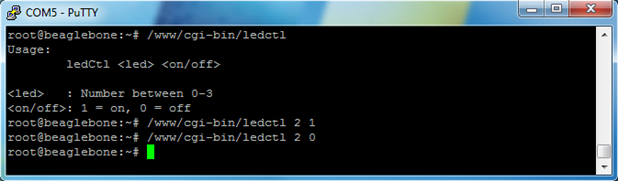
Then we can run some examples and make sure that it works:


/www/cgi-bin/ledCtl

/www/cgi-bin/ledCtl 2 1

/www/cgi-bin/ledCtl 2 0
image


Creating a Web Page

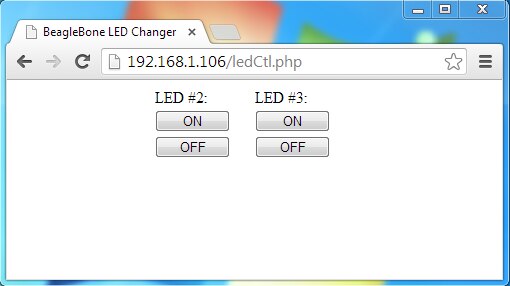
Awesome, now that we have a program to control the LEDs on the BeagleBone, let’s create a web page so that we can control the LEDs over the Internet.  Let’s call the web page ledCtl.php and place the following code in it:


<html>

<head>

<title>BeagleBone LED Changer</title>

<style type="text/css">

p { display: table-cell; }

button { width: 75px; margin: 2px auto; }

</style>

<?php

if (isset($_GET['led']) && isset($_GET['onOff']))

{

$led = $_GET['led'];

$onOff = $_GET['onOff'];


exec( "/www/cgi-bin/ledctl $led $onOff" );

}

?>

</head>

<body>

<div style="width: 200px; margin: 0px auto;">

<div style="width: 100px; float: left;">

<p>LED #2:</p>

<button type="button" onclick="location.href='ledCtl.php?led=2&onOff=1'">ON</button>

<button type="button" onclick="location.href='ledCtl.php?led=2&onOff=0'">OFF</button>

</div>

<div sytle="width: 100px; margin-left: 100px;">

<p>LED #3:</p>

<button type="button" onclick="location.href='ledCtl.php?led=3&onOff=1'">ON</button>

<button type="button" onclick="location.href='ledCtl.php?led=3&onOff=0'">OFF</button>

</div>

</div>

</body>

</html>


Note: We used LEDs #2 and #3 because LED #0 and #1 occasionally blink and override our on/off settings.


Then we can test our web page by going to a browser and using our new web page:
image

Pressing the buttons on the page should change the state of the LEDs on the BeagleBone!


Next Article

In the next article, we are going to get MySQL up and running on the BeagleBone.  We will use MySQL as a convenient place to store the temperature measurements that we take.  This will also make it easy to retrieve the data when the user requests historical temperature information through our web page.

Attachments:
ledctl.zip
  • Sign in to reply
  • Former Member
    Former Member over 11 years ago in reply to Former Member

    I have tried it, creating a directory /www/cgi-bin where I put "ledctl"


         root@beaglebone:/www/cgi-bin#

         And in my php code: exec("/www/cgi-bin/ledctl $led $onOff" );


    I have also tried putting "ledctl" in the directory /usr/lib/cgi-bin because when I read in /etc/apache2/sites-enabled


               ScriptAlias /cgi-bin/ /usr/lib/cgi-bin/

                 <Directory "/usr/lib/cgi-bin">

                    AllowOverride None

                    Options +ExecCGI -MultiViews +SymLinksIfOwnerMatch

                    Order allow,deny

                    Allow from all

                 </Directory>


         And in my php code: exec("/usr/lib/cgi-bin/ledctl $led $onOff" );


    I have also tried putting "ledctl" in the directory /usr/share/php5 because I read in /etc/php5/apache2/php.ini


             ;;;;;;;;;;;;;;;;;;;;;;;;;

              ; Paths and Directories ;

              ;;;;;;;;;;;;;;;;;;;;;;;;;


              ; UNIX: "/path1:/path2"

              ;include_path = ".:/usr/share/php"


         And in my php code: exec("/usr/share/php5/ledctl $led $onOff" );


    In all these case, when I click the bottom nothing happens. if I write in the Beagle, for example and as you said, /www/cgi-bin/ledctl 2 1 it runs ok.


    Thank you very much, and please help me I,m desperate

    • Cancel
    • Vote Up 0 Vote Down
    • Sign in to reply
    • More
    • Cancel
  • Former Member
    Former Member over 11 years ago in reply to oneleggedredcow

    shaun endres wrote:


    Something like "chmod 7555 /www/cgi-bin/ledctl" should do the trick.)

    Do you really mean 7555 there ?  A script that can be ran from a web page that has setuid & setgid is probably a bad idea for lots of reasons..  I can understand why you might want to do it that way, but perhaps changing the permissions in /sys/class/leds would be a better idea.  Otherwise, you probably want to explain the implications of setuid - which may take a while image

    • Cancel
    • Vote Up 0 Vote Down
    • Sign in to reply
    • More
    • Cancel
  • oneleggedredcow
    oneleggedredcow over 11 years ago in reply to Former Member

    So, to run an executable, you need to specify the path to the executable.  If the executable is in the same path as your current directory, then you type in ./<executable>.  The "." is a special command for the current directory.  (Kinda like ".." is the special symbol for the parent directory.)  So, when you do ./<executable> you are really specifying a full path to the file.


    If you do not specify a path, then it will search in all of the directories specified in the $PATH variable.  Since your executable is not in there, it says that it cannot find it.  (You can do an "echo $PATH" to see what your current search path is.)


    So, hopefully that explains why ./ledctl works and ledctl does not work.  Additionally, that should explain why /www/cgi-bin/ledctl works in the example above, I'm specifying a full path to the executable.  When I do this, I don't need to be in the same directory as the executable.  Same thing goes with "root/ledctl".  That's not a full path.  Something like "~root/ledctl" should work, if you want to use some more fancy symbols.


    The first question is, did you copy over ledctl to /www/cgi-bin/?  (or it looks like /var/www/cgi-bin/ for you)


    If so, what happens when you type in "/www/cgi-bin/ledctl 2 1", does it turn on LED #2?


    Also, note selisnork's comment above about the webserver running as a different and less privileged user.  So, that's why you want to copy the file into /www/cgi-bin.  (Another thing to do would be to change the permissions on the file.  Something like "chmod 755 /www/cgi-bin/ledctl" should do the trick.)


    Hopefully that helps!

    • Cancel
    • Vote Up 0 Vote Down
    • Sign in to reply
    • More
    • Cancel
  • Former Member
    Former Member over 11 years ago

    Hello I´m having some problems, If you could help I´d be very grateful. (Sorry for my english)


    First I have apache2 and php.  In beaglebone it runs ok and the led turns on or off, but y have to do:


    ./ledctl 2 2


    if y I only do:


    ledctl 2 2


    This message appear:"-bash: ledctl: command not found"


    When I run the php code, and I click a bottom, this appear http://192.168.1.2/ledCtl.php?led=3&onOff=1

    but nothing happens in the beaglebone, the led doesn´t turn on. In the php code I have:


    exec( "/var/www/cgi-bin/ledctl $led $onOff" );

    (and I´ve also probe with:  exec( "root/ledctl $led $onOff" );


    I have a Debian distribution in the BeagleBone. Please help me. thank you very much.

    • Cancel
    • Vote Up 0 Vote Down
    • Sign in to reply
    • More
    • Cancel
  • Former Member
    Former Member over 11 years ago in reply to Former Member

    Thank you very much !

    I do follow you guide. And I success.

    exec("/home/root/jdk1.7.0_51/bin//java -cp .:/www/cgi-bin/ BasicLedExample ");

    • Cancel
    • Vote Up 0 Vote Down
    • Sign in to reply
    • More
    • Cancel
<>
element14 Community

element14 is the first online community specifically for engineers. Connect with your peers and get expert answers to your questions.

  • Members
  • Learn
  • Technologies
  • Challenges & Projects
  • Products
  • Store
  • About Us
  • Feedback & Support
  • FAQs
  • Terms of Use
  • Privacy Policy
  • Legal and Copyright Notices
  • Sitemap
  • Cookies

An Avnet Company © 2026 Premier Farnell Limited. All Rights Reserved.

Premier Farnell Ltd, registered in England and Wales (no 00876412), registered office: Farnell House, Forge Lane, Leeds LS12 2NE.

ICP 备案号 10220084.

Follow element14

  • X
  • Facebook
  • linkedin
  • YouTube