element14 Community
element14 Community
    Register Log In
  • Site
  • Search
  • Log In Register
  • Community Hub
    Community Hub
    • What's New on element14
    • Feedback and Support
    • Benefits of Membership
    • Personal Blogs
    • Members Area
    • Achievement Levels
  • Learn
    Learn
    • Ask an Expert
    • eBooks
    • element14 presents
    • Learning Center
    • Tech Spotlight
    • STEM Academy
    • Webinars, Training and Events
    • Learning Groups
  • Technologies
    Technologies
    • 3D Printing
    • FPGA
    • Industrial Automation
    • Internet of Things
    • Power & Energy
    • Sensors
    • Technology Groups
  • Challenges & Projects
    Challenges & Projects
    • Design Challenges
    • element14 presents Projects
    • Project14
    • Arduino Projects
    • Raspberry Pi Projects
    • Project Groups
  • Products
    Products
    • Arduino
    • Avnet & Tria Boards Community
    • Dev Tools
    • Manufacturers
    • Multicomp Pro
    • Product Groups
    • Raspberry Pi
    • RoadTests & Reviews
  • About Us
    About the element14 Community
  • Store
    Store
    • Visit Your Store
    • Choose another store...
      • Europe
      •  Austria (German)
      •  Belgium (Dutch, French)
      •  Bulgaria (Bulgarian)
      •  Czech Republic (Czech)
      •  Denmark (Danish)
      •  Estonia (Estonian)
      •  Finland (Finnish)
      •  France (French)
      •  Germany (German)
      •  Hungary (Hungarian)
      •  Ireland
      •  Israel
      •  Italy (Italian)
      •  Latvia (Latvian)
      •  
      •  Lithuania (Lithuanian)
      •  Netherlands (Dutch)
      •  Norway (Norwegian)
      •  Poland (Polish)
      •  Portugal (Portuguese)
      •  Romania (Romanian)
      •  Russia (Russian)
      •  Slovakia (Slovak)
      •  Slovenia (Slovenian)
      •  Spain (Spanish)
      •  Sweden (Swedish)
      •  Switzerland(German, French)
      •  Turkey (Turkish)
      •  United Kingdom
      • Asia Pacific
      •  Australia
      •  China
      •  Hong Kong
      •  India
      •  Japan
      •  Korea (Korean)
      •  Malaysia
      •  New Zealand
      •  Philippines
      •  Singapore
      •  Taiwan
      •  Thailand (Thai)
      •  Vietnam
      • Americas
      •  Brazil (Portuguese)
      •  Canada
      •  Mexico (Spanish)
      •  United States
      Can't find the country/region you're looking for? Visit our export site or find a local distributor.
  • Translate
  • Profile
  • Settings
BeagleBoard
  • Products
  • Dev Tools
  • Single-Board Computers
  • BeagleBoard
  • More
  • Cancel
BeagleBoard
Blog BeagleBone Web Server - LED Blinking
  • Blog
  • Forum
  • Documents
  • Quiz
  • Polls
  • Files
  • Members
  • Mentions
  • Sub-Groups
  • Tags
  • More
  • Cancel
  • New
Join BeagleBoard to participate - click to join for free!
  • Share
  • More
  • Cancel
Group Actions
  • Group RSS
  • More
  • Cancel
Engagement
  • Author Author: oneleggedredcow
  • Date Created: 22 Nov 2013 1:21 AM Date Created
  • Views 7038 views
  • Likes 2 likes
  • Comments 42 comments
Related
Recommended

BeagleBone Web Server - LED Blinking

oneleggedredcow
oneleggedredcow
22 Nov 2013

Table of Contents

Setup

LED Blinking

MySQL Installation

Temperature Sensor

Introduction

In the previous article, we set up the BeagleBone to be a webserver running Lighttpd and PHP.


In this article, we are going to build upon that foundation.  We are going to create a web site that lets the user turn on and off an LED on the BeagleBone.  This is a good example of how to create a simple web page that interacts with the BeagleBone and is a step towards our final goal of creating a website to show historical temperature information.


Turning a LED On/Off

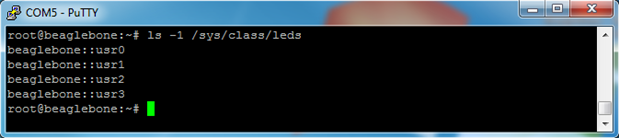
BeagleBone LEDs can be turned on/off through command line, but in order to do this, we need to figure out what they are named.  The names can be found like this:


ls -1 /sys/class/leds
image

So, turning the usr2 LED on/off would look something like this:

image

1 will turn the LED on, and 0 will turn the LED off.


By default, some of the LEDs are used to display information to us about what is going on.  So, if you change the state of one of those LEDs, it will be quickly overwritten.  We can see this by looking at the trigger:


cat /sys/class/leds/beaglebone::usr0/trigger

image

To modify this so that the LED only changes when we tell it to, we can change the trigger to none:


echo none > /sys/class/leds/beaglebone::usr0/trigger

image


C Program

Now that we know how to turn on/off the LEDs, we can write a small C program to make it easier for us. The program will take in the number of the LED to change (0-4) and the state to change it to (off = 0, on = 1). Here’s the code:


#include <stdio.h>

#include <stdlib.h>

#include <fcntl.h>

#include <unistd.h>


int main(int argc, const char *argv[])

{

if (argc != 3)

{

printf("Usage:\n");

printf("\tledCtl <led> <on/off>\n");

printf("\n");

printf("<led>  : Number between 0-3\n");

printf("<on/off>: 1 = on, 0 = off\n");


return 1;

}


int ledNum = atoi(argv[1]);

if (ledNum < 0 || ledNum > 3)

{

printf("<led>  : Number between 0-3\n");


return 1;

}


char ledPath[1024];

sprintf(ledPath, "/sys/class/leds/beaglebone::usr%d/brightness", ledNum);

int fid = open(ledPath, O_WRONLY);


int onOff = atoi(argv[2]);

switch (onOff)

{

case 0:

write(fid, "0", 1);

break;

case 1:

write(fid, "1", 1);

break;

default:

printf("<on/off>: 1 = on, 0 = off\n");

return 1;

}


close(fid);


return 0;

}


Remember to change the path of the LED to the path that we found earlier.


For a simple task like this, we could have just used the command line to turn the LEDs on/off. However, I wanted to put it into a C program so that we set ourselves up better for the future.  When we take temperature measurements and put them into a MySQL database, it will require more logic that is better suited for a small program rather than the command line.


The code should be fairly clear.  It is mostly just checking the inputs that the user gave us to make sure that they are reasonable.


Before we compile it, we need to create a directory to store the scripts that we are going to be running on our web site:


mkdir /www/cgi-bin


To compile the code, type:


g++ ledctl.cpp -o /www/cgi-bin/ledctl

image


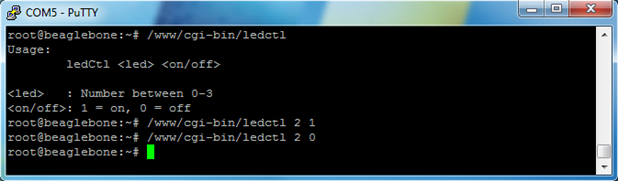
Then we can run some examples and make sure that it works:


/www/cgi-bin/ledCtl

/www/cgi-bin/ledCtl 2 1

/www/cgi-bin/ledCtl 2 0
image


Creating a Web Page

Awesome, now that we have a program to control the LEDs on the BeagleBone, let’s create a web page so that we can control the LEDs over the Internet.  Let’s call the web page ledCtl.php and place the following code in it:


<html>

<head>

<title>BeagleBone LED Changer</title>

<style type="text/css">

p { display: table-cell; }

button { width: 75px; margin: 2px auto; }

</style>

<?php

if (isset($_GET['led']) && isset($_GET['onOff']))

{

$led = $_GET['led'];

$onOff = $_GET['onOff'];


exec( "/www/cgi-bin/ledctl $led $onOff" );

}

?>

</head>

<body>

<div style="width: 200px; margin: 0px auto;">

<div style="width: 100px; float: left;">

<p>LED #2:</p>

<button type="button" onclick="location.href='ledCtl.php?led=2&onOff=1'">ON</button>

<button type="button" onclick="location.href='ledCtl.php?led=2&onOff=0'">OFF</button>

</div>

<div sytle="width: 100px; margin-left: 100px;">

<p>LED #3:</p>

<button type="button" onclick="location.href='ledCtl.php?led=3&onOff=1'">ON</button>

<button type="button" onclick="location.href='ledCtl.php?led=3&onOff=0'">OFF</button>

</div>

</div>

</body>

</html>


Note: We used LEDs #2 and #3 because LED #0 and #1 occasionally blink and override our on/off settings.


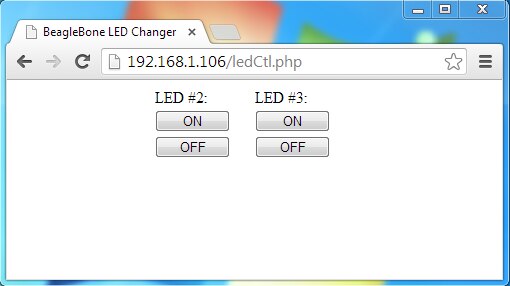
Then we can test our web page by going to a browser and using our new web page:
image

Pressing the buttons on the page should change the state of the LEDs on the BeagleBone!


Next Article

In the next article, we are going to get MySQL up and running on the BeagleBone.  We will use MySQL as a convenient place to store the temperature measurements that we take.  This will also make it easy to retrieve the data when the user requests historical temperature information through our web page.

Attachments:
ledctl.zip
  • Sign in to reply
  • Former Member
    Former Member over 12 years ago in reply to oneleggedredcow

    shaun endres wrote:

    I was really hoping for something simple.  If there is a better way, I'd love to hear about it.

    I understand wanting something simple image   I think the only way to get it would be to restrict yourself to a single board - I guess BBW if that's what you have, and then specify a particular version of OS image. That way you control some of the variables and limit the uncertainties of future changes.

    Sadly, it also leaves you in a position where you have to do everything with what's installed by default since you don't know if future changes to angstrom will cause problems. I think that's also the issue with the lighttpd install - something in angstrom has changed.

    I signed up to the beagleboard google group a couple of weeks ago and unfortunately it's all too common for people to be posting about problems with some package or another in angstrom.. There's also been some murmurs about angstrom being replaced as the default, although no official comment about it that I've seen so far.

    • Cancel
    • Vote Up 0 Vote Down
    • Sign in to reply
    • More
    • Cancel
  • oneleggedredcow
    oneleggedredcow over 12 years ago in reply to Former Member

    Thanks for the feedback.  I changed up flow of the article, so that the first step is querying for what the LED's names are.  Hopefully this makes the article easier to follow on systems with different LED names.  I agree with Morgaine that it would be much better to be able to handle all possible configurations, however I think that would lead to a complex script and I was really hoping for something simple.  If there is a better way, I'd love to hear about it.


    I also changed up the file names to remove the camel casing and the .exe extension.  I liked the suggestion of moving it out of the home directory as well.  I have a bad habit of putting everything in home directory, well at least until it gets too big and then I have to clean house.


    No good reason to use g++ in this case.  gcc will work fine.  A couple of my first attempts at this project used more C++.  However, I had an easier time getting the MySQL C API to install, so I ended up using more C code.  (I guess I was in a C frame of mind when I wrote this.)

    • Cancel
    • Vote Up 0 Vote Down
    • Sign in to reply
    • More
    • Cancel
  • Former Member
    Former Member over 12 years ago in reply to morgaine

    The new led names seem to be the default for 3.12 kernels onwards and it does seem that there's a fair bit of effort being put into getting both the BBW and BBB to be able to run the same kernel. This makes a lot of sense as it gives a common starting point.


    In reality, the differences are all in the devicetree that gets loaded for your board, the kernels are identical. That includes the ability to rename those leds to whatever you like just by tweaking the contents of /boot/am335x-boneblack.dtb

    • Cancel
    • Vote Up 0 Vote Down
    • Sign in to reply
    • More
    • Cancel
  • morgaine
    morgaine over 12 years ago in reply to oneleggedredcow

    As selsinork suggested, the details of what's exposed in /sys are dependent on many things and can be expected to vary, so it's best always to state one's operating conditions first (especially the O/S and kernel revision), and then to actually examine the tree to see what's there.


    My BeagleBone (white) is currently running Arch Linux with kernel 3.12.0-rc2-1-ARCH, and shows the following:


    root@bb-arch:~-- $ ls -l /sys/class/leds/beaglebone:*:*/brightness
    -rw-r--r-- 1 root root 4096 Nov 22 13:35 /sys/class/leds/beaglebone:green:heartbeat/brightness
    -rw-r--r-- 1 root root 4096 Nov 22 13:35 /sys/class/leds/beaglebone:green:mmc0/brightness
    -rw-r--r-- 1 root root 4096 Nov 22 01:37 /sys/class/leds/beaglebone:green:usr2/brightness
    -rw-r--r-- 1 root root 4096 Nov 22 13:35 /sys/class/leds/beaglebone:green:usr3/brightness


    My various BeagleBone Blacks have Debian Wheezy 7.2 running on their eMMC with kernel 3.8.13-bone30, and show:


    root@bbb-deb:~-- $ ls -l /sys/class/leds/beaglebone:*:*/brightness
    -rw-r--r-- 1 root root 4096 Nov 22 13:35 /sys/class/leds/beaglebone:green:usr0/brightness
    -rw-r--r-- 1 root root 4096 Nov 22 13:35 /sys/class/leds/beaglebone:green:usr1/brightness
    -rw-r--r-- 1 root root 4096 Nov 22 01:30 /sys/class/leds/beaglebone:green:usr2/brightness
    -rw-r--r-- 1 root root 4096 Nov 22 13:35 /sys/class/leds/beaglebone:green:usr3/brightness


    This confirms that the LED names are board-dependent and/or evolving, so it's important that our programs and scripts can handle the variation or they'll break across system upgrades or work on only one type of BeagleBone.


    Morgaine.

    • Cancel
    • Vote Up 0 Vote Down
    • Sign in to reply
    • More
    • Cancel
  • Former Member
    Former Member over 12 years ago

    Please don't camel case anything that's a filename. The case sensitive filesystems you find on linux make this unuseable very quickly and no other normal unix commands do it. You'd also be amazed at how many times I've had to fix someones php code after they've camel cased all the php script names inside the code then found that when they uploaded the files from their case-insensitive windows machine to the case sensitive linux host nothing works. Stick to lowercase everywhere and people trying to follow the article will thank you instead of wondering why it doesn't work.


    Also the led names you're using are not stable, in a future version you're going to find that usr0 changes to heartbeat and usr1 changes to mmc0.

    This has the interesting side effect that the official emmc updaters fail to turn on all the led's when they're done as they currently only check for usr0


    If you're seeing the BBW not having 'green' as part of one of the leds names, then it seems that every different kernel has a different set of names. Unfortunately that really means your code needs to enumerate the contents of the directory and use the names it finds. That probably also gives you a problem with using numeric references to the leds as there doesn't seem to be a simple way to find out that heartbeat = usr0 or whatever currently unknown naming convention might be used in the future.

    On the BBB you can try to look at /sys/kernel/debug/gpio but this gives truncated names as follows:

    GPIOs 32-63, gpio:

    gpio-53  (beaglebone:green:hea) out lo

    gpio-54  (beaglebone:green:mmc) out lo

    gpio-55  (beaglebone:green:usr) out hi

    gpio-56  (beaglebone:green:usr) out lo

    note the number is truncated as the led name is too long.. and that file isn't valid on BBW as it doesn't use devicetree, so isn't a general solution anyway.


    For the simple echo commands you could use echo 1 > /sys/class/leds/*usr2


    I note that you only change the brightness value for the leds, on my BBB all of the leds have a trigger associated with them, so simply changing the brightness value won't have the effect of turning the led on/off unless the trigger never runs.  So you might want to change the trigger to 'none' or 'default-on' as well.


    On the escaping of the colon, quoting and escaping conventions can be confusingly complex and may depend on which shell you're using. In your fairly simple usage, with bash as the shell you don't need it. In other uses you might have a filename inside quotes or something similar where the outer layer changes the meaning of some character or sequence of characters and the escape becomes necessary to make it do the right thing. The tab completion is trying to be conservative and give you something that'll work in all circumstances.


    For file extensions, in windows you can type "ledCtl" and it'll find and run "ledctl.exe" in the current directory, if your program was just called "ledCtl" (no extension) then windows won't run it as it uses the extension to work out what's an executable file. Unix doesn't do that. If you name it "ledCtl.exe" then you need to type the whole thing. Also, if the ledCtl.exe file on the linux machine doesn't have the executable permission then it won't be executed. Run 'chmod ugo-x ledCtl.exe' then try to run it, you won't be able to. It's not so much that using a file extension isn't the convention on unix, it's more that the filename has no part in deciding if the file is executable or not. Unlike on windows where the filenames extension is the deciding factor. (ok, windows is more complex, you need the associations setup in the registry as well, but you get the idea)


    In your php code, you have exec( "/home/root/ledCtl.exe $led $onOff" );  I know you're using angstrom, but probably worth pointing out that most other distros don't use /home/root more usually it'll be just /root

    In addition, typically a webserver doesn't run as root and so won't be able to see or execute an application that's not in the cgi directory or some other directory under the webservers home directory. Unfortunately lighttpd fails to install on my BBB so it's impossible to see if they're doing something insane like running it as root in order to make this work.  I've replied to your previous post with some ideas around the hang on installing lighttpd.


    Lastly, why are you using g++ (and a *.cpp filename) for what's clearly a plain C program ?

    • Cancel
    • Vote Up 0 Vote Down
    • Sign in to reply
    • More
    • Cancel
<>
element14 Community

element14 is the first online community specifically for engineers. Connect with your peers and get expert answers to your questions.

  • Members
  • Learn
  • Technologies
  • Challenges & Projects
  • Products
  • Store
  • About Us
  • Feedback & Support
  • FAQs
  • Terms of Use
  • Privacy Policy
  • Legal and Copyright Notices
  • Sitemap
  • Cookies

An Avnet Company © 2026 Premier Farnell Limited. All Rights Reserved.

Premier Farnell Ltd, registered in England and Wales (no 00876412), registered office: Farnell House, Forge Lane, Leeds LS12 2NE.

ICP 备案号 10220084.

Follow element14

  • X
  • Facebook
  • linkedin
  • YouTube