element14 Community
element14 Community
    Register Log In
  • Site
  • Search
  • Log In Register
  • Community Hub
    Community Hub
    • What's New on element14
    • Feedback and Support
    • Benefits of Membership
    • Personal Blogs
    • Members Area
    • Achievement Levels
  • Learn
    Learn
    • Ask an Expert
    • eBooks
    • element14 presents
    • Learning Center
    • Tech Spotlight
    • STEM Academy
    • Webinars, Training and Events
    • Learning Groups
  • Technologies
    Technologies
    • 3D Printing
    • FPGA
    • Industrial Automation
    • Internet of Things
    • Power & Energy
    • Sensors
    • Technology Groups
  • Challenges & Projects
    Challenges & Projects
    • Design Challenges
    • element14 presents Projects
    • Project14
    • Arduino Projects
    • Raspberry Pi Projects
    • Project Groups
  • Products
    Products
    • Arduino
    • Avnet & Tria Boards Community
    • Dev Tools
    • Manufacturers
    • Multicomp Pro
    • Product Groups
    • Raspberry Pi
    • RoadTests & Reviews
  • About Us
    About the element14 Community
  • Store
    Store
    • Visit Your Store
    • Choose another store...
      • Europe
      •  Austria (German)
      •  Belgium (Dutch, French)
      •  Bulgaria (Bulgarian)
      •  Czech Republic (Czech)
      •  Denmark (Danish)
      •  Estonia (Estonian)
      •  Finland (Finnish)
      •  France (French)
      •  Germany (German)
      •  Hungary (Hungarian)
      •  Ireland
      •  Israel
      •  Italy (Italian)
      •  Latvia (Latvian)
      •  
      •  Lithuania (Lithuanian)
      •  Netherlands (Dutch)
      •  Norway (Norwegian)
      •  Poland (Polish)
      •  Portugal (Portuguese)
      •  Romania (Romanian)
      •  Russia (Russian)
      •  Slovakia (Slovak)
      •  Slovenia (Slovenian)
      •  Spain (Spanish)
      •  Sweden (Swedish)
      •  Switzerland(German, French)
      •  Turkey (Turkish)
      •  United Kingdom
      • Asia Pacific
      •  Australia
      •  China
      •  Hong Kong
      •  India
      •  Japan
      •  Korea (Korean)
      •  Malaysia
      •  New Zealand
      •  Philippines
      •  Singapore
      •  Taiwan
      •  Thailand (Thai)
      •  Vietnam
      • Americas
      •  Brazil (Portuguese)
      •  Canada
      •  Mexico (Spanish)
      •  United States
      Can't find the country/region you're looking for? Visit our export site or find a local distributor.
  • Translate
  • Profile
  • Settings
BeagleBoard
  • Products
  • Dev Tools
  • Single-Board Computers
  • BeagleBoard
  • More
  • Cancel
BeagleBoard
Blog UPDATE: under 40 degrees C!!! Lowest idle cpu temp so far on the BeagleBone AI SBC! how-to and pictures inside
  • Blog
  • Forum
  • Documents
  • Quiz
  • Polls
  • Files
  • Members
  • Mentions
  • Sub-Groups
  • Tags
  • More
  • Cancel
  • New
Join BeagleBoard to participate - click to join for free!
  • Share
  • More
  • Cancel
Group Actions
  • Group RSS
  • More
  • Cancel
Engagement
  • Author Author: clickio
  • Date Created: 16 Jan 2020 10:56 AM Date Created
  • Views 4737 views
  • Likes 7 likes
  • Comments 11 comments
  • beaglebone ai
Related
Recommended

UPDATE: under 40 degrees C!!! Lowest idle cpu temp so far on the BeagleBone AI SBC! how-to and pictures inside

clickio
clickio
16 Jan 2020

OK, it shouldn't be a surprise to anyone that this board gets H-O-T. It's not something to be held in the palm of your hand, so it's not that critical. Until it is. Because, as all/most CPUs, it halts when reaching a certain temperature in order to prevent a complete meltdown. In its case, its probably around 85-100 degrees Celsius.(I'll update the exact figure if I find it in the documentation)


So one of the key things for maximizing the use of this SBC is cooling it properly. There is currently a fan cooler solution (this one was kindly provided to me by element14 for the dedicated RoadTest), a dedicated cooling cape (a plug-in board just like HATs for Raspberry PI) and I think that we will see even more solutions in the future, possibly a dual-fan solution to heat both sides of the board, as in my testing a very primitive simulation of this reached the lowest cpu temp.


I say 'primitive' because the only thing I did was placing the board on a laptop cooler with large cooling fans, as shown in the picture.
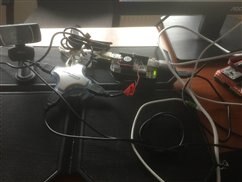
image

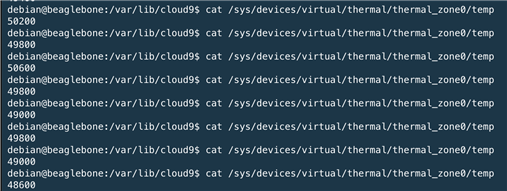
And here is the result!


image

As a recap, my test results for idle cpu temps were:


1. 61,8 - 64,2 degrees Celsius with just the supplied heatsink, passive cooling

2. 50,6 - 53,4 degrees Celsius  with the 5V F251R-05LLC brushless fan cooler attached

3.  48,6 - 50,6 degrees Celsius  with both the 5V F251R-05LLC brushless fan cooler attached and the board placed on the laptop cooler.


So cooling from both sides improves the cpu temperature with 2-5 degrees Celsius, by just using this simulation, I bet that by using a second heatsink + dedicated fan can make a lot more difference.


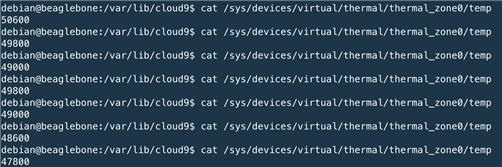
LATER EDIT: It even got as low as 47,8 with my dual-active cooling setup!!!
image


IMPORTANT UPDATES: going under 40 degrees!!!


Enclosure update: Thanks to shabaz who had a few spares (see his article here: BeagleBone AI (BB-AI) - Getting Started )and was very kind to send them over, my BBAI now is housed in a white-plastic enclosure, which I'll try to use as a base for a dual-active cooling solution. Yes, I still haven't found shorter screws yet!:)


imageimageimage


Cooling update:


I've finally achieved maximum cooling with this board, let me tell you how I did it. Now I really feel  I can try the machine-learning features without any worry of overheating and/or unexpected halts because of that.


Based on shabaz's enclosure, I added another tall floor under the board, where I fitted a 12V cooler powered independently from the board. I also added passive cooling to all the black chips on the top side (RAM memory, eMMC memory and the TPS659037 power management chip) and to the one on the underside (second RAM memory chip) with the help of some microporous heatsinks and now the board stays below 40 degrees in regular usage.


Here are the pix!

image image

And the test results:


WITH underside cooling:

image


WITHOUT underside cooling (I took the cooler off the 'contraption'):


image

  • Sign in to reply

Top Comments

  • shabaz
    shabaz over 6 years ago in reply to clickio +4
    Hi Ionut, The heatsink is a sheet of 58x40x1mm copper with six 20x20mm heatsinks tiled across it. There is a better heatsink tile than the one I used, the link to it is here: BeagleBone AI (BB-AI) - Getting…
  • shabaz
    shabaz over 6 years ago in reply to colporteur +3
    It is configurable to disable unused accelerators/cores but you're right, in its default normal config, it does need a fan, or a bigger heatsink (a small one is supplied) or both. Having said that, if…
  • clickio
    clickio over 6 years ago in reply to clem57 +2
    It definitely has, they just need to fix a few issues, heating being one and the installed libraries, the second.
  • clem57
    clem57 over 6 years ago

    I like the hub you used in the picture! BTW, due to the cooling issues I was unable to use the BB AI as intended on a walking stick.image But I feel the board has a huge potential in the future...

    • Cancel
    • Vote Up +1 Vote Down
    • Sign in to reply
    • More
    • Cancel
<
element14 Community

element14 is the first online community specifically for engineers. Connect with your peers and get expert answers to your questions.

  • Members
  • Learn
  • Technologies
  • Challenges & Projects
  • Products
  • Store
  • About Us
  • Feedback & Support
  • FAQs
  • Terms of Use
  • Privacy Policy
  • Legal and Copyright Notices
  • Sitemap
  • Cookies

An Avnet Company © 2026 Premier Farnell Limited. All Rights Reserved.

Premier Farnell Ltd, registered in England and Wales (no 00876412), registered office: Farnell House, Forge Lane, Leeds LS12 2NE.

ICP 备案号 10220084.

Follow element14

  • X
  • Facebook
  • linkedin
  • YouTube