element14 Community
element14 Community
    Register Log In
  • Site
  • Search
  • Log In Register
  • Community Hub
    Community Hub
    • What's New on element14
    • Feedback and Support
    • Benefits of Membership
    • Personal Blogs
    • Members Area
    • Achievement Levels
  • Learn
    Learn
    • Ask an Expert
    • eBooks
    • element14 presents
    • Learning Center
    • Tech Spotlight
    • STEM Academy
    • Webinars, Training and Events
    • Learning Groups
  • Technologies
    Technologies
    • 3D Printing
    • FPGA
    • Industrial Automation
    • Internet of Things
    • Power & Energy
    • Sensors
    • Technology Groups
  • Challenges & Projects
    Challenges & Projects
    • Design Challenges
    • element14 presents Projects
    • Project14
    • Arduino Projects
    • Raspberry Pi Projects
    • Project Groups
  • Products
    Products
    • Arduino
    • Avnet & Tria Boards Community
    • Dev Tools
    • Manufacturers
    • Multicomp Pro
    • Product Groups
    • Raspberry Pi
    • RoadTests & Reviews
  • About Us
    About the element14 Community
  • Store
    Store
    • Visit Your Store
    • Choose another store...
      • Europe
      •  Austria (German)
      •  Belgium (Dutch, French)
      •  Bulgaria (Bulgarian)
      •  Czech Republic (Czech)
      •  Denmark (Danish)
      •  Estonia (Estonian)
      •  Finland (Finnish)
      •  France (French)
      •  Germany (German)
      •  Hungary (Hungarian)
      •  Ireland
      •  Israel
      •  Italy (Italian)
      •  Latvia (Latvian)
      •  
      •  Lithuania (Lithuanian)
      •  Netherlands (Dutch)
      •  Norway (Norwegian)
      •  Poland (Polish)
      •  Portugal (Portuguese)
      •  Romania (Romanian)
      •  Russia (Russian)
      •  Slovakia (Slovak)
      •  Slovenia (Slovenian)
      •  Spain (Spanish)
      •  Sweden (Swedish)
      •  Switzerland(German, French)
      •  Turkey (Turkish)
      •  United Kingdom
      • Asia Pacific
      •  Australia
      •  China
      •  Hong Kong
      •  India
      •  Japan
      •  Korea (Korean)
      •  Malaysia
      •  New Zealand
      •  Philippines
      •  Singapore
      •  Taiwan
      •  Thailand (Thai)
      •  Vietnam
      • Americas
      •  Brazil (Portuguese)
      •  Canada
      •  Mexico (Spanish)
      •  United States
      Can't find the country/region you're looking for? Visit our export site or find a local distributor.
  • Translate
  • Profile
  • Settings
RIoTboard
  • Products
  • Dev Tools
  • Single-Board Computers
  • RIoTboard
  • More
  • Cancel
RIoTboard
Blog Building Android from Source
  • Blog
  • Forum
  • Documents
  • Files
  • Members
  • Mentions
  • Sub-Groups
  • Tags
  • More
  • Cancel
  • New
Join RIoTboard to participate - click to join for free!
  • Share
  • More
  • Cancel
Group Actions
  • Group RSS
  • More
  • Cancel
Engagement
  • Author Author: radiatortwo
  • Date Created: 17 May 2014 5:14 PM Date Created
  • Views 4778 views
  • Likes 1 like
  • Comments 28 comments
  • android
  • environment
  • build
  • riotboard
Related
Recommended

Building Android from Source

radiatortwo
radiatortwo
17 May 2014

Since there´s only a small description on how to build Android from the sources and nothing about setting up the build environment, I am going to show you how to setup the build environment to compile Android for the RIoTBoard yourself.


I always work with Debian so the system we´ll be using is Debian 7.5. And it has to be the 64 bit version.

There is a chance this also works with Ubuntu 12.04 and above. But no guarantee to that.


It doesn´t matter if you use a virtual machine or a real host.

But this whole procedure will take some time depending on the speed of your system and your internet connection.

Also you´ll need a lot of space. At least 30 GB only for the sources plus some extra space of course.

Plus if you want to use the Cache to compile faster, you´ll need 50 to 100 GB extra space.

Also you need enough RAM. Recommended are 16 GB of RAM. But if your SWAP partition is big enough it should work anyway.

Just takes a bit longer.


I am using a server with a 4 Core Xeon E3 at 3.2GHz 32GB RAM and a GBit internet connection.

And it took me a few hours to get to the compiled image in the end.


But enough with that. Let´s grab a pot of coffee get in the terminal and start with the preparation.


First thing always before doing anything:

(As you see I assume you´re root.)


apt-get update
apt-get upgrade
apt-get dist-upgrade


Because we´ll need some stuff that´s compiled for i386 (no worries it works under 64bit)

Do the following:


dpkg --add-architecture i386
apt-get update


Now let´s install everything we need in this order.


apt-get install git-core gnupg flex bison python original-awk gawk p7zip-full gperf squashfs-tools build-essential zip curl pngcrush schedtool uboot-mkimage

apt-get install libsdl1.2-dev libesd0-dev libwxgtk2.8-dev zlib1g-dev

apt-get install lib32z1-dev ia32-libs lib32readline-gplv2-dev

apt-get install libc6-dev x11proto-core-dev libgl1-mesa-dev mingw32 tofrodos python-markdown libxml2-utils

apt-get install uuid-dev liblz-dev liblzo2-2 liblzo2-dev g++-multilib gcc-multilib

apt-get install libncurses5-dev:i386 libx11-dev:i386 libreadline6-dev:i386 libgl1-mesa-glx:i386 xsltproc zlib1g-dev:i386

ln -s /usr/lib/i386-linux-gnu/mesa/libGL.so.1 /usr/lib/i386-linux-gnu/libGL.so


Now that was the first part and already took a while.

Only thing we need to install additionally is a JDK.

We need a JDK with version 6. Since the old JDK 6 is not freely available anymore (Thank you for that Oracle) we can only use OpenJDK 6.


apt-get install openjdk-6-jdk


If everything went through without problems we need to get the source code for Android.

To get it we need a little tool called repo.

This tool downloads all the stuff from all the different repos and puts it together in one folder.


So let´s download repo and put it in place so we can use it.

(I like to use the folder "/usr/src". But you can change that as you like.)


cd /usr/src
wget https://raw.github.com/android/tools_repo/stable/repo
mv repo /bin/repo
chmod 0755 /bin/repo


I know the manual says to use it temporary. But i don´t like stuff like that.

Then everytime you start a new session you have to put it in place again.

Like this it´s always availabe.


Now create a folder in which the whole Source is being downloaded.


mkdir riot_source
cd riot_source


Init the repo within that folder and start syncing it.


repo init --repo-url=git://github.com/android/tools_repo.git -u git://github.com/embest-tech/imx-manifest.git -m embest_android_jb4.3_1.0.0
repo sync -j16


With the parameter -j16 you tell repo to use 16 Threads.

If your Internet connection is fast enough this can speed it up a lot.

With a slower connection you should use something lower like 8 or 4 Threads.


Now that was part 2 and most likely the longest part of the whole procedure.

Grab another pot of coffee and let´s go on.


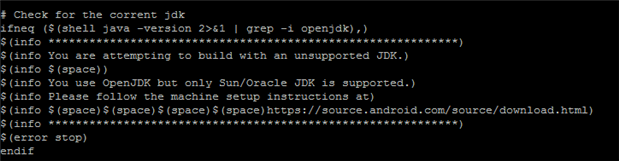
Because we don´t have Oracle JDK6 but OpenJDK6 and the makefile will stop with OpenJDK, we need to change the core makefile.


nano build/core/main.mk


Search for a block like this around line 142.

It´s easy to spot, because it misspells current...
image

You can either comment/remove that whole block.

Or just comment/remove the line "$(error stop)".

Then save that file and go on.


Next we will change a file to get a bit more permissions on the shell.


nano system/core/rootdir/init.rc


Search around line 417 for this.


service console /system/bin/sh
    class core
    console
    disabled
    user shell
    group log


And change it to this.


service console /system/bin/sh
    class core
    console
    disabled
    user root
    group root


Now we´re almost ready to compile.


First build up the environment.


. build/envsetup.sh


(I´ve seen something like "source build/envsetup.sh". But that will most likely not work.)


Then call lunch. (Everything in Android has to do with something to eat. Getting hungry here...)


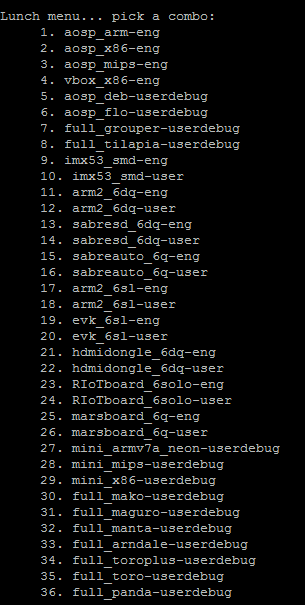
lunch


And you get a list like this.
image

You see two entries for the RIoTBoard.

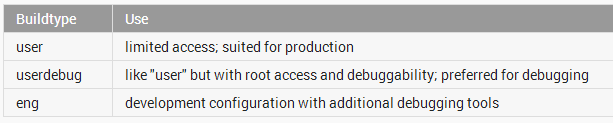
One with -eng and one with -user.

Here´s the explanation for that.
image

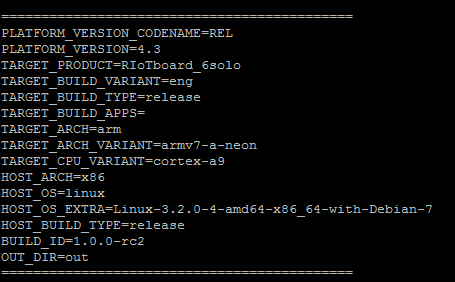
Of course we want -eng. So we type in 23 and press Enter.

If you´re then greeted with this, you´re ready to compile.
image


The next thing is optional. It´s used to speed up the compiling process, by using a cache on your hdd.

But consider this needs at least 50GB of free space in that cache folder.

So here is how to do it still being inthe folder "/usr/src/riot_source".


mkdir /usr/src/cache
export USE_CCACHE=1
export CCACHE_DIR=/usr/src/cache
prebuilts/misc/linux-x86/ccache/ccache -M 50G


This defines the environment variables so the cache is used. Stored inside "/usr/src/cache" and has a maximum size of 50GB.

It needs at least 50 GB of free space. Maximum is 100GB. (If you have that much free.)


Protip:

If you want to determine the location in which the image files are created.

Do the following before compiling.


export OUT_DIR_COMMON_BASE=<path-to-your-out-directory>


And now let´s compile.

Change the parameter -j8 to the count of your CPUs. Or a little bit more than that to get the CPU a little bit sweating.

But then it will compile a bit faster.

I chose 8.

2 threads for each core.


make -j8


So after it went hopefully through without errors.

You´ll find the image files in the folder "out/target/product/RIoTboard_6solo".

(Or the path you specified in "OUT_DIR_COMMON_BASE")


You´ll need these files.


boot.img

recovery.img

system.img

u-boot-mx6solo_RIoTboard_android_config.bin


These files are now ready to flash them on your RIoTBoard.


Hope this wasn´t too much for you and good luck.


image

  • Sign in to reply

Top Comments

  • radiatortwo
    radiatortwo over 11 years ago +1
    Since there are some problems with the repo init. Try this. Remove the folder (rm -rf folder) in which you want to create the repo and create it again. Then DON´T copy and paste it from here but type it…
  • Former Member
    Former Member over 10 years ago

    Hi.

    I compile Android 4.4.2 (Kernel 3.0.35-06528-gc47ca58-dirty) whit Debain 7.5 from https://github.com/embest-tech/imx-manifest

    I don't have any error in the compilation process, but when I flashing the image compiled .. the riotboard is blocked in the boot.


    I connect the j18 UART to putty... this is the out put:


    /*

    Starting kernel ...


    Initializing cgroup subsys cpu

    Linux version 3.0.35-06530-g8094371 (root@androidrd) (gcc version 4.6.x-google 2                                                                                        0120106 (prerelease) (GCC) ) #1 SMP PREEMPT Wed Dec 23 10:04:47 CST 2015

    CPU: ARMv7 Processor [412fc09a] revision 10 (ARMv7), cr=10c53c7d

    CPU: VIPT nonaliasing data cache, VIPT aliasing instruction cache

    Machine: Freescale i.MX 6Solo RIoTboard

    Ignoring unrecognised tag 0x54410008

    Memory policy: ECC disabled, Data cache writealloc

    CPU identified as i.MX6DL/SOLO, silicon rev 1.1

    PERCPU: Embedded 7 pages/cpu @c134d000 s6528 r8192 d13952 u32768

    Built 1 zonelists in Zone order, mobility grouping on.  Total pages: 208128

    Kernel command line: console=ttymxc1,115200 init=/init nosmp video=mxcfb0:dev=hd                                                                                        mi,1280x720M@60,bpp=32 video=mxcfb1:off fbmem=10M vmalloc=400M androidboot.conso                                                                                        le=ttymxc1 androidboot.hardware=freescale

    PID hash table entries: 2048 (order: 1, 8192 bytes)

    Dentry cache hash table entries: 65536 (order: 6, 262144 bytes)

    Inode-cache hash table entries: 32768 (order: 5, 131072 bytes)

    Memory: 767MB 54MB = 821MB total

    Memory: 819976k/819976k available, 228600k reserved, 431104K highmem

    Virtual kernel memory layout:

        vector  : 0xffff0000 - 0xffff1000   (   4 kB)

        fixmap  : 0xfff00000 - 0xfffe0000   ( 896 kB)

        DMA     : 0xfbe00000 - 0xffe00000   (  64 MB)

        vmalloc : 0xd9800000 - 0xf2000000   ( 392 MB)

        lowmem  : 0xc0000000 - 0xd9000000   ( 400 MB)

        pkmap   : 0xbfe00000 - 0xc0000000   (   2 MB)

        modules : 0xbf000000 - 0xbfe00000   (  14 MB)

          .init : 0xc0008000 - 0xc0049000   ( 260 kB)

          .text : 0xc0049000 - 0xc091a94c   (9031 kB)

          .data : 0xc091c000 - 0xc09ba8f0   ( 635 kB)

           .bss : 0xc09ba914 - 0xc0b4353c   (1572 kB)

    Preemptible hierarchical RCU implementation.

    NR_IRQS:624

    MXC GPIO hardware

    sched_clock: 32 bits at 3000kHz, resolution 333ns, wraps every 1431655ms

    Set periph_clk's parent to pll2_pfd_400M!

    arm_max_freq=1GHz

    MXC_Early serial console at MMIO 0x21e8000 (options '115200')

    bootconsole [ttymxc1] enabled

    Calibrating delay loop... 1581.05 BogoMIPS (lpj=7905280)

    pid_max: default: 32768 minimum: 301

    Security Framework initialized

    SELinux:  Initializing.

    Mount-cache hash table entries: 512

    Initializing cgroup subsys debug

    Initializing cgroup subsys cpuacct

    Initializing cgroup subsys freezer

    CPU: Testing write buffer coherency: ok

    hw perfevents: enabled with ARMv7 Cortex-A9 PMU driver, 7 counters available

    Brought up 1 CPUs

    SMP: Total of 1 processors activated (1581.05 BogoMIPS).

    print_constraints: dummy:

    NET: Registered protocol family 16

    print_constraints: vddpu: 725 <--> 1300 mV at 700 mV fast normal

    print_constraints: vddcore: 725 <--> 1300 mV at 1150 mV fast normal

    print_constraints: vddsoc: 725 <--> 1300 mV at 1200 mV fast normal

    print_constraints: vdd2p5: 2000 <--> 2775 mV at 2400 mV fast normal

    print_constraints: vdd1p1: 800 <--> 1400 mV at 1100 mV fast normal

    print_constraints: vdd3p0: 2625 <--> 3400 mV at 3000 mV fast normal

    ram_console: got buffer at 3ff00000, size 100000

    ram_console: uncorrectable error in header

    ram_console: no valid data in buffer (sig = 0x00034000)

    console [ram-1] enabled

    ----ldb_init

    hw-breakpoint: found 6 breakpoint and 1 watchpoint registers.

    hw-breakpoint: 1 breakpoint(s) reserved for watchpoint single-step.

    hw-breakpoint: maximum watchpoint size is 4 bytes.

    L310 cache controller enabled

    l2x0: 16 ways, CACHE_ID 0x410000c8, AUX_CTRL 0x32050000, Cache size: 524288 B

    bio: create slab <bio-0> at 0

    mxs-dma mxs-dma-apbh: initialized

    print_constraints: VDDA: 2500 mV

    print_constraints: VDDIO: 3300 mV

    machine_constraints_voltage: VDDD: unsupportable voltage constraints

    reg-fixed-voltage reg-fixed-voltage.2: Failed to register regulator: -22

    reg-fixed-voltage: probe of reg-fixed-voltage.2 failed with error -22

    print_constraints: vmmc: 3300 mV

    vgaarb: loaded

    SCSI subsystem initialized

    spi_imx imx6q-ecspi.0: probed

    usbcore: registered new interface driver usbfs

    usbcore: registered new interface driver hub

    usbcore: registered new device driver usb

    Freescale USB OTG Driver loaded, $Revision: 1.55 $

    mc_pfuze 1-0008: recv failed!:-5,0

    mc_pfuze: probe of 1-0008 failed with error -1

    imx-ipuv3 imx-ipuv3.0: IPU DMFC NORMAL mode: 1(0~1), 5B(4,5), 5F(6,7)

    mxc_mipi_csi2 mxc_mipi_csi2: i.MX MIPI CSI2 driver probed

    mxc_mipi_csi2 mxc_mipi_csi2: i.MX MIPI CSI2 dphy version is 0x3130302a

    MIPI CSI2 driver module loaded

    Advanced Linux Sound Architecture Driver Version 1.0.24.

    Bluetooth: Core ver 2.16

    NET: Registered protocol family 31

    Bluetooth: HCI device and connection manager initialized

    Bluetooth: HCI socket layer initialized

    Bluetooth: L2CAP socket layer initialized

    Bluetooth: SCO socket layer initialized

    i2c-core: driver [max17135] using legacy suspend method

    i2c-core: driver [max17135] using legacy resume method

    Switching to clocksource mxc_timer1

    NET: Registered protocol family 2

    IP route cache hash table entries: 16384 (order: 4, 65536 bytes)

    TCP established hash table entries: 65536 (order: 7, 524288 bytes)

    TCP bind hash table entries: 65536 (order: 7, 786432 bytes)

    TCP: Hash tables configured (established 65536 bind 65536)

    TCP reno registered

    UDP hash table entries: 256 (order: 1, 8192 bytes)

    UDP-Lite hash table entries: 256 (order: 1, 8192 bytes)

    NET: Registered protocol family 1

    RPC: Registered named UNIX socket transport module.

    RPC: Registered udp transport module.

    RPC: Registered tcp transport module.

    RPC: Registered tcp NFSv4.1 backchannel transport module.

    PCI: CLS 0 bytes, default 32

    Unpacking initramfs...

    Freeing initrd memory: 532K

    PMU: registered new PMU device of type 0

    Static Power Management for Freescale i.MX6

    wait mode is enabled for i.MX6

    cpaddr = d9820000 suspend_iram_base=d98b8000

    PM driver module loaded

    IMX usb wakeup probe

    the wakeup pdata is 0xd61e7820

    add wake up source irq 75

    IMX usb wakeup probe

    the wakeup pdata is 0xd61e75a0

    cpu regulator mode:ldo_enable

    i.MXC CPU frequency driver

    audit: initializing netlink socket (disabled)

    type=2000 audit(0.880:1): initialized

    highmem bounce pool size: 64 pages

    ashmem: initialized

    NTFS driver 2.1.30 [Flags: R/O].

    JFFS2 version 2.2. (NAND) Copyright 2001-2006 Red Hat, Inc.

    fuse init (API version 7.16)

    msgmni has been set to 760

    SELinux:  Registering netfilter hooks

    NET: Registered protocol family 38

    cryptodev: driver loaded.

    io scheduler noop registered

    io scheduler deadline registered

    io scheduler cfq registered (default)

    mxc_mipi_dsi mxc_mipi_dsi: i.MX MIPI DSI driver probed

    MIPI DSI driver module loaded

    mxc_sdc_fb mxc_sdc_fb.0: register mxc display driver hdmi

    mxc_hdmi mxc_hdmi: Detected HDMI controller 0x13:0x1a:0xa0:0xc1

    fbcvt: 1280x720@60: CVT Name - .921M9

    imx-ipuv3 imx-ipuv3.0: IPU DMFC DP HIGH RESOLUTION: 1(0,1), 5B(2~5), 5F(6,7)

    mxc_sdc_fb mxc_sdc_fb.1: Can't get fb option for mxcfb1!

    imx-sdma imx-sdma: loaded firmware 1.1

    imx-sdma imx-sdma: initialized

    fbcvt: 1280x720@60: CVT Name - .921M9

    Serial: IMX driver

    imx-uart.2: ttymxc2 at MMIO 0x21ec000 (irq = 60) is a IMX

    imx-uart.1: ttymxc1 at MMIO 0x21e8000 (irq = 59) is a IMX

    console [ttymxc1] enabled, bootconsole disabled

    console [ttymxc1] enabled, bootconsole disabled

    imx-uart.0: ttymxc0 at MMIO 0x2020000 (irq = 58) is a IMX

    loop: module loaded

    GPMI NAND driver registered. (IMX)

    vcan: Virtual CAN interface driver

    CAN device driver interface

    flexcan netdevice driver

    FEC Ethernet Driver

    fec_enet_mii_bus: probed

    PPP generic driver version 2.4.2

    PPP Deflate Compression module registered

    PPP BSD Compression module registered

    PPP MPPE Compression module registered

    NET: Registered protocol family 24

    tun: Universal TUN/TAP device driver, 1.6

    tun: (C) 1999-2004 Max Krasnyansky <maxk@qualcomm.com>

    ehci_hcd: USB 2.0 'Enhanced' Host Controller (EHCI) Driver

    fsl-ehci fsl-ehci.0: Freescale On-Chip EHCI Host Controller

    fsl-ehci fsl-ehci.0: new USB bus registered, assigned bus number 1

    fsl-ehci fsl-ehci.0: irq 75, io base 0x02184000

    fsl-ehci fsl-ehci.0: USB 2.0 started, EHCI 1.00

    hub 1-0:1.0: USB hub found

    hub 1-0:1.0: 1 port detected

    add wake up source irq 72

    fsl-ehci fsl-ehci.1: Freescale On-Chip EHCI Host Controller

    fsl-ehci fsl-ehci.1: new USB bus registered, assigned bus number 2

    fsl-ehci fsl-ehci.1: irq 72, io base 0x02184200

    fsl-ehci fsl-ehci.1: USB 2.0 started, EHCI 1.00

    hub 2-0:1.0: USB hub found

    hub 2-0:1.0: 1 port detected

    usbcore: registered new interface driver cdc_acm

    cdc_acm: USB Abstract Control Model driver for USB modems and ISDN adapters

    Initializing USB Mass Storage driver...

    usbcore: registered new interface driver usb-storage

    USB Mass Storage support registered.

    usbcore: registered new interface driver usbserial

    usbserial: USB Serial Driver core

    USB Serial support registered for GSM modem (1-port)

    usbcore: registered new interface driver option

    option: v0.7.2:USB Driver for GSM modems

    USB Serial support registered for Qualcomm USB modem

    usbcore: registered new interface driver qcserial

    ARC USBOTG Device Controller driver (1 August 2005)

    android_usb gadget: Mass Storage Function, version: 2009/09/11

    android_usb gadget: Number of LUNs=1

    lun0: LUN: removable file: (no medium)

    Gadget Android: controller 'fsl-usb2-udc' not recognized

    android_usb gadget: android_usb ready

    Suspend udc for OTG auto detect

    USB Host suspend begins

    will suspend roothub and its children

    ehci_fsl_bus_suspend begins, DR

    ehci_fsl_bus_suspend ends, DR

    host suspend ends

    USB Gadget resume begins

    fsl_udc_resume, Wait for wakeup thread finishes

    dr_controller_run: udc out low power mode

    USB Gadget resume ends

    fsl-usb2-udc: bind to driver android_usb

    mousedev: PS/2 mouse device common for all mice

    ----ads7846_probe

    ads7846 spi0.0: touchscreen, irq 344

    input: ads7846 as /devices/platform/imx6q-ecspi.0/spi_master/spi0/spi0.0/input/i                                                                                        nput0

    generic touchscreen driver, <@>.

    mxc_hdmi mxc_hdmi: same edid

    fbcvt: 1280x720@60: CVT Name - .921M9

    android_work: did not send uevent (0 0   (null))

    android_work: sent uevent USB_STATE=CONNECTED

    android_work: sent uevent USB_STATE=DISCONNECTED

    usb 2-1: new high speed USB device number 2 using fsl-ehci

    mxc_hdmi mxc_hdmi: same edid

    fbcvt: 1280x720@60: CVT Name - .921M9

    android_work: sent uevent USB_STATE=CONNECTED

    android_work: sent uevent USB_STATE=DISCONNECTED

    android_work: sent uevent USB_STATE=CONNECTED

    android_work: sent uevent USB_STATE=DISCONNECTED

    hub 2-1:1.0: USB hub found

    hub 2-1:1.0: 4 ports detected

    mxc_hdmi mxc_hdmi: same edid

    fbcvt: 1280x720@60: CVT Name - .921M9

    android_work: sent uevent USB_STATE=CONNECTED

    android_work: sent uevent USB_STATE=DISCONNECTED

    android_work: sent uevent USB_STATE=CONNECTED

    android_work: sent uevent USB_STATE=DISCONNECTED

    usb 2-1.3: new low speed USB device number 3 using fsl-ehci

    USB Gadget resume begins

    fsl_udc_resume, Wait for wakeup thread finishes

    android_work: sent uevent USB_STATE=CONNECTED

    android_work: sent uevent USB_STATE=DISCONNECTED

    usb 2-1.4: new high speed USB device number 4 using fsl-ehci

    android_work: sent uevent USB_STATE=CONNECTED

    android_work: sent uevent USB_STATE=DISCONNECTED

    android_work: sent uevent USB_STATE=CONNECTED

    >>>>> ct365_get_vendor() called <<<<<

    Chip ID: 0x0

    Chip data allocation failed: 0x0

    i2c-core: driver [generic_ts] using legacy suspend method

    i2c-core: driver [generic_ts] using legacy resume method

    i2c-core: driver [isl29023] using legacy suspend method

    i2c-core: driver [isl29023] using legacy resume method

    using rtc device, snvs_rtc, for alarms

    snvs_rtc snvs_rtc.0: rtc core: registered snvs_rtc as rtc0

    i2c /dev entries driver

    ch7033_probe

    ch7033 id:fffffffb

    i2c-core: driver [ch7033] using legacy suspend method

    i2c-core: driver [ch7033] using legacy resume method

    Linux video capture interface: v2.00

    ov5640_read_reg:write reg error:reg=300a

    camera ov5640 is not found

    ov2656_read_reg:write reg error:reg=300a

    camera ov2656 is not found

    mxc_v4l2_output mxc_v4l2_output.0: V4L2 device registered as video16

    mxc_v4l2_output mxc_v4l2_output.0: V4L2 device registered as video17

    usbcore: registered new interface driver uvcvideo

    USB Video Class driver (v1.1.0)

    i2c-core: driver [mag3110] using legacy suspend method

    i2c-core: driver [mag3110] using legacy resume method

    imx2-wdt imx2-wdt.0: IMX2+ Watchdog Timer enabled. timeout=60s (nowayout=1)

    device-mapper: uevent: version 1.0.3

    device-mapper: ioctl: 4.20.0-ioctl (2011-02-02) initialised: dm-devel@redhat.com

    Bluetooth: Virtual HCI driver ver 1.3

    Bluetooth: HCI UART driver ver 2.2

    Bluetooth: HCIATH3K protocol initialized

    Bluetooth: Generic Bluetooth USB driver ver 0.6

    usbcore: registered new interface driver btusb

    sdhci: Secure Digital Host Controller Interface driver

    sdhci: Copyright(c) Pierre Ossman

    mmc0: SDHCI controller on platform [sdhci-esdhc-imx.3] using ADMA

    mmc1: SDHCI controller on platform [sdhci-esdhc-imx.1] using ADMA

    mmc2: SDHCI controller on platform [sdhci-esdhc-imx.2] using ADMA

    mxc_vdoa mxc_vdoa: i.MX Video Data Order Adapter(VDOA) driver probed

    VPU initialized

    mxc_asrc registered

    Galcore version 4.6.9.9754

    Thermal calibration data is 0x58a50f5f

    Thermal sensor with ratio = 184

    Anatop Thermal registered as thermal_zone0

    anatop_thermal_probe: default cooling device is cpufreq!

    Registered led device: sys_led

    Registered led device: user_led

    mmc0: new high speed DDR MMC card at address 0001

    input:  USB OPTICAL MOUSE as /devices/platform/fsl-ehci.1/usb2/2-1/2-1.3/2-1.3:1                                                                                        .0/input/input1

    mmcblk0: mmc0:0001 MMC04G 3.57 GiB

    mmcblk0boot0: mmc0:0001 MMC04G partition 1 2.00 MiB

    generic-usb 0003:15D9:0A4C.0001: input,hidraw0: USB HID v1.11 Mouse [ USB OPTICA                                                                                        L MOUSE] on usb-fsl-ehci.1-1.3/input0

    mmcblk0boot1: mmc0:0001 MMC04G partition 2 2.00 MiB

    usbcore: registered new interface driver usbhid

    usbhid: USB HID core driver

    logger: created 256K log 'log_main'

    logger: created 256K log 'log_events'

    logger: created 256K log 'log_radio'

    mmcblk0: p1 p2 p3 < p5 p6 p7 p8 > p4

    mmcblk0: p4 size 5324800 extends beyond EOD,

    logger: created 256K log 'log_system'

    truncated

    usbcore: registered new interface driver snd-usb-audio

    mxc_hdmi_soc mxc_hdmi_soc.0: MXC HDMI Audio

    Cirrus Logic CS42888 ALSA SoC Codec Driver

    i2c-core: driver [cs42888] using legacy suspend method

    i2c-core: driver [cs42888] using legacy resume method

    mmcblk0boot1: unknown partition table

    mmcblk0boot0: unknown partition table

    ----sab_sgtl5000_init

    ----enable clko_clk.

    sgtl5000 0-000a: Failed to get supply 'VDDD': -19

    print_constraints: 0-000a: 850 <--> 1600 mV at 1200 mV normal

    sgtl5000 0-000a: sgtl5000 revision 17

    asoc: sgtl5000 <-> imx-ssi.1 mapping ok

    imx_3stack asoc driver

    asoc: mxc-hdmi-soc <-> imx-hdmi-soc-dai.0 mapping ok

    ALSA device list:

      #0: sgtl5000-audio

      #1: imx-hdmi-soc

    oprofile: using arm/armv7-ca9

    u32 classifier

        Actions configured

    Netfilter messages via NETLINK v0.30.

    nf_conntrack version 0.5.0 (12820 buckets, 51280 max)

    ctnetlink v0.93: registering with nfnetlink.

    NF_TPROXY: Transparent proxy support initialized, version 4.1.0

    NF_TPROXY: Copyright (c) 2006-2007 BalaBit IT Ltd.

    xt_time: kernel timezone is -0000

    ip_tables: (C) 2000-2006 Netfilter Core Team

    arp_tables: (C) 2002 David S. Miller

    TCP cubic registered

    Initializing XFRM netlink socket

    NET: Registered protocol family 10

    Mobile IPv6

    ip6_tables: (C) 2000-2006 Netfilter Core Team

    NET: Registered protocol family 17

    NET: Registered protocol family 15

    can: controller area network core (rev 20090105 abi 8)

    NET: Registered protocol family 29

    can: raw protocol (rev 20090105)

    can: broadcast manager protocol (rev 20090105 t)

    Bluetooth: RFCOMM TTY layer initialized

    Bluetooth: RFCOMM socket layer initialized

    Bluetooth: RFCOMM ver 1.11

    Bluetooth: BNEP (Ethernet Emulation) ver 1.3

    Bluetooth: BNEP filters: protocol multicast

    Bluetooth: HIDP (Human Interface Emulation) ver 1.2

    lib80211: common routines for IEEE802.11 drivers

    lib80211_crypt: registered algorithm 'NULL'

    lib80211_crypt: registered algorithm 'WEP'

    lib80211_crypt: registered algorithm 'CCMP'

    lib80211_crypt: registered algorithm 'TKIP'

    VFP support v0.3: implementor 41 architecture 3 part 30 variant 9 rev 4

    Bus freq driver module loaded

    Bus freq driver Enabled

    mxc_dvfs_core_probe

    DVFS driver module loaded

    snvs_rtc snvs_rtc.0: setting system clock to 1970-01-01 00:00:00 UTC (0)

    Freeing init memory: 260K

    healthd: No charger supplies found

    healthd: BatteryStatusPath not found

    init: using deprecated syntax for specifying property 'ro.serialno', use ${name}                                                                                         instead

    healthd: BatteryHealthPath not found

    healthd: BatteryPresentPath not found

    init: property 'ro.serialno' doesn't exist while expanding '$ro.serialno'

    healthd: BatteryCapacityPath not found

    healthd: BatteryVoltagePath not found

    init: cannot expand '$ro.serialno' while writing to '/sys/class/android_usb/andr                                                                                        oid0/iSerial'

    healthd: BatteryTemperaturePath not found

    healthd: BatteryTechnologyPath not found

    init: using deprecated syntax for specifying property 'ro.product.manufacturer',                                                                                         use ${name} instead

    binder: 2236:2236 transaction failed 29189, size 0-0

    init: using deprecated syntax for specifying property 'ro.product.model', use ${                                                                                        name} instead

    init: property 'sys.powerctl' doesn't exist while expanding '${sys.powerctl}'

    init: powerctl: cannot expand '${sys.powerctl}'

    init: property 'sys.sysctl.extra_free_kbytes' doesn't exist while expanding '${s                                                                                        ys.sysctl.extra_free_kbytes}'

    init: cannot expand '${sys.sysctl.extra_free_kbytes}' while writing to '/proc/sy                                                                                        s/vm/extra_free_kbytes'

    android_usb: already disabled

    mtp_bind_config

    adb_bind_config

    adb_open

    SELinux: initialized (dev fuse, type fuse), uses genfs_contexts

    root@RIoTboard_6solo:/ # android_work: sent uevent USB_STATE=DISCONNECTED

    android_work: did not send uevent (0 0   (null))

    android_usb gadget: high speed config #1: android

    android_work: sent uevent USB_STATE=CONNECTED

    android_work: sent uevent USB_STATE=CONFIGURED

    ERROR: v4l2 capture: slave not found!

    ERROR: v4l2 capture: slave not found!

    ERROR: v4l2 capture: slave not found!

    ERROR: v4l2 capture: slave not found!

    ERROR: v4l2 capture: slave not found!

    ERROR: v4l2 capture: slave not found!

    ERROR: v4l2 capture: slave not found!

    ERROR: v4l2 capture: slave not found!

    ERROR: v4l2 capture: slave not found!

    ERROR: v4l2 capture: slave not found!

    ERROR: v4l2 capture: slave not found!

    ERROR: v4l2 capture: slave not found!

    SELinux: initialized (dev tmpfs, type tmpfs), uses transition SIDs

    request_suspend_state: wakeup (3->0) at 15820615338 (1970-01-01 00:00:12.3590580                                                                                        03 UTC)

    */


    The last part repeat continuously and the system never start.

    /*

    SELinux: initialized (dev tmpfs, type tmpfs), uses transition SIDs

    request_suspend_state: wakeup (0->0) at 264820581034 (1970-01-01 00:04:21.356481032 UTC)

    init: untracked pid 12380 exited

    ERROR: v4l2 capture: slave not found!

    ERROR: v4l2 capture: slave not found!

    ERROR: v4l2 capture: slave not found!

    ERROR: v4l2 capture: slave not found!

    ERROR: v4l2 capture: slave not found!

    ERROR: v4l2 capture: slave not found!

    ERROR: v4l2 capture: slave not found!

    ERROR: v4l2 capture: slave not found!

    ERROR: v4l2 capture: slave not found!

    ERROR: v4l2 capture: slave not found!

    ERROR: v4l2 capture: slave not found!

    ERROR: v4l2 capture: slave not found!

    */


    Thanks for your help

    • Cancel
    • Vote Up 0 Vote Down
    • Sign in to reply
    • More
    • Cancel
  • Former Member
    Former Member over 10 years ago

    Hello, I tried to follow this tutorial for both jb and kk manifest from here:


    https://github.com/embest-tech/imx-manifest


    I tried

    - jb4.3, resulting an ethernet tracker java error same as here: http://www.element14.com/community/thread/43843/l/unable-to-do-initial-make-on-jelly-bean-43

    - kk4.4.2 embest

    resulting in a c++ syntax error seen below

    - kk4.4.2 rohm

    same as for kk4.4.2 embest


    Here is my host system:

    $ lsb_release -a


    Distributor ID:    Ubuntu

    Description:    Ubuntu 14.04.2 LTS

    Release:    14.04

    Codename:    trusty


    $ g++ --version

    g++ (Ubuntu 4.8.4-2ubuntu1~14.04) 4.8.4


    $ java -version

    java version "1.6.0_35"

    OpenJDK Runtime Environment (IcedTea6 1.13.7) (6b35-1.13.7-1ubuntu0.14.04.1)

    OpenJDK 64-Bit Server VM (build 23.25-b01, mixed mode)


    and the error output when building kk:


    target thumb C++: content_content_common_gyp <= external/chromium_org/content/common/android/trace_event_binding.cc

    In file included from external/chromium_org/content/common/android/hash_set.cc:5:0:

    out/target/product/RIoTboard_6solo/obj/GYP/shared_intermediates/content/jni/HashSet_jni.h:10:26: error: extra tokens at end of #ifndef directive [-Werror]

    out/target/product/RIoTboard_6solo/obj/GYP/shared_intermediates/content/jni/HashSet_jni.h:11:26: error: missing whitespace after the macro name [-Werror]

    In file included from external/chromium_org/content/common/android/hash_set.cc:5:0:

    out/target/product/RIoTboard_6solo/obj/GYP/shared_intermediates/content/jni/HashSet_jni.h:24:20: error: expected initializer before '<' token

    out/target/product/RIoTboard_6solo/obj/GYP/shared_intermediates/content/jni/HashSet_jni.h:26:17: error: expected initializer before '<' token

    out/target/product/RIoTboard_6solo/obj/GYP/shared_intermediates/content/jni/HashSet_jni.h:29:22: error: expected '{' before '<' token

    out/target/product/RIoTboard_6solo/obj/GYP/shared_intermediates/content/jni/HashSet_jni.h:29:22: error: expected unqualified-id before '<' token

    external/chromium_org/content/common/android/hash_set.cc:30:1: error: expected '}' at end of input

    cc1plus: all warnings being treated as errors

    make: *** [out/target/product/RIoTboard_6solo/obj/STATIC_LIBRARIES/content_content_common_gyp_intermediates/content/common/android/hash_set.o] Fehler 1

    make: *** Auf noch nicht beendete Prozesse wird gewartet …

    patch   1 is 401454 bytes (of 547263)

    patch   2 is 153 bytes (of 1591)

    chunk   0: normal   (         0,    4866058)         208

    chunk   1: deflate  (   4866058,    1102360)      401454  (null)

    chunk   2: normal   (   5968418,       1502)         153


    It seems to fail because there is some kind of auto generated c++ code containging java classnames, which have "<" and ">" generics in the name. the c++ compiler does not like this. maybe I need to set a specific -std param. or use a specific version of gcc?


    Any help would be apprechiated. Thx

    • Cancel
    • Vote Up 0 Vote Down
    • Sign in to reply
    • More
    • Cancel
  • Former Member
    Former Member over 10 years ago

    Hi,


    I'm trying to use Android with kernel 3.10.17 (embest_imx_3.10.17_1.0.0_ga branch). I used mkbootimg/unmkbootimg to pack/unpack boot.img. The problem is that the boot stops at "Starting kernel".


    I don't know how to tackle the problem. Any help would be greatly appreciated.


    Thanks in advance,

    Damien

    • Cancel
    • Vote Up 0 Vote Down
    • Sign in to reply
    • More
    • Cancel
  • Former Member
    Former Member over 10 years ago in reply to radiatortwo

    Hi,


    Just to keep you updated, I managed to compile sources with embest_android_kk4.4.2_1.0.0 manifest file. I had trouble with the  fsl-sdcard-partition.sh script so I modified the dd command's parameters in the flash_android funtion:

    function flash_android

    {

    if [ "${flash_images}" -eq "1" ]; then

        echo "flashing android images..."   

        dd if=/dev/zero of=${node} bs=512 seek=1536 count=16

        dd if=u-boot-mx6solo-RIoTboard.bin of=${node} bs=512 seek=2 skip=2 conv=fsync

        dd if=recovery.img of=${node}${part}2 bs=512

        dd if=system.img of=${node}${part}5 bs=512

        dd if=boot.img of=${node}${part}1

        sync

    fi

    }


    Regards,

    Damien

    • Cancel
    • Vote Up 0 Vote Down
    • Sign in to reply
    • More
    • Cancel
  • radiatortwo
    radiatortwo over 10 years ago in reply to Former Member

    I did this the last time when embest_android_jb4.3_1.0.0 was the latest branch.
    Never tried it with a newer version.


    I don´t know what they changed in the code. But it seems they missed to include some files.


    Why don´t you try to compile the newest branch if the files there are included?

    • Cancel
    • Vote Up 0 Vote Down
    • Sign in to reply
    • More
    • Cancel
<>
element14 Community

element14 is the first online community specifically for engineers. Connect with your peers and get expert answers to your questions.

  • Members
  • Learn
  • Technologies
  • Challenges & Projects
  • Products
  • Store
  • About Us
  • Feedback & Support
  • FAQs
  • Terms of Use
  • Privacy Policy
  • Legal and Copyright Notices
  • Sitemap
  • Cookies

An Avnet Company © 2026 Premier Farnell Limited. All Rights Reserved.

Premier Farnell Ltd, registered in England and Wales (no 00876412), registered office: Farnell House, Forge Lane, Leeds LS12 2NE.

ICP 备案号 10220084.

Follow element14

  • X
  • Facebook
  • linkedin
  • YouTube