element14 Community
element14 Community
    Register Log In
  • Site
  • Search
  • Log In Register
  • Community Hub
    Community Hub
    • What's New on element14
    • Feedback and Support
    • Benefits of Membership
    • Personal Blogs
    • Members Area
    • Achievement Levels
  • Learn
    Learn
    • Ask an Expert
    • eBooks
    • element14 presents
    • Learning Center
    • Tech Spotlight
    • STEM Academy
    • Webinars, Training and Events
    • Learning Groups
  • Technologies
    Technologies
    • 3D Printing
    • FPGA
    • Industrial Automation
    • Internet of Things
    • Power & Energy
    • Sensors
    • Technology Groups
  • Challenges & Projects
    Challenges & Projects
    • Design Challenges
    • element14 presents Projects
    • Project14
    • Arduino Projects
    • Raspberry Pi Projects
    • Project Groups
  • Products
    Products
    • Arduino
    • Avnet & Tria Boards Community
    • Dev Tools
    • Manufacturers
    • Multicomp Pro
    • Product Groups
    • Raspberry Pi
    • RoadTests & Reviews
  • About Us
    About the element14 Community
  • Store
    Store
    • Visit Your Store
    • Choose another store...
      • Europe
      •  Austria (German)
      •  Belgium (Dutch, French)
      •  Bulgaria (Bulgarian)
      •  Czech Republic (Czech)
      •  Denmark (Danish)
      •  Estonia (Estonian)
      •  Finland (Finnish)
      •  France (French)
      •  Germany (German)
      •  Hungary (Hungarian)
      •  Ireland
      •  Israel
      •  Italy (Italian)
      •  Latvia (Latvian)
      •  
      •  Lithuania (Lithuanian)
      •  Netherlands (Dutch)
      •  Norway (Norwegian)
      •  Poland (Polish)
      •  Portugal (Portuguese)
      •  Romania (Romanian)
      •  Russia (Russian)
      •  Slovakia (Slovak)
      •  Slovenia (Slovenian)
      •  Spain (Spanish)
      •  Sweden (Swedish)
      •  Switzerland(German, French)
      •  Turkey (Turkish)
      •  United Kingdom
      • Asia Pacific
      •  Australia
      •  China
      •  Hong Kong
      •  India
      •  Japan
      •  Korea (Korean)
      •  Malaysia
      •  New Zealand
      •  Philippines
      •  Singapore
      •  Taiwan
      •  Thailand (Thai)
      •  Vietnam
      • Americas
      •  Brazil (Portuguese)
      •  Canada
      •  Mexico (Spanish)
      •  United States
      Can't find the country/region you're looking for? Visit our export site or find a local distributor.
  • Translate
  • Profile
  • Settings
Software
  • Products
  • Dev Tools
  • Software
  • More
  • Cancel
Software
Forum C++ and templates: restrict what types can be used in a template
  • Forum
  • Documents
  • Files
  • Members
  • Mentions
  • Sub-Groups
  • Tags
  • More
  • Cancel
  • New
Join Software to participate - click to join for free!
Actions
  • Share
  • More
  • Cancel
Forum Thread Details
  • Replies 7 replies
  • Subscribers 27 subscribers
  • Views 3557 views
  • Users 0 members are here
  • template
  • stl
  • lambda
  • OO
  • c++
Related

C++ and templates: restrict what types can be used in a template

Jan Cumps
Jan Cumps over 1 year ago

When you use templates in C++, the user can normally plug any C type in a program. For a template class I developed (read  C++ callbacks and templates ), I want to restrict one of the template arguments: R. This is the type of the return value of a callback function. The restriction that I want to impose, is that the function should not return an object, array, string, ... . Numeric and bool types should do. Or return nothing (void).

I want to be able to return a 0 if no function is set in _callback. So as long as the return value is a C++ arithmetic types, I'll be good. My mechanism will fail if a developer wants to use functions that return strings, arrays, objects, ...
I think that being able to return any arithmetic type is flexible enough for a generic callback handler.

template <typename R, typename... Args>
// restrict to arithmetic data types for return value, or void
  requires std::is_void<R>::value || std::is_arithmetic_v<R>
class Callback {

// ...

	/*
	 * R can either be an arithmetic type, or void
	 */
	inline R call(Args... args) {
		if constexpr (std::is_void<R>::value) {
			if (_callback == nullptr) {
				return;
			}
			(*_callback)(args...);
		}

		if constexpr (! std::is_void<R>::value) {
			if (_callback == nullptr) {
				return 0; // R can only be a arithmetic type. 0 should work as default.
			}
			return (*_callback)(args...);
		}
	}

// ...

I could do nothing. In that case the developer would get a compilation error on this line in my code: return 0;. And they 'll have to go and investigate why my code throws an error.

C++ now has a mechanism that's called concept. With that, I can restrict the C++ type that a particular template attribute can have. I will use that to only allow arithmetic types for the return value type R.
When doing that, the compiler will give a clear message, pointing to the user's code line where they defined an invalid return type: 

   78 |     Callback<std::string, const int&, const int&> cb;
error: template constraint failure for 'template<class R, class ... Args>  requires  std::is_arithmetic<_Tp>::value class Callback'

note: constraints not satisfied

Thank you for reading. Check  C++ and templates: callbacks that return a value, or a void for yet another dive into hip C++...

  • Sign in to reply
  • Cancel

Top Replies

  • shabaz
    shabaz over 1 year ago +1
    Very interesting! If using g++ to build it, I correctly see the following: error: 'requires' does not name a type requires std::is_arithmetic<R>::value note: 'requires' only available with ' -std=c…
  • Jan Cumps
    Jan Cumps over 1 year ago in reply to shabaz +1
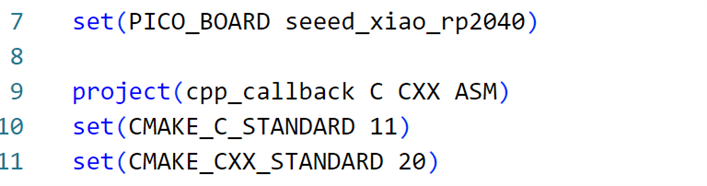
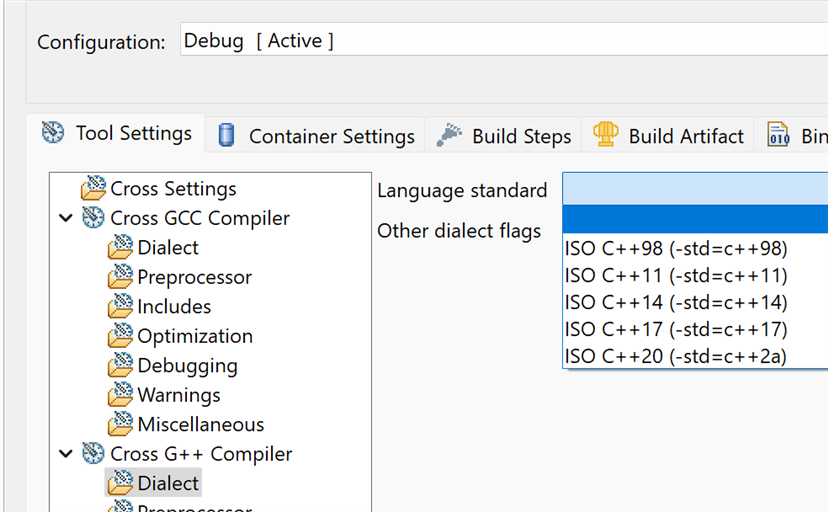
    for pico C sdk: for eclipse: No idea how to set in Arduino IDE V2. V1 had a platform file, that you could edit.
  • Jan Cumps
    Jan Cumps over 1 year ago in reply to Jan Cumps +1
    when you press ctl+shift+p in Arduino IDE2, you get a command pallet. There you can set preferences user/workspace (with a form or directly in settings.json) If the dialect can be set, I'd suspect it's…
  • shabaz
    shabaz over 1 year ago

    Very interesting!

    If using g++ to build it, I correctly see the following:

    error: 'requires' does not name a type
      requires std::is_arithmetic<R>::value

    note: 'requires' only available with '-std=c++20' or '-fconcepts'

    All is fine, of course, when I add the specified switch.

    However, Arduino IDE is a bit vague:

    error: 'requires' does not name a type
    requires std::is_arithmetic<R>::value
    ^~~~~~~~

    exit status 1

    Compilation error: 'requires' does not name a type

    It fails to mention that the reason is the switch is missing. A pity the IDE doesn't support it, because this sort of feature is excellent for real-time applications, and would be a nice way to demonstrate. Still, at least Pico can build with it (using -std=c++20 in the COMPILE_OPTIONS in CMakeLists.txt

    • Cancel
    • Vote Up +1 Vote Down
    • Sign in to reply
    • Cancel
  • Jan Cumps
    Jan Cumps over 1 year ago in reply to shabaz

    for pico C sdk:

    image

    for eclipse:

    image

    No idea how to set in Arduino IDE V2. V1 had a platform file, that you could edit.

    • Cancel
    • Vote Up +1 Vote Down
    • Sign in to reply
    • Cancel
  • Jan Cumps
    Jan Cumps over 1 year ago in reply to Jan Cumps

    when you press ctl+shift+p in Arduino IDE2, you get a command pallet. There you can set  preferences user/workspace (with a form or directly in settings.json) 
    If the dialect can be set, I'd suspect it's there ...

    • Cancel
    • Vote Up +1 Vote Down
    • Sign in to reply
    • Cancel
  • shabaz
    shabaz over 1 year ago in reply to Jan Cumps

    Ahh thanks for the tip! Simpler to remember than the compile-line option I was using for Pico SDK.

    • Cancel
    • Vote Up 0 Vote Down
    • Sign in to reply
    • Cancel
  • Jan Cumps
    Jan Cumps over 1 year ago in reply to Jan Cumps

    no, the option is not there

    • Cancel
    • Vote Up +1 Vote Down
    • Sign in to reply
    • Cancel
  • Jan Cumps
    Jan Cumps over 1 year ago in reply to shabaz

     shabaz I found where you can set it for Arduino IDE 2.X on windows:

    C:\Users\jancu\AppData\Local\Arduino15\packages\arduino\hardware\avr\1.8.4\platform.txt

    You need to replace jancu with your windows user name, and controller family with the board you are working for. And std=gnu++11 with std=c++20

    compiler.cpp.flags=-c -g -Os {compiler.warning_flags} -std=gnu++11 -fpermissive -fno-exceptions -ffunction-sections -fdata-sections -fno-threadsafe-statics -Wno-error=narrowing -MMD -flto

    edit: I don't think that this is useful for code that you want to share with others.
    edit edit: the setting gets overwritten when updating the IDE
    edit edit edit: and avr-gcc 7.x does not support c++20

    • Cancel
    • Vote Up +1 Vote Down
    • Sign in to reply
    • Cancel
  • Jan Cumps
    Jan Cumps over 1 year ago

    I added the option to use a callback that doesn't return anything , e.g.:  void handler(...) 

    First, I allowed the template constraint to accept both arithmetic and void return values.

    template <typename R, typename... Args>
    // restrict to arithmetic data types for return value, or void
      requires std::is_void<R>::value || std::is_arithmetic_v<R>
    class Callback {

    And altered the call() function in the template, to not return a value if the return type is void:

    	/*
    	 * R can either be an arithmetic type, or void
    	 */
    	inline R call(Args... args) {
    		if constexpr (std::is_void<R>::value) {
    			if (_callback == nullptr) {
    				return;
    			}
    			(*_callback)(args...);
    		}
    
    		if constexpr (! std::is_void<R>::value) {
    			if (_callback == nullptr) {
    				return 0; // R can only be a arithmetic type. 0 should work as default.
    			}
    			return (*_callback)(args...);
    		}
    	}

    Here's an example that uses a bool handler,

    	// scenario: return a bool
        Callback<bool, const int&, const int&> cb;
        // Use a lambda to execute anonymous C code
        cb.set([](const int& num1, const int& num2) -> bool {
            return num1 == num2;
        });
    
        printf("Value: %s\n", cb.call(a, b) ? "true" : "false");
    	fflush(stdout);
    	}

    and a void handler:

        // scenario: use void
        Callback<void, const int&, const int&> cb;
        // Use a lambda to execute anonymous C code
        cb.set([](const int& num1, const int& num2) {
            return;
        });
        cb.call(a, b);

    There are more lines of code in the template class definition. But all of that is compile time resolved.

    No executable code is added.

    • Cancel
    • Vote Up +1 Vote Down
    • Sign in to reply
    • Cancel
element14 Community

element14 is the first online community specifically for engineers. Connect with your peers and get expert answers to your questions.

  • Members
  • Learn
  • Technologies
  • Challenges & Projects
  • Products
  • Store
  • About Us
  • Feedback & Support
  • FAQs
  • Terms of Use
  • Privacy Policy
  • Legal and Copyright Notices
  • Sitemap
  • Cookies

An Avnet Company © 2026 Premier Farnell Limited. All Rights Reserved.

Premier Farnell Ltd, registered in England and Wales (no 00876412), registered office: Farnell House, Forge Lane, Leeds LS12 2NE.

ICP 备案号 10220084.

Follow element14

  • X
  • Facebook
  • linkedin
  • YouTube