element14 Community
element14 Community
    Register Log In
  • Site
  • Search
  • Log In Register
  • Community Hub
    Community Hub
    • What's New on element14
    • Feedback and Support
    • Benefits of Membership
    • Personal Blogs
    • Members Area
    • Achievement Levels
  • Learn
    Learn
    • Ask an Expert
    • eBooks
    • element14 presents
    • Learning Center
    • Tech Spotlight
    • STEM Academy
    • Webinars, Training and Events
    • Learning Groups
  • Technologies
    Technologies
    • 3D Printing
    • FPGA
    • Industrial Automation
    • Internet of Things
    • Power & Energy
    • Sensors
    • Technology Groups
  • Challenges & Projects
    Challenges & Projects
    • Design Challenges
    • element14 presents Projects
    • Project14
    • Arduino Projects
    • Raspberry Pi Projects
    • Project Groups
  • Products
    Products
    • Arduino
    • Avnet & Tria Boards Community
    • Dev Tools
    • Manufacturers
    • Multicomp Pro
    • Product Groups
    • Raspberry Pi
    • RoadTests & Reviews
  • About Us
  • Store
    Store
    • Visit Your Store
    • Choose another store...
      • Europe
      •  Austria (German)
      •  Belgium (Dutch, French)
      •  Bulgaria (Bulgarian)
      •  Czech Republic (Czech)
      •  Denmark (Danish)
      •  Estonia (Estonian)
      •  Finland (Finnish)
      •  France (French)
      •  Germany (German)
      •  Hungary (Hungarian)
      •  Ireland
      •  Israel
      •  Italy (Italian)
      •  Latvia (Latvian)
      •  
      •  Lithuania (Lithuanian)
      •  Netherlands (Dutch)
      •  Norway (Norwegian)
      •  Poland (Polish)
      •  Portugal (Portuguese)
      •  Romania (Romanian)
      •  Russia (Russian)
      •  Slovakia (Slovak)
      •  Slovenia (Slovenian)
      •  Spain (Spanish)
      •  Sweden (Swedish)
      •  Switzerland(German, French)
      •  Turkey (Turkish)
      •  United Kingdom
      • Asia Pacific
      •  Australia
      •  China
      •  Hong Kong
      •  India
      •  Korea (Korean)
      •  Malaysia
      •  New Zealand
      •  Philippines
      •  Singapore
      •  Taiwan
      •  Thailand (Thai)
      • Americas
      •  Brazil (Portuguese)
      •  Canada
      •  Mexico (Spanish)
      •  United States
      Can't find the country/region you're looking for? Visit our export site or find a local distributor.
  • Translate
  • Profile
  • Settings
Autodesk EAGLE
  • Products
  • More
Autodesk EAGLE
EAGLE User Chat (English) Pads in inner layers
  • Blog
  • Forum
  • Documents
  • Events
  • Polls
  • Files
  • Members
  • Mentions
  • Sub-Groups
  • Tags
  • More
  • Cancel
  • New
Join Autodesk EAGLE to participate - click to join for free!
Actions
  • Share
  • More
  • Cancel
Forum Thread Details
  • Replies 5 replies
  • Subscribers 177 subscribers
  • Views 867 views
  • Users 0 members are here
Related

Pads in inner layers

Former Member
Former Member over 15 years ago

I am making my first board with inner supply layers, and when I make the cam

files, the component pads are showin up in the inner layers. Since the

supply layers are inverted, this makes an area around the thru-holes with no

copper, and none of my power or ground connections are being made. How do I

keep the pads from showing up in my supply layers?


  • Sign in to reply
  • Cancel
  • Former Member
    Former Member over 15 years ago

    Paxton Alsgaard schrieb:


    I am making my first board with inner supply layers, and when I make the cam

    files, the component pads are showin up in the inner layers. Since the

    supply layers are inverted, this makes an area around the thru-holes with no

    copper, and none of my power or ground connections are being made. How do I

    keep the pads from showing up in my supply layers?
     

    Probably you didn't set the NAME of the supply layers (or your supply

    nets) correctly resp. matching each other.


    Of course every pad that has another net/signal name is insulated in the

    supply layer by the "annulus" symbols you noticed. Those pads that have

    the same name will show a "thermal" symbol in the supply layer.


    For details, see HELP LAYER (and/or the manual).


    You might check your signal names with the SHOW command and look what

    gets hightlighted. Also, INFO is a good help.


    Tilmann


    • Cancel
    • Vote Up 0 Vote Down
    • Sign in to reply
    • Cancel
  • Former Member
    Former Member over 15 years ago in reply to Former Member

    Tilmann,


    Thank you for your time, I greatly appreciate the help. I have  checked the
    names of all the layers and nets several times, and I think that  they are
    correct. I don't know what I'm doing wrong. I have attached a  couple of
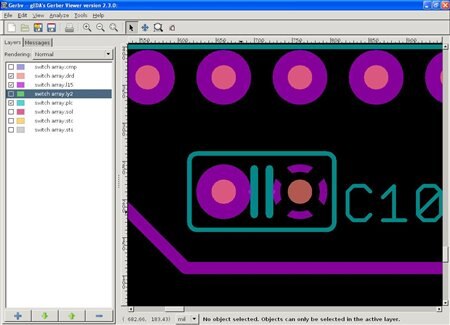
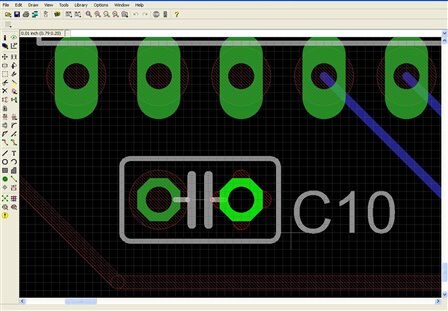
    screen shots to clarify the issue. Help1 is the Eagle layout, and  Help2 is
    the gerber files open in Gerbv, with only the ground layer,  silkscreen, and
    drill data shown. You can see that the thermal symbol is  shown in the supply
    layer in eagle, but when the CAM files are generated,  the pad shows up in
    the supply layer as negative space. The oval pads on the  IC above C10 show
    up as well.


    Again, I appreciate your help. Thank  You,


    Paxton


    image

    image

    • Cancel
    • Vote Up 0 Vote Down
    • Sign in to reply
    • Cancel
  • Former Member
    Former Member over 15 years ago in reply to Former Member

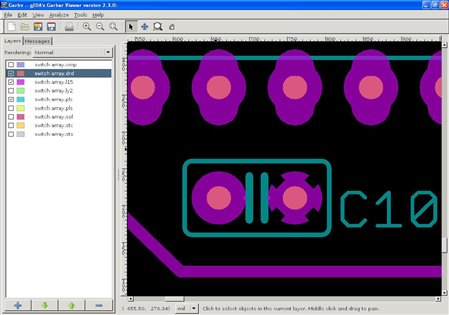
    Well I solved the problem. It was fairly easy to fix, although not obvious to me at first. In the CAM Job, pads and vias were selected for each inner layer tab, which is why they were showing up on the inner layers. Duh, right? Deselecting those in the job gave me the following:


    image

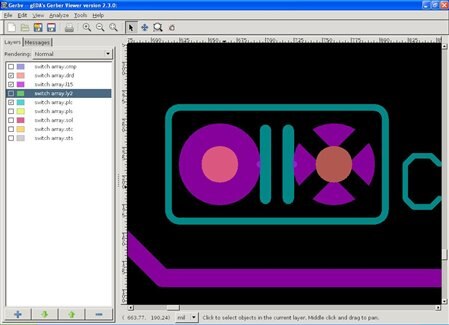
    Looks good. I now had an inner layer clearance error, which was fixed by activating restring for the thermal isolate under the supply tab in DRC. The final result, below, gives no more errors.


    image

    I would like to thank you Tilmann for your help, and I hope that this thread can help others who may run into the same issue.

    • Cancel
    • Vote Up 0 Vote Down
    • Sign in to reply
    • Cancel
  • Former Member
    Former Member over 15 years ago in reply to Former Member

    On 09/07/2010 01:16 PM, Paxton Alsgaard wrote:

    Tilmann,

    >

    Thank you for your time, I greatly appreciate the help. I have  checked the

    names of all the layers and nets several times, and I think that  they are

    correct. I don't know what I'm doing wrong. I have attached a  couple of

    screen shots to clarify the issue. Help1 is the Eagle layout, and  Help2 is

    the gerber files open in Gerbv, with only the ground layer,  silkscreen, and

    drill data shown. You can see that the thermal symbol is  shown in the supply

    layer in eagle, but when the CAM files are generated,  the pad shows up in

    the supply layer as negative space. The oval pads on the  IC above C10 show

    up as well.

    >

    Again, I appreciate your help. Thank  You,

    >

    Paxton

    >

      Image:help1.JPG

      Image:help2.JPG

    >

    Can't see the image in the newsgroup but from what you are describing I

    think this could be the problem.


    I never used supply layers but I think when using supply layers don't

    include the pad's in the cam setup for that layer.

    Paul R.


    • Cancel
    • Vote Up 0 Vote Down
    • Sign in to reply
    • Cancel
  • Former Member
    Former Member over 15 years ago in reply to Former Member

    Paxton Alsgaard schrieb:


    I have attached a couple of screen shots to clarify the issue.


    Take care that if you are posting through the web interface at

    element-14, none of your "attachments" are sent to the newsgroups.

    Besides other bugs and limitations, this is one of the disadvantages of

    that interface. You might consider directly accessing the newsgroups

    with a newsreader.

    Otherwise, you'd better place your files anywhere on the web and include

    links in your post.


    Anyway, thanks for letting us know you found the solution.


    Tilmann


    • Cancel
    • Vote Up 0 Vote Down
    • Sign in to reply
    • Cancel
element14 Community

element14 is the first online community specifically for engineers. Connect with your peers and get expert answers to your questions.

  • Members
  • Learn
  • Technologies
  • Challenges & Projects
  • Products
  • Store
  • About Us
  • Feedback & Support
  • FAQs
  • Terms of Use
  • Privacy Policy
  • Legal and Copyright Notices
  • Sitemap
  • Cookies

An Avnet Company © 2025 Premier Farnell Limited. All Rights Reserved.

Premier Farnell Ltd, registered in England and Wales (no 00876412), registered office: Farnell House, Forge Lane, Leeds LS12 2NE.

ICP 备案号 10220084.

Follow element14

  • X
  • Facebook
  • linkedin
  • YouTube