element14 Community
element14 Community
    Register Log In
  • Site
  • Search
  • Log In Register
  • Community Hub
    Community Hub
    • What's New on element14
    • Feedback and Support
    • Benefits of Membership
    • Personal Blogs
    • Members Area
    • Achievement Levels
  • Learn
    Learn
    • Ask an Expert
    • eBooks
    • element14 presents
    • Learning Center
    • Tech Spotlight
    • STEM Academy
    • Webinars, Training and Events
    • Learning Groups
  • Technologies
    Technologies
    • 3D Printing
    • FPGA
    • Industrial Automation
    • Internet of Things
    • Power & Energy
    • Sensors
    • Technology Groups
  • Challenges & Projects
    Challenges & Projects
    • Design Challenges
    • element14 presents Projects
    • Project14
    • Arduino Projects
    • Raspberry Pi Projects
    • Project Groups
  • Products
    Products
    • Arduino
    • Avnet & Tria Boards Community
    • Dev Tools
    • Manufacturers
    • Multicomp Pro
    • Product Groups
    • Raspberry Pi
    • RoadTests & Reviews
  • About Us
  • Store
    Store
    • Visit Your Store
    • Choose another store...
      • Europe
      •  Austria (German)
      •  Belgium (Dutch, French)
      •  Bulgaria (Bulgarian)
      •  Czech Republic (Czech)
      •  Denmark (Danish)
      •  Estonia (Estonian)
      •  Finland (Finnish)
      •  France (French)
      •  Germany (German)
      •  Hungary (Hungarian)
      •  Ireland
      •  Israel
      •  Italy (Italian)
      •  Latvia (Latvian)
      •  
      •  Lithuania (Lithuanian)
      •  Netherlands (Dutch)
      •  Norway (Norwegian)
      •  Poland (Polish)
      •  Portugal (Portuguese)
      •  Romania (Romanian)
      •  Russia (Russian)
      •  Slovakia (Slovak)
      •  Slovenia (Slovenian)
      •  Spain (Spanish)
      •  Sweden (Swedish)
      •  Switzerland(German, French)
      •  Turkey (Turkish)
      •  United Kingdom
      • Asia Pacific
      •  Australia
      •  China
      •  Hong Kong
      •  India
      • Japan
      •  Korea (Korean)
      •  Malaysia
      •  New Zealand
      •  Philippines
      •  Singapore
      •  Taiwan
      •  Thailand (Thai)
      • Vietnam
      • Americas
      •  Brazil (Portuguese)
      •  Canada
      •  Mexico (Spanish)
      •  United States
      Can't find the country/region you're looking for? Visit our export site or find a local distributor.
  • Translate
  • Profile
  • Settings
Autodesk EAGLE
  • Products
  • More
Autodesk EAGLE
EAGLE User Support (English) DIP pins shorted
  • Blog
  • Forum
  • Documents
  • Events
  • Polls
  • Files
  • Members
  • Mentions
  • Sub-Groups
  • Tags
  • More
  • Cancel
  • New
Join Autodesk EAGLE to participate - click to join for free!
Actions
  • Share
  • More
  • Cancel
Forum Thread Details
  • Replies 11 replies
  • Subscribers 179 subscribers
  • Views 812 views
  • Users 0 members are here
Related

DIP pins shorted

Former Member
Former Member over 14 years ago

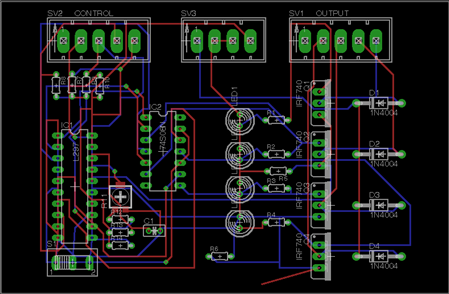
Hello All. This is my first attempt at using Eagle software to develop a printed circuit board. This project is for the purpose of jumping into the program to gain a foothold on learning it's ways. I've come accross something that I don't understand so I've come asking for some help. As seen in the board image, IC1 (L297) is a DIP. It looks to me that pins on both sides of the chip are shorted to adjacent pins. Anyone have an idea of what's going on? Thanks. - Scotty
 

imageimage


Message was edited. Inserted new images in hopes of better resolution.

  • Sign in to reply
  • Cancel
Parents
  • Former Member
    Former Member over 14 years ago

    On 11/18/2011 8:42 AM, Robert Scott Jr wrote:

    Hello All. This is my first attempt at using Eagle software to develop a printed circuit board. This project is for the purpose of jumping into the program to gain a foothold on learning it's ways. I've come accross something that I don't understand so I've come asking for some help. As seen in the board image, IC1 (L297) is a DIP. It looks to me that pins on both sides of the chip are shorted to adjacent pins. Anyone have an idea of what's going on? Thanks. - Scotty


      Image:L297 board.jpg  Image:L297 schematic.jpg


    The images are of pretty poor resolution so its hard to tell.    Some of

    the (non- adjacent) pins are shorted together but it appears that the

    schematic has the same connections.


    I do not see a case where "adjacent" pins are shorted.    You do

    understand that editor is showing you multiple layers?   The blue traces

    are on a different layer of the board than the red traces.   Although

    these traces do cross each other they are not electrically connected

    unless there is a via or pin also connecting the board layers.


    Why not use the "show" command to display the nets on your board.   This

    will quickly tell you if there are connections between adjacent pins.


    Jim


    • Cancel
    • Vote Up 0 Vote Down
    • Sign in to reply
    • Cancel
Reply
  • Former Member
    Former Member over 14 years ago

    On 11/18/2011 8:42 AM, Robert Scott Jr wrote:

    Hello All. This is my first attempt at using Eagle software to develop a printed circuit board. This project is for the purpose of jumping into the program to gain a foothold on learning it's ways. I've come accross something that I don't understand so I've come asking for some help. As seen in the board image, IC1 (L297) is a DIP. It looks to me that pins on both sides of the chip are shorted to adjacent pins. Anyone have an idea of what's going on? Thanks. - Scotty


      Image:L297 board.jpg  Image:L297 schematic.jpg


    The images are of pretty poor resolution so its hard to tell.    Some of

    the (non- adjacent) pins are shorted together but it appears that the

    schematic has the same connections.


    I do not see a case where "adjacent" pins are shorted.    You do

    understand that editor is showing you multiple layers?   The blue traces

    are on a different layer of the board than the red traces.   Although

    these traces do cross each other they are not electrically connected

    unless there is a via or pin also connecting the board layers.


    Why not use the "show" command to display the nets on your board.   This

    will quickly tell you if there are connections between adjacent pins.


    Jim


    • Cancel
    • Vote Up 0 Vote Down
    • Sign in to reply
    • Cancel
Children
  • Former Member
    Former Member over 14 years ago in reply to Former Member

    Thanks for responding Jim. I inserted some new images. They are readable now. Yes, I do understand about trace colors and board sides. When I use the Show tool on a selected 'problem' trace, the trace and only the intended component pins of the selected trace illuminate. However, that trace has a path right along the drill holes of adjacent pins of IC1.

    • Cancel
    • Vote Up 0 Vote Down
    • Sign in to reply
    • Cancel
  • MDeGrauw
    MDeGrauw over 14 years ago in reply to Former Member

    Hi robert,


    First which version do you use and can you put in the sch and brd files so we can check for you.

    • Cancel
    • Vote Up 0 Vote Down
    • Sign in to reply
    • Cancel
  • Former Member
    Former Member over 14 years ago in reply to Former Member

    On 11/18/2011 11:24 AM, Robert Scott Jr wrote:

    Thanks for responding Jim. I inserted some new images. They are readable now. Yes, I do understand about trace colors and board sides. When I use the Show tool on a selected 'problem' trace, the trace and only the intended component pins of the selected trace illuminate. However, that trace has a path right along the drill holes of adjacent pins of IC1.


    Ok..I see it now and it does look wrong.   How did the traces get routed

    this way ....manually perhaps?   Try running DRC and see if the problems

    are picked up in the check.   I think the suggestion to post your sch

    and brd files makes sense.


    Jim


    • Cancel
    • Vote Up 0 Vote Down
    • Sign in to reply
    • Cancel
  • Former Member
    Former Member over 14 years ago in reply to Former Member

    Gentlemen, I am using Eagle light version 5.11.0. Attached are the files. I did run DRC and there are about 60 errors. Most have to do with IC1. The others I created when trying to reposition the resistors, leds and the switch. I was working on them when I realized the problem with the traces of IC1. I haven't done any manual routing on this board. It almost seems that the source of this problem may be the L297 file in the library. Thanks agian for responding. - Scotty


    Well, I tried attaching the files. I went to their location in the folder and chose the .brd and .sch files. When tried to post, I got an error message; 'The content type of this attachment is not allowed.' ???

    • Cancel
    • Vote Up 0 Vote Down
    • Sign in to reply
    • Cancel
  • Former Member
    Former Member over 14 years ago in reply to Former Member

    On 11/18/2011 6:19 PM, Robert Scott Jr wrote:

    Gentlemen, I am using Eagle light version 5.11.0. Attached are the files. I did run DRC and there are about 60 errors. Most have to do with IC1. The others I created when trying to reposition the resistors, leds and the switch. I was working on them when I realized the problem with the traces of IC1. I haven't done any manual routing on this board. It almost seems that the source of this problem may be the L297 file in the library. Thanks agian for responding. - Scotty


    Well, I tried attaching the files. I went to their location in the folder and chose the .brd and .sch files. When tried to post, I got an error message; 'The content type of this attachment is not allowed.' ???


    Try zipping the files and posting the zip?


    • Cancel
    • Vote Up 0 Vote Down
    • Sign in to reply
    • Cancel
  • Former Member
    Former Member over 14 years ago in reply to Former Member

    Ok. I'll try the zipped files. - Scotty

    Attachments:
    Mosfet Driver Circuit.zip
    • Cancel
    • Vote Up 0 Vote Down
    • Sign in to reply
    • Cancel
  • MDeGrauw
    MDeGrauw over 14 years ago in reply to Former Member

    Hi Robert,


    I looked at your files and I see some things that are beginners failures.

    I would advice you to first look at the tutorials to see how things are working.

    Use the ERC/DRC to check for consistency and errors in schematic / PCB layout.

    Keep your hands of the Design rules as long as you don't really know what you are doing and look if you can find DRU files at your boardhouse for eagle.

    Use VCC instead of 5V for digital power this because when you look at IC2 in the PCB you'll see that power is not connected.

    Also for GND instead of AGND (AGND is analog ground and not Digital GND).

    Also check trace sizes, the traces at the 24V is way to thin when looking at the maximum current the MOSFETs can drive.

    Advices you to define extra NETCLASSES for power and 24V with wider traces and use a polygon for GND.

    Did you route the board by hand or autorouter? If you can use the autorouter you better try these will respect the design rules.


    Whe you have more wuestions don't hesitate to ask.

    • Cancel
    • Vote Up 0 Vote Down
    • Sign in to reply
    • Cancel
  • Former Member
    Former Member over 14 years ago in reply to MDeGrauw

    On 11/20/2011 3:54 AM, Marco de Grauw wrote:

    Hi Robert,


    I looked at your files and I see some things that are beginners failures.

    I would advice you to first look at the tutorials to see how things are working.

    Use the ERC/DRC to check for consistency and errors in schematic / PCB layout.

    Keep your hands of the Design rules as long as you don't really know what you are doing and look if you can find DRU files at your boardhouse for eagle.

    Use VCC instead of 5V for digital power this because when you look at IC2 in the PCB you'll see that power is not connected.

    Also for GND instead of AGND (AGND is analog ground and not Digital GND).

    Also check trace sizes, the traces at the 24V is way to thin when looking at the maximum current the MOSFETs can drive.

    Advices you to define extra NETCLASSES for power and 24V with wider traces and use a polygon for GND.

    Did you route the board by hand or autorouter? If you can use the autorouter you better try these will respect the design rules.


    Whe you have more wuestions don't hesitate to ask.


    Hi Robert,


    I also looked at your files and agree with Marco's suggestions.   I

    tested the layout by running DRC and there were many reported overlap

    errors ..some of which you had pointed out.   I then ripped up all the

    traces and auto-routed the board and it did not re-create the overlaps

    in your original design.    From these results it appears likely that

    the original layout errors were created during a manual routing procedure.


    You may have been expecting that Eagle would automatically avoid other

    traces/nets/pads/vias but in the manual routing mode it does not.   If

    you have a version of Eagle that supports the "follow-me" routing modes

    you get something like the behavior I think you were looking for so

    maybe you want to experiment/read up on that feature (added around

    version 5.10 I think).


    Regards,

    Jim


    • Cancel
    • Vote Up 0 Vote Down
    • Sign in to reply
    • Cancel
  • Former Member
    Former Member over 14 years ago in reply to Former Member

    Thank You Gentleman for your time and advice. Your comments are exactly the leads I (and other beginners) need to go off and learn how to more successfully use Eagle. I will take all your suggestions and start over. The ground and supply I chose from the library as the best I could find. I'm gonna have to do some poking around and see if there is a way to take certain common, frequently used, frequently used by me, etc. components and create my own library from them to avoid spending so much time trying to figure out where components are in th default library. - Scotty

    • Cancel
    • Vote Up 0 Vote Down
    • Sign in to reply
    • Cancel
  • Former Member
    Former Member over 14 years ago in reply to Former Member

    On 11/20/2011 12:44 PM, Robert Scott Jr wrote:

    Thank You Gentleman for your time and advice. Your comments are exactly the leads I (and other beginners) need to go off and learn how to more successfully use Eagle. I will take all your suggestions and start over. The ground and supply I chose from the library as the best I could find. I'm gonna have to do some poking around and see if there is a way to take certain common, frequently used, frequently used by me, etc. components and create my own library from them to avoid spending so much time trying to figure out where components are in th default library. - Scotty


    Yes...finding parts it the libraries can be puzzling at first.

    Different people have different methods but I find the following steps

    will often get me to what I need or close...


    - First search on a portion of the device name.   Try to use wildcards

    to make the search term reasonable specific but not exact.   Eg use

    "LS04  instead of "SN74LS04".   This will avoid the case where two

    manufacturers add a different prefix code to what is essentially the

    same part.   If you find what you need then use it....but definitely

    verify the pinout and package footprint against the datasheet to be sure

    that its right.   ( You could also check on download section of the

    cadsoft website to see if there are some libraries there that might have

    what you want).


    - If you can't find something close then search for the package in an

    existing library.   Again use the wildcards in the search term, "SOIC

    to find all the SOIC packages.    If you find something with the right

    package then copy that package to a custom library of your own.   This

    way you have 1/2 the work done and all you need to do is create the

    symbol and device.   Again...check to make sure that the package

    footprint you found is exactly what the datasheet recommends....if not

    you can edit it to agree.


    - If neither of the previous steps fails then its time to create your

    own part.    This can be daunting the first time or two but after you've

    created a few devices it becomes pretty routine and it doesn't take that

    long unless your part has lots of pins/pads.   There are some excellent

    video tutorials on-line about how to use the library editor.


    Have fun w/ Eagle


    Jim


    • Cancel
    • Vote Up 0 Vote Down
    • Sign in to reply
    • Cancel
element14 Community

element14 is the first online community specifically for engineers. Connect with your peers and get expert answers to your questions.

  • Members
  • Learn
  • Technologies
  • Challenges & Projects
  • Products
  • Store
  • About Us
  • Feedback & Support
  • FAQs
  • Terms of Use
  • Privacy Policy
  • Legal and Copyright Notices
  • Sitemap
  • Cookies

An Avnet Company © 2026 Premier Farnell Limited. All Rights Reserved.

Premier Farnell Ltd, registered in England and Wales (no 00876412), registered office: Farnell House, Forge Lane, Leeds LS12 2NE.

ICP 备案号 10220084.

Follow element14

  • X
  • Facebook
  • linkedin
  • YouTube