element14 Community
element14 Community
    Register Log In
  • Site
  • Search
  • Log In Register
  • Community Hub
    Community Hub
    • What's New on element14
    • Feedback and Support
    • Benefits of Membership
    • Personal Blogs
    • Members Area
    • Achievement Levels
  • Learn
    Learn
    • Ask an Expert
    • eBooks
    • element14 presents
    • Learning Center
    • Tech Spotlight
    • STEM Academy
    • Webinars, Training and Events
    • Learning Groups
  • Technologies
    Technologies
    • 3D Printing
    • FPGA
    • Industrial Automation
    • Internet of Things
    • Power & Energy
    • Sensors
    • Technology Groups
  • Challenges & Projects
    Challenges & Projects
    • Design Challenges
    • element14 presents Projects
    • Project14
    • Arduino Projects
    • Raspberry Pi Projects
    • Project Groups
  • Products
    Products
    • Arduino
    • Avnet & Tria Boards Community
    • Dev Tools
    • Manufacturers
    • Multicomp Pro
    • Product Groups
    • Raspberry Pi
    • RoadTests & Reviews
  • About Us
    About the element14 Community
  • Store
    Store
    • Visit Your Store
    • Choose another store...
      • Europe
      •  Austria (German)
      •  Belgium (Dutch, French)
      •  Bulgaria (Bulgarian)
      •  Czech Republic (Czech)
      •  Denmark (Danish)
      •  Estonia (Estonian)
      •  Finland (Finnish)
      •  France (French)
      •  Germany (German)
      •  Hungary (Hungarian)
      •  Ireland
      •  Israel
      •  Italy (Italian)
      •  Latvia (Latvian)
      •  
      •  Lithuania (Lithuanian)
      •  Netherlands (Dutch)
      •  Norway (Norwegian)
      •  Poland (Polish)
      •  Portugal (Portuguese)
      •  Romania (Romanian)
      •  Russia (Russian)
      •  Slovakia (Slovak)
      •  Slovenia (Slovenian)
      •  Spain (Spanish)
      •  Sweden (Swedish)
      •  Switzerland(German, French)
      •  Turkey (Turkish)
      •  United Kingdom
      • Asia Pacific
      •  Australia
      •  China
      •  Hong Kong
      •  India
      •  Japan
      •  Korea (Korean)
      •  Malaysia
      •  New Zealand
      •  Philippines
      •  Singapore
      •  Taiwan
      •  Thailand (Thai)
      •  Vietnam
      • Americas
      •  Brazil (Portuguese)
      •  Canada
      •  Mexico (Spanish)
      •  United States
      Can't find the country/region you're looking for? Visit our export site or find a local distributor.
  • Translate
  • Profile
  • Settings
Autodesk EAGLE
  • Products
  • More
Autodesk EAGLE
EAGLE User Support (English) Microchip PIC16(L)F1938 symbol
  • Blog
  • Forum
  • Documents
  • Events
  • Polls
  • Files
  • Members
  • Mentions
  • Sub-Groups
  • Tags
  • More
  • Cancel
  • New
Join Autodesk EAGLE to participate - click to join for free!
Actions
  • Share
  • More
  • Cancel
Forum Thread Details
  • Replies 6 replies
  • Subscribers 189 subscribers
  • Views 690 views
  • Users 0 members are here
Related

Microchip PIC16(L)F1938 symbol

e14 Contributor
e14 Contributor over 14 years ago

I can view the PIC16(L)F1938 (28pin) symbol in the library window but it comes up as only the PIC16(L)F1939 (40pin) in the schematic window.


How can I add a symbol directly from the library window into the schematic window?

  • Sign in to reply
  • Cancel
  • robotonics
    robotonics over 14 years ago in reply to e14 Contributor

    image Don't beat yourself up...lol...sometimes you just need another pair of eyes on the job...happens to me all time!

    • Cancel
    • Vote Up 0 Vote Down
    • Sign in to reply
    • Cancel
  • e14 Contributor
    e14 Contributor over 14 years ago in reply to robotonics

    David,


    I found it.


    I was looking under PIC16F1936-I/MVPIC16F1936-I/MV*.  I didn't notice PIC16F19* a few lines up the page.

    Duh!


    Charles

    • Cancel
    • Vote Up 0 Vote Down
    • Sign in to reply
    • Cancel
  • robotonics
    robotonics over 14 years ago in reply to e14 Contributor

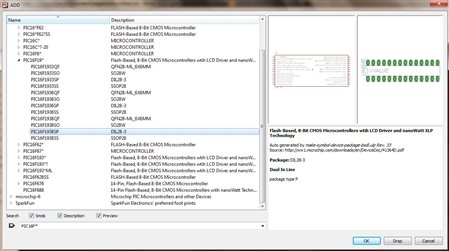
    Yes, the screenshot was from the Library in Eagle 6.2.0...invoked with ADD command in schematic editor etc...I was not able to reproduce the scenario you describe, meanings are hard to convey all at once I find...image


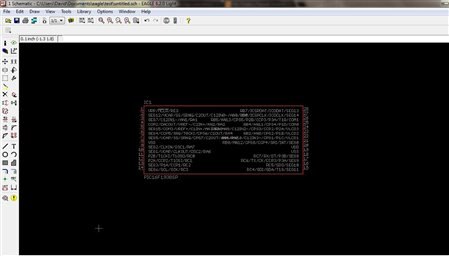
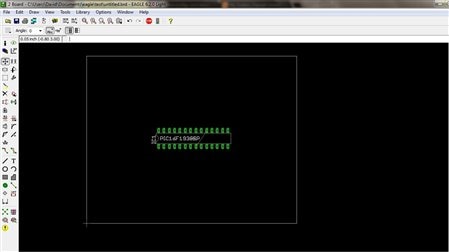
    So I thought it might help to show how I would add that part to a schematic...

    • Cancel
    • Vote Up 0 Vote Down
    • Sign in to reply
    • Cancel
  • e14 Contributor
    e14 Contributor over 14 years ago in reply to robotonics

    Thanks David.


    I did find a convoluted sollution using "Ultra Librarian".


    http://www.microchip.com/stellent/idcplg?IdcService=SS_GET_PAGE&nodeId=1406&dDocName=en537026&redirects=cad


    How did you get first screen shot?   Was is from the Library Editor in Eagle?


    Charles

    • Cancel
    • Vote Up 0 Vote Down
    • Sign in to reply
    • Cancel
  • robotonics
    robotonics over 14 years ago

    Hi


    A few pic's are better than a thousand words....sometimes  image


    image

    image

    image

    Hope this helps...

    • Cancel
    • Vote Up 0 Vote Down
    • Sign in to reply
    • Cancel
  • autodeskguest
    autodeskguest over 14 years ago

    Am 18.04.2012 03:49, schrieb charlesH:

    I can view the PIC16(L)F1938 (28pin) symbol in the library window but it comes up as only the PIC16(L)F1939 (40pin) in the schematic window.


    How can I add a symbol directly from the library window into the schematic window?


    Not at all, you must pick it via the ADD dialog in the schematic.

    In the microchip library are more than one PIC16F19*, there is also a

    PIC16F191* group. You just picked the wrong one.

    You could easily let eagle do the search by just typing f1938 into the

    search string.


    --

    Mit freundlichen Grüßen / With best regards


    Joern Paschedag


    • Cancel
    • Vote Up 0 Vote Down
    • Sign in to reply
    • Cancel
element14 Community

element14 is the first online community specifically for engineers. Connect with your peers and get expert answers to your questions.

  • Members
  • Learn
  • Technologies
  • Challenges & Projects
  • Products
  • Store
  • About Us
  • Feedback & Support
  • FAQs
  • Terms of Use
  • Privacy Policy
  • Legal and Copyright Notices
  • Sitemap
  • Cookies

An Avnet Company © 2026 Premier Farnell Limited. All Rights Reserved.

Premier Farnell Ltd, registered in England and Wales (no 00876412), registered office: Farnell House, Forge Lane, Leeds LS12 2NE.

Follow element14

  • X
  • Facebook
  • linkedin
  • YouTube