element14 Community
element14 Community
    Register Log In
  • Site
  • Search
  • Log In Register
  • Community Hub
    Community Hub
    • What's New on element14
    • Feedback and Support
    • Benefits of Membership
    • Personal Blogs
    • Members Area
    • Achievement Levels
  • Learn
    Learn
    • Ask an Expert
    • eBooks
    • element14 presents
    • Learning Center
    • Tech Spotlight
    • STEM Academy
    • Webinars, Training and Events
    • Learning Groups
  • Technologies
    Technologies
    • 3D Printing
    • FPGA
    • Industrial Automation
    • Internet of Things
    • Power & Energy
    • Sensors
    • Technology Groups
  • Challenges & Projects
    Challenges & Projects
    • Design Challenges
    • element14 presents Projects
    • Project14
    • Arduino Projects
    • Raspberry Pi Projects
    • Project Groups
  • Products
    Products
    • Arduino
    • Avnet & Tria Boards Community
    • Dev Tools
    • Manufacturers
    • Multicomp Pro
    • Product Groups
    • Raspberry Pi
    • RoadTests & Reviews
  • About Us
    About the element14 Community
  • Store
    Store
    • Visit Your Store
    • Choose another store...
      • Europe
      •  Austria (German)
      •  Belgium (Dutch, French)
      •  Bulgaria (Bulgarian)
      •  Czech Republic (Czech)
      •  Denmark (Danish)
      •  Estonia (Estonian)
      •  Finland (Finnish)
      •  France (French)
      •  Germany (German)
      •  Hungary (Hungarian)
      •  Ireland
      •  Israel
      •  Italy (Italian)
      •  Latvia (Latvian)
      •  
      •  Lithuania (Lithuanian)
      •  Netherlands (Dutch)
      •  Norway (Norwegian)
      •  Poland (Polish)
      •  Portugal (Portuguese)
      •  Romania (Romanian)
      •  Russia (Russian)
      •  Slovakia (Slovak)
      •  Slovenia (Slovenian)
      •  Spain (Spanish)
      •  Sweden (Swedish)
      •  Switzerland(German, French)
      •  Turkey (Turkish)
      •  United Kingdom
      • Asia Pacific
      •  Australia
      •  China
      •  Hong Kong
      •  India
      •  Japan
      •  Korea (Korean)
      •  Malaysia
      •  New Zealand
      •  Philippines
      •  Singapore
      •  Taiwan
      •  Thailand (Thai)
      •  Vietnam
      • Americas
      •  Brazil (Portuguese)
      •  Canada
      •  Mexico (Spanish)
      •  United States
      Can't find the country/region you're looking for? Visit our export site or find a local distributor.
  • Translate
  • Profile
  • Settings
Autodesk EAGLE
  • Products
  • More
Autodesk EAGLE
EAGLE User Support (English) Adding vias in a copper polygon
  • Blog
  • Forum
  • Documents
  • Events
  • Polls
  • Files
  • Members
  • Mentions
  • Sub-Groups
  • Tags
  • More
  • Cancel
  • New
Join Autodesk EAGLE to participate - click to join for free!
Actions
  • Share
  • More
  • Cancel
Forum Thread Details
  • Replies 8 replies
  • Subscribers 189 subscribers
  • Views 1645 views
  • Users 0 members are here
Related

Adding vias in a copper polygon

StefanTh
StefanTh over 13 years ago

Hi


I have routed my pcb with Router and everything looks fine.


I want to add a heatsinker to some of the pins of a IC by creating a polygon of copper on each side of the PCB close to the IC pin.

I connect these polygons with a number of vias and attach the vias to the IC pin by givign the the vias and copper polygon the

same net name as the IC pin


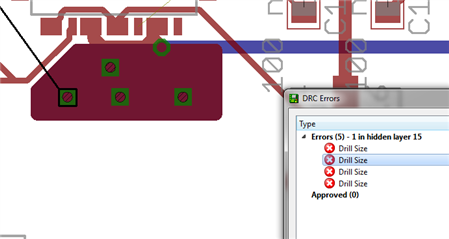
However the Drc command generate a "drill error" for each of the via's.


1) Create a polygon in copper on both side of the PCB

2) Place a number of vias inside this polygon of copper

3) Set the Net class name of the vias and copper polygon to the same net class name as the pin

4) Run "Drc"


It seems that the copper polygon's have painted copper over the whole of the vias and therefore the error is reported.


How do I avoid this error message ?

Why do the copper polygon paint over the vias ?

Should I instead set the via's at the edge of the copper polygon or is there other ways of doing it ?


Regards

  • Sign in to reply
  • Cancel

Top Replies

  • StefanTh
    StefanTh over 13 years ago in reply to dukepro +1
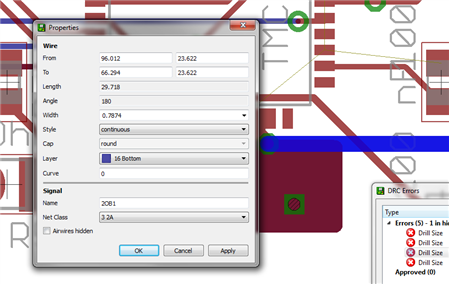
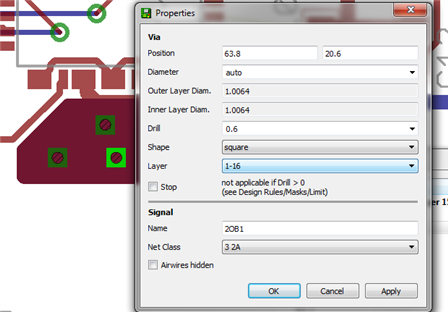
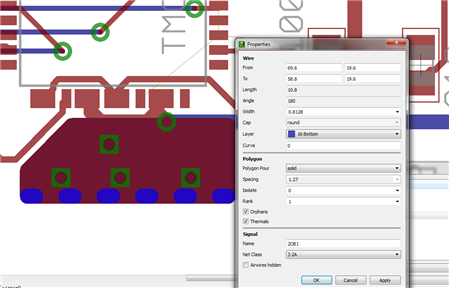
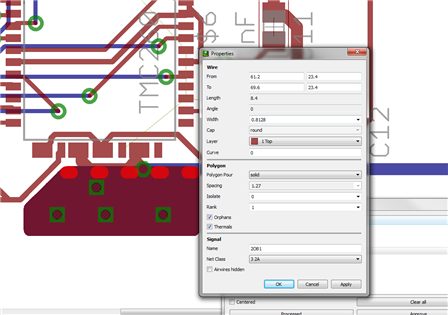
    Hi I do not know how to attach a .brd file so I insert a number of screen shoots instead Regards
  • dukepro
    dukepro over 13 years ago

    On 10/24/2012 03:00 AM, Stefan Olsson wrote:

    Hi


    I have routed my pcb with Router and everything looks fine.


    I want to add a heatsinker to some of the pins of a IC by creating a polygon of copper on each side of the PCB close to the IC pin.

    I connect these polygons with a number of vias and attach the vias to the IC pin by givign the the vias and copper polygon the

    same net name as the IC pin


    However the Drc command generate a "drill error" for each of the via's.


    Drill errors are usually caused by drill holes being too close to each

    other.  Check the distance settings in your DRC.  You may also want to

    try to move a via to determine if multiple vias are co-located.


    Try posting your test board here.  I'll take a quick look at it.


    Best regards,

        - Chuck


    • Cancel
    • Vote Up 0 Vote Down
    • Sign in to reply
    • Cancel
  • StefanTh
    StefanTh over 13 years ago in reply to dukepro

    Hi


    I do not know how to attach a .brd file so I insert a number of screen shoots instead


    image


    image


    image


    image


    image


    image


    Regards

    • Cancel
    • Vote Up +1 Vote Down
    • Sign in to reply
    • Cancel
  • dukepro
    dukepro over 13 years ago in reply to StefanTh

    Good morning, Stefan,


    The screenshots didn't make it into the message.


        - Chuck


    On 10/25/2012 01:58 AM, Stefan Olsson wrote:

    Hi


    >

    I do not know how to attach a .brd file so I insert a number of screen shoots instead


    >

    Image:testboard.png


    >

    Image:testboard2.png


    >

    Image:testboard3.png


    >

    >


    Image:testboard4.png


    Image:testboard5.png


    Image:testboard6.png


    >

    >

    >

    >


    Regards


    • Cancel
    • Vote Up 0 Vote Down
    • Sign in to reply
    • Cancel
  • Former Member
    Former Member over 13 years ago in reply to dukepro

    Chuck Huber wrote on Thu, 25 October 2012 07:32

    The screenshots didn't make it into the message.


    Actually they did make it just fine.  The message was posted over at the

    official Element-14 Eagle forum.  The images didn't make it to the NNTP

    feed and therefore the Eagle Central forums, which only display the NNTP

    content.

    --

    Web access to CadSoft support forums at www.eaglecentral.ca.  Where the CadSoft EAGLE community meets.


    • Cancel
    • Vote Up 0 Vote Down
    • Sign in to reply
    • Cancel
  • StefanTh
    StefanTh over 13 years ago in reply to Former Member

    Hi


    Did you find anything that would explain why the copper layers do not connect to the vias but instead "put itself" over the via holes and

    the nthe DRC complain that the "drill size" is wrong ?


    Regards Stefan

    • Cancel
    • Vote Up 0 Vote Down
    • Sign in to reply
    • Cancel
  • StefanTh
    StefanTh over 13 years ago in reply to StefanTh

    This have been solved, it seems that EAGLE change the drill hole size when you create polygons.


    The solution is to use properties on an existing via and copy the drill size of that via and use the drill size on the manually placed vias

    • Cancel
    • Vote Up 0 Vote Down
    • Sign in to reply
    • Cancel
  • techsupport
    techsupport over 13 years ago

    Hi,


    *******How do I avoid this error message ?

    In the DRC/Sizes tab there is a Mininum Size option, usually the default value is set to 24 mil.  Its possible the last drill size you used was bellow this value, for then, the vias as using a drill size value below 24 mil.  This will cause DRC to generate a Drill Layer.

    Make sure you have not place 2 vias on top of each other.


    *******Why do the copper polygon paint over the vias ?

    By Defaul Vias have the Thermal option disabled, it is not expected for vias to have anything soldered to them, for then, heat doesn't need to build.   If you would like vias to have Thermals, go to DRC/SUPPLY tab and enable the Thermal option.


    *******Should I instead set the via's at the edge of the copper polygon or is there other ways of doing it ?

    This is a matter of preference, but it is not necessary.  After enabling the Thermal option for vias in the DRC option, you may change the option for each via individually.


    I hope this helps.

    Best Regards,

    Ed

    • Cancel
    • Vote Up 0 Vote Down
    • Sign in to reply
    • Cancel
  • StefanTh
    StefanTh over 13 years ago in reply to techsupport

    I see, thanks a lot


    /Stefan

    • Cancel
    • Vote Up 0 Vote Down
    • Sign in to reply
    • Cancel
element14 Community

element14 is the first online community specifically for engineers. Connect with your peers and get expert answers to your questions.

  • Members
  • Learn
  • Technologies
  • Challenges & Projects
  • Products
  • Store
  • About Us
  • Feedback & Support
  • FAQs
  • Terms of Use
  • Privacy Policy
  • Legal and Copyright Notices
  • Sitemap
  • Cookies

An Avnet Company © 2026 Premier Farnell Limited. All Rights Reserved.

Premier Farnell Ltd, registered in England and Wales (no 00876412), registered office: Farnell House, Forge Lane, Leeds LS12 2NE.

ICP 备案号 10220084.

Follow element14

  • X
  • Facebook
  • linkedin
  • YouTube