element14 Community
element14 Community
    Register Log In
  • Site
  • Search
  • Log In Register
  • Community Hub
    Community Hub
    • What's New on element14
    • Feedback and Support
    • Benefits of Membership
    • Personal Blogs
    • Members Area
    • Achievement Levels
  • Learn
    Learn
    • Ask an Expert
    • eBooks
    • element14 presents
    • Learning Center
    • Tech Spotlight
    • STEM Academy
    • Webinars, Training and Events
    • Learning Groups
  • Technologies
    Technologies
    • 3D Printing
    • FPGA
    • Industrial Automation
    • Internet of Things
    • Power & Energy
    • Sensors
    • Technology Groups
  • Challenges & Projects
    Challenges & Projects
    • Design Challenges
    • element14 presents Projects
    • Project14
    • Arduino Projects
    • Raspberry Pi Projects
    • Project Groups
  • Products
    Products
    • Arduino
    • Avnet & Tria Boards Community
    • Dev Tools
    • Manufacturers
    • Multicomp Pro
    • Product Groups
    • Raspberry Pi
    • RoadTests & Reviews
  • About Us
    About the element14 Community
  • Store
    Store
    • Visit Your Store
    • Choose another store...
      • Europe
      •  Austria (German)
      •  Belgium (Dutch, French)
      •  Bulgaria (Bulgarian)
      •  Czech Republic (Czech)
      •  Denmark (Danish)
      •  Estonia (Estonian)
      •  Finland (Finnish)
      •  France (French)
      •  Germany (German)
      •  Hungary (Hungarian)
      •  Ireland
      •  Israel
      •  Italy (Italian)
      •  Latvia (Latvian)
      •  
      •  Lithuania (Lithuanian)
      •  Netherlands (Dutch)
      •  Norway (Norwegian)
      •  Poland (Polish)
      •  Portugal (Portuguese)
      •  Romania (Romanian)
      •  Russia (Russian)
      •  Slovakia (Slovak)
      •  Slovenia (Slovenian)
      •  Spain (Spanish)
      •  Sweden (Swedish)
      •  Switzerland(German, French)
      •  Turkey (Turkish)
      •  United Kingdom
      • Asia Pacific
      •  Australia
      •  China
      •  Hong Kong
      •  India
      •  Japan
      •  Korea (Korean)
      •  Malaysia
      •  New Zealand
      •  Philippines
      •  Singapore
      •  Taiwan
      •  Thailand (Thai)
      •  Vietnam
      • Americas
      •  Brazil (Portuguese)
      •  Canada
      •  Mexico (Spanish)
      •  United States
      Can't find the country/region you're looking for? Visit our export site or find a local distributor.
  • Translate
  • Profile
  • Settings
Autodesk EAGLE
  • Products
  • More
Autodesk EAGLE
EAGLE User Support (English) Grid Layer PCB to search components
  • Blog
  • Forum
  • Documents
  • Events
  • Polls
  • Files
  • Members
  • Mentions
  • Sub-Groups
  • Tags
  • More
  • Cancel
  • New
Join Autodesk EAGLE to participate - click to join for free!
Actions
  • Share
  • More
  • Cancel
Forum Thread Details
  • Replies 2 replies
  • Subscribers 187 subscribers
  • Views 355 views
  • Users 0 members are here
Related

Grid Layer PCB to search components

e14 Contributor
e14 Contributor over 13 years ago

Hello, sorry for my bad English


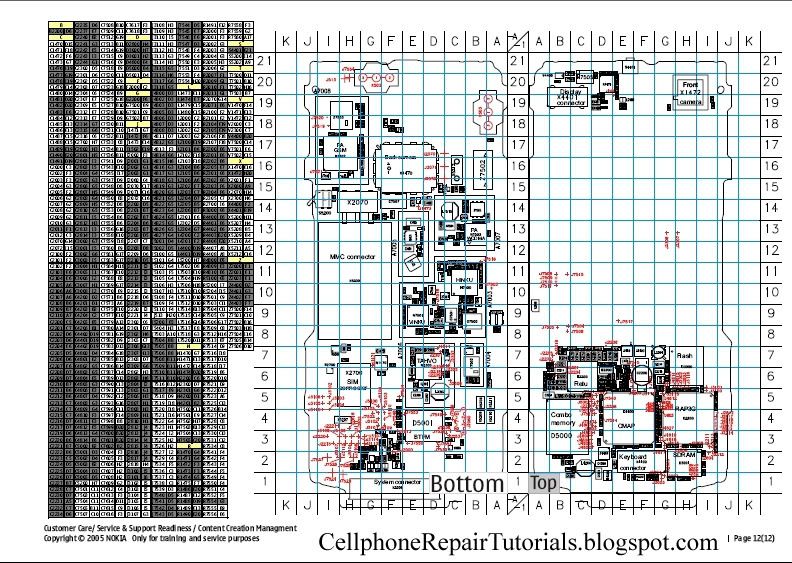
One way to quickly and easily find components on a PCB, is through a grid layer (rows of numbers and columns of  letters)


In the next picture (low quality) on the left shows the table or list of components with names like Rxxx - resistorr, Cxxx - Capacitor and etc, and the right side the PCB with the same names, I would to see this feature as a ULP or default in EAGLE software


Is this feature useful for you?


Would be useful, when the PCB is given printed on paper to a technician for example for search and replacement of components


know other cad-software that do this?


thanks


http://i665.photobucket.com/albums/vv11/kcandkim/12.jpg

  • Sign in to reply
  • Cancel
  • autodeskguest
    autodeskguest over 13 years ago in reply to shabaz

    On 04/15/2013 04:47 PM, shabaz wrote:

    I tend to just use the 'find.ulp' to search for any particular component

    - it finds, centers and highlights it, but also states the co-ords.

    But, it is also possible by running the mountsmd.ulp file, which

    generates a file (save it as a .txt file) which contains component

    identifier,

    X-Y co-ordinates and component value.

    Or, you could be kind and give the technicial a computer so he can run

    the find command ; -)


    Another option is the "show" command, especially with the "@" option.

    Let's say you're looking for T0123 on the board. Just type the command

    "show T0123" (without the quotes) and hit the ENTER key, and the named

    device will light up.


    If that's not good enough, as it might not be with a small component on

    a large, dense board, add an "at" sign like this, "show @ T0123", and

    Eagle will draw white rectangle around the component.


    • Cancel
    • Vote Up +1 Vote Down
    • Sign in to reply
    • Cancel
  • shabaz
    shabaz over 13 years ago

    Hi JF,


    I tend to just use the 'find.ulp' to search for any particular component - it finds, centers and highlights it, but also states the co-ords.

    But, it is also possible by running the mountsmd.ulp file, which generates a file (save it as a .txt file) which contains component identifier,

    X-Y co-ordinates and component value.

    Or, you could be kind and give the technician a computer so he can run the find command ; -)

    • Cancel
    • Vote Up 0 Vote Down
    • Sign in to reply
    • Cancel
element14 Community

element14 is the first online community specifically for engineers. Connect with your peers and get expert answers to your questions.

  • Members
  • Learn
  • Technologies
  • Challenges & Projects
  • Products
  • Store
  • About Us
  • Feedback & Support
  • FAQs
  • Terms of Use
  • Privacy Policy
  • Legal and Copyright Notices
  • Sitemap
  • Cookies

An Avnet Company © 2026 Premier Farnell Limited. All Rights Reserved.

Premier Farnell Ltd, registered in England and Wales (no 00876412), registered office: Farnell House, Forge Lane, Leeds LS12 2NE.

Follow element14

  • X
  • Facebook
  • linkedin
  • YouTube