element14 Community
element14 Community
    Register Log In
  • Site
  • Search
  • Log In Register
  • Community Hub
    Community Hub
    • What's New on element14
    • Feedback and Support
    • Benefits of Membership
    • Personal Blogs
    • Members Area
    • Achievement Levels
  • Learn
    Learn
    • Ask an Expert
    • eBooks
    • element14 presents
    • Learning Center
    • Tech Spotlight
    • STEM Academy
    • Webinars, Training and Events
    • Learning Groups
  • Technologies
    Technologies
    • 3D Printing
    • FPGA
    • Industrial Automation
    • Internet of Things
    • Power & Energy
    • Sensors
    • Technology Groups
  • Challenges & Projects
    Challenges & Projects
    • Design Challenges
    • element14 presents Projects
    • Project14
    • Arduino Projects
    • Raspberry Pi Projects
    • Project Groups
  • Products
    Products
    • Arduino
    • Avnet & Tria Boards Community
    • Dev Tools
    • Manufacturers
    • Multicomp Pro
    • Product Groups
    • Raspberry Pi
    • RoadTests & Reviews
  • About Us
    About the element14 Community
  • Store
    Store
    • Visit Your Store
    • Choose another store...
      • Europe
      •  Austria (German)
      •  Belgium (Dutch, French)
      •  Bulgaria (Bulgarian)
      •  Czech Republic (Czech)
      •  Denmark (Danish)
      •  Estonia (Estonian)
      •  Finland (Finnish)
      •  France (French)
      •  Germany (German)
      •  Hungary (Hungarian)
      •  Ireland
      •  Israel
      •  Italy (Italian)
      •  Latvia (Latvian)
      •  
      •  Lithuania (Lithuanian)
      •  Netherlands (Dutch)
      •  Norway (Norwegian)
      •  Poland (Polish)
      •  Portugal (Portuguese)
      •  Romania (Romanian)
      •  Russia (Russian)
      •  Slovakia (Slovak)
      •  Slovenia (Slovenian)
      •  Spain (Spanish)
      •  Sweden (Swedish)
      •  Switzerland(German, French)
      •  Turkey (Turkish)
      •  United Kingdom
      • Asia Pacific
      •  Australia
      •  China
      •  Hong Kong
      •  India
      •  Japan
      •  Korea (Korean)
      •  Malaysia
      •  New Zealand
      •  Philippines
      •  Singapore
      •  Taiwan
      •  Thailand (Thai)
      •  Vietnam
      • Americas
      •  Brazil (Portuguese)
      •  Canada
      •  Mexico (Spanish)
      •  United States
      Can't find the country/region you're looking for? Visit our export site or find a local distributor.
  • Translate
  • Profile
  • Settings
Autodesk EAGLE
  • Products
  • More
Autodesk EAGLE
EAGLE User Support (English) Controlling Main Breaker (150 amp ) using arduino
  • Blog
  • Forum
  • Documents
  • Events
  • Polls
  • Files
  • Members
  • Mentions
  • Sub-Groups
  • Tags
  • More
  • Cancel
  • New
Join Autodesk EAGLE to participate - click to join for free!
Actions
  • Share
  • More
  • Cancel
Forum Thread Details
  • Replies 3 replies
  • Subscribers 189 subscribers
  • Views 2638 views
  • Users 0 members are here
  • contactor
  • main_power
  • breaker
  • arduino
  • 150amp
Related

Controlling Main Breaker (150 amp ) using arduino

e14 Contributor
e14 Contributor over 11 years ago

Hello there ,


i've been digging around on how to control my home main breaker(150 amp )  using arduino ( i asked my local lawyer , and he said it's legal ).

and i asked electrician "how can i do my project" he  told me that i need to get 150 amp Contactor (this : lsIS_GMC_09_12_18_22_32.jpg_220x220.jpg)
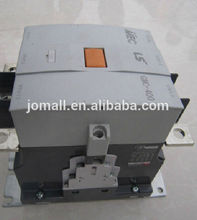
But now i'm stuck, how to control this using my arduino uno ? i dig even more and somebody told me i need to use SSR as following  [Arduino>SSR>Contactor>Main Breaker] but i'm confused i need a true expert who can guide me to the right answer ( which i believe he will be from element14 community ) .

  • Sign in to reply
  • Cancel
  • aldenridge
    aldenridge 2 months ago

    Controlling a 150A main breaker with an Arduino is not done directly in real electrical practice. The Arduino should never be connected to the high-current path or anything related to the breaker terminals. The correct method is to control a properly rated contactor, and even then only its low-voltage coil side.

    Most 150A contactors use a 24V AC or DC coil. Since an Arduino UNO only outputs 5V logic signals, an intermediate switching stage is required, such as a relay module or a transistor with opto-isolation. This stage safely switches the 24V coil circuit, which then energizes the contactor. The contactor itself handles the actual load switching on the mains side.

    The idea of using an SSR between Arduino and contactor is often misunderstood. SSRs are generally used for directly switching certain AC loads, but they are not required for driving a contactor coil and can introduce unnecessary complexity.

    In proper installations, all high-current wiring and protection devices remain inside a certified electrical enclosure. Only the low-voltage control lines are exposed to automation logic. A licensed electrician should always handle integration at the distribution panel level.

    A useful reference for safe installation practices and professional wiring approaches can be found through Electrician Singapore, which is a Singapore-based electrical service resource that reflects how controlled load switching is typically implemented in real residential environments.

    Overall, Arduino should be limited to control logic only, while certified electrical hardware manages all mains switching safely.

    • Cancel
    • Vote Up 0 Vote Down
    • Sign in to reply
    • Cancel
  • jw0752
    jw0752 over 11 years ago

    Hi Hamoud, Because of the design of most breaker boxes there is going to be a temptation to put your contactor ahead of your main 150 Amp breaker. This is not a good idea as there will be no protection and no way to cut power to your modification. You will have to put in a primary breaker with the contactor so that you will still have a breaker ahead of your system. From the contactor you can then feed your main beaker box. No one will probably tell you exactly how to hook an arduino up to this system as there are serious safety and liability issues. If you are going to do this get the electrician to set it up properly so that you can safely power the contactor with your arduino.

    John

    • Cancel
    • Vote Up +1 Vote Down
    • Sign in to reply
    • Cancel
  • gadget.iom
    gadget.iom over 11 years ago

    Hi Hamoud.


    This is a serious undertaking (safety wise) for somebody who does not have electrical experience.

    While you can, in theory, connect a 150a contactor to your main breaker, the potential for electrocution/fire is much greater when you are working in front of the circuit MCBs/fuses.


    The contactor will have a coil voltage. You do not list a contactor that you wish to use, though something like this would require a 24v coil voltage: http://uk.farnell.com/abb/a75-30-11-24v-50hz/contactor-37kw-75a/dp/8640610

    Get this fitted by an experienced electrician, he can fit this in a suitable enclosure, and supply you with two 'tails' that you can put 24v onto in order to close the contractor. This will negate the need for you to work around the potentially lethal connections.


    You can then use your Arduino, together with a relay, to control the contactor. A basic relay circuit for the Arduino is available here: http://playground.arduino.cc/uploads/Learning/relays.pdf

    • Cancel
    • Vote Up 0 Vote Down
    • Sign in to reply
    • Cancel
element14 Community

element14 is the first online community specifically for engineers. Connect with your peers and get expert answers to your questions.

  • Members
  • Learn
  • Technologies
  • Challenges & Projects
  • Products
  • Store
  • About Us
  • Feedback & Support
  • FAQs
  • Terms of Use
  • Privacy Policy
  • Legal and Copyright Notices
  • Sitemap
  • Cookies

An Avnet Company © 2026 Premier Farnell Limited. All Rights Reserved.

Premier Farnell Ltd, registered in England and Wales (no 00876412), registered office: Farnell House, Forge Lane, Leeds LS12 2NE.

Follow element14

  • X
  • Facebook
  • linkedin
  • YouTube