element14 Community
element14 Community
    Register Log In
  • Site
  • Search
  • Log In Register
  • Community Hub
    Community Hub
    • What's New on element14
    • Feedback and Support
    • Benefits of Membership
    • Personal Blogs
    • Members Area
    • Achievement Levels
  • Learn
    Learn
    • Ask an Expert
    • eBooks
    • element14 presents
    • Learning Center
    • Tech Spotlight
    • STEM Academy
    • Webinars, Training and Events
    • Learning Groups
  • Technologies
    Technologies
    • 3D Printing
    • FPGA
    • Industrial Automation
    • Internet of Things
    • Power & Energy
    • Sensors
    • Technology Groups
  • Challenges & Projects
    Challenges & Projects
    • Design Challenges
    • element14 presents Projects
    • Project14
    • Arduino Projects
    • Raspberry Pi Projects
    • Project Groups
  • Products
    Products
    • Arduino
    • Avnet & Tria Boards Community
    • Dev Tools
    • Manufacturers
    • Multicomp Pro
    • Product Groups
    • Raspberry Pi
    • RoadTests & Reviews
  • About Us
  • Store
    Store
    • Visit Your Store
    • Choose another store...
      • Europe
      •  Austria (German)
      •  Belgium (Dutch, French)
      •  Bulgaria (Bulgarian)
      •  Czech Republic (Czech)
      •  Denmark (Danish)
      •  Estonia (Estonian)
      •  Finland (Finnish)
      •  France (French)
      •  Germany (German)
      •  Hungary (Hungarian)
      •  Ireland
      •  Israel
      •  Italy (Italian)
      •  Latvia (Latvian)
      •  
      •  Lithuania (Lithuanian)
      •  Netherlands (Dutch)
      •  Norway (Norwegian)
      •  Poland (Polish)
      •  Portugal (Portuguese)
      •  Romania (Romanian)
      •  Russia (Russian)
      •  Slovakia (Slovak)
      •  Slovenia (Slovenian)
      •  Spain (Spanish)
      •  Sweden (Swedish)
      •  Switzerland(German, French)
      •  Turkey (Turkish)
      •  United Kingdom
      • Asia Pacific
      •  Australia
      •  China
      •  Hong Kong
      •  India
      • Japan
      •  Korea (Korean)
      •  Malaysia
      •  New Zealand
      •  Philippines
      •  Singapore
      •  Taiwan
      •  Thailand (Thai)
      • Vietnam
      • Americas
      •  Brazil (Portuguese)
      •  Canada
      •  Mexico (Spanish)
      •  United States
      Can't find the country/region you're looking for? Visit our export site or find a local distributor.
  • Translate
  • Profile
  • Settings
Autodesk EAGLE
  • Products
  • More
Autodesk EAGLE
EAGLE User Support (English) LT3759 exposed Pad
  • Blog
  • Forum
  • Documents
  • Events
  • Polls
  • Files
  • Members
  • Mentions
  • Sub-Groups
  • Tags
  • More
  • Cancel
  • New
Join Autodesk EAGLE to participate - click to join for free!
Actions
  • Share
  • More
  • Cancel
Forum Thread Details
  • State Suggested Answer
  • Replies 14 replies
  • Answers 1 answer
  • Subscribers 181 subscribers
  • Views 1974 views
  • Users 0 members are here
Related

LT3759 exposed Pad

nikoly
nikoly over 9 years ago

I'm using a 2 Layer Board in Eagle .

The datasheet gives some info about the layout, advising me to add some  vias inside that Pad for heatsink problems.

I have opened Eagle tutorial "ti-launchpad" where there are  2 IC with Pads and vias on them (how in the image)p .image
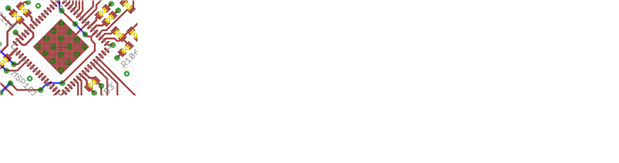
Watching the DRC I have some overlap errors.

I can follow that way in order to design my board but I wonder if it's the right way to do this or not !

I have also seen someone to put arrays of pads instead of vias in order to get this!


Hope you can put me in the right direction!

Thanks a lot

Nico

  • Sign in to reply
  • Cancel
Parents
  • nikoly
    0 nikoly over 9 years ago

    Hi and thanks again.

    Now I have some points more clear.

    So  if I decide to hand solder I should put the thermal structure through the all  board (like some people on you tube make) .

    Which is the best way to do this in Eagle cad?

    How can do this ? in the package editor or in the PCB  layout?

    Could you please suggest an example?

    Thanks a lot


    • Cancel
    • Vote Up 0 Vote Down
    • Sign in to reply
    • Verify Answer
    • Cancel
Reply
  • nikoly
    0 nikoly over 9 years ago

    Hi and thanks again.

    Now I have some points more clear.

    So  if I decide to hand solder I should put the thermal structure through the all  board (like some people on you tube make) .

    Which is the best way to do this in Eagle cad?

    How can do this ? in the package editor or in the PCB  layout?

    Could you please suggest an example?

    Thanks a lot


    • Cancel
    • Vote Up 0 Vote Down
    • Sign in to reply
    • Verify Answer
    • Cancel
Children
  • rachaelp
    0 rachaelp over 9 years ago in reply to nikoly

    nikk kik wrote:


    Which is the best way to do this in Eagle cad?

    How can do this ? in the package editor or in the PCB  layout?


    Hi Nico,


    This is basically as we discussed initially, so you start by creating the package with the thermal pad defined correctly as per the datasheet, this ensures the solder mask and paste mask are defined correctly so it doesn't move to the wrong place when the solder paste underneath it reflows.


    Then you have a couple of choices:


    You could add additional polygons top and bottom side in the board and add the vias between them. Just name the polygons and vias the same as the net the thermal pad connect to which I think in your case will be GND.


    Alternatively you could build the polygons and into the library part. This has the advantage that they'll appear automatically on all parts placed but the disadvantage is that you'll not be able to alter/remove them if they are in the way anywhere without editing the library part again. You then put the via's between the two in the board as previously or I think you could do it using correctly sized TH pads placed within the polygons. You'd need to ensure they were all connected to the same pin as the thermal pad. This method may throw up a bunch of DRC errors but I am not sure as I haven't tried it this way myself, I always just do all this in the board as I find it quite easy.


    With either of these options it may be worth putting a small polygon on the bottom solder mask layer inside the bottom side heatsink polygon to leave a small area of copper exposed so your soldering iron makes a good thermal contact with the copper to help get the heat up through to reflow the thermal pad more quickly.


    Best Regards,


    Rachael


    EDIT: Added comment about on bottom side solder mask.

    • Cancel
    • Vote Up 0 Vote Down
    • Sign in to reply
    • Verify Answer
    • Cancel
element14 Community

element14 is the first online community specifically for engineers. Connect with your peers and get expert answers to your questions.

  • Members
  • Learn
  • Technologies
  • Challenges & Projects
  • Products
  • Store
  • About Us
  • Feedback & Support
  • FAQs
  • Terms of Use
  • Privacy Policy
  • Legal and Copyright Notices
  • Sitemap
  • Cookies

An Avnet Company © 2026 Premier Farnell Limited. All Rights Reserved.

Premier Farnell Ltd, registered in England and Wales (no 00876412), registered office: Farnell House, Forge Lane, Leeds LS12 2NE.

ICP 备案号 10220084.

Follow element14

  • X
  • Facebook
  • linkedin
  • YouTube