element14 Community
element14 Community
    Register Log In
  • Site
  • Search
  • Log In Register
  • Community Hub
    Community Hub
    • What's New on element14
    • Feedback and Support
    • Benefits of Membership
    • Personal Blogs
    • Members Area
    • Achievement Levels
  • Learn
    Learn
    • Ask an Expert
    • eBooks
    • element14 presents
    • Learning Center
    • Tech Spotlight
    • STEM Academy
    • Webinars, Training and Events
    • Learning Groups
  • Technologies
    Technologies
    • 3D Printing
    • FPGA
    • Industrial Automation
    • Internet of Things
    • Power & Energy
    • Sensors
    • Technology Groups
  • Challenges & Projects
    Challenges & Projects
    • Design Challenges
    • element14 presents Projects
    • Project14
    • Arduino Projects
    • Raspberry Pi Projects
    • Project Groups
  • Products
    Products
    • Arduino
    • Avnet & Tria Boards Community
    • Dev Tools
    • Manufacturers
    • Multicomp Pro
    • Product Groups
    • Raspberry Pi
    • RoadTests & Reviews
  • About Us
    About the element14 Community
  • Store
    Store
    • Visit Your Store
    • Choose another store...
      • Europe
      •  Austria (German)
      •  Belgium (Dutch, French)
      •  Bulgaria (Bulgarian)
      •  Czech Republic (Czech)
      •  Denmark (Danish)
      •  Estonia (Estonian)
      •  Finland (Finnish)
      •  France (French)
      •  Germany (German)
      •  Hungary (Hungarian)
      •  Ireland
      •  Israel
      •  Italy (Italian)
      •  Latvia (Latvian)
      •  
      •  Lithuania (Lithuanian)
      •  Netherlands (Dutch)
      •  Norway (Norwegian)
      •  Poland (Polish)
      •  Portugal (Portuguese)
      •  Romania (Romanian)
      •  Russia (Russian)
      •  Slovakia (Slovak)
      •  Slovenia (Slovenian)
      •  Spain (Spanish)
      •  Sweden (Swedish)
      •  Switzerland(German, French)
      •  Turkey (Turkish)
      •  United Kingdom
      • Asia Pacific
      •  Australia
      •  China
      •  Hong Kong
      •  India
      •  Japan
      •  Korea (Korean)
      •  Malaysia
      •  New Zealand
      •  Philippines
      •  Singapore
      •  Taiwan
      •  Thailand (Thai)
      •  Vietnam
      • Americas
      •  Brazil (Portuguese)
      •  Canada
      •  Mexico (Spanish)
      •  United States
      Can't find the country/region you're looking for? Visit our export site or find a local distributor.
  • Translate
  • Profile
  • Settings
Autodesk EAGLE
  • Products
  • More
Autodesk EAGLE
EAGLE User Support (English) DRC Question
  • Blog
  • Forum
  • Documents
  • Events
  • Polls
  • Files
  • Members
  • Mentions
  • Sub-Groups
  • Tags
  • More
  • Cancel
  • New
Join Autodesk EAGLE to participate - click to join for free!
Actions
  • Share
  • More
  • Cancel
Forum Thread Details
  • State Not Answered
  • Replies 3 replies
  • Subscribers 181 subscribers
  • Views 383 views
  • Users 0 members are here
Related

DRC Question

therrm266
therrm266 over 9 years ago

I'm currently in the process of routing a dense board and not having an online DRC is making it difficult.


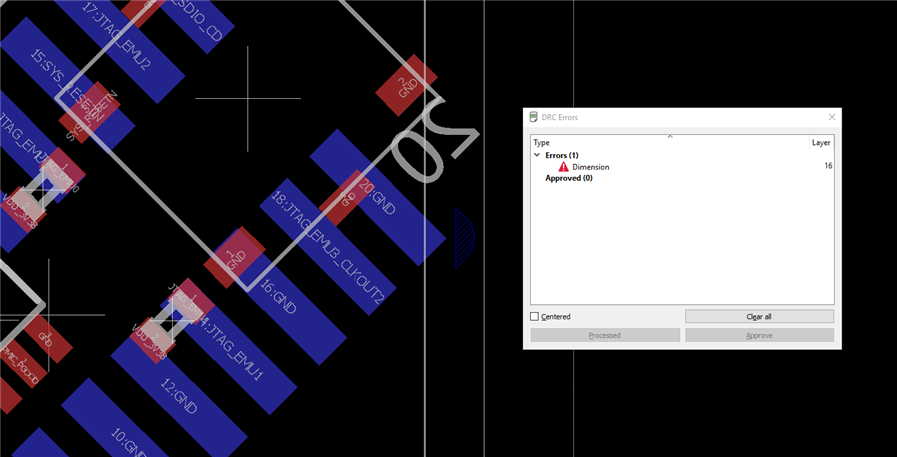
I periodically run the DRC to ensure that I have no errors but that lack of information does not help. It only tells me the layer and type of error (see image below).
image


From that DRC Errors list I have no idea how far I need to move the part from the board edge. Is there a way to have Eagle display how much it failed by ( e.g. Dimension rule: 20 mils ---- Measured Distance 15 mils)? This would tell me that I need to move the part 5 mils. Right now it is kind of a guessing game and is incredibly inefficient. It only gets worse as I try route traces between a small pitched BGA when I have only have 1 mil clearance on each side of a 4 mil trace.


Any help or suggestions would greatly appreciated!


Thanks!

  • Sign in to reply
  • Cancel
Parents
  • autodeskguest
    0 autodeskguest over 9 years ago

    On 26/01/17 03:35, T H wrote:

    From that DRC Errors list I have no idea how far I need to move the part from the board edge. Is there a way to have Eagle display how much it failed by ( e.g. Dimension rule: 20 mils ---- Measured Distance 15 mils)?

    Surely it already shows you a hatched area where the violation occurs?

    This tells you how big the overlap is and thus how far you need to move

    the offending item.


    • Cancel
    • Vote Up 0 Vote Down
    • Sign in to reply
    • Verify Answer
    • Cancel
  • therrm266
    0 therrm266 over 9 years ago in reply to autodeskguest

    You would think that is the case, but it isn't. All the hatched area does is highlight that there is an error, it doesn't create a hatched area that shows where I would need to move the part to.


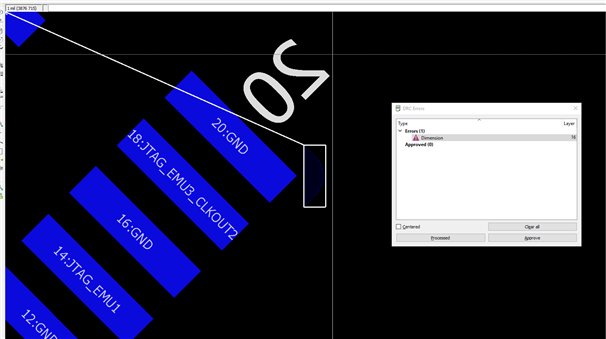
    Using my example above (new image below), you can see the hatched area only highlights the error, but not the actual area that completely errors. So from that I can't tell how far I need to move the part.  In this example I have a 40 mil clearance requirement to the edge of the board. The white vertical line going through the pad is a reference wire on the document layer that is 40 mils away from the board edge. As you can see the hatched area stops before reaching that wire.


    image

    There has to be an easier way to determine how far I need to move the part to remove an error other than drawing "helper wires."


    Or am I understanding the DRC hatched area incorrectly? Is the hatched area not highlighting the area in error but the distance the offending object needs to move? If that is the case I would need to measure the hatched area using dimension or mark. That still seems like an extra step instead of just adding the measured distance compared to the rule in the "DRC Errors" window.


    Does anybody know of an ULP that would display that information?


    Thanks again!

    • Cancel
    • Vote Up 0 Vote Down
    • Sign in to reply
    • Verify Answer
    • Cancel
  • rachaelp
    0 rachaelp over 9 years ago in reply to therrm266

    I agree with you that the DRC errors window could contain more information, it shouldn't be hard to note which specific rule was being violated between where, what the required clearance is, what the actual clearance is, and the difference. There is lots of wasted space in the DRC errors window which could be used to give a lot more useful information.


    Yes you can visually see roughly how much things need to move with the current hatched marking system and whilst I don't find that I have any real issues clearing all the errors with this, additional information would make things easier sometimes. Other packages provide a lot more info in their DRC reports, it would probably be beneficial if EAGLE did too, along with the ability to export the DRC report.


    I don't know of any ULP which can give more info unfortunately.


    Best Regards,


    Rachael

    • Cancel
    • Vote Up 0 Vote Down
    • Sign in to reply
    • Verify Answer
    • Cancel
Reply
  • rachaelp
    0 rachaelp over 9 years ago in reply to therrm266

    I agree with you that the DRC errors window could contain more information, it shouldn't be hard to note which specific rule was being violated between where, what the required clearance is, what the actual clearance is, and the difference. There is lots of wasted space in the DRC errors window which could be used to give a lot more useful information.


    Yes you can visually see roughly how much things need to move with the current hatched marking system and whilst I don't find that I have any real issues clearing all the errors with this, additional information would make things easier sometimes. Other packages provide a lot more info in their DRC reports, it would probably be beneficial if EAGLE did too, along with the ability to export the DRC report.


    I don't know of any ULP which can give more info unfortunately.


    Best Regards,


    Rachael

    • Cancel
    • Vote Up 0 Vote Down
    • Sign in to reply
    • Verify Answer
    • Cancel
Children
No Data
element14 Community

element14 is the first online community specifically for engineers. Connect with your peers and get expert answers to your questions.

  • Members
  • Learn
  • Technologies
  • Challenges & Projects
  • Products
  • Store
  • About Us
  • Feedback & Support
  • FAQs
  • Terms of Use
  • Privacy Policy
  • Legal and Copyright Notices
  • Sitemap
  • Cookies

An Avnet Company © 2026 Premier Farnell Limited. All Rights Reserved.

Premier Farnell Ltd, registered in England and Wales (no 00876412), registered office: Farnell House, Forge Lane, Leeds LS12 2NE.

ICP 备案号 10220084.

Follow element14

  • X
  • Facebook
  • linkedin
  • YouTube