element14 Community
element14 Community
    Register Log In
  • Site
  • Search
  • Log In Register
  • Community Hub
    Community Hub
    • What's New on element14
    • Feedback and Support
    • Benefits of Membership
    • Personal Blogs
    • Members Area
    • Achievement Levels
  • Learn
    Learn
    • Ask an Expert
    • eBooks
    • element14 presents
    • Learning Center
    • Tech Spotlight
    • STEM Academy
    • Webinars, Training and Events
    • Learning Groups
  • Technologies
    Technologies
    • 3D Printing
    • FPGA
    • Industrial Automation
    • Internet of Things
    • Power & Energy
    • Sensors
    • Technology Groups
  • Challenges & Projects
    Challenges & Projects
    • Design Challenges
    • element14 presents Projects
    • Project14
    • Arduino Projects
    • Raspberry Pi Projects
    • Project Groups
  • Products
    Products
    • Arduino
    • Avnet & Tria Boards Community
    • Dev Tools
    • Manufacturers
    • Multicomp Pro
    • Product Groups
    • Raspberry Pi
    • RoadTests & Reviews
  • About Us
    About the element14 Community
  • Store
    Store
    • Visit Your Store
    • Choose another store...
      • Europe
      •  Austria (German)
      •  Belgium (Dutch, French)
      •  Bulgaria (Bulgarian)
      •  Czech Republic (Czech)
      •  Denmark (Danish)
      •  Estonia (Estonian)
      •  Finland (Finnish)
      •  France (French)
      •  Germany (German)
      •  Hungary (Hungarian)
      •  Ireland
      •  Israel
      •  Italy (Italian)
      •  Latvia (Latvian)
      •  
      •  Lithuania (Lithuanian)
      •  Netherlands (Dutch)
      •  Norway (Norwegian)
      •  Poland (Polish)
      •  Portugal (Portuguese)
      •  Romania (Romanian)
      •  Russia (Russian)
      •  Slovakia (Slovak)
      •  Slovenia (Slovenian)
      •  Spain (Spanish)
      •  Sweden (Swedish)
      •  Switzerland(German, French)
      •  Turkey (Turkish)
      •  United Kingdom
      • Asia Pacific
      •  Australia
      •  China
      •  Hong Kong
      •  India
      •  Japan
      •  Korea (Korean)
      •  Malaysia
      •  New Zealand
      •  Philippines
      •  Singapore
      •  Taiwan
      •  Thailand (Thai)
      •  Vietnam
      • Americas
      •  Brazil (Portuguese)
      •  Canada
      •  Mexico (Spanish)
      •  United States
      Can't find the country/region you're looking for? Visit our export site or find a local distributor.
  • Translate
  • Profile
  • Settings
Autodesk EAGLE
  • Products
  • More
Autodesk EAGLE
EAGLE User Support (English) Problems exporting drills in eagle 8.7.0
  • Blog
  • Forum
  • Documents
  • Events
  • Polls
  • Files
  • Members
  • Mentions
  • Sub-Groups
  • Tags
  • More
  • Cancel
  • New
Join Autodesk EAGLE to participate - click to join for free!
Actions
  • Share
  • More
  • Cancel
Forum Thread Details
  • State Suggested Answer
  • Replies 13 replies
  • Answers 2 answers
  • Subscribers 191 subscribers
  • Views 3107 views
  • Users 0 members are here
Related

Problems exporting drills in eagle 8.7.0

josetomas
josetomas over 8 years ago

Hi!

I'm trying to export the .drd files for a CAM work with the excellon profile. The problem is the following, these are the Pads, Vias and Holes planes, so my drill should have onlye these points. image
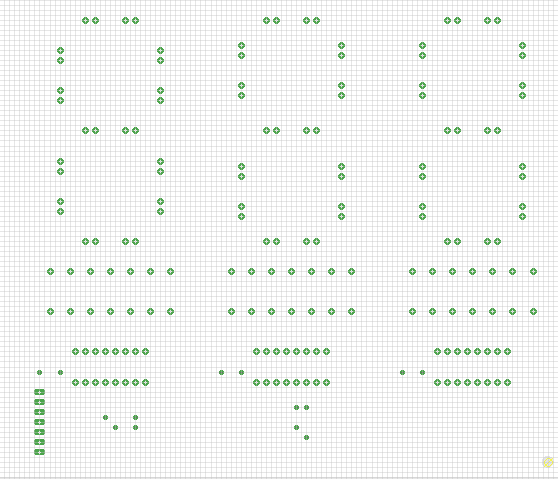
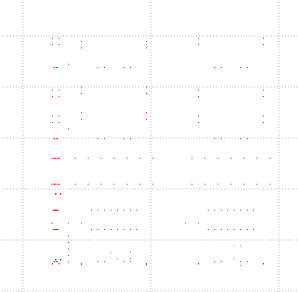
And this is what I get:

image


As you can see at the left part there are some holes that should even exist, and in the upper and right part a whole part of the board is missing. Does anyone have had this same problems?

  • Sign in to reply
  • Cancel
  • autodeskguest
    0 autodeskguest over 8 years ago in reply to rafaellehmkuhl

    On 19/05/18 17:18, Rafael Araujo Lehmkuhl wrote:

    Sorry for taking this post back, but to me it looks like the problem is not solved, even using legacy Excellon CAM job.


    I tried three viewers (webGerber (http://mayhewlabs.com/webGerber/) , GerbV and FlatCAM), and all of them gave me the same problem: scaled drill points with respect to the gerber.


    This is the export from Eagle 8/9 (using legacy Excellon) notice that the drill point are all over this green area, when the components are all on the bottom right corner):


    That looks like the classic problem that the excellon format fails to

    specify the meaning of its coordinates, and viewers often pick the wrong

    number of decimal places. The result, as you have, is that the drill

    locations are displayed at ten times larger coordinates than they should

    be. The fix is to manually set the number format in the viewer.


    This is the export from Eagle 6, with the same CAM files (default Gerber and Excellon CAMs):


    Yes, but the odd thing here is not the problem with V9 but the fact that

    you aren't having the problem on V6, because lots of people did.


    • Cancel
    • Vote Up 0 Vote Down
    • Sign in to reply
    • Verify Answer
    • Cancel
  • autodeskguest
    0 autodeskguest over 8 years ago in reply to rafaellehmkuhl

    On 19/05/18 17:18, Rafael Araujo Lehmkuhl wrote:

    Sorry for taking this post back, but to me it looks like the problem is not solved, even using legacy Excellon CAM job.


    I tried three viewers (webGerber (http://mayhewlabs.com/webGerber/) , GerbV and FlatCAM), and all of them gave me the same problem: scaled drill points with respect to the gerber.


    This is the export from Eagle 8/9 (using legacy Excellon) notice that the drill point are all over this green area, when the components are all on the bottom right corner):


    That looks like the classic problem that the excellon format fails to

    specify the meaning of its coordinates, and viewers often pick the wrong

    number of decimal places. The result, as you have, is that the drill

    locations are displayed at ten times larger coordinates than they should

    be. The fix is to manually set the number format in the viewer.


    This is the export from Eagle 6, with the same CAM files (default Gerber and Excellon CAMs):


    Yes, but the odd thing here is not the problem with V9 but the fact that

    you aren't having the problem on V6, because lots of people did.


    • Cancel
    • Vote Up 0 Vote Down
    • Sign in to reply
    • Verify Answer
    • Cancel
  • autodeskguest
    0 autodeskguest over 8 years ago in reply to rafaellehmkuhl

    On 19/05/18 17:18, Rafael Araujo Lehmkuhl wrote:

    Sorry for taking this post back, but to me it looks like the problem is not solved, even using legacy Excellon CAM job.


    I tried three viewers (webGerber (http://mayhewlabs.com/webGerber/) , GerbV and FlatCAM), and all of them gave me the same problem: scaled drill points with respect to the gerber.


    This is the export from Eagle 8/9 (using legacy Excellon) notice that the drill point are all over this green area, when the components are all on the bottom right corner):


    That looks like the classic problem that the excellon format fails to

    specify the meaning of its coordinates, and viewers often pick the wrong

    number of decimal places. The result, as you have, is that the drill

    locations are displayed at ten times larger coordinates than they should

    be. The fix is to manually set the number format in the viewer.


    This is the export from Eagle 6, with the same CAM files (default Gerber and Excellon CAMs):


    Yes, but the odd thing here is not the problem with V9 but the fact that

    you aren't having the problem on V6, because lots of people did.


    • Cancel
    • Vote Up 0 Vote Down
    • Sign in to reply
    • Verify Answer
    • Cancel
  • rafaellehmkuhl
    0 rafaellehmkuhl over 8 years ago

    Sorry for taking this post back, but to me it looks like the problem is not solved, even using legacy Excellon CAM job.

    I tried three viewers (webGerber , GerbV and FlatCAM), and all of them gave me the same problem: scaled drill points with respect to the gerber.


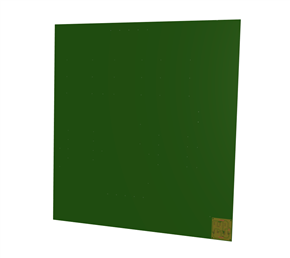
    This is the export from Eagle 8/9 (using legacy Excellon) notice that the drill point are all over this green area, when the components are all on the bottom right corner):


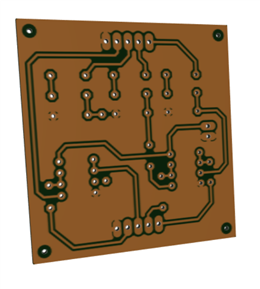
    This is the export from Eagle 6, with the same CAM files (default Gerber and Excellon CAMs):


    imageimage

    • Cancel
    • Vote Up 0 Vote Down
    • Sign in to reply
    • Verify Answer
    • Cancel
  • josetomas
    0 josetomas over 8 years ago in reply to techsupport

    I tested both option, eagle 8.5.2 and 8.7 with the legacy excellon in 2.5 and have got the results I should. This is really strange, beacuse the gerbers are looking great.

    • Cancel
    • Vote Up 0 Vote Down
    • Sign in to reply
    • Verify Answer
    • Cancel
  • techsupport
    0 techsupport over 8 years ago

    Hi,

    As Rachael stated, using the legacy EXCELLON CAM processor should work just fine. Make sure you are setting up your Gerber/Drill viewer correctly for drill file with the following parameters:

    Leading Zeros suppressed

    2.5 format

    Absolute values

    Inches


    Make sure not to convert the legacy CAM job to the new format.

    I hope this helps.

    Best Regards,

    Edwin

    • Cancel
    • Vote Up +1 Vote Down
    • Sign in to reply
    • Verify Answer
    • Reject Answer
    • Cancel
  • rachaelp
    0 rachaelp over 8 years ago in reply to josetomas

    Hello,


    8.7.1 won't fix the issues you are seeing with the new CAM exporter, it's going to take them a bit more time to resolved the issues I think.


    However, I think when you tried to use the legacy Excellon CAM job and you said it didn't work, maybe there was an error in the way you were trying to use it which meant you weren't actually using the old CAM exporter as this should work exactly the same as in v8.5.2. Could you post up a video of how you were trying to export using the legacy CAM job? I think that might help identify where things are going wrong.


    Best Regards,


    Rachael

    • Cancel
    • Vote Up 0 Vote Down
    • Sign in to reply
    • Verify Answer
    • Cancel
  • josetomas
    0 josetomas over 8 years ago in reply to rachaelp

    They have released the verson 8.7.1, do you still recomend me a previous version?

    • Cancel
    • Vote Up 0 Vote Down
    • Sign in to reply
    • Verify Answer
    • Cancel
  • rachaelp
    0 rachaelp over 8 years ago in reply to josetomas

    Right ok that should have worked....


    Download and install 8.5.2 from here and try exporting using the CAM processor on that: http://eagle.autodesk.com/eagle/software-versions


    Best Regards,


    Rachael

    • Cancel
    • Vote Up 0 Vote Down
    • Sign in to reply
    • Verify Answer
    • Cancel
  • josetomas
    0 josetomas over 8 years ago in reply to rachaelp

    I tried using the legacy, but didnt worked :/

    • Cancel
    • Vote Up 0 Vote Down
    • Sign in to reply
    • Verify Answer
    • Cancel
>
element14 Community

element14 is the first online community specifically for engineers. Connect with your peers and get expert answers to your questions.

  • Members
  • Learn
  • Technologies
  • Challenges & Projects
  • Products
  • Store
  • About Us
  • Feedback & Support
  • FAQs
  • Terms of Use
  • Privacy Policy
  • Legal and Copyright Notices
  • Sitemap
  • Cookies

An Avnet Company © 2026 Premier Farnell Limited. All Rights Reserved.

Premier Farnell Ltd, registered in England and Wales (no 00876412), registered office: Farnell House, Forge Lane, Leeds LS12 2NE.

Follow element14

  • X
  • Facebook
  • linkedin
  • YouTube