element14 Community
element14 Community
    Register Log In
  • Site
  • Search
  • Log In Register
  • Community Hub
    Community Hub
    • What's New on element14
    • Feedback and Support
    • Benefits of Membership
    • Personal Blogs
    • Members Area
    • Achievement Levels
  • Learn
    Learn
    • Ask an Expert
    • eBooks
    • element14 presents
    • Learning Center
    • Tech Spotlight
    • STEM Academy
    • Webinars, Training and Events
    • Learning Groups
  • Technologies
    Technologies
    • 3D Printing
    • FPGA
    • Industrial Automation
    • Internet of Things
    • Power & Energy
    • Sensors
    • Technology Groups
  • Challenges & Projects
    Challenges & Projects
    • Design Challenges
    • element14 presents Projects
    • Project14
    • Arduino Projects
    • Raspberry Pi Projects
    • Project Groups
  • Products
    Products
    • Arduino
    • Avnet & Tria Boards Community
    • Dev Tools
    • Manufacturers
    • Multicomp Pro
    • Product Groups
    • Raspberry Pi
    • RoadTests & Reviews
  • About Us
  • Store
    Store
    • Visit Your Store
    • Choose another store...
      • Europe
      •  Austria (German)
      •  Belgium (Dutch, French)
      •  Bulgaria (Bulgarian)
      •  Czech Republic (Czech)
      •  Denmark (Danish)
      •  Estonia (Estonian)
      •  Finland (Finnish)
      •  France (French)
      •  Germany (German)
      •  Hungary (Hungarian)
      •  Ireland
      •  Israel
      •  Italy (Italian)
      •  Latvia (Latvian)
      •  
      •  Lithuania (Lithuanian)
      •  Netherlands (Dutch)
      •  Norway (Norwegian)
      •  Poland (Polish)
      •  Portugal (Portuguese)
      •  Romania (Romanian)
      •  Russia (Russian)
      •  Slovakia (Slovak)
      •  Slovenia (Slovenian)
      •  Spain (Spanish)
      •  Sweden (Swedish)
      •  Switzerland(German, French)
      •  Turkey (Turkish)
      •  United Kingdom
      • Asia Pacific
      •  Australia
      •  China
      •  Hong Kong
      •  India
      • Japan
      •  Korea (Korean)
      •  Malaysia
      •  New Zealand
      •  Philippines
      •  Singapore
      •  Taiwan
      •  Thailand (Thai)
      • Vietnam
      • Americas
      •  Brazil (Portuguese)
      •  Canada
      •  Mexico (Spanish)
      •  United States
      Can't find the country/region you're looking for? Visit our export site or find a local distributor.
  • Translate
  • Profile
  • Settings
Autodesk EAGLE
  • Products
  • More
Autodesk EAGLE
EAGLE User Support (English) EAGLE V6 Autorouter Ignores Certain Airwires
  • Blog
  • Forum
  • Documents
  • Events
  • Polls
  • Files
  • Members
  • Mentions
  • Sub-Groups
  • Tags
  • More
  • Cancel
  • New
Join Autodesk EAGLE to participate - click to join for free!
Actions
  • Share
  • More
  • Cancel
Forum Thread Details
  • State Not Answered
  • Replies 2 replies
  • Subscribers 179 subscribers
  • Views 376 views
  • Users 0 members are here
  • board
  • eagle
  • pcb_traces
  • autorouter
  • pcb
  • bug
Related

EAGLE V6 Autorouter Ignores Certain Airwires

Former Member
Former Member over 14 years ago

Hi,


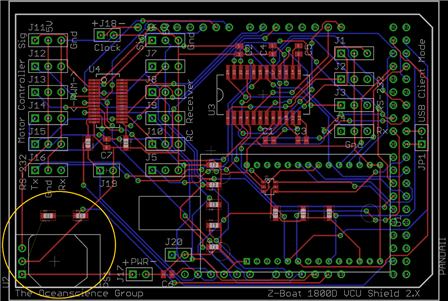
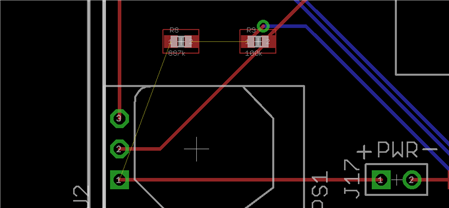
Inside the orange circle in the bottom left corner of the attached picture, there are two airwires that have not been routed by the autorouter using the default settings. As you can see, completing the trace is extremely simple, yet the autorouter seems to have ignored them. Does anyone know why? In a previous version of the layout, all the components on the board were in completely different positions, and in that earlier version, the autorouter ignored these two same connections as well, as if it has a grudge against them. I can route the wires manually easily enough in this particular case. However, for more complicated designs in the future, I am worried that the autorouter may choose to bypass certain airwires for some unknown reason. I did not observe this behavior in V5.11. Might this issue be related to the new V6 redesign? Is there a way to prevent this? In the schematic, I have already removed these two components and added them back in, just to see if that might fix it, yet the results are the same. Thank you.
image

image

Attachments:
image
image
  • Sign in to reply
  • Cancel
  • Former Member
    0 Former Member over 14 years ago

    SOLVED . . . kinda.


    I deleted the offending components from the schematic. Then I closed all libraries. Afterwards I reopened the library that the components belong to and added them back into the schematic. And just to be certain, I did a library Update All. Now the airwires are being routed normally again. This feels more like a workaround than an actual solution though . . . .

    • Cancel
    • Vote Up 0 Vote Down
    • Sign in to reply
    • Verify Answer
    • Cancel
  • autodeskguest
    0 autodeskguest over 10 years ago in reply to Former Member

    Adrian,


    Can you elaborate more on the steps taken to eliminate the air wire

    issue (e.g. " Then I closed all the libraries" too ambiguous how do you

    exactly close the libraries)? Also, have you found this approach to

    solve the air wire and auto router issue consistently?


    --

    To view any images and attachments in this post, visit:

    http://www.element14.com/community/message/150261


    • Cancel
    • Vote Up 0 Vote Down
    • Sign in to reply
    • Verify Answer
    • Cancel
element14 Community

element14 is the first online community specifically for engineers. Connect with your peers and get expert answers to your questions.

  • Members
  • Learn
  • Technologies
  • Challenges & Projects
  • Products
  • Store
  • About Us
  • Feedback & Support
  • FAQs
  • Terms of Use
  • Privacy Policy
  • Legal and Copyright Notices
  • Sitemap
  • Cookies

An Avnet Company © 2026 Premier Farnell Limited. All Rights Reserved.

Premier Farnell Ltd, registered in England and Wales (no 00876412), registered office: Farnell House, Forge Lane, Leeds LS12 2NE.

ICP 备案号 10220084.

Follow element14

  • X
  • Facebook
  • linkedin
  • YouTube