element14 Community
element14 Community
    Register Log In
  • Site
  • Search
  • Log In Register
  • Community Hub
    Community Hub
    • What's New on element14
    • Feedback and Support
    • Benefits of Membership
    • Personal Blogs
    • Members Area
    • Achievement Levels
  • Learn
    Learn
    • Ask an Expert
    • eBooks
    • element14 presents
    • Learning Center
    • Tech Spotlight
    • STEM Academy
    • Webinars, Training and Events
    • Learning Groups
  • Technologies
    Technologies
    • 3D Printing
    • FPGA
    • Industrial Automation
    • Internet of Things
    • Power & Energy
    • Sensors
    • Technology Groups
  • Challenges & Projects
    Challenges & Projects
    • Design Challenges
    • element14 presents Projects
    • Project14
    • Arduino Projects
    • Raspberry Pi Projects
    • Project Groups
  • Products
    Products
    • Arduino
    • Avnet & Tria Boards Community
    • Dev Tools
    • Manufacturers
    • Multicomp Pro
    • Product Groups
    • Raspberry Pi
    • RoadTests & Reviews
  • About Us
  • Store
    Store
    • Visit Your Store
    • Choose another store...
      • Europe
      •  Austria (German)
      •  Belgium (Dutch, French)
      •  Bulgaria (Bulgarian)
      •  Czech Republic (Czech)
      •  Denmark (Danish)
      •  Estonia (Estonian)
      •  Finland (Finnish)
      •  France (French)
      •  Germany (German)
      •  Hungary (Hungarian)
      •  Ireland
      •  Israel
      •  Italy (Italian)
      •  Latvia (Latvian)
      •  
      •  Lithuania (Lithuanian)
      •  Netherlands (Dutch)
      •  Norway (Norwegian)
      •  Poland (Polish)
      •  Portugal (Portuguese)
      •  Romania (Romanian)
      •  Russia (Russian)
      •  Slovakia (Slovak)
      •  Slovenia (Slovenian)
      •  Spain (Spanish)
      •  Sweden (Swedish)
      •  Switzerland(German, French)
      •  Turkey (Turkish)
      •  United Kingdom
      • Asia Pacific
      •  Australia
      •  China
      •  Hong Kong
      •  India
      • Japan
      •  Korea (Korean)
      •  Malaysia
      •  New Zealand
      •  Philippines
      •  Singapore
      •  Taiwan
      •  Thailand (Thai)
      • Vietnam
      • Americas
      •  Brazil (Portuguese)
      •  Canada
      •  Mexico (Spanish)
      •  United States
      Can't find the country/region you're looking for? Visit our export site or find a local distributor.
  • Translate
  • Profile
  • Settings
Autodesk EAGLE
  • Products
  • More
Autodesk EAGLE
EAGLE User Support (English) Generating Scripts to create CapacitiveTouch Wheels
  • Blog
  • Forum
  • Documents
  • Events
  • Polls
  • Files
  • Members
  • Mentions
  • Sub-Groups
  • Tags
  • More
  • Cancel
  • New
Join Autodesk EAGLE to participate - click to join for free!
Actions
  • Share
  • More
  • Cancel
Forum Thread Details
  • State Not Answered
  • Replies 2 replies
  • Subscribers 178 subscribers
  • Views 310 views
  • Users 0 members are here
Related

Generating Scripts to create CapacitiveTouch Wheels

patekd
patekd over 12 years ago

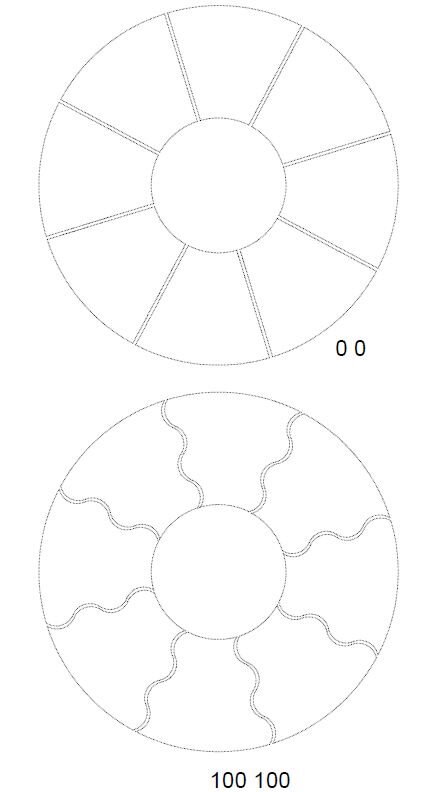
I got it to work. Requires some gap and curve value tweaking but really nice.


thanks for your comments, helped. I got rid of the Trig and just went with Geometry.


image


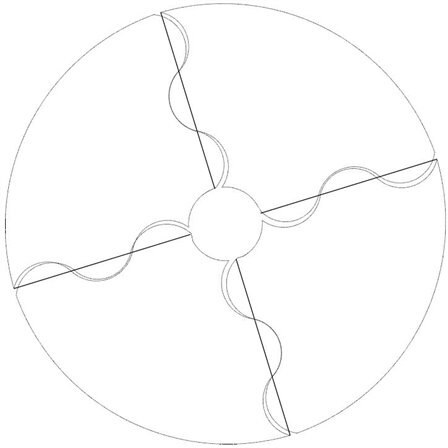
I have written a C program that generates a Script to draw the pads of a capacitive touch wheel (sort of).

My challenge is using the ARC and CURVE when I draw my pads using the Polygon command. I am trying

to create wavey edges of the pads and I can do that but my problem is I cannot maintain the spacing

between the pads when I use an arc when I draw the adjacent polygon. I have included an image

of what I have achieved and the script that generated it.


I have used some pretty extensive trig and geometry to generate the script but it seams like when I

change the arc height, width etc. I am not getting the behavior that I would expect from my calculations.


I was hoping for some feedback.


1. The explination of arc and curve seem pretty straight forward. Have you ever found them hard to control

    in scripts?

2..Is there anyway to avoid using the arc or curve to draw smooth curves?

3. Should I just look at the time I spent doing this as wasted and move on with my life?


Thanks for any comments or ideas you might have


I image
 

CHANGE WIDTH .2032;

GRID mm;

SET WIRE_BEND 7;

Change layer 51;

CIRCLE (0 0) (30.0000 0);

CIRCLE (0 0) (5.0000 0);

CHANGE WIDTH .1;

WIRE (4.7815 1.4619) (28.6891 8.7712);

WIRE (-1.4619 4.7815) (-8.7712 28.6891);

WIRE (-4.7815 -1.4619) (-28.6891 -8.7711);

WIRE (1.4619 -4.7815) (8.7711 -28.6891);

CHANGE LAYER 1;

CHANGE WIDTH .1;

CHANGE WIDTH 0.0254;

GRID mm;

SET WIRE_BEND 2;

POLYGON (4.3950 2.3841) +67.0433 (-0.4811 4.9768) +120.00 (-4.0355 12.6118) -120.00 (-6.1910 20.8609) +120.00 (-8.7656 28.6908) -86.1801 (28.3809 9.7225) -120.00 (20.8586 6.4786) +120.00 (12.6101 3.7609) -120.00 (4.9211 1.6027) (4.3950 2.3841)

POLYGON (-2.3841 4.3950) +67.0433 (-4.9768 -0.4811) +120.00 (-12.6118 -3.7561) -120.00 (-20.8609 -6.4704) +120.00 (-28.6908 -8.7656) -86.1801 (-9.7224 28.3809) -120.00 (-6.1989 20.8586) +120.00 (-4.0406 12.6101) -120.00 (-1.3229 4.9211) (-2.3841 4.3950)

POLYGON (-4.3950 -2.3841) +67.0433 (0.4811 -4.9768) +120.00 (3.7561 -12.8912) -120.00 (6.4704 -20.5814) +120.00 (8.7656 -28.6908) -86.1801 (-28.3809 -9.7224) -120.00 (-20.5788 -6.1989) +120.00 (-12.8899 -4.0406) -120.00 (-4.6414 -1.3229) (-4.3950 -2.3841)

POLYGON (2.3841 -4.3950) +67.0433 (4.9768 0.4811) +120.00 (12.8912 4.0355) -120.00 (20.5814 6.1910) +120.00 (28.6908 8.7656) -86.1801 (9.7224 -28.3809) -120.00 (6.4786 -20.5788) +120.00 (3.7609 -12.8899) -120.00 (1.6027 -4.6414) (2.3841 -4.3950)

Attachments:
imageCapacitive Wheel.pdf
  • Sign in to reply
  • Cancel
  • Former Member
    0 Former Member over 12 years ago

    I am not sure the shape you are going for but how about just putting a

    thin line with restrict or is it the keepout layer and the polygon

    outline will clearance the wire on that layer.

    Use the same curve on both polygon edges and the restrict layer. Use the

    width of the line to set the clearance between the polygons.

    Paul R.

    On 02/17/2013 03:47 PM, patekd wrote:

    I have written a C program that generates a Script to draw the pads of a capacitive touch wheel (sort of).

    My challenge is using the ARC and CURVE when I draw my pads using the Polygon command. I am trying

    to create wavey edges of the pads and I can do that but my problem is I cannot maintain the spacing

    between the pads when I use an arc when I draw the adjacent polygon. I have included an image

    of what I have achieved and the script that generated it.


    I have used some pretty extensive trig and geometry to generate the script but it seams like when I

    change the arc height, width etc. I am not getting the behavior that I would expect from my calculations.


    I was hoping for some feedback.


    1. The explination of arc and curve seem pretty straight forward. Have you ever found them hard to control

         in scripts?

    2..Is there anyway to avoid using the arc or curve to draw smooth curves?

    3. Should I just look at the time I spent doing this as wasted and move on with my life?


    Thanks for any comments or ideas you might have


    >

    I 


    CHANGE WIDTH .2032;

    GRID mm;

    SET WIRE_BEND 7;

    Change layer 51;

    CIRCLE (0 0) (30.0000 0);

    CIRCLE (0 0) (5.0000 0);

    CHANGE WIDTH .1;

    WIRE (4.7815 1.4619) (28.6891 8.7712);

    WIRE (-1.4619 4.7815) (-8.7712 28.6891);

    WIRE (-4.7815 -1.4619) (-28.6891 -8.7711);

    WIRE (1.4619 -4.7815) (8.7711 -28.6891);

    CHANGE LAYER 1;

    CHANGE WIDTH .1;

    CHANGE WIDTH 0.0254;

    GRID mm;

    SET WIRE_BEND 2;

    POLYGON (4.3950 2.3841) +67.0433 (-0.4811 4.9768) +120.00 (-4.0355 12.6118) -120.00 (-6.1910 20.8609) +120.00 (-8.7656 28.6908) -86.1801 (28.3809 9.7225) -120.00 (20.8586 6.4786) +120.00 (12.6101 3.7609) -120.00 (4.9211 1.6027) (4.3950 2.3841)

    POLYGON (-2.3841 4.3950) +67.0433 (-4.9768 -0.4811) +120.00 (-12.6118 -3.7561) -120.00 (-20.8609 -6.4704) +120.00 (-28.6908 -8.7656) -86.1801 (-9.7224 28.3809) -120.00 (-6.1989 20.8586) +120.00 (-4.0406 12.6101) -120.00 (-1.3229 4.9211) (-2.3841 4.3950)

    POLYGON (-4.3950 -2.3841) +67.0433 (0.4811 -4.9768) +120.00 (3.7561 -12.8912) -120.00 (6.4704 -20.5814) +120.00 (8.7656 -28.6908) -86.1801 (-28.3809 -9.7224) -120.00 (-20.5788 -6.1989) +120.00 (-12.8899 -4.0406) -120.00 (-4.6414 -1.3229) (-4.3950 -2.3841)

    POLYGON (2.3841 -4.3950) +67.0433 (4.9768 0.4811) +120.00 (12.8912 4.0355) -120.00 (20.5814 6.1910) +120.00 (28.6908 8.7656) -86.1801 (9.7224 -28.3809) -120.00 (6.4786 -20.5788) +120.00 (3.7609 -12.8899) -120.00 (1.6027 -4.6414) (2.3841 -4.3950)


    --

    To view any images and attachments in this post, visit:

    http://www.element14.com/community/message/69945#69945/l/generating-scripts-to-create-capacitivetouch-wheels


    Attachments:

    Capacitive Wheel.pdf


    • Cancel
    • Vote Up 0 Vote Down
    • Sign in to reply
    • Verify Answer
    • Cancel
  • Former Member
    0 Former Member over 12 years ago

    patekd wrote:

    I have written a C program that generates a Script to draw the pads

    of a capacitive touch wheel (sort of).

    My challenge is using the ARC and CURVE when I draw my pads using the

    Polygon command. I am trying

    to create wavey edges of the pads and I can do that but my problem is

    I cannot maintain the spacing

    between the pads when I use an arc when I draw the adjacent polygon.

    I have included an image

    of what I have achieved and the script that generated it.


    I have used some pretty extensive trig and geometry to generate the

    script but it seams like when I

    change the arc height, width etc. I am not getting the behavior that

    I would expect from my calculations.


    I was hoping for some feedback.


    1. The explination of arc and curve seem pretty straight forward.

    Have you ever found them hard to control

    in scripts?

    2..Is there anyway to avoid using the arc or curve to draw smooth

    curves?

    3. Should I just look at the time I spent doing this as wasted and

    move on with my life?


    Thanks for any comments or ideas you might have


    >

    I 


    CHANGE WIDTH .2032;

    GRID mm;

    SET WIRE_BEND 7;

    Change layer 51;

    CIRCLE (0 0) (30.0000 0);

    CIRCLE (0 0) (5.0000 0);

    CHANGE WIDTH .1;

    WIRE (4.7815 1.4619) (28.6891 8.7712);

    WIRE (-1.4619 4.7815) (-8.7712 28.6891);

    WIRE (-4.7815 -1.4619) (-28.6891 -8.7711);

    WIRE (1.4619 -4.7815) (8.7711 -28.6891);

    CHANGE LAYER 1;

    CHANGE WIDTH .1;

    CHANGE WIDTH 0.0254;

    GRID mm;

    SET WIRE_BEND 2;

    POLYGON (4.3950 2.3841) +67.0433 (-0.4811 4.9768) +120.00 (-4.0355

    12.6118) -120.00 (-6.1910 20.8609) +120.00 (-8.7656 28.6908) -86.1801

    (28.3809 9.7225) -120.00 (20.8586 6.4786) +120.00 (12.6101 3.7609)

    -120.00 (4.9211 1.6027) (4.3950 2.3841)

    POLYGON (-2.3841 4.3950) +67.0433 (-4.9768 -0.4811) +120.00 (-12.6118

    -3.7561) -120.00 (-20.8609 -6.4704) +120.00 (-28.6908 -8.7656)

    -86.1801 (-9.7224 28.3809) -120.00 (-6.1989 20.8586) +120.00 (-4.0406

    12.6101) -120.00 (-1.3229 4.9211) (-2.3841 4.3950) POLYGON (-4.3950

    -2.3841) +67.0433 (0.4811 -4.9768) +120.00 (3.7561 -12.8912) -120.00

    (6.4704 -20.5814) +120.00 (8.7656 -28.6908) -86.1801 (-28.3809

    -9.7224) -120.00 (-20.5788 -6.1989) +120.00 (-12.8899 -4.0406)

    -120.00 (-4.6414 -1.3229) (-4.3950 -2.3841) POLYGON (2.3841 -4.3950)

    +67.0433 (4.9768 0.4811) +120.00 (12.8912 4.0355) -120.00 (20.5814

    6.1910) +120.00 (28.6908 8.7656) -86.1801 (9.7224 -28.3809) -120.00

    (6.4786 -20.5788) +120.00 (3.7609 -12.8899) -120.00 (1.6027 -4.6414)

    (2.3841 -4.3950)


    --

    To view any images and attachments in this post, visit:


    http://www.element14.com/community/message/69945#69945/l/generating-scripts-to-create-capacitivetouch-wheels


    Attachments:

    Capacitive Wheel.pdf


    Have confidence Eagle is depicting accurately what you tell it in your

    script .  Out of interest I tried it using version 4 and got the same result

    as your image.

    I believe you have an calculation error. The wavey arcs are different enough

    in height that they must cross over.

    I avoid the arc and use the wire with curve/radius. But thats what you have

    done, when you view the polygon elements.

    So I would revisit the approach you have taken with the trigonomatry

    /geometry.


    The descriptions of the wavey paths should be the same if they straddle a

    radial line (spoke). They will be the same length and run parallel to a

    radial .They are displaced from the radial by half the spacing you desire.

    So you may like to determine the start point and plot the wavey line as

    polar coords. The adjacent wavely line will have the same direction and

    values but start at a different point. Practice with straight lines.


    All the best

    Warren


    --

    Viewed / responded via the newsgroup at

    news.cadsoft.de


    • Cancel
    • Vote Up 0 Vote Down
    • Sign in to reply
    • Verify Answer
    • Cancel
element14 Community

element14 is the first online community specifically for engineers. Connect with your peers and get expert answers to your questions.

  • Members
  • Learn
  • Technologies
  • Challenges & Projects
  • Products
  • Store
  • About Us
  • Feedback & Support
  • FAQs
  • Terms of Use
  • Privacy Policy
  • Legal and Copyright Notices
  • Sitemap
  • Cookies

An Avnet Company © 2025 Premier Farnell Limited. All Rights Reserved.

Premier Farnell Ltd, registered in England and Wales (no 00876412), registered office: Farnell House, Forge Lane, Leeds LS12 2NE.

ICP 备案号 10220084.

Follow element14

  • X
  • Facebook
  • linkedin
  • YouTube