element14 Community
element14 Community
    Register Log In
  • Site
  • Search
  • Log In Register
  • Community Hub
    Community Hub
    • What's New on element14
    • Feedback and Support
    • Benefits of Membership
    • Personal Blogs
    • Members Area
    • Achievement Levels
  • Learn
    Learn
    • Ask an Expert
    • eBooks
    • element14 presents
    • Learning Center
    • Tech Spotlight
    • STEM Academy
    • Webinars, Training and Events
    • Learning Groups
  • Technologies
    Technologies
    • 3D Printing
    • FPGA
    • Industrial Automation
    • Internet of Things
    • Power & Energy
    • Sensors
    • Technology Groups
  • Challenges & Projects
    Challenges & Projects
    • Design Challenges
    • element14 presents Projects
    • Project14
    • Arduino Projects
    • Raspberry Pi Projects
    • Project Groups
  • Products
    Products
    • Arduino
    • Avnet & Tria Boards Community
    • Dev Tools
    • Manufacturers
    • Multicomp Pro
    • Product Groups
    • Raspberry Pi
    • RoadTests & Reviews
  • About Us
  • Store
    Store
    • Visit Your Store
    • Choose another store...
      • Europe
      •  Austria (German)
      •  Belgium (Dutch, French)
      •  Bulgaria (Bulgarian)
      •  Czech Republic (Czech)
      •  Denmark (Danish)
      •  Estonia (Estonian)
      •  Finland (Finnish)
      •  France (French)
      •  Germany (German)
      •  Hungary (Hungarian)
      •  Ireland
      •  Israel
      •  Italy (Italian)
      •  Latvia (Latvian)
      •  
      •  Lithuania (Lithuanian)
      •  Netherlands (Dutch)
      •  Norway (Norwegian)
      •  Poland (Polish)
      •  Portugal (Portuguese)
      •  Romania (Romanian)
      •  Russia (Russian)
      •  Slovakia (Slovak)
      •  Slovenia (Slovenian)
      •  Spain (Spanish)
      •  Sweden (Swedish)
      •  Switzerland(German, French)
      •  Turkey (Turkish)
      •  United Kingdom
      • Asia Pacific
      •  Australia
      •  China
      •  Hong Kong
      •  India
      • Japan
      •  Korea (Korean)
      •  Malaysia
      •  New Zealand
      •  Philippines
      •  Singapore
      •  Taiwan
      •  Thailand (Thai)
      • Vietnam
      • Americas
      •  Brazil (Portuguese)
      •  Canada
      •  Mexico (Spanish)
      •  United States
      Can't find the country/region you're looking for? Visit our export site or find a local distributor.
  • Translate
  • Profile
  • Settings
Autodesk EAGLE
  • Products
  • More
Autodesk EAGLE
EAGLE User Support (English) Adding ICSP header pins to an Eagle circuit
  • Blog
  • Forum
  • Documents
  • Events
  • Polls
  • Files
  • Members
  • Mentions
  • Sub-Groups
  • Tags
  • More
  • Cancel
  • New
Join Autodesk EAGLE to participate - click to join for free!
Actions
  • Share
  • More
  • Cancel
Forum Thread Details
  • State Verified Answer
  • Replies 7 replies
  • Subscribers 179 subscribers
  • Views 3859 views
  • Users 0 members are here
  • mod
  • pin
  • hole
  • headers
  • icsp
  • thickness
Related

Adding ICSP header pins to an Eagle circuit

bazz
bazz over 12 years ago

Hi guys,


first post.


Let's get right to it.


I'm very inexperienced with Eagle Cad, so it would help to be detailed, don't go overboard though. Hopefully we find a good match.


I'm looking to modify a pre-existing eagle Schematic and board combo to include a 3x2 row of pin headers connected to the microcontroller for easy hookup to do ICSP. I thought it would be great to try this out to improve and get acquainted with Eagle.


For this project, I am ordering a set of 2-row headers.


I took a look at the datasheet for my pin headers. here is a link: http://www.samtec.com/documents/webfiles/pdf/TSW_TH.PDF


I already extracted what I think is the most important information, but let's review so that you can approve. The two pieces of info I took are the thickness of the pin itself, and the distance between 2 pins from their centers.


Pin Thickness: 0.64mm

Distance between center of pins (for all adjacent pins, up/down/left/right): 2.54 mm


I think these are the most essential pieces to have. Please correct me if I'm wrong. Once again, this is my first time doing this.


Moving forward, I have some important information that I need to communicate to Eagle. I want to make, and please pardon my language here *symantics, I want to place 2 rows of 3 pin headers connected to the microcontroller as previously stated. Here's a picture of a fabricated circuit that has these pin headers in place:


http://wiki.ladecadence.net/lib/exe/fetch.php?media=programador-funcionando.jpg

See at the bottom left of the board.


Now, let's take a look at the current image of the board I am working on, in Eagle:
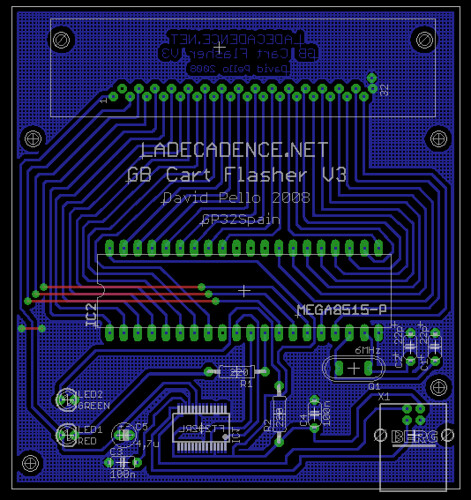
http://farm8.staticflickr.com/7398/9189980332_eb8a892732.jpg

As we can see, for the most part a single sided board, with the exception of a few wires on the top.


Now here's where I need help:

I want to learn how to route some tracks from certain pins of IC2 to a special spot for my new pin headers.

Also, with the information I extracted on my pin headers. How do I:

  a) Create the actual pin headers in software

  b) know the correct diameter to specify for those holes. Also, is there a certain formula that I can go by for the future when I have the pin thickness that I can use to always know what to use in the future for the diameter of the hole?


I would really appreciate a step-by-step process for the actual placement of the pin headers, and how to modify the current state of the board? I really have no idea where to get started.


Thanks,

Bazz

  • Sign in to reply
  • Cancel

Top Replies

  • autodeskguest
    autodeskguest over 12 years ago +1 verified
    Am 03.07.2013 05:31, schrieb Michael Bazzinotti: Hi guys, first post. Let's get right to it. I'm very inexperienced with Eagle Cad, so it would help to be detailed, don't go overboard though. Hopefully…
  • fritzz
    fritzz over 12 years ago in reply to bazz +1
    The holes are plated, so yes.
  • bazz
    0 bazz over 12 years ago

    Also, I keep talking about holes, I mean not only the thickness of the hole itself, but also the optimal metallic surface size to solder to. How do I calculate that? Are there standard sizes/presets I should be aware of? Anything helps!


    Are my other questions clear?


    Thank you

    • Cancel
    • Vote Up 0 Vote Down
    • Sign in to reply
    • Verify Answer
    • Cancel
  • fritzz
    0 fritzz over 12 years ago

    2.54 mm is 100mil, which is the same grid you working on.


    Pin Thickness: 0.64mm, you need a hole a little bigger than that for the pins. Then the ring size is auto calculated by Eagle.


    You have to create a library object that is a 2x3 header to place on the board.


    ICSP header is to program a new bootloader. Maybe you want FTDI header?

    • Cancel
    • Vote Up 0 Vote Down
    • Sign in to reply
    • Verify Answer
    • Cancel
  • shabaz
    0 shabaz over 12 years ago in reply to bazz

    Hi Michael,


    Michael Bazzinotti wrote:

    How do I:


      a) Create the actual pin headers in software


    The part already exists in EAGLE; see the con-lstb library, it is called MA03-2. These DIL headers are quite common parts.


       b) know the correct diameter to specify for those holes.


    If you know the pin thickness, since it is square, pythagoras' theorem is used. Or, just use the part mentioned above.


    I would really appreciate a step-by-step process for the actual placement of the pin headers, and how to modify the current state of the board? I really have no idea where to get started.


    There is a tutorial. If you follow it entirely, then it will help a lot, because it covers the entire process.


    I mean not only the thickness of the hole itself, but also the optimal metallic surface size to solder to. How do I calculate that? Are there standard sizes/presets I should be aware of?


    It depends on the board manufacturer's rules, which they publish or you can request. They will have a rule on the clearance you can have between pads. As far as I know, there is no standard. Usually, the component manufacturer will publish a recommended land pattern. For 2.54mm DIL headers, it is not critical usually, and the con-lstb library may be sufficient.

    • Cancel
    • Vote Up 0 Vote Down
    • Sign in to reply
    • Verify Answer
    • Cancel
  • autodeskguest
    0 autodeskguest over 12 years ago

    Am 03.07.2013 05:31, schrieb Michael Bazzinotti:

    Hi guys,


    first post.


    Let's get right to it.


    I'm very inexperienced with Eagle Cad, so it would help to be detailed,

    don't go overboard though. Hopefully we find a good match.


    I'm looking to modify a pre-existing eagle Schematic and board combo to

    include a 3x2 row of pin headers connected to the microcontroller for

    easy hookup to do ICSP. I thought it would be great to try this out to

    improve and get acquainted with Eagle.


    For this project, I am ordering a set of 2-row headers.


    I took a look at the datasheet for my pin headers. here is a link:

    http://www.samtec.com/documents/webfiles/pdf/TSW_TH.PDF


    I already extracted what I think is the most important information, but

    let's review so that you can approve. The two pieces of info I took are

    the thickness of the pin itself, and the distance between 2 pins from

    their centers.


    Pin Thickness: 0.64mm

    Distance between center of pins (for all adjacent pins,

    up/down/left/right): 2.54 mm


    I think these are the most essential pieces to have. Please correct me

    if I'm wrong. Once again, this is my first time doing this.


    Moving forward, I have some important information that I need to

    communicate to Eagle. I want to make, and please pardon my language here

    *symantics, I want to place 2 rows of 3 pin headers connected to the

    microcontroller as previously stated. Here's a picture of a fabricated

    circuit that has these pin headers in place:


    http://wiki.ladecadence.net/lib/exe/fetch.php?media=programador-funcionando.jpg


    See at the bottom left of the board.


    Now, let's take a look at the current image of the board I am working

    on, in Eagle:

      http://farm8.staticflickr.com/7398/9189980332_eb8a892732.jpg

    As we can see, for the most part a single sided board, with the

    exception of a few wires on the top.


    Now here's where I need help:

    I want to learn how to route some tracks from certain pins of IC2 to a

    special spot for my new pin headers.

    Also, with the information I extracted on my pin headers. How do I:

       a) Create the actual pin headers in software

       b) know the correct diameter to specify for those holes. Also, is

    there a certain formula that I can go by for the future when I have the

    pin thickness that I can use to always know what to use in the future

    for the diameter of the hole?


    I would really appreciate a step-by-step process for the actual

    placement of the pin headers, and how to modify the current state of the

    board? I really have no idea where to get started.


    Thanks,

    Bazz


    --

    To view any images and attachments in this post, visit:

    http://www.element14.com/community/message/81850#81850


    Open board and schematic.

    The connectors you'll find in the pinhead-lbr.

    ADD the connector to your schematic and connect it with NET.

    Change now to board and you shall see the new component connected with

    airwires.

    Place (MOVE) the component and ROUTE the connectins.


    --

    Mit freundlichen Grüßen / With best regards


    Joern Paschedag


    • Cancel
    • Vote Up +1 Vote Down
    • Sign in to reply
    • Reject Answer
    • Cancel
  • bazz
    0 bazz over 12 years ago in reply to autodeskguest

    Hi Joern,


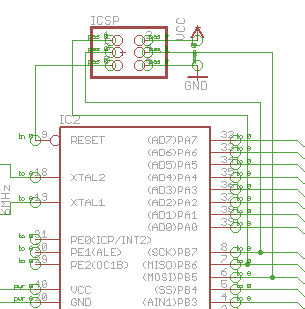
    I found your post most helpful and easy to learn. I have created the board and schematic. Please criticize my work and let me know any areas, if there are any faults, or place to improve.


    there is my ICSP:

    image

    I had to figure out to display Pin Layer, so that the connections would become valid.


    Then I placed the component on the Board file in the only suitable place, added some text to the tPlace layer for the pin numbers labeling, and then routed. Actually, first I auto-routed, then I redid some connections to make them look cleaner.

    image

    2 of the vias were auto routed, then I created a third one and made sure to specify the same sizes as the ones that were auto-created. I did this because I have never created vias before, and I was not sure how to size best.the Drill is set to 0.024. Diameters are auto which make it 0.04. Will that be alright you think?


    Thanks,

    Michael

    • Cancel
    • Vote Up 0 Vote Down
    • Sign in to reply
    • Verify Answer
    • Cancel
  • bazz
    0 bazz over 12 years ago in reply to bazz

    I need one more confirmation. It has to do with the top of the board. IC2 component was already placed on the board, with the solder plates on the bottom of the board. When I routed my new component, I set the traces for the top of the board, to one of those IC2 pins. does Eagle automatically correctly create a connection for the top of the board and the bottom? The trace at the top of the board must connect to the connections at the bottom. Is that happening? I don't want to order my board and have it incorrect! I will wait for response!

    • Cancel
    • Vote Up 0 Vote Down
    • Sign in to reply
    • Verify Answer
    • Cancel
  • fritzz
    0 fritzz over 12 years ago in reply to bazz

    The holes are plated, so yes.

    • Cancel
    • Vote Up +1 Vote Down
    • Sign in to reply
    • Verify Answer
    • Cancel
element14 Community

element14 is the first online community specifically for engineers. Connect with your peers and get expert answers to your questions.

  • Members
  • Learn
  • Technologies
  • Challenges & Projects
  • Products
  • Store
  • About Us
  • Feedback & Support
  • FAQs
  • Terms of Use
  • Privacy Policy
  • Legal and Copyright Notices
  • Sitemap
  • Cookies

An Avnet Company © 2025 Premier Farnell Limited. All Rights Reserved.

Premier Farnell Ltd, registered in England and Wales (no 00876412), registered office: Farnell House, Forge Lane, Leeds LS12 2NE.

ICP 备案号 10220084.

Follow element14

  • X
  • Facebook
  • linkedin
  • YouTube