element14 Community
element14 Community
    Register Log In
  • Site
  • Search
  • Log In Register
  • Community Hub
    Community Hub
    • What's New on element14
    • Feedback and Support
    • Benefits of Membership
    • Personal Blogs
    • Members Area
    • Achievement Levels
  • Learn
    Learn
    • Ask an Expert
    • eBooks
    • element14 presents
    • Learning Center
    • Tech Spotlight
    • STEM Academy
    • Webinars, Training and Events
    • Learning Groups
  • Technologies
    Technologies
    • 3D Printing
    • FPGA
    • Industrial Automation
    • Internet of Things
    • Power & Energy
    • Sensors
    • Technology Groups
  • Challenges & Projects
    Challenges & Projects
    • Design Challenges
    • element14 presents Projects
    • Project14
    • Arduino Projects
    • Raspberry Pi Projects
    • Project Groups
  • Products
    Products
    • Arduino
    • Avnet & Tria Boards Community
    • Dev Tools
    • Manufacturers
    • Multicomp Pro
    • Product Groups
    • Raspberry Pi
    • RoadTests & Reviews
  • About Us
  • Store
    Store
    • Visit Your Store
    • Choose another store...
      • Europe
      •  Austria (German)
      •  Belgium (Dutch, French)
      •  Bulgaria (Bulgarian)
      •  Czech Republic (Czech)
      •  Denmark (Danish)
      •  Estonia (Estonian)
      •  Finland (Finnish)
      •  France (French)
      •  Germany (German)
      •  Hungary (Hungarian)
      •  Ireland
      •  Israel
      •  Italy (Italian)
      •  Latvia (Latvian)
      •  
      •  Lithuania (Lithuanian)
      •  Netherlands (Dutch)
      •  Norway (Norwegian)
      •  Poland (Polish)
      •  Portugal (Portuguese)
      •  Romania (Romanian)
      •  Russia (Russian)
      •  Slovakia (Slovak)
      •  Slovenia (Slovenian)
      •  Spain (Spanish)
      •  Sweden (Swedish)
      •  Switzerland(German, French)
      •  Turkey (Turkish)
      •  United Kingdom
      • Asia Pacific
      •  Australia
      •  China
      •  Hong Kong
      •  India
      •  Korea (Korean)
      •  Malaysia
      •  New Zealand
      •  Philippines
      •  Singapore
      •  Taiwan
      •  Thailand (Thai)
      • Americas
      •  Brazil (Portuguese)
      •  Canada
      •  Mexico (Spanish)
      •  United States
      Can't find the country/region you're looking for? Visit our export site or find a local distributor.
  • Translate
  • Profile
  • Settings
Autodesk EAGLE
  • Products
  • More
Autodesk EAGLE
EAGLE User Support (English) question about G2R2 relay
  • Blog
  • Forum
  • Documents
  • Events
  • Polls
  • Files
  • Members
  • Mentions
  • Sub-Groups
  • Tags
  • More
  • Cancel
  • New
Join Autodesk EAGLE to participate - click to join for free!
Actions
  • Share
  • More
  • Cancel
Forum Thread Details
  • State Verified Answer
  • Replies 4 replies
  • Subscribers 178 subscribers
  • Views 565 views
  • Users 0 members are here
  • eagle
  • schematic
  • relay
Related

question about G2R2 relay

auarduino
auarduino over 11 years ago

I am trying to design a small board (my first) that incorporates three G2R2 relays.  I found the component in the "add" section but it appears that the schematic and the board drawings are different, specifically the N.O. and N.C. contacts.  The actual part has the N.C. contact as the one closest to the coil (as shown in the board image).  I am miss-reading the two images or is it as simple as rotating the N.O-Com-N.C. connection in the schematic?  Or is there something else?  It seems odd that the two images wouldn't have the components lined up.  I attached a screenshot of the G2R2 part images.  Thanks.
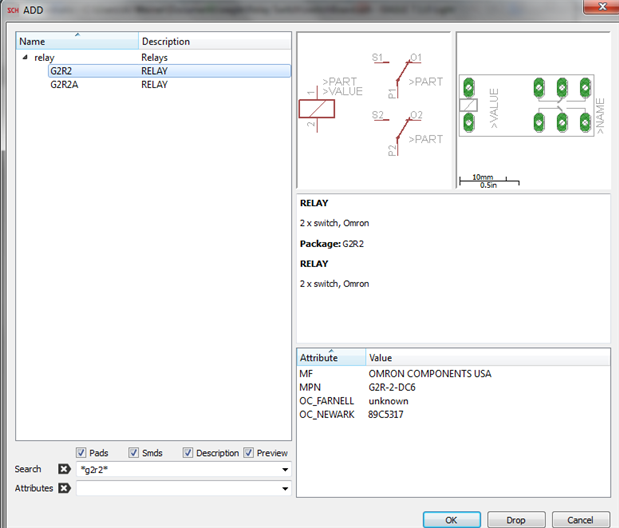
 

image

  • Sign in to reply
  • Cancel
Parents
  • autodeskguest
    0 autodeskguest over 11 years ago

    On 24/09/14 01:00, AJ Weiner wrote:

    I am trying to design a small board (my first) that incorporates three

    G2R2 relays.  I found the component in the "add" section but it appears

    that the schematic and the board drawings are different, specifically

    the N.O. and N.C. contacts.  The actual part has the N.C. contact as the

    one closest to the coil (as shown in the board image).  I am

    miss-reading the two images or is it as simple as rotating the

    N.O-Com-N.C. connection in the schematic?  I attached a screenshot of

    the G2R2 part images.  Thanks.


    There is no reason to think anything is wrong based on this screenshot.


    Never assume that the schematic symbol has any geometric similarity to

    the physical part. THIS IS NOT WHAT SCHEMATICS ARE FOR! How many

    transistors do you know that physically look like their schematic

    symbol? How many NAND gates in D-shaped packages?


    Schematics represent function, not layout. That is precisely why the

    contact part(s) of a relay are separate from the coil - you may want to

    represent the function in different parts of the sheet (or even on

    different sheets).


    If it bugs you, you can rotate the contact parts. You can even make a

    net connection between the NC pins and confirm that the board has the

    airwire between the pins you expect.


    HTH Rob


    • Cancel
    • Vote Up 0 Vote Down
    • Sign in to reply
    • Reject Answer
    • Cancel
  • auarduino
    0 auarduino over 11 years ago in reply to autodeskguest

    Thank you for the response.  I am very new to electrical designs and schematics and you bring up some good points. 


    It did really bug me and I spent a long time trying to get the two to look the same.  Also, is this the same reason why sometimes I would connect a net to the contact on the "left" of the relay but the board diagram would show an airwire on the "right" side of the relay? 

    • Cancel
    • Vote Up 0 Vote Down
    • Sign in to reply
    • Verify Answer
    • Cancel
  • autodeskguest
    0 autodeskguest over 11 years ago in reply to auarduino

    On 24/09/14 19:02, auarduino wrote:

    Thank you for the response.  I am very new to electrical designs and

    schematics and you bring up some good points. 


    It did really bug me and I spent a long time trying to get the two to

    look the same.  Also, is this the same reason why sometimes I would

    connect a net to the contact on the "left" of the relay but the board

    diagram would show an airwire on the "right" side of the relay? 


    Yes and no.


    Because the schematic is concerned with function, the symbols often put

    inputs on the left and outputs on the right, as this helps

    understanding. The physical components may be arranged quite differently

    for packaging reasons.


    In the case of relays, though, the coil is usually not directional

    (although some do have built-in flyback diodes) and the contacts are

    simply switches. It's common for the library symbol to show the coil on

    the left and the contacts on the right, because of the input-to-output

    thing. It's also common for the contacts to be drawn with the N/O pin

    nearest the coil, because that makes it look like the coil "pulls" the

    switch over. The physical relay may well be designed with a lever or

    pivot, so that the contacts end up the other way round (the coil pulls

    down on the top arm, which pivots around the bend and pushes the

    contacts away from the coil).


    You should train yourself out of the desire to make the schematic and

    board "look the same". They never will, and it's far more useful to lay

    out the schematic to clearly represent function. Design your initial

    schematic with no regard for the packages at all (some EDA tools

    encourage this by completely separating the two editors, Eagle keeps

    them together but you don't need to create a board at all until you've

    got a nearly ready schematic).


    HTH,

    Rob


    • Cancel
    • Vote Up 0 Vote Down
    • Sign in to reply
    • Verify Answer
    • Cancel
  • auarduino
    0 auarduino over 11 years ago in reply to autodeskguest

    Good to know.  Thanks again for the detailed response.  Do you have any other comments/suggestions/tips  for someone knew to the world of electronic designing (predominately hobbyist designs)? 


    I am marking your first response correct as it answered my question.

    • Cancel
    • Vote Up 0 Vote Down
    • Sign in to reply
    • Verify Answer
    • Cancel
Reply
  • auarduino
    0 auarduino over 11 years ago in reply to autodeskguest

    Good to know.  Thanks again for the detailed response.  Do you have any other comments/suggestions/tips  for someone knew to the world of electronic designing (predominately hobbyist designs)? 


    I am marking your first response correct as it answered my question.

    • Cancel
    • Vote Up 0 Vote Down
    • Sign in to reply
    • Verify Answer
    • Cancel
Children
No Data
element14 Community

element14 is the first online community specifically for engineers. Connect with your peers and get expert answers to your questions.

  • Members
  • Learn
  • Technologies
  • Challenges & Projects
  • Products
  • Store
  • About Us
  • Feedback & Support
  • FAQs
  • Terms of Use
  • Privacy Policy
  • Legal and Copyright Notices
  • Sitemap
  • Cookies

An Avnet Company © 2025 Premier Farnell Limited. All Rights Reserved.

Premier Farnell Ltd, registered in England and Wales (no 00876412), registered office: Farnell House, Forge Lane, Leeds LS12 2NE.

ICP 备案号 10220084.

Follow element14

  • X
  • Facebook
  • linkedin
  • YouTube