element14 Community
element14 Community
    Register Log In
  • Site
  • Search
  • Log In Register
  • Community Hub
    Community Hub
    • What's New on element14
    • Feedback and Support
    • Benefits of Membership
    • Personal Blogs
    • Members Area
    • Achievement Levels
  • Learn
    Learn
    • Ask an Expert
    • eBooks
    • element14 presents
    • Learning Center
    • Tech Spotlight
    • STEM Academy
    • Webinars, Training and Events
    • Learning Groups
  • Technologies
    Technologies
    • 3D Printing
    • FPGA
    • Industrial Automation
    • Internet of Things
    • Power & Energy
    • Sensors
    • Technology Groups
  • Challenges & Projects
    Challenges & Projects
    • Design Challenges
    • element14 presents Projects
    • Project14
    • Arduino Projects
    • Raspberry Pi Projects
    • Project Groups
  • Products
    Products
    • Arduino
    • Avnet & Tria Boards Community
    • Dev Tools
    • Manufacturers
    • Multicomp Pro
    • Product Groups
    • Raspberry Pi
    • RoadTests & Reviews
  • About Us
  • Store
    Store
    • Visit Your Store
    • Choose another store...
      • Europe
      •  Austria (German)
      •  Belgium (Dutch, French)
      •  Bulgaria (Bulgarian)
      •  Czech Republic (Czech)
      •  Denmark (Danish)
      •  Estonia (Estonian)
      •  Finland (Finnish)
      •  France (French)
      •  Germany (German)
      •  Hungary (Hungarian)
      •  Ireland
      •  Israel
      •  Italy (Italian)
      •  Latvia (Latvian)
      •  
      •  Lithuania (Lithuanian)
      •  Netherlands (Dutch)
      •  Norway (Norwegian)
      •  Poland (Polish)
      •  Portugal (Portuguese)
      •  Romania (Romanian)
      •  Russia (Russian)
      •  Slovakia (Slovak)
      •  Slovenia (Slovenian)
      •  Spain (Spanish)
      •  Sweden (Swedish)
      •  Switzerland(German, French)
      •  Turkey (Turkish)
      •  United Kingdom
      • Asia Pacific
      •  Australia
      •  China
      •  Hong Kong
      •  India
      • Japan
      •  Korea (Korean)
      •  Malaysia
      •  New Zealand
      •  Philippines
      •  Singapore
      •  Taiwan
      •  Thailand (Thai)
      • Vietnam
      • Americas
      •  Brazil (Portuguese)
      •  Canada
      •  Mexico (Spanish)
      •  United States
      Can't find the country/region you're looking for? Visit our export site or find a local distributor.
  • Translate
  • Profile
  • Settings
Autodesk EAGLE
  • Products
  • More
Autodesk EAGLE
EAGLE User Support (English) Removing Part Names from Board
  • Blog
  • Forum
  • Documents
  • Events
  • Polls
  • Files
  • Members
  • Mentions
  • Sub-Groups
  • Tags
  • More
  • Cancel
  • New
Join Autodesk EAGLE to participate - click to join for free!
Actions
  • Share
  • More
  • Cancel
Forum Thread Details
  • State Verified Answer
  • Replies 3 replies
  • Subscribers 179 subscribers
  • Views 1714 views
  • Users 0 members are here
  • prototyping
  • layer
  • names
Related

Removing Part Names from Board

sailmike1
sailmike1 over 10 years ago

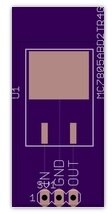
I am designing and building my own prototyping boards in Eagle. When I uploaded the board file to OSH Park the board image the site showed was not the board I thought I designed. The part names were included in the image on the website, but I don't want the names to show up. How do I get rid of the part names? I've attached a couple images to show what I mean. One image is how I want it to look and the other is what the OSH Park website showed.


Thanks,

Mikeimageimage

  • Sign in to reply
  • Cancel
  • autodeskguest
    0 autodeskguest over 10 years ago

    On 01/05/2015 10:15 PM, Michael Levin wrote:

    I am designing and building my own prototyping boards in Eagle. When I

    uploaded the board file to OSH Park the board image the site showed was

    not the board I thought I designed. The part names were included in the

    image on the website, but I don't want the names to show up. How do I

    get rid of the part names? I've attached a couple images to show what I

    mean. One image is how I want it to look and the other is what the OSH

    Park website showed.


    Thanks,

    Mike  
     

    --

    To view any images and attachments in this post, visit:

    http://www.element14.com/community/message/136591


    I am assuming you don't want the 3V1 and the MC78x... text.

    It looks like your cam job has the tvalues included.


    • Cancel
    • Vote Up 0 Vote Down
    • Sign in to reply
    • Verify Answer
    • Cancel
  • sailmike1
    0 sailmike1 over 10 years ago in reply to autodeskguest

    Yes that's correct. I'd also like to be able to remove specific items from the tplace layer like the number 1 next to the header.

    • Cancel
    • Vote Up 0 Vote Down
    • Sign in to reply
    • Verify Answer
    • Cancel
  • dukepro
    0 dukepro over 10 years ago in reply to sailmike1

    On 01/06/2015 03:06 AM, Michael Levin wrote:

    Yes that's correct. I'd also like to be able to remove specific items

    from the tplace layer like the number 1 next to the header.


    Make sure the top values layer is not included in the list of layers in

    your cam job section that generates the silk screen.


    A CAM job is essentially a recipe that describes each layer that the

    board house will fabricate.  Each layer to be fabricated is called a

    Section.  Each section contains the Eagle layers to include in that section.


    For example.  The section describing the top layer of copper, one would

    want to include, of course, Top.  Also desirable to include are the Pads

    layer and the Vias layer.  The union of all three of these layers will

    be fabricated as the top copper layer.  Another example is the top

    silkscreen layer.  Consider what you want to show up.  Component

    outlines are usually in the tPlace layer.  You definitely want reference

    designators (component names) so include the tNames layer as well.

    Another layer to include is the Dimension layer describing the board

    outline.  (This helps the board house align the layers.)  Others layers

    to consider including are the tDoc and the tValues.


    The device's package, as defined in an Eagle library, defines what text

    (or other objects) shows up on what layer.  Without jumping into the

    package editor, an easy way to figure out what you want to include on a

    layer is to use the DISPLAY command to turn off all layers except the

    ones of interest.  Try entering in the command line "display none tPlace

    tNames tValues".  To get back to the previous display, you can enter

    "display last" in the command line.


    Play with it some.  Find out what you want to include on the silkscreen

    layer, and adjust each section in your cam job accordingly.


    HTH,

        - Chuck


    Attachments:
    1385.att1.html.zip
    • Cancel
    • Vote Up 0 Vote Down
    • Sign in to reply
    • Reject Answer
    • Cancel
element14 Community

element14 is the first online community specifically for engineers. Connect with your peers and get expert answers to your questions.

  • Members
  • Learn
  • Technologies
  • Challenges & Projects
  • Products
  • Store
  • About Us
  • Feedback & Support
  • FAQs
  • Terms of Use
  • Privacy Policy
  • Legal and Copyright Notices
  • Sitemap
  • Cookies

An Avnet Company © 2025 Premier Farnell Limited. All Rights Reserved.

Premier Farnell Ltd, registered in England and Wales (no 00876412), registered office: Farnell House, Forge Lane, Leeds LS12 2NE.

ICP 备案号 10220084.

Follow element14

  • X
  • Facebook
  • linkedin
  • YouTube