element14 Community
element14 Community
    Register Log In
  • Site
  • Search
  • Log In Register
  • Community Hub
    Community Hub
    • What's New on element14
    • Feedback and Support
    • Benefits of Membership
    • Personal Blogs
    • Members Area
    • Achievement Levels
  • Learn
    Learn
    • Ask an Expert
    • eBooks
    • element14 presents
    • Learning Center
    • Tech Spotlight
    • STEM Academy
    • Webinars, Training and Events
    • Learning Groups
  • Technologies
    Technologies
    • 3D Printing
    • FPGA
    • Industrial Automation
    • Internet of Things
    • Power & Energy
    • Sensors
    • Technology Groups
  • Challenges & Projects
    Challenges & Projects
    • Design Challenges
    • element14 presents Projects
    • Project14
    • Arduino Projects
    • Raspberry Pi Projects
    • Project Groups
  • Products
    Products
    • Arduino
    • Avnet & Tria Boards Community
    • Dev Tools
    • Manufacturers
    • Multicomp Pro
    • Product Groups
    • Raspberry Pi
    • RoadTests & Reviews
  • About Us
  • Store
    Store
    • Visit Your Store
    • Choose another store...
      • Europe
      •  Austria (German)
      •  Belgium (Dutch, French)
      •  Bulgaria (Bulgarian)
      •  Czech Republic (Czech)
      •  Denmark (Danish)
      •  Estonia (Estonian)
      •  Finland (Finnish)
      •  France (French)
      •  Germany (German)
      •  Hungary (Hungarian)
      •  Ireland
      •  Israel
      •  Italy (Italian)
      •  Latvia (Latvian)
      •  
      •  Lithuania (Lithuanian)
      •  Netherlands (Dutch)
      •  Norway (Norwegian)
      •  Poland (Polish)
      •  Portugal (Portuguese)
      •  Romania (Romanian)
      •  Russia (Russian)
      •  Slovakia (Slovak)
      •  Slovenia (Slovenian)
      •  Spain (Spanish)
      •  Sweden (Swedish)
      •  Switzerland(German, French)
      •  Turkey (Turkish)
      •  United Kingdom
      • Asia Pacific
      •  Australia
      •  China
      •  Hong Kong
      •  India
      • Japan
      •  Korea (Korean)
      •  Malaysia
      •  New Zealand
      •  Philippines
      •  Singapore
      •  Taiwan
      •  Thailand (Thai)
      • Vietnam
      • Americas
      •  Brazil (Portuguese)
      •  Canada
      •  Mexico (Spanish)
      •  United States
      Can't find the country/region you're looking for? Visit our export site or find a local distributor.
  • Translate
  • Profile
  • Settings
Autodesk EAGLE
  • Products
  • More
Autodesk EAGLE
EAGLE User Support (English) Changing the "angle" list.
  • Blog
  • Forum
  • Documents
  • Events
  • Polls
  • Files
  • Members
  • Mentions
  • Sub-Groups
  • Tags
  • More
  • Cancel
  • New
Join Autodesk EAGLE to participate - click to join for free!
Actions
  • Share
  • More
  • Cancel
Forum Thread Details
  • State Not Answered
  • Replies 4 replies
  • Subscribers 179 subscribers
  • Views 725 views
  • Users 0 members are here
  • angle
  • list
Related

Changing the "angle" list.

kikoun
kikoun over 10 years ago

Hello,


I would like to change the "angle" list.

Is there a command such as "SET DRILL_MENU" for changing the angle list (I would like  45° steps). I found nothing in the documentation, and I tried SET ANGLE_MENU, but it doesn't work.....


anyone have an idea ?


Guillaume.

  • Sign in to reply
  • Cancel
Parents
  • autodeskguest
    0 autodeskguest over 10 years ago

    Am 05.02.2015 um 14:04 schrieb Guillaume barrey:

    Hello,


    I would like to change the "angle" list.

    Is there a command such as "SET DRILL_MENU" for changing the angle

    list (I would like  45° steps). I found nothing in the documentation,

    and I tried SET ANGLE_MENU, but it doesn't work.....


    anyone have an idea ?


    Guillaume.


    --

    To view any images and attachments in this post, visit:

    http://www.element14.com/community/message/139614


    Hello

    an idea is help: "bend" or "miter" or "set Miter_menu"


    HTH

    Werner


    • Cancel
    • Vote Up 0 Vote Down
    • Sign in to reply
    • Verify Answer
    • Cancel
  • kikoun
    0 kikoun over 10 years ago in reply to autodeskguest

    Thank you for your help, but it's not what I'm looking for....

    I need to place parts with an angle different than 90 180 270... I can do it by changing the value in the "Angle" selection, but I would rather change the list and add 45, 135 etc.... value, so it would be easier to click in the list, than typing  the value. And the best would be that the right click follow the list I defined instead of the 4 0 90 180 270 angle....


    that why I was hopping for a SET ANGLE_MENU.....

    • Cancel
    • Vote Up 0 Vote Down
    • Sign in to reply
    • Verify Answer
    • Cancel
Reply
  • kikoun
    0 kikoun over 10 years ago in reply to autodeskguest

    Thank you for your help, but it's not what I'm looking for....

    I need to place parts with an angle different than 90 180 270... I can do it by changing the value in the "Angle" selection, but I would rather change the list and add 45, 135 etc.... value, so it would be easier to click in the list, than typing  the value. And the best would be that the right click follow the list I defined instead of the 4 0 90 180 270 angle....


    that why I was hopping for a SET ANGLE_MENU.....

    • Cancel
    • Vote Up 0 Vote Down
    • Sign in to reply
    • Verify Answer
    • Cancel
Children
  • Former Member
    0 Former Member over 10 years ago in reply to kikoun

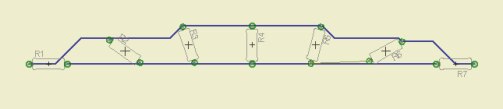
    image

    Do not use angels they just fly away.

    Help ROTATE.

    Mogens

    • Cancel
    • Vote Up 0 Vote Down
    • Sign in to reply
    • Verify Answer
    • Cancel
  • kikoun
    0 kikoun over 10 years ago in reply to Former Member

    Thank you for your help but i sorry, I think that you don't understand my issue.


    I know how to use ROTATE, PLACE MOVE...

    Ok ROTATE is a little better since eagle 'remember' the angle I typed but it's only true if I don't close the board editor, if you close the board editor or Eagle , the value is lost....


    My second point is when I place my parts, I don't want to waste my time to changing the tool (Move > rotate -> move -> rotate etc....), or typing the same angle value, just because it's not in the list.   just want to have my own angle list in the MOVE options, like I defined my own list of drill, width, diameter, isolate size for other tools.... and I would be glad that the right click with the move tool, will follow that list.


    By the way this 'Angles' list doesn't work like other lists (such as Dirll, Width...) : If you need a drill that is not in the list, you type it, and the new value is added to the list - at least if you don't quit eagle, but you can define it with the SET command. That is not true for the 'ANGLE' of the MOVE command.


    That's why I was just asking "is there a way to change that list (SET command) so I could configure it one for all ?".

    I guess it's not possible. it's not a big deal.


    Thanks again....

    • Cancel
    • Vote Up 0 Vote Down
    • Sign in to reply
    • Verify Answer
    • Cancel
element14 Community

element14 is the first online community specifically for engineers. Connect with your peers and get expert answers to your questions.

  • Members
  • Learn
  • Technologies
  • Challenges & Projects
  • Products
  • Store
  • About Us
  • Feedback & Support
  • FAQs
  • Terms of Use
  • Privacy Policy
  • Legal and Copyright Notices
  • Sitemap
  • Cookies

An Avnet Company © 2025 Premier Farnell Limited. All Rights Reserved.

Premier Farnell Ltd, registered in England and Wales (no 00876412), registered office: Farnell House, Forge Lane, Leeds LS12 2NE.

ICP 备案号 10220084.

Follow element14

  • X
  • Facebook
  • linkedin
  • YouTube