element14 Community
element14 Community
    Register Log In
  • Site
  • Search
  • Log In Register
  • Community Hub
    Community Hub
    • What's New on element14
    • Feedback and Support
    • Benefits of Membership
    • Personal Blogs
    • Members Area
    • Achievement Levels
  • Learn
    Learn
    • Ask an Expert
    • eBooks
    • element14 presents
    • Learning Center
    • Tech Spotlight
    • STEM Academy
    • Webinars, Training and Events
    • Learning Groups
  • Technologies
    Technologies
    • 3D Printing
    • FPGA
    • Industrial Automation
    • Internet of Things
    • Power & Energy
    • Sensors
    • Technology Groups
  • Challenges & Projects
    Challenges & Projects
    • Design Challenges
    • element14 presents Projects
    • Project14
    • Arduino Projects
    • Raspberry Pi Projects
    • Project Groups
  • Products
    Products
    • Arduino
    • Avnet & Tria Boards Community
    • Dev Tools
    • Manufacturers
    • Multicomp Pro
    • Product Groups
    • Raspberry Pi
    • RoadTests & Reviews
  • About Us
  • Store
    Store
    • Visit Your Store
    • Choose another store...
      • Europe
      •  Austria (German)
      •  Belgium (Dutch, French)
      •  Bulgaria (Bulgarian)
      •  Czech Republic (Czech)
      •  Denmark (Danish)
      •  Estonia (Estonian)
      •  Finland (Finnish)
      •  France (French)
      •  Germany (German)
      •  Hungary (Hungarian)
      •  Ireland
      •  Israel
      •  Italy (Italian)
      •  Latvia (Latvian)
      •  
      •  Lithuania (Lithuanian)
      •  Netherlands (Dutch)
      •  Norway (Norwegian)
      •  Poland (Polish)
      •  Portugal (Portuguese)
      •  Romania (Romanian)
      •  Russia (Russian)
      •  Slovakia (Slovak)
      •  Slovenia (Slovenian)
      •  Spain (Spanish)
      •  Sweden (Swedish)
      •  Switzerland(German, French)
      •  Turkey (Turkish)
      •  United Kingdom
      • Asia Pacific
      •  Australia
      •  China
      •  Hong Kong
      •  India
      • Japan
      •  Korea (Korean)
      •  Malaysia
      •  New Zealand
      •  Philippines
      •  Singapore
      •  Taiwan
      •  Thailand (Thai)
      • Vietnam
      • Americas
      •  Brazil (Portuguese)
      •  Canada
      •  Mexico (Spanish)
      •  United States
      Can't find the country/region you're looking for? Visit our export site or find a local distributor.
  • Translate
  • Profile
  • Settings
Autodesk EAGLE
  • Products
  • More
Autodesk EAGLE
Forum Making multiple copies
  • Blog
  • Forum
  • Documents
  • Events
  • Polls
  • Files
  • Members
  • Mentions
  • Sub-Groups
  • Tags
  • More
  • Cancel
  • New
Join Autodesk EAGLE to participate - click to join for free!
Actions
  • Share
  • More
  • Cancel
Forum Thread Details
  • State Not Answered
  • Replies 3 replies
  • Subscribers 179 subscribers
  • Views 483 views
  • Users 0 members are here
Related

Making multiple copies

Former Member
Former Member over 13 years ago

Sir,  I have completed my full PCB design. Now i want to make 6 copies of the same board. so it will be a huge board with 6 copies of my board on it..  Can you please tell me if there is any option in eagle for making multiple copies of a board.  I am using Eagle 5.10 version.

  • Sign in to reply
  • Cancel
  • Former Member
    0 Former Member over 13 years ago

    How do you plan to have these made? Are you etching them yourself or do you want them professionally made?


    If your etching them yourself which method will you use to transfer the design to the copper clad board?


    Either way assuming your board is small enough that you can fit 6 copies of it on a standard 8.5" x 11" sheet of paper all you have to do is group the whole board, copy and paste. Lay them all out so they will fit in the 8.5" x 11" area and export it as a PDF. Then you can print it out onto a piece of transfer paper or a transparency.

    • Cancel
    • Vote Up 0 Vote Down
    • Sign in to reply
    • Verify Answer
    • Cancel
  • Former Member
    0 Former Member over 13 years ago in reply to Former Member

    No i wont be etching it by myself but will be giving it to a fabricating company.. I will be sending only the gerber files to them.


    I tried the 'copy-paste'option but that only gives me the same parts which i have to reroute again by myself manually.

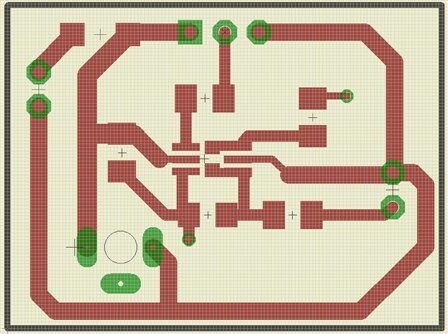
    what i was asking about was if replicating the entire board as it is along with the routes, is possible in eagle?


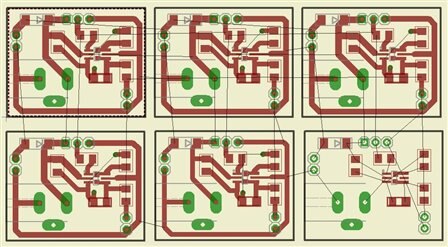
    I have attached herewith 2 images. One of my original board and the second image is taken after making 6 copies of the original board using "copy-paste" option in eagle.


    Copy pasting only copies the components and not the routes.

    In the second images i have done the placement and routed all the 5 copies manually one by one and the 6th one is unrouted yet.


    image


    image

    • Cancel
    • Vote Up 0 Vote Down
    • Sign in to reply
    • Verify Answer
    • Cancel
  • Richard_H
    0 Richard_H over 13 years ago in reply to Former Member

    Hi,


    in EAGLE version 5 it can be done with the help of the commands GROUP, CUT, and PASTE.


    Assumed you have consistent pair of schematic and board and you

    would like to use one of your existing designs (also a consistent pair

    of sch and brd) in the current project you could begin, for example,

    with the schematic:

    * Open the schematic you want to use in your project and use the

      commands GROUP and CUT to copy it into the clipboard

    * Now open the schematic of your current project. You will notice

      that the layout editor opens the consistent layout file, too.

      BUT YOU HAVE TO CLOSE IT AGAIN!

    * Now use the PASTE command in the schematic and place the

      previously selected group.

    That's it for the schematic.


    Now the same procedure for the layout:

    * Open the board you want to put into the clipboard and use

      DISPLAY ALL first to activate all layers.

    * Now: GROUP, CUT. Open the "target" layout and PASTE.


    Now you have to run the ERC which compares schematic and layout.

    This is necessary because it might happen that the names of parts or

    nets are renamed while pasting them into the existing project.

    ERC can check whether the new numbering in SCH and BRD is all the

    same. In the case there are differences ERC reports this and you have

    to adjust this manually. Until ERC reports consistency again.


    Hope this helps.

    Regards,

    Richard

    • Cancel
    • Vote Up 0 Vote Down
    • Sign in to reply
    • Verify Answer
    • Cancel
element14 Community

element14 is the first online community specifically for engineers. Connect with your peers and get expert answers to your questions.

  • Members
  • Learn
  • Technologies
  • Challenges & Projects
  • Products
  • Store
  • About Us
  • Feedback & Support
  • FAQs
  • Terms of Use
  • Privacy Policy
  • Legal and Copyright Notices
  • Sitemap
  • Cookies

An Avnet Company © 2025 Premier Farnell Limited. All Rights Reserved.

Premier Farnell Ltd, registered in England and Wales (no 00876412), registered office: Farnell House, Forge Lane, Leeds LS12 2NE.

ICP 备案号 10220084.

Follow element14

  • X
  • Facebook
  • linkedin
  • YouTube