element14 Community
element14 Community
    Register Log In
  • Site
  • Search
  • Log In Register
  • Community Hub
    Community Hub
    • What's New on element14
    • Feedback and Support
    • Benefits of Membership
    • Personal Blogs
    • Members Area
    • Achievement Levels
  • Learn
    Learn
    • Ask an Expert
    • eBooks
    • element14 presents
    • Learning Center
    • Tech Spotlight
    • STEM Academy
    • Webinars, Training and Events
    • Learning Groups
  • Technologies
    Technologies
    • 3D Printing
    • FPGA
    • Industrial Automation
    • Internet of Things
    • Power & Energy
    • Sensors
    • Technology Groups
  • Challenges & Projects
    Challenges & Projects
    • Design Challenges
    • element14 presents Projects
    • Project14
    • Arduino Projects
    • Raspberry Pi Projects
    • Project Groups
  • Products
    Products
    • Arduino
    • Avnet & Tria Boards Community
    • Dev Tools
    • Manufacturers
    • Multicomp Pro
    • Product Groups
    • Raspberry Pi
    • RoadTests & Reviews
  • About Us
  • Store
    Store
    • Visit Your Store
    • Choose another store...
      • Europe
      •  Austria (German)
      •  Belgium (Dutch, French)
      •  Bulgaria (Bulgarian)
      •  Czech Republic (Czech)
      •  Denmark (Danish)
      •  Estonia (Estonian)
      •  Finland (Finnish)
      •  France (French)
      •  Germany (German)
      •  Hungary (Hungarian)
      •  Ireland
      •  Israel
      •  Italy (Italian)
      •  Latvia (Latvian)
      •  
      •  Lithuania (Lithuanian)
      •  Netherlands (Dutch)
      •  Norway (Norwegian)
      •  Poland (Polish)
      •  Portugal (Portuguese)
      •  Romania (Romanian)
      •  Russia (Russian)
      •  Slovakia (Slovak)
      •  Slovenia (Slovenian)
      •  Spain (Spanish)
      •  Sweden (Swedish)
      •  Switzerland(German, French)
      •  Turkey (Turkish)
      •  United Kingdom
      • Asia Pacific
      •  Australia
      •  China
      •  Hong Kong
      •  India
      • Japan
      •  Korea (Korean)
      •  Malaysia
      •  New Zealand
      •  Philippines
      •  Singapore
      •  Taiwan
      •  Thailand (Thai)
      • Vietnam
      • Americas
      •  Brazil (Portuguese)
      •  Canada
      •  Mexico (Spanish)
      •  United States
      Can't find the country/region you're looking for? Visit our export site or find a local distributor.
  • Translate
  • Profile
  • Settings
Altium CircuitStudio
  • Products
  • Manufacturers
  • Altium CircuitStudio
  • More
  • Cancel
Altium CircuitStudio
Altium CircuitStudio Forum v1.4 Library Panel - Bug/Malfunction? Misunderstanding? Something else?
  • Blog
  • Forum
  • Documents
  • Events
  • Polls
  • Members
  • Mentions
  • Sub-Groups
  • Tags
  • More
  • Cancel
  • New
Join Altium CircuitStudio to participate - click to join for free!
Actions
  • Share
  • More
  • Cancel
Forum Thread Details
  • State Verified Answer
  • Locked Locked
  • Replies 4 replies
  • Subscribers 88 subscribers
  • Views 825 views
  • Users 0 members are here
  • libraries
  • search filter
Related
This discussion has been locked.
You can no longer post new replies to this discussion. If you have a question you can start a new discussion

v1.4 Library Panel - Bug/Malfunction? Misunderstanding? Something else?

tlc8126
tlc8126 over 8 years ago

I just upgraded to 1.4, but even in 1.3 I've had a problem with either my understanding of how the Libraries Panel should function, or with the actual function of the panel's search functionality.


So, being new to Circuit Studio, I went to the Documentation and tried following the 'tutorial', "From Idea to Manufacture - Driving a PCB Design through CircuitStudio". In the part that discusses the Libraries and the various ways to search for components I found that the Libraries Panel doesn't do what I would expect.


When searching the *.SchLIb I 'assume' that it would only pull up the component data within this library (as if the Library Types Browse mode was set to Components). When searching the *.PcbLib I would assume to be searching for pads and PCB related items (as if the Library Types Browse mode was set to both Footprints and 3D Models). When searching the *.IntLib I expect to find anything in either the SchLib or PcbLib (All Library Types checked in the Browse mode). That's not what I appear to get.


When searching the SchLib I get results similar to what I'd expect if searching the IntLIb. If I search the IntLib I get no results. If I search the PcbLib I get no footprint but only the 3D model.


Whats more, When I use the 'Search...' button at the top center of the panel, it changes to 'stop' and I can't get it to change back to 'Search...'. I can't get it to 'stop'. This with or without a string in the filter (just '*') under the Libraries selection drop down list, and all Library Types selected in the Browse mode selector.


My understanding was that if I used the 'Search...' button, the Libraries Search dialog would appear, and when set searches all installed libraries and returns the results as 'Query Results'. If I just select the 'Miscellaneous Devices.IntLib' with an asterisk ('*') as my filter string I should get everything in that library listed in the Components List. I get nothing. (I've read the Documentation on the Libraries Panel here. I just don't get this functionality.)


Is something set wrong? Am I misunderstanding what should happen? Any help would be appreciated. I've come to a stand still - just in the 'Tutorial'!


Thanks,

Thomas

  • Cancel
  • tlc8126
    0 tlc8126 over 8 years ago

    Augh! It just started working!! (Maybe not...)


    All I did was uncheck all of the Library Types in the Browse mode selector. The Component list and other info cleared out, and there was a string of text, "Library is not available". Then when I went back and selected 'Components' I got the expected list of components from the 'Miscellaneous Devices.IntLib', which I didn't get before!


    Playing around some more, it seems that anything other than Components, or any combination of Components, Footprints, or 3D Models when searching the IntLib returns a blank result set. Searching with just Footprints checked returns a list from 'Miscellaneous Devices.IntLib [Footprint View]'. Even when I search with both Components and Footprints I can get a return set. But any other combination, especially when 3D Models is checked, just returns a blank result.


    This looks like a bug. (It could still be my understanding, or something with my PC.)


    Thanks,

    Thomas

    • Cancel
    • Vote Up 0 Vote Down
    • Cancel
  • e14softwareteam
    0 e14softwareteam over 8 years ago

    Checking with the developers.

    • Cancel
    • Vote Up 0 Vote Down
    • Cancel
  • e14softwareteam
    0 e14softwareteam over 8 years ago

    From the developers:


    The elipses ... button in the Libraries panel adjacent to the dropdown to choose the library, has 3 checkboxes:

    Components - leave this enabled

    Footprints - enable this if specifically viewing Footprint View, but it can clutter up the dropdown list

    3D Models - leave disabled because this is for legacy 3D models


    The field below the dropdown list normally contains a * character to indicate show all. That field may also be left blank but be careful not to put a space character in there as the first character, because it will hide everything.


    • Cancel
    • Vote Up 0 Vote Down
    • Cancel
  • jamesharrimanaltium
    0 jamesharrimanaltium over 8 years ago in reply to e14softwareteam

    Hi Thomas,


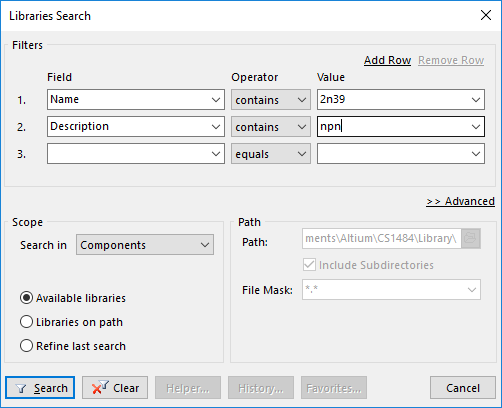
    Also, if you click the Search button on the Libraries panel, the Libraries Search dialog appears. The search results are then displayed, showing Query Results on the libraries panel and can be filtered as described above.


    • The Field column specifies what field/parameter in the library to search. This defaults to Name.
    • The Operator column controls whether to search for the entire value or just part of it, or to search just at the beginning or the end. This defaults to equals, but is usually better to change it to contains.
    • The Value column is what to search for. This is blank by default. Using * in there will search all.


    A common search example, find a transistor beginning with 2N39:

    Field: Name; Operator: contains; Value: 2n39


    If another row is added, this will further restrict the search, because the two filters are AND'ed together. For example, add npn, so that only NPN transistors are found:

    Field: Description; Operator: contains; Value: npn


    image


    However if you're wanting to find a string such as "darlington" in either the Name or Description to expand the search, they need to be OR'd together.

    To do this, click the link: >> Advanced and use an OR statement to search both the Component Name and Description fields, for example:

    (Name LIKE '*darlington*') OR (Description LIKE '*darlington*')


    Notes:

    1. The Scope, "Available Libraries" is a very fast search of the installed libraries so should complete quickly. If the Search button shows "Stop" for more than a few seconds, ignore it and feel free to click the Stop button to do another search.

    2. The Scope, "Libraries on path" is slower if the folder or sub folders contain a lot of libraries. Once a component is found, if you try to place it, a dialog will ask if you'd like to install the library.

    3. The equals Operator is case sensitive, so it's better to use the contains Operator, unless you're picking from the list of components in the Value field.


    Best regards,


    James Harriman

    Altium

    • Cancel
    • Vote Up 0 Vote Down
    • Cancel
element14 Community

element14 is the first online community specifically for engineers. Connect with your peers and get expert answers to your questions.

  • Members
  • Learn
  • Technologies
  • Challenges & Projects
  • Products
  • Store
  • About Us
  • Feedback & Support
  • FAQs
  • Terms of Use
  • Privacy Policy
  • Legal and Copyright Notices
  • Sitemap
  • Cookies

An Avnet Company © 2025 Premier Farnell Limited. All Rights Reserved.

Premier Farnell Ltd, registered in England and Wales (no 00876412), registered office: Farnell House, Forge Lane, Leeds LS12 2NE.

ICP 备案号 10220084.

Follow element14

  • X
  • Facebook
  • linkedin
  • YouTube