element14 Community
element14 Community
    Register Log In
  • Site
  • Search
  • Log In Register
  • Community Hub
    Community Hub
    • What's New on element14
    • Feedback and Support
    • Benefits of Membership
    • Personal Blogs
    • Members Area
    • Achievement Levels
  • Learn
    Learn
    • Ask an Expert
    • eBooks
    • element14 presents
    • Learning Center
    • Tech Spotlight
    • STEM Academy
    • Webinars, Training and Events
    • Learning Groups
  • Technologies
    Technologies
    • 3D Printing
    • FPGA
    • Industrial Automation
    • Internet of Things
    • Power & Energy
    • Sensors
    • Technology Groups
  • Challenges & Projects
    Challenges & Projects
    • Design Challenges
    • element14 presents Projects
    • Project14
    • Arduino Projects
    • Raspberry Pi Projects
    • Project Groups
  • Products
    Products
    • Arduino
    • Avnet & Tria Boards Community
    • Dev Tools
    • Manufacturers
    • Multicomp Pro
    • Product Groups
    • Raspberry Pi
    • RoadTests & Reviews
  • About Us
  • Store
    Store
    • Visit Your Store
    • Choose another store...
      • Europe
      •  Austria (German)
      •  Belgium (Dutch, French)
      •  Bulgaria (Bulgarian)
      •  Czech Republic (Czech)
      •  Denmark (Danish)
      •  Estonia (Estonian)
      •  Finland (Finnish)
      •  France (French)
      •  Germany (German)
      •  Hungary (Hungarian)
      •  Ireland
      •  Israel
      •  Italy (Italian)
      •  Latvia (Latvian)
      •  
      •  Lithuania (Lithuanian)
      •  Netherlands (Dutch)
      •  Norway (Norwegian)
      •  Poland (Polish)
      •  Portugal (Portuguese)
      •  Romania (Romanian)
      •  Russia (Russian)
      •  Slovakia (Slovak)
      •  Slovenia (Slovenian)
      •  Spain (Spanish)
      •  Sweden (Swedish)
      •  Switzerland(German, French)
      •  Turkey (Turkish)
      •  United Kingdom
      • Asia Pacific
      •  Australia
      •  China
      •  Hong Kong
      •  India
      • Japan
      •  Korea (Korean)
      •  Malaysia
      •  New Zealand
      •  Philippines
      •  Singapore
      •  Taiwan
      •  Thailand (Thai)
      • Vietnam
      • Americas
      •  Brazil (Portuguese)
      •  Canada
      •  Mexico (Spanish)
      •  United States
      Can't find the country/region you're looking for? Visit our export site or find a local distributor.
  • Translate
  • Profile
  • Settings
Altium CircuitStudio
  • Products
  • Manufacturers
  • Altium CircuitStudio
  • More
  • Cancel
Altium CircuitStudio
Altium CircuitStudio Forum Error in libraries
  • Blog
  • Forum
  • Documents
  • Events
  • Polls
  • Members
  • Mentions
  • Sub-Groups
  • Tags
  • More
  • Cancel
  • New
Join Altium CircuitStudio to participate - click to join for free!
Actions
  • Share
  • More
  • Cancel
Forum Thread Details
  • State Suggested Answer
  • Locked Locked
  • Replies 7 replies
  • Answers 1 answer
  • Subscribers 89 subscribers
  • Views 824 views
  • Users 0 members are here
  • frontpage
Related
This discussion has been locked.
You can no longer post new replies to this discussion. If you have a question you can start a new discussion

Error in libraries

satyaeee247
satyaeee247 over 8 years ago

Hi,


I am trying to access Circuit studio Vault, it is coming up with an error as shown in the attachment.


anyone having this problem ?


Can anyone point me in right direction to sort out ?


Many thanks

Satya
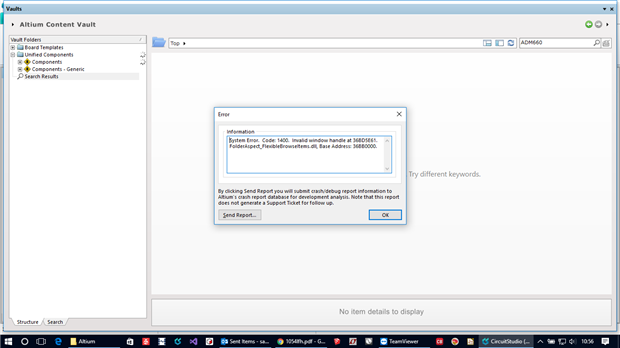
 

image

  • Cancel

Top Replies

  • jamesharrimanaltium
    jamesharrimanaltium over 8 years ago +1 suggested
    Element14 asked me to reply. Could you please check your version of Windows. If you're using Windows 10 and recently updated to the Creators Update then there is currently an incompatibility with the Vaults…
  • jamesharrimanaltium
    jamesharrimanaltium over 8 years ago in reply to bugrobotics +1
    Hi Skyler, CircuitStudio is still build 84 and isn't currently being changed to address this apparent bug in Windows. The built I mentioned "15063.296" is the Windows operating system version that you…
Parents
  • jamesharrimanaltium
    0 jamesharrimanaltium over 8 years ago

    Element14 asked me to reply.

    Could you please check your version of Windows. If you're using Windows 10 and recently updated to the Creators Update then there is currently an incompatibility with the Vaults panel for some versions.


    The following issue may be related to what you're seeing, so I'm including this here, just in case.

    --------------------------------------------

    The following Windows 10 Creators Update version is causing blue screen crashes for some users when using the Vaults panel. This was released to some Windows users in April 2017:

    Version 1703

    OS Build 15063.250

    (displayed in About your PC control panel)


    Our current recommendation is to try updating to the latest version such as build 15063.296 which was released 09-May-2017. This eliminates the crash for some, not not all users.


    If this doesn't work, then you may want to consider to roll back Windows to the previous version, but this must be done within 10 days of the Creators Update being installed because Windows automatically deletes the Windows.old folder that is required for rolling back.


    To roll back the Windows update, use the "Go back" feature detailed below. This rollback is an IT function and could be time consuming so the usual precautions of backing up the system apply.


    Settings > Update & security. (or search for Check for Updates), and in the Update status screen, click Update history. Click Recovery options.


    Note 1: The Recovery options are usually a last resort, for example, Reset this PC is a reinstallation of the entire operating system, so this is not recommended.


    Note 2: The Creators Update stores your previous Windows 10 in a folder named Windows.old. This folder is automatically deleted after 10 days. Therefore the "Go back" functionality is only available within 10 days of your system being updated.


    An extra section on the Recovery screen is displayed if the Creators Update was installed and is able to be removed:

    "Go back to the previous version of Windows 10".

    If this section is included, click the "Get started" button directly below this heading.


    The Go back screen displays:

    Why are you going back?

    - My apps or devices don't work on this build

    etc.

    Choose an option such as this one and click Next


    Click "Go back to earlier build" to roll back to the previous version of Windows 10 that you had installed. You may need to reinstall or correct other problems after rolling back.

    --------------------------------------------


    Best regards,


    James Harriman

    Altium

    • Cancel
    • Vote Up +1 Vote Down
    • Cancel
  • bugrobotics
    0 bugrobotics over 8 years ago in reply to jamesharrimanaltium

    jamesharrimanaltium How does one update to the latest build?  I tried looking on Circuitstudio's site but didn't see anything.  Also tried installed from the "Download Circuitstudio" button and it is the same build (84) as before.

    • Cancel
    • Vote Up 0 Vote Down
    • Cancel
  • jamesharrimanaltium
    0 jamesharrimanaltium over 8 years ago in reply to bugrobotics

    Hi Skyler,


    CircuitStudio is still build 84 and isn't currently being changed to address this apparent bug in Windows. The built I mentioned "15063.296" is the Windows operating system version that you see in Windows 10 if you search for About Your PC. Updating to that version may help but on some systems the crash is still present, even in the newer Windows 10 build.


    Best regards,


    James Harriman

    Altium

    • Cancel
    • Vote Up +1 Vote Down
    • Cancel
Reply
  • jamesharrimanaltium
    0 jamesharrimanaltium over 8 years ago in reply to bugrobotics

    Hi Skyler,


    CircuitStudio is still build 84 and isn't currently being changed to address this apparent bug in Windows. The built I mentioned "15063.296" is the Windows operating system version that you see in Windows 10 if you search for About Your PC. Updating to that version may help but on some systems the crash is still present, even in the newer Windows 10 build.


    Best regards,


    James Harriman

    Altium

    • Cancel
    • Vote Up +1 Vote Down
    • Cancel
Children
  • bugrobotics
    0 bugrobotics over 8 years ago in reply to jamesharrimanaltium

    Sorry about that James.  Not sure what I was thinking there.

    • Cancel
    • Vote Up 0 Vote Down
    • Cancel
element14 Community

element14 is the first online community specifically for engineers. Connect with your peers and get expert answers to your questions.

  • Members
  • Learn
  • Technologies
  • Challenges & Projects
  • Products
  • Store
  • About Us
  • Feedback & Support
  • FAQs
  • Terms of Use
  • Privacy Policy
  • Legal and Copyright Notices
  • Sitemap
  • Cookies

An Avnet Company © 2026 Premier Farnell Limited. All Rights Reserved.

Premier Farnell Ltd, registered in England and Wales (no 00876412), registered office: Farnell House, Forge Lane, Leeds LS12 2NE.

ICP 备案号 10220084.

Follow element14

  • X
  • Facebook
  • linkedin
  • YouTube