element14 Community
element14 Community
    Register Log In
  • Site
  • Search
  • Log In Register
  • Community Hub
    Community Hub
    • What's New on element14
    • Feedback and Support
    • Benefits of Membership
    • Personal Blogs
    • Members Area
    • Achievement Levels
  • Learn
    Learn
    • Ask an Expert
    • eBooks
    • element14 presents
    • Learning Center
    • Tech Spotlight
    • STEM Academy
    • Webinars, Training and Events
    • Learning Groups
  • Technologies
    Technologies
    • 3D Printing
    • FPGA
    • Industrial Automation
    • Internet of Things
    • Power & Energy
    • Sensors
    • Technology Groups
  • Challenges & Projects
    Challenges & Projects
    • Design Challenges
    • element14 presents Projects
    • Project14
    • Arduino Projects
    • Raspberry Pi Projects
    • Project Groups
  • Products
    Products
    • Arduino
    • Avnet & Tria Boards Community
    • Dev Tools
    • Manufacturers
    • Multicomp Pro
    • Product Groups
    • Raspberry Pi
    • RoadTests & Reviews
  • About Us
  • Store
    Store
    • Visit Your Store
    • Choose another store...
      • Europe
      •  Austria (German)
      •  Belgium (Dutch, French)
      •  Bulgaria (Bulgarian)
      •  Czech Republic (Czech)
      •  Denmark (Danish)
      •  Estonia (Estonian)
      •  Finland (Finnish)
      •  France (French)
      •  Germany (German)
      •  Hungary (Hungarian)
      •  Ireland
      •  Israel
      •  Italy (Italian)
      •  Latvia (Latvian)
      •  
      •  Lithuania (Lithuanian)
      •  Netherlands (Dutch)
      •  Norway (Norwegian)
      •  Poland (Polish)
      •  Portugal (Portuguese)
      •  Romania (Romanian)
      •  Russia (Russian)
      •  Slovakia (Slovak)
      •  Slovenia (Slovenian)
      •  Spain (Spanish)
      •  Sweden (Swedish)
      •  Switzerland(German, French)
      •  Turkey (Turkish)
      •  United Kingdom
      • Asia Pacific
      •  Australia
      •  China
      •  Hong Kong
      •  India
      • Japan
      •  Korea (Korean)
      •  Malaysia
      •  New Zealand
      •  Philippines
      •  Singapore
      •  Taiwan
      •  Thailand (Thai)
      • Vietnam
      • Americas
      •  Brazil (Portuguese)
      •  Canada
      •  Mexico (Spanish)
      •  United States
      Can't find the country/region you're looking for? Visit our export site or find a local distributor.
  • Translate
  • Profile
  • Settings
Altium CircuitStudio
  • Products
  • Manufacturers
  • Altium CircuitStudio
  • More
  • Cancel
Altium CircuitStudio
Altium CircuitStudio Forum CS component vault not working?
  • Blog
  • Forum
  • Documents
  • Events
  • Polls
  • Members
  • Mentions
  • Sub-Groups
  • Tags
  • More
  • Cancel
  • New
Join Altium CircuitStudio to participate - click to join for free!
Actions
  • Share
  • More
  • Cancel
Forum Thread Details
  • State Not Answered
  • Locked Locked
  • Replies 6 replies
  • Subscribers 90 subscribers
  • Views 1115 views
  • Users 0 members are here
  • frontpage
  • circuitstudio 1.4
Related
This discussion has been locked.
You can no longer post new replies to this discussion. If you have a question you can start a new discussion

CS component vault not working?

drgdhorler
drgdhorler over 8 years ago

Hi. Downloaded a 30 day evaluation version (2 layer, 300 pin) of CS today. Component and schematic creation was straightforward, but I cannot use the vault explorer function. File -> Vault Explorer gives a pop-up with a folder tree of IC component manufacturers only; not the more detailed view discussed in the tutorials. Is this function enabled in the evaluation version? Any elp on how the set-up and use Vault Explorer would be welcomes.


Cheers

  • Cancel
Parents
  • e14softwareuk
    0 e14softwareuk over 8 years ago

    Hi Greg, not sure why you think the evaluation is 2 layer 300 pin? You get the full software to try. If we have any misleading information on our site regarding CS pin/layer limitations then please do let me know so we can correct it.


    The Vault takes some getting used to as there can be an issue where far too many columns are displayed in the results making it a little tricky to use. My usual suggestion is to bring up the Vault window and then switch to the search tab (lower left). Sometimes, on first use, it seems necessary to search then switch to the Structure tab and back but generally the search tab does not increase the number of results columns whereas the structure tab view can.


    Maybe this is an excellent topic for alexsander_altium to produce a short video tutorial for the community.

    • Cancel
    • Vote Up 0 Vote Down
    • Cancel
  • drgdhorler
    0 drgdhorler over 8 years ago in reply to e14softwareuk

    Peter, thanks for the reply. By pure hacking I managed to get the vault working; however, this together with your reply troubles me, as in my view this aspect of the software is unreliable.


    I've managed to create a footprint for a TSSOP8 device, not without niggles, however the main challenge I now face is how do you integrate a component schematic with a footprint. I cannot find any meaningful step by step instructions on how to do this. Futhermore it is unclear to me how the directory and file structures work.


    Gripe: It baffles me that tech companies insist on crowing about and focussing upon bells and whistles, such as the vault and 3d visualisation. I know modern software suites are complex tools,so to my mind It would be far more useful to focus on documenting the basics..well! In so doing engineers can quickly learn and evaluate tools. I concede that Altium CS is marginally more intuitive than Eagle, but the fact that I'm having to ask questions means that either the system is not as intuitive as it could be, that the dicumentation is not up to scratch or that I am not very bright. The truth lies somewhere in there!


    BTW, why do companies insist on developing their own lexicon, what ever happened to silkscreen and keepout, terms that are understood...what is a Top Overlay (Top silk?) and a courtyard bottom, 3d top: if Altium want to use their own terminology, then give us the definitions?


    I'm keen to pursue my evaluation of CS to a board design, so any help would be welcomed.

    • Cancel
    • Vote Up 0 Vote Down
    • Cancel
  • e14softwareuk
    0 e14softwareuk over 8 years ago in reply to drgdhorler

    If very new to CircuitStudio then I would recommend watching the video tutorial series Getting Started with CircuitStudio: Video Tutorial Series plus the older series CircuitStudio Quick Start Webinar Series .


    Footprints are associated with a symbol through the schematic library editor. Bring up the property dialog using Home > Library > Component Properties and take a look at the Models section. Use Add... Footprint to associate one or more footprints with this symbol. The footprint is matched to a PCB library component by name so you would just need to make sure the names you use match.


    On a simple level you can either add libraries on a per-project basis (appearing as a file within the project) or on a global level File > System Preferences > Data Management > Installed Libraries.


    Don't forget that in addition to the Vault you can also download libraries from https://designcontent.live.altium.com/ .

    • Cancel
    • Vote Up 0 Vote Down
    • Cancel
  • drgdhorler
    0 drgdhorler over 8 years ago in reply to e14softwareuk

    Peter, I have watched the videos and read the docs and tried to associate footprint with schematic with no success.

    Here is what I have and have been doing.


    1) I have created a footprint from scratch called TSSOP8.PcbLib (using File > New document > PCB Library) it is stored in mypath/Altium/MyLibs

    2) TSSOP8.PcbLib is present in CS in the projects pane Proximity-1.PrjPcb>Libraries>PCB Library Documents>TSSOP8.PcbLib

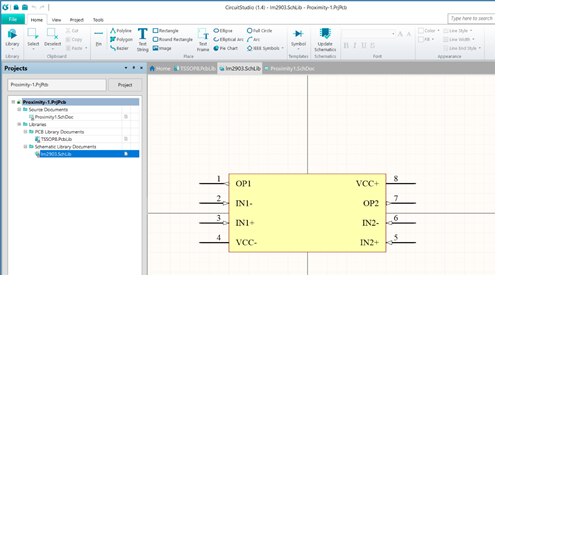
    3) I have created a schematic from scratch called lm2903.SchLib (using File > New document > Schematic Library) it is stored in mypath/Altium/MyLibs

    4) lm2903.SchLib is present in CS in the projects pane Proximity-11.PrjPcb>Libraries>Schematic Library Documents>lm2903.SchLib


    If I highlight the lm2903.SchLib in the project pane, as shown in Fig 1 image

    Figure 1

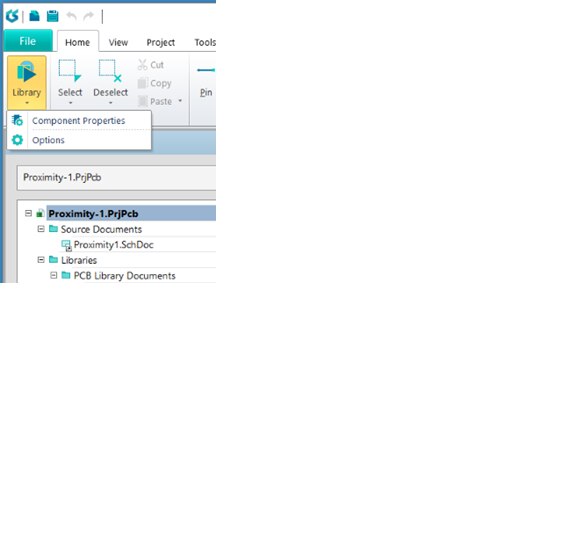
    Then use the Library to get to Component Properties, Figure 2


    image

    Figure 2


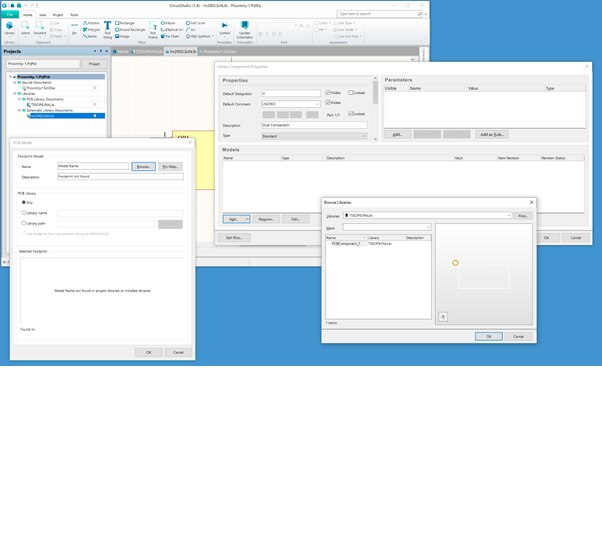
    This brings up many windows, Figure 3 that seem to be in the right direction, for example Pin Map… seems to map component pins to Model Pins, see below. However, I am concerned on two fronts

    1) Why is the name of the component PCBComponent_1 when I thought it was called TSSOP8?

    2) How will I know when the footprint and schematic have been associated?


    Figure 3image


    As far as I can tell (from videos and the documentation), none of the detail I’ve presented above is present in the documentation or support. Please can you explain how I may proceed to associate a footprint and schematic and test that the association has been achieved successfully.


    Thanks Greg


    PS THIS MESSAGING EDITOR JUMPS TO THE TOP OF THE SCREEN SO YOU CaN'T SEE WHAT YOU'RE TYPING!

    • Cancel
    • Vote Up 0 Vote Down
    • Cancel
  • e14softwareuk
    0 e14softwareuk over 8 years ago in reply to drgdhorler

    I think what's missing is the concept that a library holds many components, the name of the library is just a file name nothing to do with the footprint. Within the library you have many components and the name of these is important. You would have to rename PCBComponent_1 to be TSSOP8.

    • Cancel
    • Vote Up 0 Vote Down
    • Cancel
  • bugrobotics
    0 bugrobotics over 8 years ago in reply to drgdhorler

    Hey Greg,

    Avoid the vault.  It is riddled with issues.  Get efficient at creating components on your own.  I'm replying a bit late in the thread but thought I would give you some feedback regarding the vault.

    • Cancel
    • Vote Up 0 Vote Down
    • Cancel
Reply
  • bugrobotics
    0 bugrobotics over 8 years ago in reply to drgdhorler

    Hey Greg,

    Avoid the vault.  It is riddled with issues.  Get efficient at creating components on your own.  I'm replying a bit late in the thread but thought I would give you some feedback regarding the vault.

    • Cancel
    • Vote Up 0 Vote Down
    • Cancel
Children
No Data
element14 Community

element14 is the first online community specifically for engineers. Connect with your peers and get expert answers to your questions.

  • Members
  • Learn
  • Technologies
  • Challenges & Projects
  • Products
  • Store
  • About Us
  • Feedback & Support
  • FAQs
  • Terms of Use
  • Privacy Policy
  • Legal and Copyright Notices
  • Sitemap
  • Cookies

An Avnet Company © 2026 Premier Farnell Limited. All Rights Reserved.

Premier Farnell Ltd, registered in England and Wales (no 00876412), registered office: Farnell House, Forge Lane, Leeds LS12 2NE.

ICP 备案号 10220084.

Follow element14

  • X
  • Facebook
  • linkedin
  • YouTube