element14 Community
element14 Community
    Register Log In
  • Site
  • Search
  • Log In Register
  • Community Hub
    Community Hub
    • What's New on element14
    • Feedback and Support
    • Benefits of Membership
    • Personal Blogs
    • Members Area
    • Achievement Levels
  • Learn
    Learn
    • Ask an Expert
    • eBooks
    • element14 presents
    • Learning Center
    • Tech Spotlight
    • STEM Academy
    • Webinars, Training and Events
    • Learning Groups
  • Technologies
    Technologies
    • 3D Printing
    • FPGA
    • Industrial Automation
    • Internet of Things
    • Power & Energy
    • Sensors
    • Technology Groups
  • Challenges & Projects
    Challenges & Projects
    • Design Challenges
    • element14 presents Projects
    • Project14
    • Arduino Projects
    • Raspberry Pi Projects
    • Project Groups
  • Products
    Products
    • Arduino
    • Avnet & Tria Boards Community
    • Dev Tools
    • Manufacturers
    • Multicomp Pro
    • Product Groups
    • Raspberry Pi
    • RoadTests & Reviews
  • About Us
  • Store
    Store
    • Visit Your Store
    • Choose another store...
      • Europe
      •  Austria (German)
      •  Belgium (Dutch, French)
      •  Bulgaria (Bulgarian)
      •  Czech Republic (Czech)
      •  Denmark (Danish)
      •  Estonia (Estonian)
      •  Finland (Finnish)
      •  France (French)
      •  Germany (German)
      •  Hungary (Hungarian)
      •  Ireland
      •  Israel
      •  Italy (Italian)
      •  Latvia (Latvian)
      •  
      •  Lithuania (Lithuanian)
      •  Netherlands (Dutch)
      •  Norway (Norwegian)
      •  Poland (Polish)
      •  Portugal (Portuguese)
      •  Romania (Romanian)
      •  Russia (Russian)
      •  Slovakia (Slovak)
      •  Slovenia (Slovenian)
      •  Spain (Spanish)
      •  Sweden (Swedish)
      •  Switzerland(German, French)
      •  Turkey (Turkish)
      •  United Kingdom
      • Asia Pacific
      •  Australia
      •  China
      •  Hong Kong
      •  India
      • Japan
      •  Korea (Korean)
      •  Malaysia
      •  New Zealand
      •  Philippines
      •  Singapore
      •  Taiwan
      •  Thailand (Thai)
      • Vietnam
      • Americas
      •  Brazil (Portuguese)
      •  Canada
      •  Mexico (Spanish)
      •  United States
      Can't find the country/region you're looking for? Visit our export site or find a local distributor.
  • Translate
  • Profile
  • Settings
Altium CircuitStudio
  • Products
  • Manufacturers
  • Altium CircuitStudio
  • More
  • Cancel
Altium CircuitStudio
Altium CircuitStudio Forum CircuitStudio PCB Designator Vorgabe
  • Blog
  • Forum
  • Documents
  • Events
  • Polls
  • Members
  • Mentions
  • Sub-Groups
  • Tags
  • More
  • Cancel
  • New
Join Altium CircuitStudio to participate - click to join for free!
Actions
  • Share
  • More
  • Cancel
Forum Thread Details
  • State Not Answered
  • Locked Locked
  • Replies 7 replies
  • Subscribers 89 subscribers
  • Views 680 views
  • Users 0 members are here
  • frontpage
Related
This discussion has been locked.
You can no longer post new replies to this discussion. If you have a question you can start a new discussion

CircuitStudio PCB Designator Vorgabe

henry.markert
henry.markert over 7 years ago

Hallo,


nach einiger erfolgloser Suche im Internet hier die Frage:


Ist es möglich das Textformat für den Designator auf der Leiterplatte (Top Overlay) zu verändern ?


Die Variante es per PCB Filter und PCB Inspector ändern zu können ist klar, allerdings wäre es besser, es gleich in den Komponenten vorzubelegen.


Zumal auch die Option "AutoPosition" offenbar immer auf "Manuell" steht und erst im PCB geändert werden kann.


Ein freier Text wäre auch möglich, aber ein Versuch mit ".Designator" wie ihn das Dropdownfeld anbietet, liefert im PCB nur genau diesen Text und nicht den Designator.

  • Cancel
  • e14softwareuk
    0 e14softwareuk over 7 years ago

    Hi

    I've tested and if you define a text string in the PCB library editor assigned with ".Designator" then the text will show the assigned designator for that component on the PCB.

    • Cancel
    • Vote Up 0 Vote Down
    • Cancel
  • henry.markert
    0 henry.markert over 7 years ago in reply to e14softwareuk

    Hello,


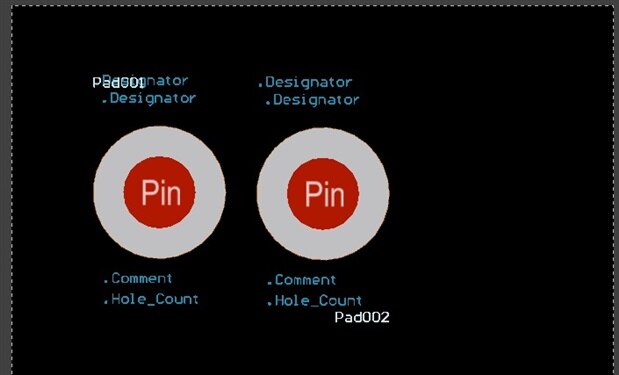
    this is rather surprising. I just tried the same thing again with an emtpy project and an empty component library. The standard Designator label is correctly displayed (the PAD002 was changed to "below-right" with autotext.


    But none of the "dot-Name" values are evaluated. see screenshot below.


    I hopefully tried all ways to solve it, such as "compile", "recompile", save source and project files.


    Is there some project option to be set ?


    To return to the initial question: IMHO the easiest way would be to offer the Designator dialog in the component editor. Or at least offer the Option "always display Designator" like in the SCH component editor.


    Are there plans to add either of them ?


    screenshot, showing the pcb plane with the added strings to be expanded. With .designator I tried ".designator" (with quotes) as well just to be sure.

    image

    • Cancel
    • Vote Up 0 Vote Down
    • Cancel
  • e14softwareuk
    0 e14softwareuk over 7 years ago in reply to henry.markert

    Hi Henry, just to clarify for me is the image from the PCB Document or the PCB Library editor?

    It may speed up things if you want to send through a copy of your library and PCB document so that I can take a look (just email me directly or software@element14.com).

    • Cancel
    • Vote Up 0 Vote Down
    • Cancel
  • henry.markert
    0 henry.markert over 7 years ago in reply to e14softwareuk

    Yes, this is an image from the PCB document. In the PCB library you wouldn't see the standard designators.


    I'll sent the files in the next few minutes.

    • Cancel
    • Vote Up 0 Vote Down
    • Cancel
  • e14softwareuk
    0 e14softwareuk over 7 years ago in reply to henry.markert

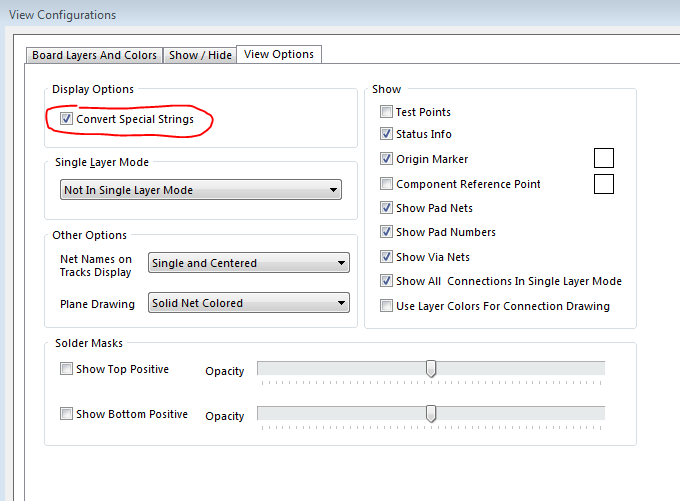
    Hi Henry. Can you check this setting in View Configurations (click near LS in lower left of window) and click on View Options tab.

    image

    • Cancel
    • Vote Up 0 Vote Down
    • Cancel
  • henry.markert
    0 henry.markert over 7 years ago in reply to e14softwareuk

    Ok, that's it. It works now as expected. Thank you.


    Still the designator dialog in component editor would be the best solution. Is there a place to suggest new functionality ?


    I had sent the files to support@element14.com as suggested. I also did not reveive any feedback about failure of delivery of the mail.


    But as the solution above works, it doesn't matter.

    • Cancel
    • Vote Up 0 Vote Down
    • Cancel
  • e14softwareuk
    0 e14softwareuk over 7 years ago in reply to henry.markert

    Henry, just mentioning new ideas / improvement suggestions and the link on the forums is a good place. They are monitored by Altium personnel who will pick up on common themes. Regarding your file we did receive it but posted the answer back to the forums so that everyone can benefit given it was nothing proprietary to your design.

    • Cancel
    • Vote Up 0 Vote Down
    • Cancel
element14 Community

element14 is the first online community specifically for engineers. Connect with your peers and get expert answers to your questions.

  • Members
  • Learn
  • Technologies
  • Challenges & Projects
  • Products
  • Store
  • About Us
  • Feedback & Support
  • FAQs
  • Terms of Use
  • Privacy Policy
  • Legal and Copyright Notices
  • Sitemap
  • Cookies

An Avnet Company © 2026 Premier Farnell Limited. All Rights Reserved.

Premier Farnell Ltd, registered in England and Wales (no 00876412), registered office: Farnell House, Forge Lane, Leeds LS12 2NE.

ICP 备案号 10220084.

Follow element14

  • X
  • Facebook
  • linkedin
  • YouTube