Complete CS beginner, but have use a lot of other packages. Tried to do something about the column filtering problem (i.e. way too many columns, filtering is not saved). Have lost the left hand menu of the Vault. How to get it back?
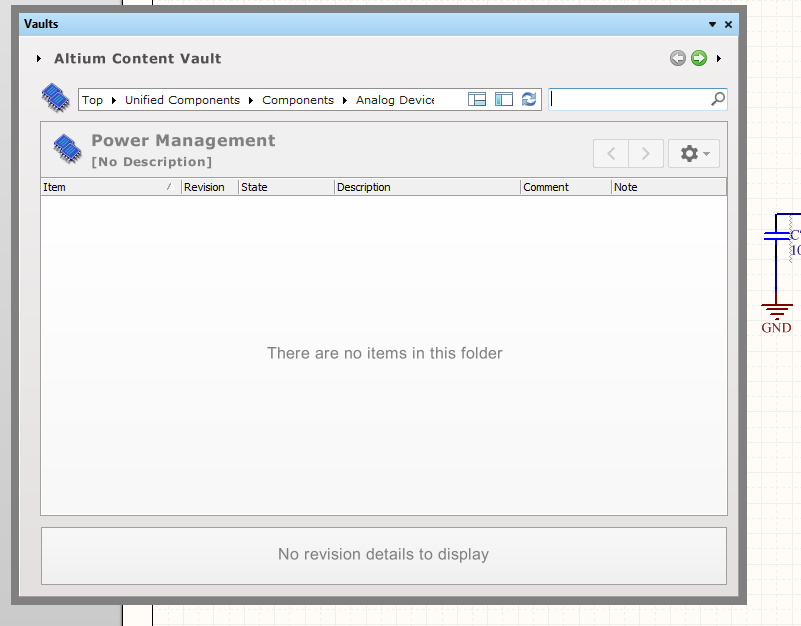
Thnx - AFAIK I don't have a restore point - any registry entry to delete / change to default (I assume that the window positions is stored in a key)?
NB for the record, this issue came about due to me trying to resize as a work-around for the unusable column view in the Vault (way too many columns) - not just out of idle "messing around".
Fantastic solution Laurens, many thanks for sharing.
If you don't wish to reset all data and are happy using the registry editor (regedit.exe) then you can restore the tree view by editing a single entry, set this to a non-zero value (e.g. 100) to restore the left tree view. The {guid} value in the string will be unique to your installation of CircuitStudio.
HKEY_CURRENT_USER\
Software\
Altium\
CircuitStudio {guid}\
DesignExplorer\
Preferences\
EDesignData\
VaultExplorer_Size_B7D15EC3-160A-466F-A46C-7801FE6295A7\
TreePanelWidth
Thanks - I'll mark it as the correct answer - though I have not tried it myself.
PS - somewhere on the web I found (and lost) a page that showed how to perform a more effective Vault component search that didn't result in all those columns (which makes the search function effectively useless), and which was the start of this thread. Can anyone remember where this was and send me a link?