element14 Community
element14 Community
    Register Log In
  • Site
  • Search
  • Log In Register
  • Community Hub
    Community Hub
    • What's New on element14
    • Feedback and Support
    • Benefits of Membership
    • Personal Blogs
    • Members Area
    • Achievement Levels
  • Learn
    Learn
    • Ask an Expert
    • eBooks
    • element14 presents
    • Learning Center
    • Tech Spotlight
    • STEM Academy
    • Webinars, Training and Events
    • Learning Groups
  • Technologies
    Technologies
    • 3D Printing
    • FPGA
    • Industrial Automation
    • Internet of Things
    • Power & Energy
    • Sensors
    • Technology Groups
  • Challenges & Projects
    Challenges & Projects
    • Design Challenges
    • element14 presents Projects
    • Project14
    • Arduino Projects
    • Raspberry Pi Projects
    • Project Groups
  • Products
    Products
    • Arduino
    • Avnet & Tria Boards Community
    • Dev Tools
    • Manufacturers
    • Multicomp Pro
    • Product Groups
    • Raspberry Pi
    • RoadTests & Reviews
  • About Us
  • Store
    Store
    • Visit Your Store
    • Choose another store...
      • Europe
      •  Austria (German)
      •  Belgium (Dutch, French)
      •  Bulgaria (Bulgarian)
      •  Czech Republic (Czech)
      •  Denmark (Danish)
      •  Estonia (Estonian)
      •  Finland (Finnish)
      •  France (French)
      •  Germany (German)
      •  Hungary (Hungarian)
      •  Ireland
      •  Israel
      •  Italy (Italian)
      •  Latvia (Latvian)
      •  
      •  Lithuania (Lithuanian)
      •  Netherlands (Dutch)
      •  Norway (Norwegian)
      •  Poland (Polish)
      •  Portugal (Portuguese)
      •  Romania (Romanian)
      •  Russia (Russian)
      •  Slovakia (Slovak)
      •  Slovenia (Slovenian)
      •  Spain (Spanish)
      •  Sweden (Swedish)
      •  Switzerland(German, French)
      •  Turkey (Turkish)
      •  United Kingdom
      • Asia Pacific
      •  Australia
      •  China
      •  Hong Kong
      •  India
      • Japan
      •  Korea (Korean)
      •  Malaysia
      •  New Zealand
      •  Philippines
      •  Singapore
      •  Taiwan
      •  Thailand (Thai)
      • Vietnam
      • Americas
      •  Brazil (Portuguese)
      •  Canada
      •  Mexico (Spanish)
      •  United States
      Can't find the country/region you're looking for? Visit our export site or find a local distributor.
  • Translate
  • Profile
  • Settings
Altium CircuitStudio
  • Products
  • Manufacturers
  • Altium CircuitStudio
  • More
  • Cancel
Altium CircuitStudio
Altium CircuitStudio Forum Vault - lost left hand selection menu.
  • Blog
  • Forum
  • Documents
  • Events
  • Polls
  • Members
  • Mentions
  • Sub-Groups
  • Tags
  • More
  • Cancel
  • New
Join Altium CircuitStudio to participate - click to join for free!
Actions
  • Share
  • More
  • Cancel
Forum Thread Details
  • State Verified Answer
  • Locked Locked
  • Replies 11 replies
  • Subscribers 90 subscribers
  • Views 995 views
  • Users 0 members are here
Related
This discussion has been locked.
You can no longer post new replies to this discussion. If you have a question you can start a new discussion

Vault - lost left hand selection menu.

larry4
larry4 over 7 years ago

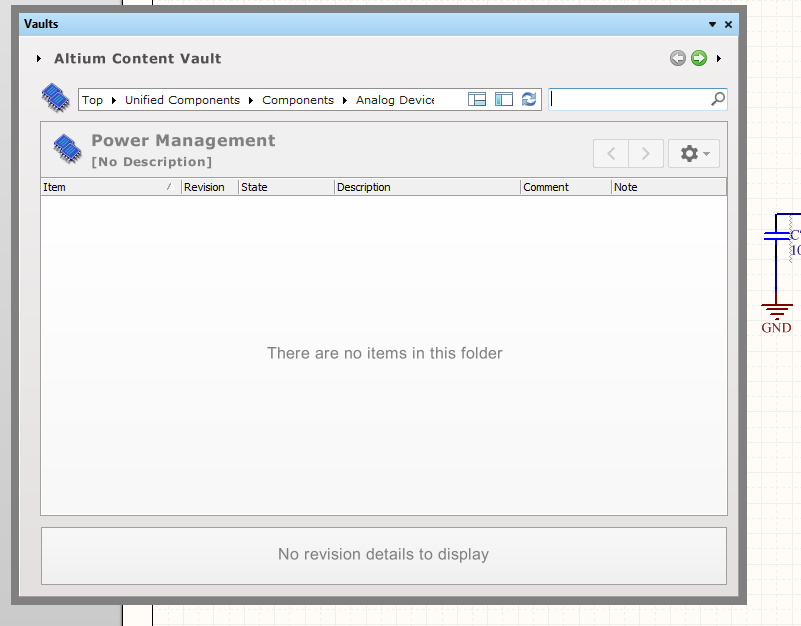
Complete CS beginner, but have use a lot of other packages. Tried to do something about the column filtering problem (i.e. way too many columns, filtering is not saved). Have lost the left hand menu of the Vault. How to get it back?
 

image

  • Cancel
Parents
  • larry4
    0 larry4 over 7 years ago

    Thnx - AFAIK I don't have a restore point - any registry entry to delete / change to default (I assume that the window positions is stored in a key)?


    NB for the record, this issue came about due to me trying to resize as a work-around for the unusable column view in the Vault (way too many columns) - not just out of idle "messing around".

    • Cancel
    • Vote Up 0 Vote Down
    • Cancel
  • tarribred61
    0 tarribred61 over 7 years ago in reply to larry4

    I didn't try to find the associated registry key but maybe CircuitStudio tech support can locate it and describe a fix short of re-installation.  It is surprisingly easy to do what you did.

    • Cancel
    • Vote Up 0 Vote Down
    • Cancel
  • larry4
    0 larry4 over 7 years ago in reply to tarribred61

    Is this the CS tech support place (do they monitor these conversations - if not how to contact?

    • Cancel
    • Vote Up 0 Vote Down
    • Cancel
  • e14softwareuk
    0 e14softwareuk over 7 years ago in reply to larry4

    Hi Laurens. This is the tech support place for CS. It is monitored by Altium and element14 personnel so we are now aware there is an issue with the vault window, however we are still investigating for a fix.

    • Cancel
    • Vote Up 0 Vote Down
    • Cancel
  • larry4
    0 larry4 over 7 years ago in reply to e14softwareuk

    Found a work around:

    Windows -> Add/Remove programs -> CircuitStudio -> select "Remove Preferences"

    Then restart CS, login again to CS account - this resets the dialog placements (and everything else).

    • Cancel
    • Vote Up 0 Vote Down
    • Cancel
  • e14softwareuk
    0 e14softwareuk over 7 years ago in reply to larry4

    Fantastic solution Laurens, many thanks for sharing.


    If you don't wish to reset all data and are happy using the registry editor (regedit.exe) then you can restore the tree view by editing a single entry, set this to a non-zero value (e.g. 100) to restore the left tree view. The {guid} value in the string will be unique to your installation of CircuitStudio.


    HKEY_CURRENT_USER\

      Software\

        Altium\

          CircuitStudio {guid}\

            DesignExplorer\

              Preferences\

                EDesignData\

                  VaultExplorer_Size_B7D15EC3-160A-466F-A46C-7801FE6295A7\

                    TreePanelWidth

    • Cancel
    • Vote Up 0 Vote Down
    • Cancel
Reply
  • e14softwareuk
    0 e14softwareuk over 7 years ago in reply to larry4

    Fantastic solution Laurens, many thanks for sharing.


    If you don't wish to reset all data and are happy using the registry editor (regedit.exe) then you can restore the tree view by editing a single entry, set this to a non-zero value (e.g. 100) to restore the left tree view. The {guid} value in the string will be unique to your installation of CircuitStudio.


    HKEY_CURRENT_USER\

      Software\

        Altium\

          CircuitStudio {guid}\

            DesignExplorer\

              Preferences\

                EDesignData\

                  VaultExplorer_Size_B7D15EC3-160A-466F-A46C-7801FE6295A7\

                    TreePanelWidth

    • Cancel
    • Vote Up 0 Vote Down
    • Cancel
Children
  • larry4
    0 larry4 over 7 years ago in reply to e14softwareuk

    Thanks - I'll mark it as the correct answer - though I have not tried it myself.


    PS - somewhere on the web I found (and lost) a page that showed how to perform a more effective Vault component search that didn't result in all those columns (which makes the search function effectively useless), and which was the start of this thread. Can anyone remember where this was and send me a link?

    • Cancel
    • Vote Up 0 Vote Down
    • Cancel
  • e14softwareuk
    0 e14softwareuk over 7 years ago in reply to larry4

    For vault searching I usually recommend using the Search rather than Structure tab (bottom of vault window), this doesn't create all the extra columns.

    • Cancel
    • Vote Up 0 Vote Down
    • Cancel
element14 Community

element14 is the first online community specifically for engineers. Connect with your peers and get expert answers to your questions.

  • Members
  • Learn
  • Technologies
  • Challenges & Projects
  • Products
  • Store
  • About Us
  • Feedback & Support
  • FAQs
  • Terms of Use
  • Privacy Policy
  • Legal and Copyright Notices
  • Sitemap
  • Cookies

An Avnet Company © 2026 Premier Farnell Limited. All Rights Reserved.

Premier Farnell Ltd, registered in England and Wales (no 00876412), registered office: Farnell House, Forge Lane, Leeds LS12 2NE.

ICP 备案号 10220084.

Follow element14

  • X
  • Facebook
  • linkedin
  • YouTube