element14 Community
element14 Community
    Register Log In
  • Site
  • Search
  • Log In Register
  • Community Hub
    Community Hub
    • What's New on element14
    • Feedback and Support
    • Benefits of Membership
    • Personal Blogs
    • Members Area
    • Achievement Levels
  • Learn
    Learn
    • Ask an Expert
    • eBooks
    • element14 presents
    • Learning Center
    • Tech Spotlight
    • STEM Academy
    • Webinars, Training and Events
    • Learning Groups
  • Technologies
    Technologies
    • 3D Printing
    • FPGA
    • Industrial Automation
    • Internet of Things
    • Power & Energy
    • Sensors
    • Technology Groups
  • Challenges & Projects
    Challenges & Projects
    • Design Challenges
    • element14 presents Projects
    • Project14
    • Arduino Projects
    • Raspberry Pi Projects
    • Project Groups
  • Products
    Products
    • Arduino
    • Avnet & Tria Boards Community
    • Dev Tools
    • Manufacturers
    • Multicomp Pro
    • Product Groups
    • Raspberry Pi
    • RoadTests & Reviews
  • About Us
  • Store
    Store
    • Visit Your Store
    • Choose another store...
      • Europe
      •  Austria (German)
      •  Belgium (Dutch, French)
      •  Bulgaria (Bulgarian)
      •  Czech Republic (Czech)
      •  Denmark (Danish)
      •  Estonia (Estonian)
      •  Finland (Finnish)
      •  France (French)
      •  Germany (German)
      •  Hungary (Hungarian)
      •  Ireland
      •  Israel
      •  Italy (Italian)
      •  Latvia (Latvian)
      •  
      •  Lithuania (Lithuanian)
      •  Netherlands (Dutch)
      •  Norway (Norwegian)
      •  Poland (Polish)
      •  Portugal (Portuguese)
      •  Romania (Romanian)
      •  Russia (Russian)
      •  Slovakia (Slovak)
      •  Slovenia (Slovenian)
      •  Spain (Spanish)
      •  Sweden (Swedish)
      •  Switzerland(German, French)
      •  Turkey (Turkish)
      •  United Kingdom
      • Asia Pacific
      •  Australia
      •  China
      •  Hong Kong
      •  India
      • Japan
      •  Korea (Korean)
      •  Malaysia
      •  New Zealand
      •  Philippines
      •  Singapore
      •  Taiwan
      •  Thailand (Thai)
      • Vietnam
      • Americas
      •  Brazil (Portuguese)
      •  Canada
      •  Mexico (Spanish)
      •  United States
      Can't find the country/region you're looking for? Visit our export site or find a local distributor.
  • Translate
  • Profile
  • Settings
Altium CircuitStudio
  • Products
  • Manufacturers
  • Altium CircuitStudio
  • More
  • Cancel
Altium CircuitStudio
Altium CircuitStudio Forum Compile warning for multiple net names...
  • Blog
  • Forum
  • Documents
  • Events
  • Polls
  • Members
  • Mentions
  • Sub-Groups
  • Tags
  • More
  • Cancel
  • New
Join Altium CircuitStudio to participate - click to join for free!
Actions
  • Share
  • More
  • Cancel
Forum Thread Details
  • State Verified Answer
  • Locked Locked
  • Replies 7 replies
  • Answers 2 answers
  • Subscribers 88 subscribers
  • Views 4210 views
  • Users 0 members are here
  • compile
Related
This discussion has been locked.
You can no longer post new replies to this discussion. If you have a question you can start a new discussion

Compile warning for multiple net names...

tonyshell
tonyshell over 7 years ago

Hi,


  I compiled a schematic and I get a warning "Compiler Nets Wire +3.3VDC has multiple names (Power Object +3.3VDC,...Power Object GND).  It's saying that I named the same net with a different name.  So, I thought that, maybe I just copied and pasted and changed a 3.3 to a ground.  I tried deleting the offending nets and placed new ones in place of the old one, selecting power ground for the type of power.  That doesn't fix it!  What am I doing wrong?  Is this anything to worry about?  Thanks in advance.

  • Cancel
Parents
  • e14softwareuk
    0 e14softwareuk over 7 years ago

    Is this a multi-sheet design? Are you trying to connect power nets off-sheet yourself using ports rather than making use of the automatic power net naming feature set in Document Options : Options : Net Identifier Scope? If using default settings the power nets are global (using power net symbols) and do not need manually wiring up across sheets or hierarchy.

    • Cancel
    • Vote Up 0 Vote Down
    • Cancel
  • tonyshell
    0 tonyshell over 7 years ago in reply to e14softwareuk

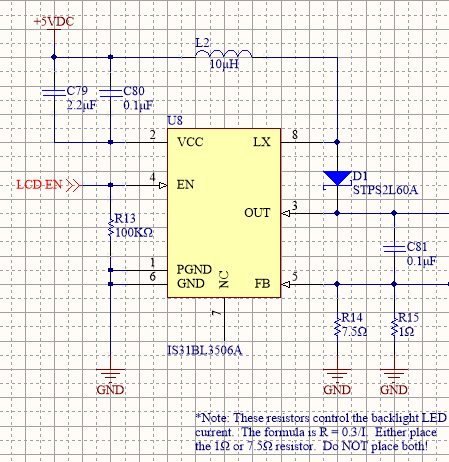
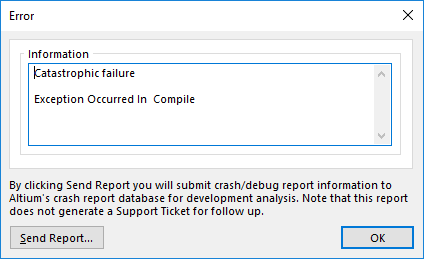
    It is a multi-sheet design - flat, not hierarchical, only 3 sheets.  I'm just using the power port objects.  I'm not trying to connect them manually, I'm just placing a power port or copying and pasting an existing one.  See the picture for typical use.  Oh, great!  Another problem... now it won't even compile without getting an exception.  It still shows the warnings/errors, so maybe it's OK or I can do a recompile.  The Net Identifier Scope is still on the default setting - I haven't changed it.  Got any ideas?


    imageimage

    • Cancel
    • Vote Up 0 Vote Down
    • Cancel
  • e14softwareuk
    0 e14softwareuk over 7 years ago in reply to tonyshell

    Hi Tony. A quick check - have you copied any online vault parts to create your own symbols? If not and you are still having problems then please feel free to send through the schematic and I will take a quick look on my system - software@element14.com.

    • Cancel
    • Vote Up 0 Vote Down
    • Cancel
  • tonyshell
    0 tonyshell over 7 years ago in reply to e14softwareuk

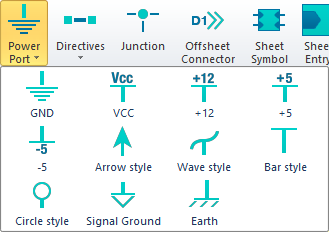
    Hi Peter, the only symbols I copied were the ones that used to create my own parts were the ones from the "Symbol" button on the Home ribbon bar.  What I'm getting warnings about are the power ports, actually that the wires connected to them.  For the GND power port, it named several dozen wires connected them "+3.3VDC".  How do I change the name of a wire?  Otherwise, I would have to delete and redo several dozen wires and it still might do the same thing.  Thanks in advance.


    imageimage

    • Cancel
    • Vote Up 0 Vote Down
    • Cancel
Reply
  • tonyshell
    0 tonyshell over 7 years ago in reply to e14softwareuk

    Hi Peter, the only symbols I copied were the ones that used to create my own parts were the ones from the "Symbol" button on the Home ribbon bar.  What I'm getting warnings about are the power ports, actually that the wires connected to them.  For the GND power port, it named several dozen wires connected them "+3.3VDC".  How do I change the name of a wire?  Otherwise, I would have to delete and redo several dozen wires and it still might do the same thing.  Thanks in advance.


    imageimage

    • Cancel
    • Vote Up 0 Vote Down
    • Cancel
Children
No Data
element14 Community

element14 is the first online community specifically for engineers. Connect with your peers and get expert answers to your questions.

  • Members
  • Learn
  • Technologies
  • Challenges & Projects
  • Products
  • Store
  • About Us
  • Feedback & Support
  • FAQs
  • Terms of Use
  • Privacy Policy
  • Legal and Copyright Notices
  • Sitemap
  • Cookies

An Avnet Company © 2026 Premier Farnell Limited. All Rights Reserved.

Premier Farnell Ltd, registered in England and Wales (no 00876412), registered office: Farnell House, Forge Lane, Leeds LS12 2NE.

ICP 备案号 10220084.

Follow element14

  • X
  • Facebook
  • linkedin
  • YouTube