element14 Community
element14 Community
    Register Log In
  • Site
  • Search
  • Log In Register
  • Community Hub
    Community Hub
    • What's New on element14
    • Feedback and Support
    • Benefits of Membership
    • Personal Blogs
    • Members Area
    • Achievement Levels
  • Learn
    Learn
    • Ask an Expert
    • eBooks
    • element14 presents
    • Learning Center
    • Tech Spotlight
    • STEM Academy
    • Webinars, Training and Events
    • Learning Groups
  • Technologies
    Technologies
    • 3D Printing
    • FPGA
    • Industrial Automation
    • Internet of Things
    • Power & Energy
    • Sensors
    • Technology Groups
  • Challenges & Projects
    Challenges & Projects
    • Design Challenges
    • element14 presents Projects
    • Project14
    • Arduino Projects
    • Raspberry Pi Projects
    • Project Groups
  • Products
    Products
    • Arduino
    • Avnet & Tria Boards Community
    • Dev Tools
    • Manufacturers
    • Multicomp Pro
    • Product Groups
    • Raspberry Pi
    • RoadTests & Reviews
  • About Us
  • Store
    Store
    • Visit Your Store
    • Choose another store...
      • Europe
      •  Austria (German)
      •  Belgium (Dutch, French)
      •  Bulgaria (Bulgarian)
      •  Czech Republic (Czech)
      •  Denmark (Danish)
      •  Estonia (Estonian)
      •  Finland (Finnish)
      •  France (French)
      •  Germany (German)
      •  Hungary (Hungarian)
      •  Ireland
      •  Israel
      •  Italy (Italian)
      •  Latvia (Latvian)
      •  
      •  Lithuania (Lithuanian)
      •  Netherlands (Dutch)
      •  Norway (Norwegian)
      •  Poland (Polish)
      •  Portugal (Portuguese)
      •  Romania (Romanian)
      •  Russia (Russian)
      •  Slovakia (Slovak)
      •  Slovenia (Slovenian)
      •  Spain (Spanish)
      •  Sweden (Swedish)
      •  Switzerland(German, French)
      •  Turkey (Turkish)
      •  United Kingdom
      • Asia Pacific
      •  Australia
      •  China
      •  Hong Kong
      •  India
      • Japan
      •  Korea (Korean)
      •  Malaysia
      •  New Zealand
      •  Philippines
      •  Singapore
      •  Taiwan
      •  Thailand (Thai)
      • Vietnam
      • Americas
      •  Brazil (Portuguese)
      •  Canada
      •  Mexico (Spanish)
      •  United States
      Can't find the country/region you're looking for? Visit our export site or find a local distributor.
  • Translate
  • Profile
  • Settings
Altium CircuitStudio
  • Products
  • Manufacturers
  • Altium CircuitStudio
  • More
  • Cancel
Altium CircuitStudio
Altium CircuitStudio Forum Edited components have same keepout area as original.
  • Blog
  • Forum
  • Documents
  • Events
  • Polls
  • Members
  • Mentions
  • Sub-Groups
  • Tags
  • More
  • Cancel
  • New
Join Altium CircuitStudio to participate - click to join for free!
Actions
  • Share
  • More
  • Cancel
Forum Thread Details
  • State Suggested Answer
  • Locked Locked
  • Replies 9 replies
  • Answers 1 answer
  • Subscribers 90 subscribers
  • Views 980 views
  • Users 0 members are here
  • frontpage
Related
This discussion has been locked.
You can no longer post new replies to this discussion. If you have a question you can start a new discussion

Edited components have same keepout area as original.

yassirreebob
yassirreebob over 7 years ago

I extracted the sources of an intlib component ( a 16 pin header).I edited the sch and pcb to make an 12 pin header and then compiled the part into a new intlib.

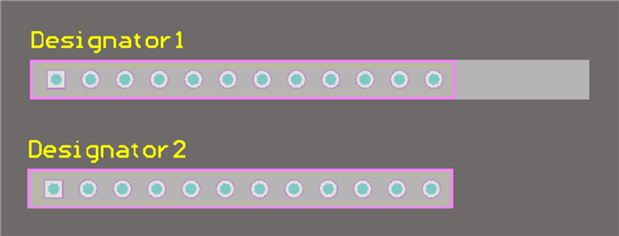
I placed the part on my schematic, and pulled the part onto the PCB. The sch part and the PCB footprint look correct, but the footprint also includes the "keepout" area from the original 16 pin part

causing the part to turn red when it interferes with another part. See attached jpg.

How can I edit the keepout area to match the 12 pins?

Many thanks,

yassirreebob

Attachments:
image
  • Cancel

Top Replies

  • eebylc
    eebylc over 7 years ago in reply to yassirreebob +1 suggested
    Hi Chuck, To change the footprint link go to the schlib and double click the part in the list. Then delete the old footprint model and add the new one. To rename a LibPkg, go to file>save library as Please…
  • e14softwareuk
    e14softwareuk over 7 years ago +1
    I've taken a look and it's the "Mechanical 22" layer that needs turning on so you can see the problem lines. It's not strictly a keepout just some lines on a layer. Useful tip: If you click on the coloured…
  • eebylc
    0 eebylc over 7 years ago

    It's possible your keepout layer is hidden in your pcblib view so you didn't see it until you used the component. Try checking your footprint and make sure the layer is being shown. If that doesn't work could you upload the library file for me to take a look at?

    • Cancel
    • Vote Up 0 Vote Down
    • Cancel
  • yassirreebob
    0 yassirreebob over 7 years ago in reply to eebylc

    Hi Liam,

    Many thanks for your quick reply.

    I edited the pcblib file. It had the keepout layer enabled, but there was nothing on the layer. I added a keepout and re-complied. The keepout showed on the PCB but still was using the wrong keepout area as before.

    int lib attached.

    Best regards,

    • Cancel
    • Vote Up 0 Vote Down
    • Cancel
  • yassirreebob
    0 yassirreebob over 7 years ago in reply to eebylc

    Hi Liam,

    Many thanks for your quick reply.

    I edited the pcblib file. It had the keepout layer enabled, but there was nothing on the layer. I added a keepout and re-complied. The keepout showed on the PCB but still was using the wrong keepout area as before.

    int lib attached.

    Best regards,

    Attachments:
    1945193.zip
    • Cancel
    • Vote Up 0 Vote Down
    • Cancel
  • eebylc
    0 eebylc over 7 years ago in reply to yassirreebob

    Hi Chuck,


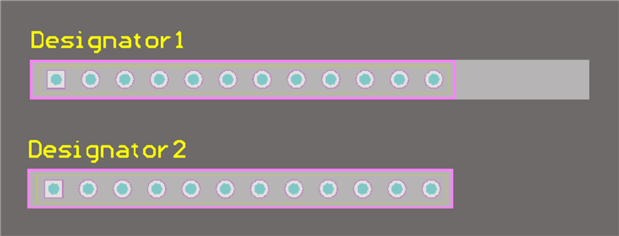
    That is indeed a very strange artifact, I experienced the same thing you did. I fixed it by left click>dragging the cursor over the footprint in the library, making sure to only go as far to the right as I needed to. I then copied it into a new footprint and changed the footprint link in the schlib. As shown below the area is fixed with the new footprint. My guess is an only semi-compatible transfer over from AD at some point. Regardless, Fixed library attached.

    image

    Good luck,

    Liam

    • Cancel
    • Vote Up 0 Vote Down
    • Cancel
  • eebylc
    0 eebylc over 7 years ago in reply to yassirreebob

    Hi Chuck,


    That is indeed a very strange artifact, I experienced the same thing you did. I fixed it by left click>dragging the cursor over the footprint in the library, making sure to only go as far to the right as I needed to. I then copied it into a new footprint and changed the footprint link in the schlib. As shown below the area is fixed with the new footprint. My guess is an only semi-compatible transfer over from AD at some point. Regardless, Fixed library attached.

    image

    Good luck,

    Liam


    Ps. It's extremely strange .intlib files are not allowed to be uploaded but .zip is permitted. Interesting security choice for the forum.

    • Cancel
    • Vote Up 0 Vote Down
    • Cancel
  • yassirreebob
    0 yassirreebob over 7 years ago in reply to eebylc

    Nice work, Liam.

    I copied the footprint.

    How do I change the footprint link in the schlib?

    How do I rename a LibPkg?

    Thanks,

    Chuck


    • Cancel
    • Vote Up 0 Vote Down
    • Cancel
  • eebylc
    0 eebylc over 7 years ago in reply to yassirreebob

    Hi Chuck,


    To change the footprint link go to the schlib and double click the part in the list. Then delete the old footprint model and add the new one.

    To rename a LibPkg, go to file>save library as


    Please accept my last answer as the solution for this question so that the question is marked as solved.


    Liam

    • Cancel
    • Vote Up +1 Vote Down
    • Cancel
  • yassirreebob
    0 yassirreebob over 7 years ago in reply to eebylc

    Many thanks Liam. You got Skilz!

    Chuck

    • Cancel
    • Vote Up 0 Vote Down
    • Cancel
  • e14softwareuk
    0 e14softwareuk over 7 years ago

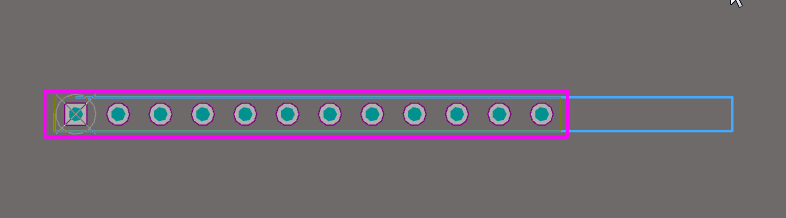
    I've taken a look and it's the "Mechanical 22" layer that needs turning on so you can see the problem lines. It's not strictly a keepout just some lines on a layer.

    image


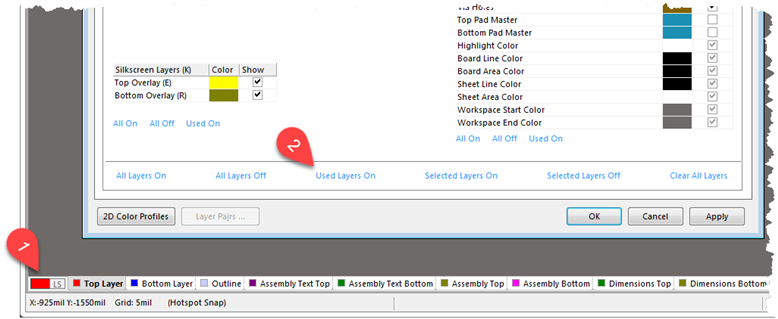
    Useful tip: If you click on the coloured box net to LS you can select Used Layers On.

    image

    • Cancel
    • Vote Up +1 Vote Down
    • Cancel
element14 Community

element14 is the first online community specifically for engineers. Connect with your peers and get expert answers to your questions.

  • Members
  • Learn
  • Technologies
  • Challenges & Projects
  • Products
  • Store
  • About Us
  • Feedback & Support
  • FAQs
  • Terms of Use
  • Privacy Policy
  • Legal and Copyright Notices
  • Sitemap
  • Cookies

An Avnet Company © 2026 Premier Farnell Limited. All Rights Reserved.

Premier Farnell Ltd, registered in England and Wales (no 00876412), registered office: Farnell House, Forge Lane, Leeds LS12 2NE.

ICP 备案号 10220084.

Follow element14

  • X
  • Facebook
  • linkedin
  • YouTube