element14 Community
element14 Community
    Register Log In
  • Site
  • Search
  • Log In Register
  • Community Hub
    Community Hub
    • What's New on element14
    • Feedback and Support
    • Benefits of Membership
    • Personal Blogs
    • Members Area
    • Achievement Levels
  • Learn
    Learn
    • Ask an Expert
    • eBooks
    • element14 presents
    • Learning Center
    • Tech Spotlight
    • STEM Academy
    • Webinars, Training and Events
    • Learning Groups
  • Technologies
    Technologies
    • 3D Printing
    • FPGA
    • Industrial Automation
    • Internet of Things
    • Power & Energy
    • Sensors
    • Technology Groups
  • Challenges & Projects
    Challenges & Projects
    • Design Challenges
    • element14 presents Projects
    • Project14
    • Arduino Projects
    • Raspberry Pi Projects
    • Project Groups
  • Products
    Products
    • Arduino
    • Avnet & Tria Boards Community
    • Dev Tools
    • Manufacturers
    • Multicomp Pro
    • Product Groups
    • Raspberry Pi
    • RoadTests & Reviews
  • About Us
  • Store
    Store
    • Visit Your Store
    • Choose another store...
      • Europe
      •  Austria (German)
      •  Belgium (Dutch, French)
      •  Bulgaria (Bulgarian)
      •  Czech Republic (Czech)
      •  Denmark (Danish)
      •  Estonia (Estonian)
      •  Finland (Finnish)
      •  France (French)
      •  Germany (German)
      •  Hungary (Hungarian)
      •  Ireland
      •  Israel
      •  Italy (Italian)
      •  Latvia (Latvian)
      •  
      •  Lithuania (Lithuanian)
      •  Netherlands (Dutch)
      •  Norway (Norwegian)
      •  Poland (Polish)
      •  Portugal (Portuguese)
      •  Romania (Romanian)
      •  Russia (Russian)
      •  Slovakia (Slovak)
      •  Slovenia (Slovenian)
      •  Spain (Spanish)
      •  Sweden (Swedish)
      •  Switzerland(German, French)
      •  Turkey (Turkish)
      •  United Kingdom
      • Asia Pacific
      •  Australia
      •  China
      •  Hong Kong
      •  India
      • Japan
      •  Korea (Korean)
      •  Malaysia
      •  New Zealand
      •  Philippines
      •  Singapore
      •  Taiwan
      •  Thailand (Thai)
      • Vietnam
      • Americas
      •  Brazil (Portuguese)
      •  Canada
      •  Mexico (Spanish)
      •  United States
      Can't find the country/region you're looking for? Visit our export site or find a local distributor.
  • Translate
  • Profile
  • Settings
Altium CircuitStudio
  • Products
  • Manufacturers
  • Altium CircuitStudio
  • More
  • Cancel
Altium CircuitStudio
Altium CircuitStudio Forum Output generation problem
  • Blog
  • Forum
  • Documents
  • Events
  • Polls
  • Members
  • Mentions
  • Sub-Groups
  • Tags
  • More
  • Cancel
  • New
Join Altium CircuitStudio to participate - click to join for free!
Actions
  • Share
  • More
  • Cancel
Forum Thread Details
  • State Not Answered
  • Locked Locked
  • Replies 3 replies
  • Subscribers 89 subscribers
  • Views 1713 views
  • Users 0 members are here
  • frontpage
Related
This discussion has been locked.
You can no longer post new replies to this discussion. If you have a question you can start a new discussion

Output generation problem

bobchordata
bobchordata over 6 years ago

Hi,


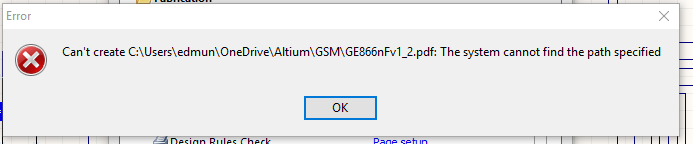
I'm currently needing to generate output files for a design in circuit studio. Generally this is no problem on other projects, but on one particular file it gets an error looking for a directory on a computer that belonged to a previous designer who is no longer with the company (see below) and then sticks trying to generate outputs, even when I de-select any *.pdf type outputs, see further below, and it still tries to product the outputs - NOTE the 'running' status next to items that are unchecked.
image

image

I have gone into options and checked the output folders are all local to my machine, I've saved the project, shut down CS , rebooted and re-started CS and it's still doing it.


I need to generate files for manufacture ASAP so your earliest attention and resolution would be appreciated.


Best regards,


Bob

  • Cancel

Top Replies

  • tarribred61
    tarribred61 over 6 years ago +1
    This is a poor behavior by the software and something they should fix. It may be best to generate a new project in the location you want. Then copy the schematic and PCB files there from Windows and then…
  • tarribred61
    0 tarribred61 over 6 years ago

    This is a poor behavior by the software and something they should fix.  It may be best to generate a new project in the location you want. Then copy the schematic and PCB files there from Windows and then add them as existing documents.  Then regenerate the project.


    If you want to risk it, back up your project first and then edit the PrjPCB file in a text editor and look for the text "DocumentPath" key name that has the old path names.  Deleted the value (but leave the key name and the = sign) and then save the file and perhaps close and reopen the project within CS.  If when you migrated the project you copied the *.PrjPCB file and renamed or save it as another name it still gets remnants of the older file structure and path names.  My guess is there is the old path name still there.


    How CS handles the output files and folders remains a mystery to me.  It seems to generate an *.outjob type file sometimes and sometimes not.  That might be because it found the outjob file someplace else off the old path name that is still in the project file.


    In my case it always saves some of the output files into a folder named Default Configuration.  Even if I change the path to something else such as a folder named Outputs it will always put the schematic PCB files in Default Configuration (sigh).  When marketing decides to change the product name as suits their whims of the day they want the new docs to reflect the project name change too.  It is always a pain (end of mini-rant).


    edit:

    I found this thread that has a method of copying the projects.


    Best way to duplicate / clone a project?


    It is a start but might not work for everyone.  One thing I notice is that you can have the schematic and PCB files directly in the directory/folder structure with the project file or they can be shortcut links to files that are elsewhere.  This is evident by the way CS shows the icon next to the files in the Source Documents list in the project tab.  It is my guess that it is probably better to have the schematic, PCB, local libraries and other project specific files in the local project folder to simplify path names.


    .

    • Cancel
    • Vote Up +1 Vote Down
    • Cancel
  • adamwebber
    0 adamwebber over 6 years ago in reply to tarribred61

    I agree.  Creating a new project seems to resolve most of the issues that are created.  Before you spend the time, first try creating a new *.outjob file.  You can delete the original or move it or rename it.  Honestly, I doubt this will fix it but it's simple and you can try it.

    • Cancel
    • Vote Up 0 Vote Down
    • Cancel
  • lamabrew
    0 lamabrew over 6 years ago

    You might also want to look at Output generation error: error ocurred deleting previous output   Not quite the same issue but probably related (and for whatever reason I have not seen it happen in a long time now).

    • Cancel
    • Vote Up 0 Vote Down
    • Cancel
element14 Community

element14 is the first online community specifically for engineers. Connect with your peers and get expert answers to your questions.

  • Members
  • Learn
  • Technologies
  • Challenges & Projects
  • Products
  • Store
  • About Us
  • Feedback & Support
  • FAQs
  • Terms of Use
  • Privacy Policy
  • Legal and Copyright Notices
  • Sitemap
  • Cookies

An Avnet Company © 2026 Premier Farnell Limited. All Rights Reserved.

Premier Farnell Ltd, registered in England and Wales (no 00876412), registered office: Farnell House, Forge Lane, Leeds LS12 2NE.

ICP 备案号 10220084.

Follow element14

  • X
  • Facebook
  • linkedin
  • YouTube