


Apparently CS uses a far more advance user interface than my simple human intellect can understand!
So I have an schematic page open, and I want to add a component. It's not in my installed libraries, so I'll check the vault....
I open the Vault Explorer, and click on Unified Components in the tree in the left hand panel:
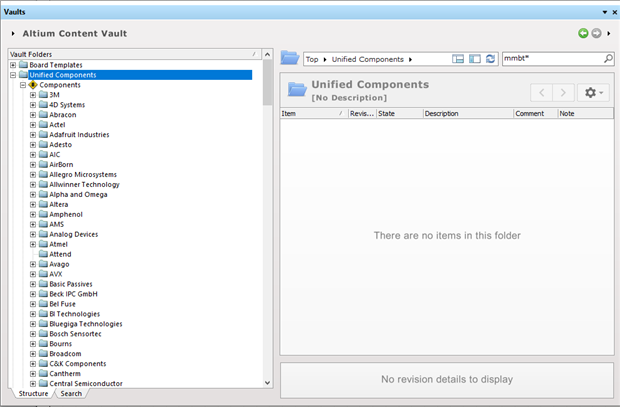
So it's a very popu;ar transistor I want to find: MMBT3904
So I enter MMBT in the Search field at the top of the right hand panel - hit return - Nothing! "No item to display"
So I enter MMBT* in the search field, - nothing.
"Hold on!", I think to myself, "Look, there's a 'Search' tab on the left too!"
"What a numptie!", I call myself, for having missed the only-slightly-obvious search tab. It's at the bottom of the tree. See it? No. Neither did I.
Anyway, with 'Search' selected at the bottom, the 'Search' at the top has now transmogrified into 'Generic search'. "Great!" I exclaim, with much anticipation.
"Now this will surely work!", and then I realise I'm talking to myself. Shamefully, I enter MMBT into the new generic search field and with bated breath hit Return one more time.
Still nothing happend. Then, after a while, nothing continued to happen. Nada. Zilch. Zippo.
Oh, well. I gues I'm not cut out for 21st century user experiences. I'd have thought they'd try to make things labelled 'Search' perform a search.
Anyone able to show an old fart like me, how to search for a simple component?


