element14 Community
element14 Community
    Register Log In
  • Site
  • Search
  • Log In Register
  • Community Hub
    Community Hub
    • What's New on element14
    • Feedback and Support
    • Benefits of Membership
    • Personal Blogs
    • Members Area
    • Achievement Levels
  • Learn
    Learn
    • Ask an Expert
    • eBooks
    • element14 presents
    • Learning Center
    • Tech Spotlight
    • STEM Academy
    • Webinars, Training and Events
    • Learning Groups
  • Technologies
    Technologies
    • 3D Printing
    • FPGA
    • Industrial Automation
    • Internet of Things
    • Power & Energy
    • Sensors
    • Technology Groups
  • Challenges & Projects
    Challenges & Projects
    • Design Challenges
    • element14 presents Projects
    • Project14
    • Arduino Projects
    • Raspberry Pi Projects
    • Project Groups
  • Products
    Products
    • Arduino
    • Avnet & Tria Boards Community
    • Dev Tools
    • Manufacturers
    • Multicomp Pro
    • Product Groups
    • Raspberry Pi
    • RoadTests & Reviews
  • About Us
    About the element14 Community
  • Store
    Store
    • Visit Your Store
    • Choose another store...
      • Europe
      •  Austria (German)
      •  Belgium (Dutch, French)
      •  Bulgaria (Bulgarian)
      •  Czech Republic (Czech)
      •  Denmark (Danish)
      •  Estonia (Estonian)
      •  Finland (Finnish)
      •  France (French)
      •  Germany (German)
      •  Hungary (Hungarian)
      •  Ireland
      •  Israel
      •  Italy (Italian)
      •  Latvia (Latvian)
      •  
      •  Lithuania (Lithuanian)
      •  Netherlands (Dutch)
      •  Norway (Norwegian)
      •  Poland (Polish)
      •  Portugal (Portuguese)
      •  Romania (Romanian)
      •  Russia (Russian)
      •  Slovakia (Slovak)
      •  Slovenia (Slovenian)
      •  Spain (Spanish)
      •  Sweden (Swedish)
      •  Switzerland(German, French)
      •  Turkey (Turkish)
      •  United Kingdom
      • Asia Pacific
      •  Australia
      •  China
      •  Hong Kong
      •  India
      •  Japan
      •  Korea (Korean)
      •  Malaysia
      •  New Zealand
      •  Philippines
      •  Singapore
      •  Taiwan
      •  Thailand (Thai)
      •  Vietnam
      • Americas
      •  Brazil (Portuguese)
      •  Canada
      •  Mexico (Spanish)
      •  United States
      Can't find the country/region you're looking for? Visit our export site or find a local distributor.
  • Translate
  • Profile
  • Settings
Altium CircuitStudio
  • Products
  • Manufacturers
  • Altium CircuitStudio
  • More
  • Cancel
Altium CircuitStudio
Altium CircuitStudio Forum Radius Corners for rectangles
  • Blog
  • Forum
  • Documents
  • Events
  • Polls
  • Members
  • Mentions
  • Sub-Groups
  • Tags
  • More
  • Cancel
  • New
Join Altium CircuitStudio to participate - click to join for free!
Actions
  • Share
  • More
  • Cancel
Forum Thread Details
  • State Verified Answer
  • Locked Locked
  • Replies 4 replies
  • Subscribers 90 subscribers
  • Views 4505 views
  • Users 0 members are here
Related
This discussion has been locked.
You can no longer post new replies to this discussion. If you have a question you can start a new discussion

Radius Corners for rectangles

stuartrumley
stuartrumley over 5 years ago

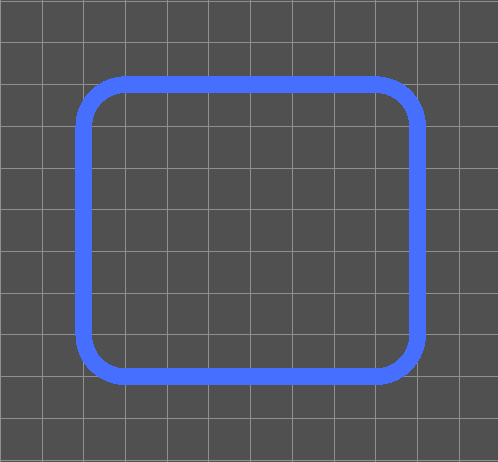
I want to create radiused corners for objects and fills but I don't see how to do that.  I can create a chamfered corners but is there a way to modify the chamfer into a radius?
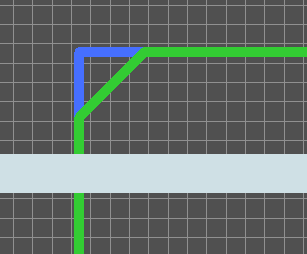
image

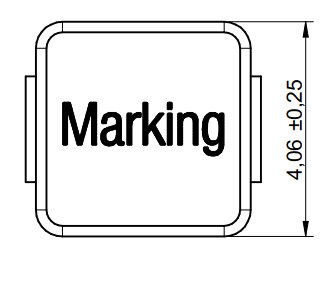
For example, how would you create an accurate geometry for an assembly drawing of this part:
image

Looks like it need about 0.5mm radius.  I can how it might be done by making up four Arcs but that seems very tedious.

Thanks,

Stuart

  • Cancel

Top Replies

  • mf_ibfeew
    mf_ibfeew over 5 years ago +1 verified
    hello, If you are good in planning and thinking ahead, you can create the round corners during drawing-time with the line-tool. start drawing the line, left-click 0,5mm ahead of the corner (to end the…
  • mf_ibfeew
    0 mf_ibfeew over 5 years ago

    hello,

    If you are good in planning and thinking ahead, you can create the round corners during drawing-time with the line-tool.

    start drawing the line, left-click 0,5mm ahead of the corner (to end the first segment), on the keyboard switch the corner mode with SHIFT-SPACE to round corner (and with SPACE alone the corner-direction), set the next left-click on the end of the round corner. And so on for all 4 sides.


    But for me this works not very well. I'm migrating from Eagle (and actual I use both tools parallel - confusing), and there its easy to throw in a rough sketch and then refine. So I can see the result of every step and decide what to do next. I like little steps.

    My practice on CS is actual:

    - draw the rectangular outline, judge the look: good?needs improvement?

    - improvement needed: mark the complete drawed rectangle, all 4 cornerpoints on the wires are highlighted. Drag on everey corner-point to get change the 90°-corners into chamfered corners (your solution above). Work with the right grid-setting, so all 4 chamfers have the same length.

    - again: judge the look: good?needs improvement?

    - ok, it really needs the round corners: Left-click on all 4 chamfers, hit DELETE on the keyboard. Chose the wire tool and set the corner mode to "round corner" (SHIFT-SPACE), draw 4 round lines from every existing line-endpoint to the enxt starting line-starting-point. It helps the set the Hotspot-snapping mode (SHIFT-E) and the show-single-layer-mode (SHIFT-S), so theline-drawing-tool snaps very easy to the existing line-endpoints.


    This instruction seems long for such an easy task (and in this special case the existence of a specific chamfer/rounding function like in Eagle is easier), but I have tried to write down every little detail.After some drawn and modified rectangles the CS-workflow is ok (not great, but acceptable).

    Maik Freitag

    • Cancel
    • Vote Up +1 Vote Down
    • Cancel
  • stuartrumley
    0 stuartrumley over 5 years ago in reply to mf_ibfeew

    Hi Maik,

    Thank you so much for that detailed explanation.  I come from the OrCAD LAYOUT world and I still use it along with Circuit Studio.  OrCAD lets you take any mitered corner and convert it to a radiused corner quite easily with an "A" key click (for arc).  But I found your first suggestion to just use the SHIFT-SPACE keys while drawing the rectangle to be the perfect answer to what I was looking for.

    image

    Thanks again Sir!

    • Cancel
    • Vote Up 0 Vote Down
    • Cancel
  • stuartrumley
    0 stuartrumley over 5 years ago in reply to mf_ibfeew

    By the way Maik, how did you ever find or figure out the SHIFT+SPACE command?  I don't see that in the Shortcuts. 

    • Cancel
    • Vote Up 0 Vote Down
    • Cancel
  • mf_ibfeew
    0 mf_ibfeew over 5 years ago in reply to stuartrumley

    hello,

    as many users already mentioned, the documentation is really, aeh, not so good.

    After a tough start with Circuitstudio I used a rainy weekend to read through the threads on the element14 and eevblog forum and viewed the available youtube-videos (there are not so much). Somewhere on one of the threads I found the Shift-Space-info.


    Many days later I found another helpful hint. Normally with a press of the F1-key I get the online-help-descriptions to the actual open window. But if one presses F1 during an active operation, than CS opens a little overlay-window with special hotkey information. So if you are in the board-editor, press 'L' for Line or 'R' for Route, left-click to start the line and than press F1. This opens not the internet-help, but presents a little hotkey-summary.

    Attention: As I saw at this moment (I try to test all my tips before publication), the little hotkey-help-window in the LINE-Modus omits the SHIFT-SPACE-hotkey, but it shows Shift+space in the Route-modus. Sometimes its like searching for easter eggs....

    Maik Freitag

    • Cancel
    • Vote Up 0 Vote Down
    • Cancel
element14 Community

element14 is the first online community specifically for engineers. Connect with your peers and get expert answers to your questions.

  • Members
  • Learn
  • Technologies
  • Challenges & Projects
  • Products
  • Store
  • About Us
  • Feedback & Support
  • FAQs
  • Terms of Use
  • Privacy Policy
  • Legal and Copyright Notices
  • Sitemap
  • Cookies

An Avnet Company © 2026 Premier Farnell Limited. All Rights Reserved.

Premier Farnell Ltd, registered in England and Wales (no 00876412), registered office: Farnell House, Forge Lane, Leeds LS12 2NE.

Follow element14

  • X
  • Facebook
  • linkedin
  • YouTube