element14 Community
element14 Community
    Register Log In
  • Site
  • Search
  • Log In Register
  • Community Hub
    Community Hub
    • What's New on element14
    • Feedback and Support
    • Benefits of Membership
    • Personal Blogs
    • Members Area
    • Achievement Levels
  • Learn
    Learn
    • Ask an Expert
    • eBooks
    • element14 presents
    • Learning Center
    • Tech Spotlight
    • STEM Academy
    • Webinars, Training and Events
    • Learning Groups
  • Technologies
    Technologies
    • 3D Printing
    • FPGA
    • Industrial Automation
    • Internet of Things
    • Power & Energy
    • Sensors
    • Technology Groups
  • Challenges & Projects
    Challenges & Projects
    • Design Challenges
    • element14 presents Projects
    • Project14
    • Arduino Projects
    • Raspberry Pi Projects
    • Project Groups
  • Products
    Products
    • Arduino
    • Avnet & Tria Boards Community
    • Dev Tools
    • Manufacturers
    • Multicomp Pro
    • Product Groups
    • Raspberry Pi
    • RoadTests & Reviews
  • About Us
  • Store
    Store
    • Visit Your Store
    • Choose another store...
      • Europe
      •  Austria (German)
      •  Belgium (Dutch, French)
      •  Bulgaria (Bulgarian)
      •  Czech Republic (Czech)
      •  Denmark (Danish)
      •  Estonia (Estonian)
      •  Finland (Finnish)
      •  France (French)
      •  Germany (German)
      •  Hungary (Hungarian)
      •  Ireland
      •  Israel
      •  Italy (Italian)
      •  Latvia (Latvian)
      •  
      •  Lithuania (Lithuanian)
      •  Netherlands (Dutch)
      •  Norway (Norwegian)
      •  Poland (Polish)
      •  Portugal (Portuguese)
      •  Romania (Romanian)
      •  Russia (Russian)
      •  Slovakia (Slovak)
      •  Slovenia (Slovenian)
      •  Spain (Spanish)
      •  Sweden (Swedish)
      •  Switzerland(German, French)
      •  Turkey (Turkish)
      •  United Kingdom
      • Asia Pacific
      •  Australia
      •  China
      •  Hong Kong
      •  India
      • Japan
      •  Korea (Korean)
      •  Malaysia
      •  New Zealand
      •  Philippines
      •  Singapore
      •  Taiwan
      •  Thailand (Thai)
      • Vietnam
      • Americas
      •  Brazil (Portuguese)
      •  Canada
      •  Mexico (Spanish)
      •  United States
      Can't find the country/region you're looking for? Visit our export site or find a local distributor.
  • Translate
  • Profile
  • Settings
Altium CircuitStudio
  • Products
  • Manufacturers
  • Altium CircuitStudio
  • More
  • Cancel
Altium CircuitStudio
Altium CircuitStudio Forum CSV1.4 What have I done wrong if "Board shape"->"Define from 3D body" is missing?
  • Blog
  • Forum
  • Documents
  • Events
  • Polls
  • Members
  • Mentions
  • Sub-Groups
  • Tags
  • More
  • Cancel
  • New
Join Altium CircuitStudio to participate - click to join for free!
Actions
  • Share
  • More
  • Cancel
Forum Thread Details
  • State Suggested Answer
  • Locked Locked
  • Replies 7 replies
  • Answers 1 answer
  • Subscribers 89 subscribers
  • Views 920 views
  • Users 0 members are here
Related
This discussion has been locked.
You can no longer post new replies to this discussion. If you have a question you can start a new discussion

CSV1.4 What have I done wrong if "Board shape"->"Define from 3D body" is missing?

bjöcka
bjöcka over 8 years ago

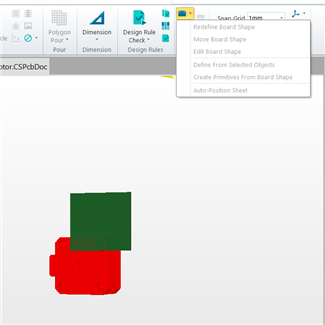
Pretty new to CircuitStudio. I have watched the tutorial "CircuitStudio Quick Start Webinar Series Part 6 - Importing enclosure .STEP Files". According to the tutorial I should be able to use the  Board shape->Define from 3D body button. I don't have this option in the list. Anyone that know if this have been removed?
image

  • Cancel

Top Replies

  • jstrautman
    jstrautman over 8 years ago in reply to jamesharrimanaltium +1
    Can you at least tell us if the "Define from 3D Body" feature was intentionally removed or if it is just a bug? It almost seems intentional because of the way it looks/feels when I attempt to do any board…
  • jamesharrimanaltium
    jamesharrimanaltium over 8 years ago in reply to jstrautman +1 suggested
    Hi Patrik and jstrautman, This is an unintended bug and we'll return this functionality in a hotfix update which we're working on. In the mean time you may want to consider installing 1.3 alongside to…
Parents
  • jamesharrimanaltium
    0 jamesharrimanaltium over 8 years ago

    Thank you Patrick. We're investigating and will reply back when I have an update.


    Best regards,


    James Harriman

    Altium

    • Cancel
    • Vote Up 0 Vote Down
    • Cancel
  • jstrautman
    0 jstrautman over 8 years ago in reply to jamesharrimanaltium

    Can you at least tell us if the "Define from 3D Body" feature was intentionally removed or if it is just a bug?


    It almost seems intentional because of the way it looks/feels when I attempt to do any board shape defining by using the 3D body the way we used to before the update.  But if the change was intentional I would expect some information about the change in the release notes for 1.4 but I don't recall seeing any.

    • Cancel
    • Vote Up +1 Vote Down
    • Cancel
  • jamesharrimanaltium
    0 jamesharrimanaltium over 8 years ago in reply to jstrautman

    Hi Patrik and jstrautman,


    This is an unintended bug and we'll return this functionality in a hotfix update which we're working on. In the mean time you may want to consider installing 1.3 alongside to use to set the board outline. You can leave both versions installed and licensed on your machine.


    The board outline can also be converted to primitives which can be copied from one board to another. So if you'd rather not edit the board in an older version, open a copy of your board in 1.3 and set the board outline from the 3D body. Open the copy in 1.4 and convert the board outline to primitives. These can then be copied to your main board and selected. Then set the board outline from selected primitives.


    Install the older version 1.3 by downloading this file:

    http://altium-install.s3.amazonaws.com/CircuitStudio/CircuitStudioSetup1.3.exe


    To retain both installations, install multiple versions on the same machine by modifying the two file location paths during the installation, e.g. add some extra letters to the end of C:\Program Files (x86)\Altium\CS so it becomes something like C:\Program Files (x86)\Altium\CS13 or use a different path.


    Sign in and Reactivate the license on the software. It is not necessary to remove or de-register the existing license.


    Best regards,


    James Harriman

    Altium

    • Cancel
    • Vote Up +1 Vote Down
    • Cancel
  • jstrautman
    0 jstrautman over 8 years ago in reply to jamesharrimanaltium

    I did the steps you mentioned with v1.3 and it did indeed work well.  Would still like to see that fix that you mention, but keeping both versions will work for now.  Thank you!

    • Cancel
    • Vote Up 0 Vote Down
    • Cancel
  • jamesharrimanaltium
    0 jamesharrimanaltium over 8 years ago in reply to jstrautman

    Hi jstrautman, no problem.


    Best regards,


    James Harriman

    Altium

    • Cancel
    • Vote Up 0 Vote Down
    • Cancel
Reply
  • jamesharrimanaltium
    0 jamesharrimanaltium over 8 years ago in reply to jstrautman

    Hi jstrautman, no problem.


    Best regards,


    James Harriman

    Altium

    • Cancel
    • Vote Up 0 Vote Down
    • Cancel
Children
No Data
element14 Community

element14 is the first online community specifically for engineers. Connect with your peers and get expert answers to your questions.

  • Members
  • Learn
  • Technologies
  • Challenges & Projects
  • Products
  • Store
  • About Us
  • Feedback & Support
  • FAQs
  • Terms of Use
  • Privacy Policy
  • Legal and Copyright Notices
  • Sitemap
  • Cookies

An Avnet Company © 2026 Premier Farnell Limited. All Rights Reserved.

Premier Farnell Ltd, registered in England and Wales (no 00876412), registered office: Farnell House, Forge Lane, Leeds LS12 2NE.

ICP 备案号 10220084.

Follow element14

  • X
  • Facebook
  • linkedin
  • YouTube