element14 Community
element14 Community
    Register Log In
  • Site
  • Search
  • Log In Register
  • Community Hub
    Community Hub
    • What's New on element14
    • Feedback and Support
    • Benefits of Membership
    • Personal Blogs
    • Members Area
    • Achievement Levels
  • Learn
    Learn
    • Ask an Expert
    • eBooks
    • element14 presents
    • Learning Center
    • Tech Spotlight
    • STEM Academy
    • Webinars, Training and Events
    • Learning Groups
  • Technologies
    Technologies
    • 3D Printing
    • FPGA
    • Industrial Automation
    • Internet of Things
    • Power & Energy
    • Sensors
    • Technology Groups
  • Challenges & Projects
    Challenges & Projects
    • Design Challenges
    • element14 presents Projects
    • Project14
    • Arduino Projects
    • Raspberry Pi Projects
    • Project Groups
  • Products
    Products
    • Arduino
    • Avnet & Tria Boards Community
    • Dev Tools
    • Manufacturers
    • Multicomp Pro
    • Product Groups
    • Raspberry Pi
    • RoadTests & Reviews
  • About Us
  • Store
    Store
    • Visit Your Store
    • Choose another store...
      • Europe
      •  Austria (German)
      •  Belgium (Dutch, French)
      •  Bulgaria (Bulgarian)
      •  Czech Republic (Czech)
      •  Denmark (Danish)
      •  Estonia (Estonian)
      •  Finland (Finnish)
      •  France (French)
      •  Germany (German)
      •  Hungary (Hungarian)
      •  Ireland
      •  Israel
      •  Italy (Italian)
      •  Latvia (Latvian)
      •  
      •  Lithuania (Lithuanian)
      •  Netherlands (Dutch)
      •  Norway (Norwegian)
      •  Poland (Polish)
      •  Portugal (Portuguese)
      •  Romania (Romanian)
      •  Russia (Russian)
      •  Slovakia (Slovak)
      •  Slovenia (Slovenian)
      •  Spain (Spanish)
      •  Sweden (Swedish)
      •  Switzerland(German, French)
      •  Turkey (Turkish)
      •  United Kingdom
      • Asia Pacific
      •  Australia
      •  China
      •  Hong Kong
      •  India
      • Japan
      •  Korea (Korean)
      •  Malaysia
      •  New Zealand
      •  Philippines
      •  Singapore
      •  Taiwan
      •  Thailand (Thai)
      • Vietnam
      • Americas
      •  Brazil (Portuguese)
      •  Canada
      •  Mexico (Spanish)
      •  United States
      Can't find the country/region you're looking for? Visit our export site or find a local distributor.
  • Translate
  • Profile
  • Settings
Altium CircuitStudio
  • Products
  • Manufacturers
  • Altium CircuitStudio
  • More
  • Cancel
Altium CircuitStudio
Altium CircuitStudio Forum Using altium vault
  • Blog
  • Forum
  • Documents
  • Events
  • Polls
  • Members
  • Mentions
  • Sub-Groups
  • Tags
  • More
  • Cancel
  • New
Join Altium CircuitStudio to participate - click to join for free!
Actions
  • Share
  • More
  • Cancel
Forum Thread Details
  • Locked Locked
  • Replies 8 replies
  • Subscribers 91 subscribers
  • Views 1674 views
  • Users 0 members are here
  • frontpage
Related
This discussion has been locked.
You can no longer post new replies to this discussion. If you have a question you can start a new discussion

Using altium vault

chrish06
chrish06 over 8 years ago

Hi.

I purchased Circuit studio and am trying to find an RJ45 8p8c R/A connector in the vault. I am clearly missing something since I can not find a model to place on a circuit board

  • Cancel

Top Replies

  • jamesharrimanaltium
    jamesharrimanaltium over 8 years ago in reply to chrish06 +2
    Hi Chris, A component (with blue icon and beginning with CMP) must be placed on the schematic. The Place command on the right click menu becomes active when a schematic document has the focus. After placing…
  • tarribred61
    tarribred61 over 8 years ago

    Looks like there is one from Halotronics CMP-1531.  There may be others.

    image

    • Cancel
    • Vote Up 0 Vote Down
    • Cancel
  • chrish06
    chrish06 over 8 years ago in reply to tarribred61

    Hi,


    I see that part but it is not a 8p8c connector alone it has other

    components. When I look at the list of devices found I assume the IC symbol

    means its has a pcb foot print and the gate schematic only. Is there a

    document that explains how to search the vault and what the options are. I

    can't believe that there is only I part - lookinf further I found a wurth

    component in the list CMP-1710-00001-2 that is more like what I need but I

    can't place the footprint, the place part  selection is grayed out. Also at

    one point when I opened the device you pointed out and  I saw a PCB image

    and a schematic image on the lower right, now I can't get that back. I know

    its me I just am wandering blindly around and need some pointers.

    Thanks for your help

    Chris

    • Cancel
    • Vote Up 0 Vote Down
    • Cancel
  • jamesharrimanaltium
    jamesharrimanaltium over 8 years ago in reply to chrish06

    Hi Chris,


    A component (with blue icon and beginning with CMP) must be placed on the schematic. The Place command on the right click menu becomes active when a schematic document has the focus.


    After placing the symbol, annotate it and push the changes from schematic your schematic to PCB by using Home > Project > Update PCB. The ECO process places the footprint onto the PCB document. The footprint can't be placed directly from the Vault Explorer.


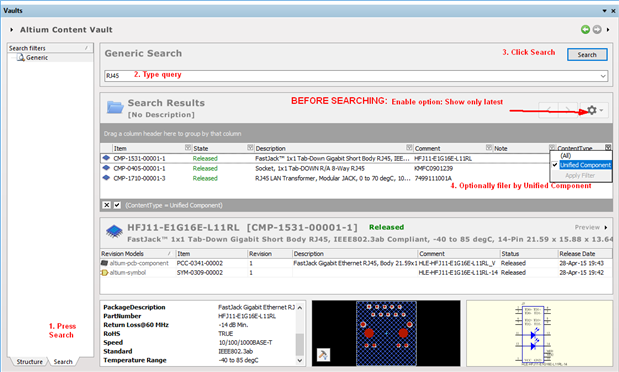
    I notice your example CMP-1710-00001-2 is the second revision, but there is a newer revision CMP-1710-00001-3 which has a slightly different schematic symbol and a square pad 1 on the footprint. If you search for CMP-1710-00001 without the revision -2 then the three revisions will be returned in the search results. Usually you only need to see and use the latest revision, so click the gear icon and enable the option: Show only latest. The old revisions that you never want to see are then hidden, unless you deliberately want to use older revisions.


    Unfortunately vault components can't be edited directly, so if you need a component that isn't in the library then you'll have to create your own library.


    If you want a similar component from one you found in the vault, the vault components can be copied and pasted from the pcb and the schematic into your own PcbLib and SchLib documents.

    I usually copy the footprint to the PcbLib first and rename it, then copy the symbol to the SchLib. You'll need to change 3 things in the symbol after pasting it into the library:


    1. (Most important:) Rename the Symbol Reference from CMP-1710-00001-3 to something else, e.g. the part number 7499111001A

    2. Change the Default Designator back from a number to ?, e.g. from J1 to J?

    3. In the Models section, remove the Footprint(s) that are still mapped to the Vault with Item Revision and map to the footprint that you made in the PcbLib.


    P.S. Some component footprints can be created by the Component Wizard. Open your PcbLib and type comp wiz in the search field.

    Click Tools > Component Wizard...

    (CircuitStudio doesn't feature the IPC Complient Footprint Wizard from Altium Designer, even though it is listed in the search results)


    Tips on Searching


    The search in Vault Explorer of CircuitStudio can be difficult since by default it displays too many columns and the column selection isn't saved.


    Try using the Generic Search instead:


    Don't search while the Structure tab is showing. If you already did so in your session of CircuitStudio, reset the dialog:

    - click the Structure tab

    - click on a component folder (any will do)

    - click the Search tab


    Once on the Search tab:

    Type the query into the wide horizontal white box at the top and click Search.

    If the Item column contains a mixture of different types such as CMP, SYM, PCC, then use the ContentType filter icon (the small funnel button) to only show Unified Component and clik Apply Filter. Clear the filter to show all, or filter for footprints (PCC) or other types.


    image


    Notes:

    Usually you only need to see and use the latest revision, so click the gear icon and enable the option: Show only latest. The old revisions that you never want to see are then hidden. You may need to search again after setting the option.


    Wildcards are automatically assumed on each end of strings. Multiple strings are AND'ed so extra strings further restrict the results. E.g.

    35µH will return nothing (because no components have that string)

    35.0 µH will return 35.0 µH

    35 µH will return 35.0 µH and 350 µH

    µH 35 will return 35.0 µH and 350 µH

    35* µH will return 35.0 µH and 350 µH

    "220 µH" returns several 220 µH

    220 µH   returns several 220 µH as well as L=220 µH and 2200 µH


    uH is more common in the Altium Content Vault than µH (u, not the lowercase mu µ character). Many more results are returned for this search:

    35 uH

    That search will return many components including one that is 4 uH 35 MHz. This is because the strings match any strings within the component and its parameter values, not just the adjacent strings you may expect.


    Best regards,


    James Harriman

    Altium

    • Cancel
    • Vote Up +2 Vote Down
    • Cancel
  • jimku
    jimku over 8 years ago in reply to jamesharrimanaltium

    Thanks James,


    I've been struggling my way through in using the Altium Vault and your explanation helps a lot.


    Jim

    • Cancel
    • Vote Up 0 Vote Down
    • Cancel
  • chrish06
    chrish06 over 8 years ago in reply to jamesharrimanaltium

    Hi,


    Thanks for the help Iam making progress but am still confused.


    First when I start Circuit studio I get this message - I check my lic and

    it appears to be valid so I am not sure what I should do here. I have run

    it from my laptop but when running in my office I make sure I am logged out

    on the laptop.


    Second - when I follow your instructions for search I get this screen


    I do not see the schematic symbol or foot print you show on the lower part

    of the screen shot. I've looked around and don't find a selection to make

    it appear. If I select full item history s sheet opens on my main widow not

    on the search widow.


    Please help the clueless here.


    Thanks

    Chris


    On Fri, Jun 30, 2017 at 8:52 AM, jamesharrimanaltium <messages@element14.com

    Attachments:
    image
    image
    • Cancel
    • Vote Up 0 Vote Down
    • Cancel
  • jamesharrimanaltium
    jamesharrimanaltium over 8 years ago in reply to chrish06

    Hi Chris,


    For the license error, please email software@element14.com for help.


    For the Vault Explorer panel, that section can be moved up with the mouse like in this screen shot. If that doesn't work, please let me know.

    image

    Best regards,


    James Harriman

    Altium

    • Cancel
    • Vote Up 0 Vote Down
    • Cancel
  • jamesharrimanaltium
    jamesharrimanaltium over 8 years ago in reply to jimku

    Thanks Jim.


    James

    • Cancel
    • Vote Up 0 Vote Down
    • Cancel
  • Sparkylabs
    Sparkylabs over 8 years ago

    The "Vault" is a waste of time, just make your own libraries. Even altium libraries are woefully incomplete.

    • Cancel
    • Vote Up 0 Vote Down
    • Cancel
element14 Community

element14 is the first online community specifically for engineers. Connect with your peers and get expert answers to your questions.

  • Members
  • Learn
  • Technologies
  • Challenges & Projects
  • Products
  • Store
  • About Us
  • Feedback & Support
  • FAQs
  • Terms of Use
  • Privacy Policy
  • Legal and Copyright Notices
  • Sitemap
  • Cookies

An Avnet Company © 2026 Premier Farnell Limited. All Rights Reserved.

Premier Farnell Ltd, registered in England and Wales (no 00876412), registered office: Farnell House, Forge Lane, Leeds LS12 2NE.

ICP 备案号 10220084.

Follow element14

  • X
  • Facebook
  • linkedin
  • YouTube