element14 Community
element14 Community
    Register Log In
  • Site
  • Search
  • Log In Register
  • Community Hub
    Community Hub
    • What's New on element14
    • Feedback and Support
    • Benefits of Membership
    • Personal Blogs
    • Members Area
    • Achievement Levels
  • Learn
    Learn
    • Ask an Expert
    • eBooks
    • element14 presents
    • Learning Center
    • Tech Spotlight
    • STEM Academy
    • Webinars, Training and Events
    • Learning Groups
  • Technologies
    Technologies
    • 3D Printing
    • FPGA
    • Industrial Automation
    • Internet of Things
    • Power & Energy
    • Sensors
    • Technology Groups
  • Challenges & Projects
    Challenges & Projects
    • Design Challenges
    • element14 presents Projects
    • Project14
    • Arduino Projects
    • Raspberry Pi Projects
    • Project Groups
  • Products
    Products
    • Arduino
    • Avnet & Tria Boards Community
    • Dev Tools
    • Manufacturers
    • Multicomp Pro
    • Product Groups
    • Raspberry Pi
    • RoadTests & Reviews
  • About Us
  • Store
    Store
    • Visit Your Store
    • Choose another store...
      • Europe
      •  Austria (German)
      •  Belgium (Dutch, French)
      •  Bulgaria (Bulgarian)
      •  Czech Republic (Czech)
      •  Denmark (Danish)
      •  Estonia (Estonian)
      •  Finland (Finnish)
      •  France (French)
      •  Germany (German)
      •  Hungary (Hungarian)
      •  Ireland
      •  Israel
      •  Italy (Italian)
      •  Latvia (Latvian)
      •  
      •  Lithuania (Lithuanian)
      •  Netherlands (Dutch)
      •  Norway (Norwegian)
      •  Poland (Polish)
      •  Portugal (Portuguese)
      •  Romania (Romanian)
      •  Russia (Russian)
      •  Slovakia (Slovak)
      •  Slovenia (Slovenian)
      •  Spain (Spanish)
      •  Sweden (Swedish)
      •  Switzerland(German, French)
      •  Turkey (Turkish)
      •  United Kingdom
      • Asia Pacific
      •  Australia
      •  China
      •  Hong Kong
      •  India
      • Japan
      •  Korea (Korean)
      •  Malaysia
      •  New Zealand
      •  Philippines
      •  Singapore
      •  Taiwan
      •  Thailand (Thai)
      • Vietnam
      • Americas
      •  Brazil (Portuguese)
      •  Canada
      •  Mexico (Spanish)
      •  United States
      Can't find the country/region you're looking for? Visit our export site or find a local distributor.
  • Translate
  • Profile
  • Settings
Altium CircuitStudio
  • Products
  • Manufacturers
  • Altium CircuitStudio
  • More
  • Cancel
Altium CircuitStudio
Altium CircuitStudio Forum Did you guys even beta test this?
  • Blog
  • Forum
  • Documents
  • Events
  • Polls
  • Members
  • Mentions
  • Sub-Groups
  • Tags
  • More
  • Cancel
  • New
Join Altium CircuitStudio to participate - click to join for free!
Actions
  • Share
  • More
  • Cancel
Forum Thread Details
  • Locked Locked
  • Replies 15 replies
  • Subscribers 90 subscribers
  • Views 1280 views
  • Users 0 members are here
Related
This discussion has been locked.
You can no longer post new replies to this discussion. If you have a question you can start a new discussion

Did you guys even beta test this?

naca6409
naca6409 over 8 years ago

I've been trying to get used to Circuit Studio after being trained on Altium, and I'm going to say straight off: This software is *extremely* disappointing.  No "Find Similar"?  Sure, remove the flex circuit functionality, but keep the basic productivity features!


Anyways, my reason for creating an account and posting was this train-wreck:

image


I'm using the software on a Surface Book 2.  Fresh install, both OS and CircuitStudio.  I haven't screwed with any display settings or anything.  It's as stock as things can get.


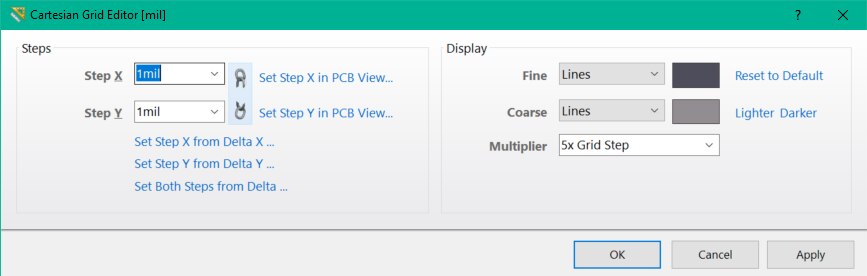
However, for some reason, the "Cartesian Grid Editor" aka "Snap Grid" dialog in the PCBLib editor is not rendering correctly, making it impossible for me to adjust the values.

  • Cancel
Parents
  • e14softwareuk
    e14softwareuk over 8 years ago

    Can you grab the bottom of the window with the mouse and resize the dialog?

    • Cancel
    • Vote Up 0 Vote Down
    • Cancel
  • naca6409
    naca6409 over 8 years ago in reply to e14softwareuk

    No, the window is not resizeable.

    • Cancel
    • Vote Up 0 Vote Down
    • Cancel
  • naca6409
    naca6409 over 8 years ago in reply to naca6409

    Clarification: I the mouse icon indicates that the window should be resizeable, but clicking and dragging does nothing.  (When mousing over the bottom of the dialog, it shows the up/down arrows.)

    • Cancel
    • Vote Up 0 Vote Down
    • Cancel
Reply
  • naca6409
    naca6409 over 8 years ago in reply to naca6409

    Clarification: I the mouse icon indicates that the window should be resizeable, but clicking and dragging does nothing.  (When mousing over the bottom of the dialog, it shows the up/down arrows.)

    • Cancel
    • Vote Up 0 Vote Down
    • Cancel
Children
  • e14softwareuk
    e14softwareuk over 8 years ago in reply to naca6409

    I can certainly make the dialog larger (there is a minimum size so cannot shrink too much, certainly not to the extent you see). Can you resize using the keyboard? With the dialog active use ALT+SPACE to activate the system menu and select S (Size) then try using the down arrow key to expand.

    • Cancel
    • Vote Up 0 Vote Down
    • Cancel
  • tarribred61
    tarribred61 over 8 years ago in reply to e14softwareuk

    In my installation I indeed get the mouse indications that the window can be resized but the window is a fixed size and the mouse handles have no effect.  Maybe the OP should try different screen resolutions or even an external monitor.  Here is what the window should look like.


    image

    • Cancel
    • Vote Up 0 Vote Down
    • Cancel
  • naca6409
    naca6409 over 8 years ago in reply to e14softwareuk

    I tried this, and the window can't be resized by any method so far described.  I tried dragging the bottom edge down as well as using the Alt+Space menu to try invoking Window's resize command directly.  Even using the keyboard exclusively like Peter said does not accomplish any change.

    • Cancel
    • Vote Up 0 Vote Down
    • Cancel
  • e14softwareuk
    e14softwareuk over 8 years ago in reply to naca6409

    One more thing you can try to resize the dialog, this is at your own risk as it edits the registry. Run regedit and go to Computer\HKEY_CURRENT_USER\Software\Altium\CircuitStudio {guid}\DesignExplorer\Forms\TGridEditorForm, there you will find the dialog size and position values that you can try changing. You can change with the program running and dialog closed, next time you invoke the dialog it should read the registry values.

    • Cancel
    • Vote Up 0 Vote Down
    • Cancel
element14 Community

element14 is the first online community specifically for engineers. Connect with your peers and get expert answers to your questions.

  • Members
  • Learn
  • Technologies
  • Challenges & Projects
  • Products
  • Store
  • About Us
  • Feedback & Support
  • FAQs
  • Terms of Use
  • Privacy Policy
  • Legal and Copyright Notices
  • Sitemap
  • Cookies

An Avnet Company © 2026 Premier Farnell Limited. All Rights Reserved.

Premier Farnell Ltd, registered in England and Wales (no 00876412), registered office: Farnell House, Forge Lane, Leeds LS12 2NE.

ICP 备案号 10220084.

Follow element14

  • X
  • Facebook
  • linkedin
  • YouTube