element14 Community
element14 Community
    Register Log In
  • Site
  • Search
  • Log In Register
  • Community Hub
    Community Hub
    • What's New on element14
    • Feedback and Support
    • Benefits of Membership
    • Personal Blogs
    • Members Area
    • Achievement Levels
  • Learn
    Learn
    • Ask an Expert
    • eBooks
    • element14 presents
    • Learning Center
    • Tech Spotlight
    • STEM Academy
    • Webinars, Training and Events
    • Learning Groups
  • Technologies
    Technologies
    • 3D Printing
    • FPGA
    • Industrial Automation
    • Internet of Things
    • Power & Energy
    • Sensors
    • Technology Groups
  • Challenges & Projects
    Challenges & Projects
    • Design Challenges
    • element14 presents Projects
    • Project14
    • Arduino Projects
    • Raspberry Pi Projects
    • Project Groups
  • Products
    Products
    • Arduino
    • Avnet & Tria Boards Community
    • Dev Tools
    • Manufacturers
    • Multicomp Pro
    • Product Groups
    • Raspberry Pi
    • RoadTests & Reviews
  • About Us
    About the element14 Community
  • Store
    Store
    • Visit Your Store
    • Choose another store...
      • Europe
      •  Austria (German)
      •  Belgium (Dutch, French)
      •  Bulgaria (Bulgarian)
      •  Czech Republic (Czech)
      •  Denmark (Danish)
      •  Estonia (Estonian)
      •  Finland (Finnish)
      •  France (French)
      •  Germany (German)
      •  Hungary (Hungarian)
      •  Ireland
      •  Israel
      •  Italy (Italian)
      •  Latvia (Latvian)
      •  
      •  Lithuania (Lithuanian)
      •  Netherlands (Dutch)
      •  Norway (Norwegian)
      •  Poland (Polish)
      •  Portugal (Portuguese)
      •  Romania (Romanian)
      •  Russia (Russian)
      •  Slovakia (Slovak)
      •  Slovenia (Slovenian)
      •  Spain (Spanish)
      •  Sweden (Swedish)
      •  Switzerland(German, French)
      •  Turkey (Turkish)
      •  United Kingdom
      • Asia Pacific
      •  Australia
      •  China
      •  Hong Kong
      •  India
      •  Japan
      •  Korea (Korean)
      •  Malaysia
      •  New Zealand
      •  Philippines
      •  Singapore
      •  Taiwan
      •  Thailand (Thai)
      •  Vietnam
      • Americas
      •  Brazil (Portuguese)
      •  Canada
      •  Mexico (Spanish)
      •  United States
      Can't find the country/region you're looking for? Visit our export site or find a local distributor.
  • Translate
  • Profile
  • Settings
Altium CircuitStudio
  • Products
  • Manufacturers
  • Altium CircuitStudio
  • More
  • Cancel
Altium CircuitStudio
Altium CircuitStudio Forum Did you guys even beta test this?
  • Blog
  • Forum
  • Documents
  • Events
  • Polls
  • Members
  • Mentions
  • Sub-Groups
  • Tags
  • More
  • Cancel
  • New
Join Altium CircuitStudio to participate - click to join for free!
Actions
  • Share
  • More
  • Cancel
Forum Thread Details
  • Locked Locked
  • Replies 15 replies
  • Subscribers 90 subscribers
  • Views 1431 views
  • Users 0 members are here
Related
This discussion has been locked.
You can no longer post new replies to this discussion. If you have a question you can start a new discussion

Did you guys even beta test this?

naca6409
naca6409 over 8 years ago

I've been trying to get used to Circuit Studio after being trained on Altium, and I'm going to say straight off: This software is *extremely* disappointing.  No "Find Similar"?  Sure, remove the flex circuit functionality, but keep the basic productivity features!


Anyways, my reason for creating an account and posting was this train-wreck:

image


I'm using the software on a Surface Book 2.  Fresh install, both OS and CircuitStudio.  I haven't screwed with any display settings or anything.  It's as stock as things can get.


However, for some reason, the "Cartesian Grid Editor" aka "Snap Grid" dialog in the PCBLib editor is not rendering correctly, making it impossible for me to adjust the values.

  • Cancel
  • naca6409
    naca6409 over 8 years ago in reply to csiemer

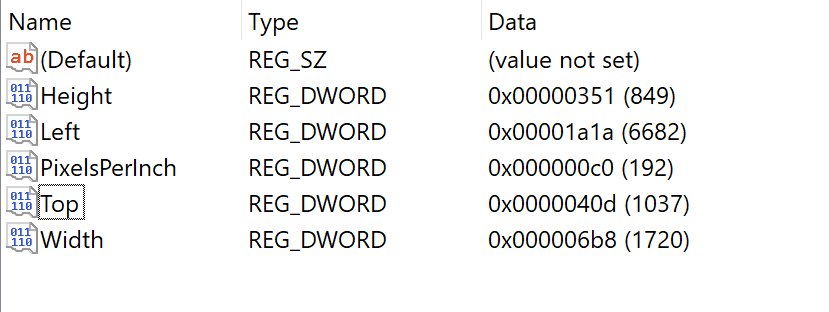
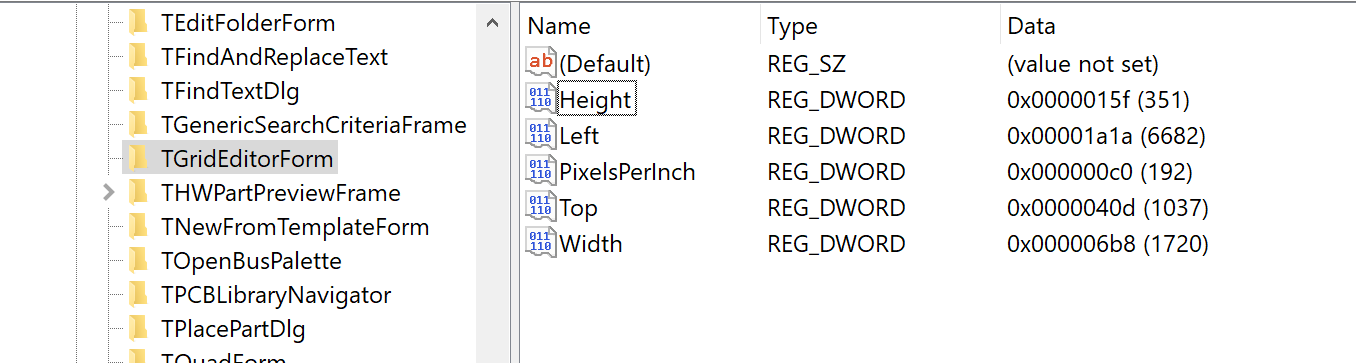
    Good idea.  I tried adjusting the height parameter to match yours and the behavior of the dialog was the same when I next invoked it. image


    imageimage


    Previously, the value was set to 240.

    • Cancel
    • Vote Up 0 Vote Down
    • Cancel
  • csiemer
    csiemer over 8 years ago in reply to naca6409

    Ok, one more thing to check settings wise.


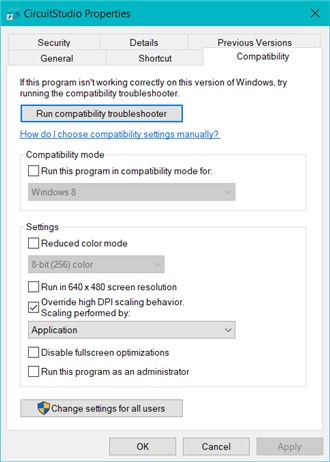
    For the shortcut you use to open CircuitStudio, access the properties of this shortcut and then go to the Compatibility tab.  There is a section here for High DPI scaling.  Please take a screenshot of this so I can see how it is set.

    Here are the regular settings I use for reference

    image

    I tried various options here to reproduce what you are seeing, but could not do it.  However, in changing these settings the dialog is modified.  So, it might be worth checking a few of the settings here to see if they either correct the issue, or at least kick that dialog into a readable/usable size.  To see changes with this, you will need to close and re-launch CircuitStudio from the updated shortcut properties.


    Also, just to be sure, check to see that you have all critical Windows updates installed.

    • Cancel
    • Vote Up 0 Vote Down
    • Cancel
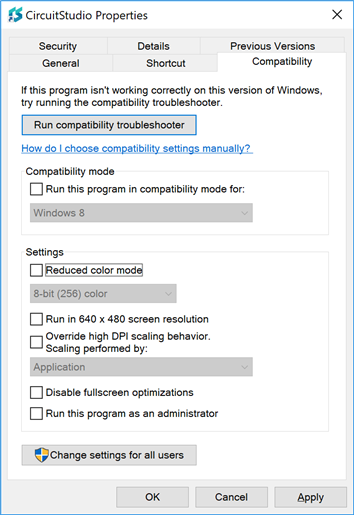
  • naca6409
    naca6409 over 8 years ago in reply to csiemer

    Here were my settings.  I tried mirroring yours and did not get any change in behavior.

    image

    My updates are current.  image

    • Cancel
    • Vote Up 0 Vote Down
    • Cancel
  • e14softwareuk
    e14softwareuk over 8 years ago in reply to naca6409

    This grid dialog is used by the the PCB and PCBLIB editors, do you get the same dialog issue from both editors?

    • Cancel
    • Vote Up 0 Vote Down
    • Cancel
  • csiemer
    csiemer over 8 years ago in reply to naca6409

    I've been reading a bit about the Surface and Scaling issues, and they seem to be in a bit of a special category, especially when additional displays are plugged in.


    The workarounds I am seeing, seem to be quite involved, but we can give them a try.  Before we consider diving into attempting the workaround, try the following and let me know if it changes anything for you.


    Disconnect any additional displays, so only the Surface display is active, don't just disable them, but disconnect, no dock etc.


    Restart Windows with no additional displays attached


    Set display scaling to 100% -  at a high resolution icons and text will be real small, don't worry, the intent is not to leave it in this mode, just to see if this alters behavior. If 100% is not an option, please let me know.


    Restart Windows or Sign out and Sign in again so the scaling settings take effect everywhere.


    Launch CS and let me know if you notice a change in that dialog.

    • Cancel
    • Vote Up 0 Vote Down
    • Cancel
<
element14 Community

element14 is the first online community specifically for engineers. Connect with your peers and get expert answers to your questions.

  • Members
  • Learn
  • Technologies
  • Challenges & Projects
  • Products
  • Store
  • About Us
  • Feedback & Support
  • FAQs
  • Terms of Use
  • Privacy Policy
  • Legal and Copyright Notices
  • Sitemap
  • Cookies

An Avnet Company © 2026 Premier Farnell Limited. All Rights Reserved.

Premier Farnell Ltd, registered in England and Wales (no 00876412), registered office: Farnell House, Forge Lane, Leeds LS12 2NE.

ICP 备案号 10220084.

Follow element14

  • X
  • Facebook
  • linkedin
  • YouTube