element14 Community
element14 Community
    Register Log In
  • Site
  • Search
  • Log In Register
  • Community Hub
    Community Hub
    • What's New on element14
    • Feedback and Support
    • Benefits of Membership
    • Personal Blogs
    • Members Area
    • Achievement Levels
  • Learn
    Learn
    • Ask an Expert
    • eBooks
    • element14 presents
    • Learning Center
    • Tech Spotlight
    • STEM Academy
    • Webinars, Training and Events
    • Learning Groups
  • Technologies
    Technologies
    • 3D Printing
    • FPGA
    • Industrial Automation
    • Internet of Things
    • Power & Energy
    • Sensors
    • Technology Groups
  • Challenges & Projects
    Challenges & Projects
    • Design Challenges
    • element14 presents Projects
    • Project14
    • Arduino Projects
    • Raspberry Pi Projects
    • Project Groups
  • Products
    Products
    • Arduino
    • Avnet & Tria Boards Community
    • Dev Tools
    • Manufacturers
    • Multicomp Pro
    • Product Groups
    • Raspberry Pi
    • RoadTests & Reviews
  • About Us
    About the element14 Community
  • Store
    Store
    • Visit Your Store
    • Choose another store...
      • Europe
      •  Austria (German)
      •  Belgium (Dutch, French)
      •  Bulgaria (Bulgarian)
      •  Czech Republic (Czech)
      •  Denmark (Danish)
      •  Estonia (Estonian)
      •  Finland (Finnish)
      •  France (French)
      •  Germany (German)
      •  Hungary (Hungarian)
      •  Ireland
      •  Israel
      •  Italy (Italian)
      •  Latvia (Latvian)
      •  
      •  Lithuania (Lithuanian)
      •  Netherlands (Dutch)
      •  Norway (Norwegian)
      •  Poland (Polish)
      •  Portugal (Portuguese)
      •  Romania (Romanian)
      •  Russia (Russian)
      •  Slovakia (Slovak)
      •  Slovenia (Slovenian)
      •  Spain (Spanish)
      •  Sweden (Swedish)
      •  Switzerland(German, French)
      •  Turkey (Turkish)
      •  United Kingdom
      • Asia Pacific
      •  Australia
      •  China
      •  Hong Kong
      •  India
      •  Japan
      •  Korea (Korean)
      •  Malaysia
      •  New Zealand
      •  Philippines
      •  Singapore
      •  Taiwan
      •  Thailand (Thai)
      •  Vietnam
      • Americas
      •  Brazil (Portuguese)
      •  Canada
      •  Mexico (Spanish)
      •  United States
      Can't find the country/region you're looking for? Visit our export site or find a local distributor.
  • Translate
  • Profile
  • Settings
Multicomp Pro
  • Products
  • Manufacturers
  • Multicomp Pro
  • More
  • Cancel
Multicomp Pro
Forum I built a browser-based control panel for our Multicomp Pro bench gear — MP711001 PSU + MP730027 DMM + MP71077x DC Load
  • Forum
  • Documents
  • Files
  • Members
  • Mentions
  • Sub-Groups
  • Tags
  • More
  • Cancel
  • New
Join Multicomp Pro to participate - click to join for free!
Actions
  • Share
  • More
  • Cancel
Forum Thread Details
  • Replies 9 replies
  • Subscribers 25 subscribers
  • Views 215 views
  • Users 0 members are here
  • MP71077
  • MP750513
  • MP730027
  • test equipment
  • programmable PSU
  • multicomp pro
  • dmm
  • MP710771
  • DC Load
  • multicomp
  • MP710772
  • automation
  • MP711001
Related

I built a browser-based control panel for our Multicomp Pro bench gear — MP711001 PSU + MP730027 DMM + MP71077x DC Load

mayermakes
mayermakes 12 days ago

I recently did another Lab equipment upgrade (video to follow on Element14presents) and wanted to get access to the new devices via my network. this quickly got a bit out of hand.

It's called lab_UI and it's a browser-based control and data-logging panel that talks to your hardware over your local network — no proprietary software, no USB drivers, just Python and a web browser.
All devices are connected via an ethernet hub to my local network.

GitHub: https://github.com/mayermakes/lab_UI

image

The project has two main parts:

lab_api — a Python driver package with one module per instrument. Each driver handles the raw network communication (TCP for the PSU and DMM, UDP for the DC Load) and exposes clean Python methods: set voltage, enable output, take a measurement, and so on.

server.py + lab_control.html — a Flask server that wraps those drivers as a REST API, and a single-file HTML/JS frontend that talks to it. You run the server on the machine that's physically connected to your network (or the same bench PC), then open the UI from any browser on the same LAN — laptop, tablet, whatever.

How it works technically

When you start server.py, it binds to port 5000 and initialises a DeviceManager that holds references to all three drivers. Connections to the instruments are lazy — the TCP/UDP sockets aren't opened until the first actual API call hits that device. If a socket drops mid-session it resets and retries once before returning an HTTP 500, so transient network hiccups don't kill your session.

All three devices and the HTML frontend are served from that single port. The API follows a clean REST structure:

  • PSU endpoints live under /api/psu/channel/<1–4>/... — you can set voltage, set current limit, toggle output, and read back actual values per channel independently.
  • Multimeter endpoints are under /api/mm/measure/<mode> — modes include dc_voltage, ac_voltage, dc_current, ac_current, resistance, continuity, diode, capacitance, and frequency.
  • DC Load endpoints are under /api/dcload/ — you set the operating mode (CC, CV, CP, or CR), send a setpoint, engage/disengage the load, and read back measured voltage and current.

Thread safety is handled with a threading.Lock around all driver access, so the auto-polling frontend (which can fire requests every 1, 2, 5, or 10 seconds across all three devices simultaneously) won't cause race conditions.

The live chart in the UI plots PSU voltage, PSU current, DMM reading, load voltage, and load current on a shared time axis, keeping up to 120 samples. You can hide individual series, clear history, or export everything as a CSV at any time.

There's also a Config Manager that saves complete instrument setups — server URL, all setpoints, modes, and channel selection — to browser localStorage and lets you export/import them as JSON. Handy for quickly switching between recurring test configurations.

Practical measurement scenarios

Here are a few workflows where having all three instruments coordinated like this actually changes how you work:

PSU output characterisation / load regulation Set the PSU to a target rail (say 5 V / 2 A on CH1), put the DC Load in CC mode at a series of current steps, and watch the PSU's actual output voltage in the live chart. The load current readback and PSU voltage readback are plotted together, so you can see how much the rail sags under load without manually writing anything down. Export to CSV and you've got a load-regulation curve.

Battery / supercapacitor discharge profiling Put the device under test between the PSU (as a charge source on a separate channel) and the DC Load in CC or CP mode. Poll voltage and current at your chosen rate and the live chart builds a discharge curve in real time. The CSV export gives you the raw data for further analysis.

Power supply efficiency testing Use the multimeter in DC voltage mode to measure input voltage at a precise point (useful when you need a third measurement point independent of the PSU's own readback), and use the load to set the output power demand. With all three polled simultaneously at the same rate, you get correlated input/output measurements for computing efficiency.

Multi-rail DUT bring-up The PSU has four independent channels. You can configure each rail (e.g. 3.3 V, 5 V, 12 V, −12 V) with its own current limit, save that as a named config, and bring them all up in sequence without touching the instrument front panel. If something trips a current limit you'll see it immediately in the chart.

Automated script testing via the REST API Because the whole thing is just HTTP, you can drive it from a Python script, a Jupyter notebook, or even a shell script with curl. The API reference in the repo documents every endpoint with request/response examples. This makes it easy to build simple parametric sweeps — iterate a voltage setpoint, trigger a measurement, log the result — without needing VISA or any instrument-specific library on the client.

You can try an example via demo.py in this repo.

It should be quite easy to add drivers for more Instruments / include them in the UI, but of course a rewrite to a more "modular" UI will likely be the next step ( in case I aquire more gear to Automate)
currently MP711001 PSU , MP730027 DMM, MP71077x DC Load are supported. the Driver for an Arbitrary Waveform generator is only working for channel 1 at the moment.
maybe someone reading this post knows how to correctly address channel 2 https://github.com/mayermakes/MP750513_python
https://github.com/mayermakes/MP750513_python/tree/multi-channel


Obviously the whole project made use of Ai for writing docs etc. the device drivers took a lot of manual tweaking as the devices all behave a bit differently and use different protocols but getting Ai tools to write test scripts that try out possible command structures for SCPI commands helped a lot. this apporach might work for many other devices, so Ideally I hope people contribute drivers for their own devices over time.

Hope this helps.
Clem

  • Sign in to reply
  • Cancel

Top Replies

  • mayermakes
    mayermakes 9 days ago +1
    I have opened a new branch for dynamic device discovery. https://github.com/mayermakes/lab_UI/tree/dynamic-discovery the recent AWG updates are already merged. Idealy once a driver is implemented and the…
  • michaelkellett
    michaelkellett 12 days ago

    Were you able to find a programming manual describing the SCPI commands for the MP750513 ?

    I couldn't  - although I didn't spend very long looking.

    MK

    • Cancel
    • Vote Up 0 Vote Down
    • Sign in to reply
    • Cancel
  • mayermakes
    mayermakes 12 days ago in reply to michaelkellett

    I started with the info found in this Mark Hughes video from his RoadTest: 

    You don't have permission to edit metadata of this video.
    Edit media
    x
    image
    Upload Preview
    image


    the manual also only references channel1 in the SCPI section..so at this point I´d hope for community help or good 'ol try 'n' error

    • Cancel
    • Vote Up 0 Vote Down
    • Sign in to reply
    • Cancel
  • michaelkellett
    michaelkellett 12 days ago in reply to mayermakes

    Slightly hard to help because I don't have the generator so I'm flying blind, but looking at the video at 4:53 I see:

    image

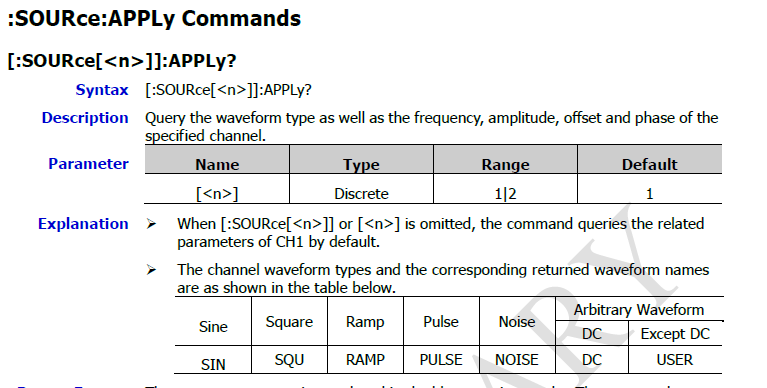
    Looking at the manual for a Rigol DG1000Z SOURCE works like this:

    image

    Focus on this bit:

    image

    It looks to me as if when you use the short form command for (for example) FREQ you can't specify the channel.

    So you will need to modify the driver so that you can set the target channel and then change frequency (etc)  using:

    SOURCEN:FREQ X

    where N is the channel

    I think you might well be able to download Rigol manuals which could be helpful.

    MK

    • Cancel
    • Vote Up 0 Vote Down
    • Sign in to reply
    • Cancel
  • gam3t3ch
    gam3t3ch 9 days ago

    Great project I did a similar project for my Hanmatek gear a while ago so I can easily record the stuff going on and review later or use in videos.   

    • Cancel
    • Vote Up 0 Vote Down
    • Sign in to reply
    • Cancel
  • shabaz
    shabaz 9 days ago

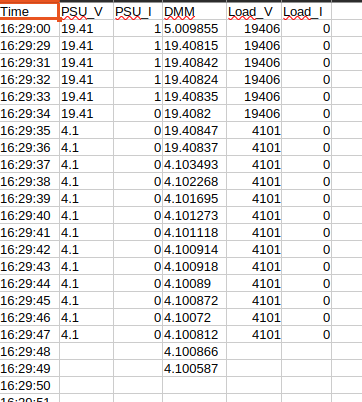
    I think you've got artificial smoothing enabled in the charts (I recognize it from that chart style because I've encountered it before), it makes voltages or other signals appear to have levels that were not there in reality, e.g. the little rising humps before the level goes low, and then the little negative dips immediately afterwards, were probably not real. It's an annoying side-effect from some of these chart libraries examples/default settings. They tailor the examples to look nice in online demos, but are not practical.

    Perhaps it's best to get rid of the smoothing (I feel anyway), otherwise people may assume a PSU is going beyond what it was set for, or a voltage was measured that the source equipment never generated.

    • Cancel
    • Vote Up 0 Vote Down
    • Sign in to reply
    • Cancel
  • mayermakes
    mayermakes 9 days ago in reply to michaelkellett

    https://github.com/mayermakes/MP750513_python
    that worked!! thanks for the valuable tip! alrready tested and merged in the driver repo + Lab_UI repo.
    I also updated the demo to use channel 2 as well.
    only caveat-> but that seems to be an HW issue is that the readback on channel 2 does not work all the time - which is minor in the grand scheme of things.

    • Cancel
    • Vote Up 0 Vote Down
    • Sign in to reply
    • Cancel
  • mayermakes
    mayermakes 9 days ago in reply to gam3t3ch

    thank you! it should be quite easy to include your old gear into the system.

    • Cancel
    • Vote Up 0 Vote Down
    • Sign in to reply
    • Cancel
  • mayermakes
    mayermakes 9 days ago in reply to shabaz

    image

    indeed the chart shows bumps , but the actual data points recorded do not. this seems to be a quirk of the chart lib as you say.
    thanks for the heads up. I'll see if I can change that.

    • Cancel
    • Vote Up 0 Vote Down
    • Sign in to reply
    • Cancel
  • mayermakes
    mayermakes 9 days ago

    I have opened a new branch for dynamic device discovery.
    https://github.com/mayermakes/lab_UI/tree/dynamic-discovery
    the recent AWG updates are already merged.  Idealy once a driver is implemented and the device is reachable on the network it should then pop up in the interface

    • Cancel
    • Vote Up +1 Vote Down
    • Sign in to reply
    • Cancel
element14 Community

element14 is the first online community specifically for engineers. Connect with your peers and get expert answers to your questions.

  • Members
  • Learn
  • Technologies
  • Challenges & Projects
  • Products
  • Store
  • About Us
  • Feedback & Support
  • FAQs
  • Terms of Use
  • Privacy Policy
  • Legal and Copyright Notices
  • Sitemap
  • Cookies

An Avnet Company © 2026 Premier Farnell Limited. All Rights Reserved.

Premier Farnell Ltd, registered in England and Wales (no 00876412), registered office: Farnell House, Forge Lane, Leeds LS12 2NE.

ICP 备案号 10220084.

Follow element14

  • X
  • Facebook
  • linkedin
  • YouTube