



element14 Community
element14 Community
    Register Log In
  • Site
  • Search
  • Log In Register
  • Community Hub
    Community Hub
    • What's New on element14
    • Feedback and Support
    • Benefits of Membership
    • Personal Blogs
    • Members Area
    • Achievement Levels
  • Learn
    Learn
    • Ask an Expert
    • eBooks
    • element14 presents
    • Learning Center
    • Tech Spotlight
    • STEM Academy
    • Webinars, Training and Events
    • Learning Groups
  • Technologies
    Technologies
    • 3D Printing
    • FPGA
    • Industrial Automation
    • Internet of Things
    • Power & Energy
    • Sensors
    • Technology Groups
  • Challenges & Projects
    Challenges & Projects
    • Design Challenges
    • element14 presents Projects
    • Project14
    • Arduino Projects
    • Raspberry Pi Projects
    • Project Groups
  • Products
    Products
    • Arduino
    • Avnet & Tria Boards Community
    • Dev Tools
    • Manufacturers
    • Multicomp Pro
    • Product Groups
    • Raspberry Pi
    • RoadTests & Reviews
  • About Us
    About the element14 Community
  • Store
    Store
    • Visit Your Store
    • Choose another store...
      • Europe
      •  Austria (German)
      •  Belgium (Dutch, French)
      •  Bulgaria (Bulgarian)
      •  Czech Republic (Czech)
      •  Denmark (Danish)
      •  Estonia (Estonian)
      •  Finland (Finnish)
      •  France (French)
      •  Germany (German)
      •  Hungary (Hungarian)
      •  Ireland
      •  Israel
      •  Italy (Italian)
      •  Latvia (Latvian)
      •  
      •  Lithuania (Lithuanian)
      •  Netherlands (Dutch)
      •  Norway (Norwegian)
      •  Poland (Polish)
      •  Portugal (Portuguese)
      •  Romania (Romanian)
      •  Russia (Russian)
      •  Slovakia (Slovak)
      •  Slovenia (Slovenian)
      •  Spain (Spanish)
      •  Sweden (Swedish)
      •  Switzerland(German, French)
      •  Turkey (Turkish)
      •  United Kingdom
      • Asia Pacific
      •  Australia
      •  China
      •  Hong Kong
      •  India
      •  Japan
      •  Korea (Korean)
      •  Malaysia
      •  New Zealand
      •  Philippines
      •  Singapore
      •  Taiwan
      •  Thailand (Thai)
      •  Vietnam
      • Americas
      •  Brazil (Portuguese)
      •  Canada
      •  Mexico (Spanish)
      •  United States
      Can't find the country/region you're looking for? Visit our export site or find a local distributor.
  • Translate
  • Profile
  • Settings
Raspberry Pi
  • Products
  • More
Raspberry Pi
Blog A Dummies Guide to Linux on a Raspberry Pi. - 1.0
  • Blog
  • Forum
  • Documents
  • Quiz
  • Events
  • Polls
  • Files
  • Members
  • Mentions
  • Sub-Groups
  • Tags
  • More
  • Cancel
  • New
Join Raspberry Pi to participate - click to join for free!
Featured Articles
Announcing Pi
Technical Specifications
Raspberry Pi FAQs
Win a Pi
GPIO Pinout
Raspberry Pi Wishlist
Comparison Chart
Quiz
  • Share
  • More
  • Cancel
Group Actions
  • Group RSS
  • More
  • Cancel
Engagement
  • Author Author: phoenixcomm
  • Date Created: 29 Jul 2015 6:42 PM Date Created
  • Views 4445 views
  • Likes 17 likes
  • Comments 32 comments
Related
Recommended
  • raspberry-pi
  • computing_history
  • unix
  • sudo_open
  • operating_systems
  • introduction
  • linux
  • raspberry_pi_getting_started

A Dummies Guide to Linux on a Raspberry Pi. - 1.0

phoenixcomm
phoenixcomm
29 Jul 2015
You don't have permission to edit metadata of this video.
Edit media
x
image
Upload Preview
image

Introduction:

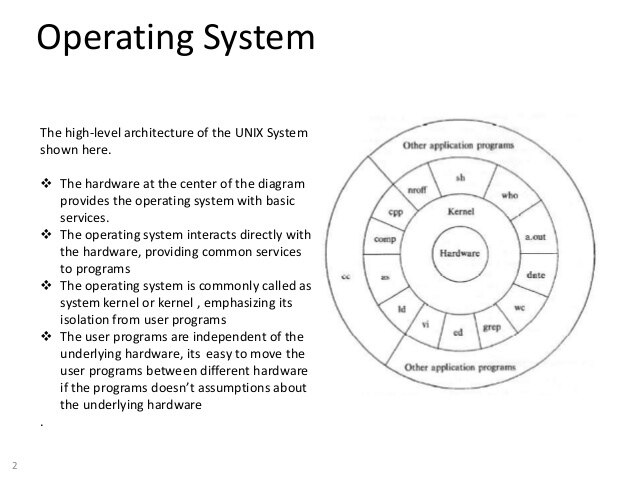
    Linux you say what is Linux? Alright, I know how I will begin. A long time ago in the mid 70's at Bell Laboratories, Murry Hill, New Jersey, a two guys came up with Unix. They were: Denis Ritchie and Ken Thompson. Here is a little film which explains it.


This was the eureka moment for computing. At that time the world changed. You see everything up to then was done in what is known a fixed length records. You sat and punched you cards and then took them to the "Computer Room" and gave them your cards. Hopefully you did not have any errors, or you had to fix the problem, and then go back to the "Computer Room".  Unix is device independent. You know in Dos/Windows (1983/5) you used to have to install your printer through your program? And then to print your document you first have to open the program to get to the printer. Well, that's gone!So to print a document/file pick it up and drag it to your local printer icon (should be on your desktop), and it asks how many copies and which printer to print it on. This printer could be in your office out in the hall, or on the other side of the world. The reason is  Unix, programs write, read to Standard I/O. And all files are just that files there are no special files like the directories. There just normal files.
 

image


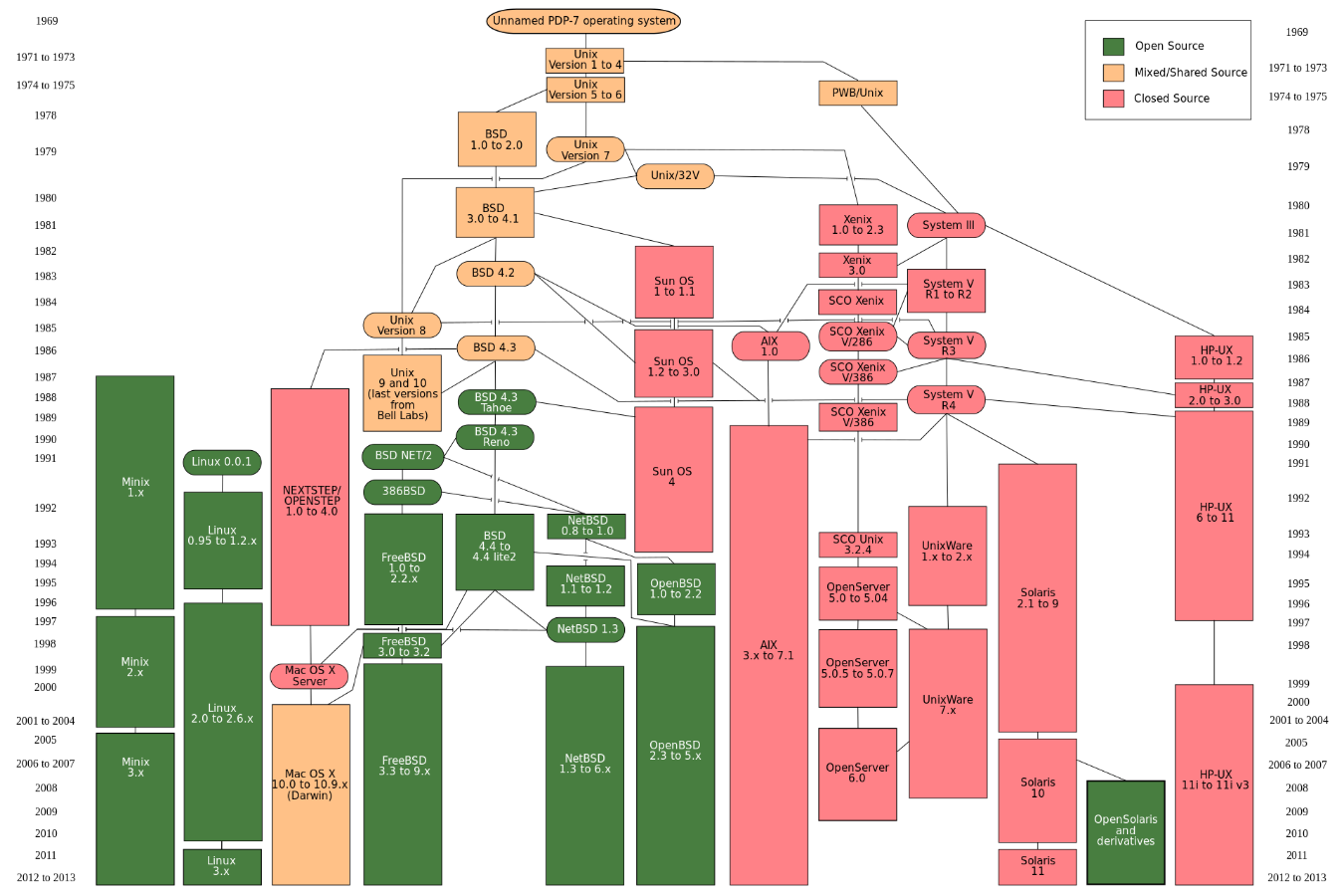
    Now you may be asking; what does Unix have to do with Linux? Well, Unix came first. If you wanted it you had to go to Bell Labs and get a license sometimes in source and build it yourself.  Unix was mostly in colleges and university's. Some folks like Sun Microsystems bought the source license and built SunOS (1981)  and then Solaris (1993). Richard Stallman (1981-85) Created GNU.  Berkley University came out with BSD. And a guy named Andrew S. Tanenbaum created MINIX at Vrije Universiteit in Amsterdam to exemplify the principles conveyed in his textbook, Operating Systems: Design and Implementation (1987). This book also contained abut 12k lines of source.
image

Now comes another guy (1991) a Finnish student Linus Torvalds created a new kernel and called it Linux. So in a way you could call Linux, a child and Unix the parent. This makes my head hurt, I'll let you strain you eyes and you head.

In the video, they said two things; small programs (utilities),  do the work and make life easier. Since they read and write to standard input and output. This means that one program's output to another program's input, you can chain as many programs as you like to get the job done. This is called a pipe ( | [symbol]). Unix and Linux are multi-treaded out of the box, the other feature is redirection in windows you might have used dir > filename, but in Unix/Linux we have standard I/O so you could do this: filename > program > filename.

In Windows you have shortcuts..  we have something much better, we have link & ulink lets say I use a directory that is not in my home directory what you can make a "Symbolic Link": ln -s target directory  local-name.  So link is ln and ulink is the unlink command.

One more thing Unix/Link we think of our hard drives (/dev/sda) separately from the data. If you had a second hard drive (/dev/sdb). One more thing a hard drive has partitions they are numbered 1, 2, 3 etc. So your drive would be  defined has /dev/sdb4 (second drive, fourth partition. 

Now to volumes, a volume is just a logical group of files, this can be more than one partition and multiple drives. Food For Thought:


(long version with both -al options)
harrison@Whirlwind
~ $ ls -al /mnt/MyData/user/harrison > /home/harrison/mnt_directory.txt
total 48
drwx------9harrisonharrison4096Jul 25 21:26.
drwxr-xr-x5rootroot4096Jul 25 20:58..
drwx------3harrisonharrison4096Apr  5 16:23export
drwxr-xr-x4harrisonharrison4096Jul 26 11:52home
drwx------2harrisonharrison4096Jul 28 14:12ISO
drwx------2rootroot16384Mar 14 10:00Lost+found
drwx------30harrisonharrison4096Jul 29 08:20public
drwx------4harrisonharrison4096Feb 13  2015SOFTWARE
drwx------7harrisonharrison4096Jun 28  2014Zotero_Data


(short version without arguments)
harrison@Whirlwind
~ $ ls

export  home  ISO  lost+found  public  SOFTWARE  Zotero_Data

Now after the first command was issued and you did a ls  here is what you will have:
harrison@Whirlwind
~ $ ls

export  home  ISO  lost+found  public  SOFTWARE  Zotero_Data mnt_directory.txt

The alphabet soup in front of the files are as follows:

  • d is directory if blank or - means it just a file
  • Then in groups of three of three: r  read, w write, execute.
  • The three groups are OWNER, GROUP, WORLD
  • There is one more it's not shown t or sticky bit (if you need it please look it up yourself)
  • number of links
  • OWNER
  • GROUP
  • File Size
  • Time/Date file was last modified.
  • File name or Directory name


Now I will take apart the long command piece by piece.

  1. Green  you have the username@machine_name.
  2. Blue you have the user prompt.
  3. The ls command with options (-al) a is all files, and l is long
  4. The commands target /mnt/MyData/user/harrison
  5. Redirect the output and create a new file.


OK, just one more thing while we are talking about the ls command. Unix/Linux always knows where the current directory is, so if you issue a ls without any options or target. It would list the current directory. So guess what when you get confused you can alway ask for it. This command is pwd or print working directory.


Stay Tuned More To Come

~~Cris H. image


  1. A Dummies Guide to Linux on a Raspberry Pi.
  2. A Dummies Guide to Linux on a Raspberry Pi. - 2.0 Distros
  3. TBA the reviews...
  • Sign in to reply

Top Comments

  • chris_b
    chris_b over 8 years ago +3
    Wow! This Chart wakes little nostalgic feelings in me. I touched, more or less every derivative on this Chart since 1988. Started my career with Sinix on MX500 Systems from Siemens, followed by Reliant…
  • dougw
    dougw over 8 years ago in reply to phoenixcomm +2
    Would that make android a grandchild of UNIX?
  • jomoenginer
    jomoenginer over 8 years ago +2
    Linus did not initially create the Linux kernel, he created a program using MINUX ( A Unix-like OS but not derived from Unix) and GNU C compiler to control hardware on his x386. He initially wanted to…
  • phoenixcomm
    phoenixcomm over 7 years ago in reply to jomoenginer

    Big Delay Sorry. Yes, I did generalize. but ls, fsck, mkfs are the same programs that we used back when. just the options have changed.

    Solaris file system was based around AT&T SysV, Dec was in left field with very screwy permissions I had the displeasure of working on one HP/ux machine thank g-d. so Zenix was dos formatted I do believe (the last one was in 1980/1990. They're all descendants of Sys V, OpenBSD was very different You had a wheel group instead of root, in order then was Multix( real crap) UNIX, BSD, Solaris, Linux, Then Linux and Android. I will not count MAXos as it really was nothing more than BSD undercovers.

    So the tree looks like this.

    1. UNIX (Bell Labs)
    2. BSD (Berkley University)
    3. Sun OS.
    4. Xenix
    5. Interactive (absorbed by Sun Micro) for x86
    6. Sun Solaris ran both Sun OS and BSD executables.
    7. Minux  Rewrite in PD the unix kernel
    8. Linux  Derived in part from Minux.
    9. Android  Rewrite again of Unix
    • Cancel
    • Vote Up 0 Vote Down
    • Sign in to reply
    • More
    • Cancel
  • phoenixcomm
    phoenixcomm over 8 years ago in reply to jomoenginer

    No genuflecting necessary! LOL  image

    Don't know I was over a Hughes when the 2 stupid kids stole some of the crypto cards. A comment was they should have been hung from the flagpole!

    Solaris 8 was what I ended up with I think I had 10 but did never installed it. about a year or so before the buyout they started charging you for the f*** security patches. And then there was a library that was missing from the CD set. that was brutal, I had to call in a favor or two to get that.

    There still of the two UltraSparc 2 servers that I have currently not powered up in a storage rack (one was Apache, and I think the other might have been sendmail server). As well as my SunBlade 1000 has 16gb of memory, 2x UltraSparc3 cpus(not sure of the speed I think maybe they where 500Mhz or 750Mhz, there are 1k CPU but I don't know what support I need. and Fiber Chanel (FC-AL Cu) Drives! It also supports SCSI (16-bit Ultra/Fast/Wide), as well as USB, firewire, and other things. But if I remember the video card has a Sun Video Connector, so I will have to adapt it to DVI should not be too hard.

    • Cancel
    • Vote Up +1 Vote Down
    • Sign in to reply
    • More
    • Cancel
  • jomoenginer
    jomoenginer over 8 years ago in reply to phoenixcomm

    Thanks for sharing an overview of your resume.  I bow to thee.  Next time I run into a tough Solaris issue perhaps I'll give you a shout.


    Funny, I work with many folks from what was once known as TRW.

    • Cancel
    • Vote Up +1 Vote Down
    • Sign in to reply
    • More
    • Cancel
  • phoenixcomm
    phoenixcomm over 8 years ago in reply to jomoenginer

    yes your are right about Endianness! fun. Normally just rebuild the program, but you can get bit in the ASS, with low level ***.  But you should not have to wory about it as I have moved lots of things between Solaris 10 and Linux, and IBM (blue) to Solaris and Linux, I started in the biz in 1976 and worked f or a little company in Oceanport NJ it was called Interdata, We delivered 8/32 #1  Murry Hill  (Bell Labs)  and 8/32 #2 went to Grumman out on Long Island. I have had all flavors of the month Zenix, Interactive (bought by Sun), HP and DEC (permisions where weired), OpenBSD, Linux, Open Solaris, Solaris 1 - 10 ( Sol 1 was a wreck), SCO and others. My First desktop was a pc with 10mb hda running interactive). I taught the "Mick & Brick" book at TRW, and had one of baddest z80 you could get you hands on 16 bit all AMD 2901's  that interface to the interdata selech buss. In the 80's while back in school I had (owned & maintained) a IBM 360/50 and sold time share on it.

    • Cancel
    • Vote Up +1 Vote Down
    • Sign in to reply
    • More
    • Cancel
  • jomoenginer
    jomoenginer over 8 years ago in reply to phoenixcomm

    Yeah, and without Multics where would UNIX be? Nowhere.  Having worked most of my professional career with HP-UX, Solaris and multi flavors of Linux, I have to disagree with you that there are only minor differences.  One main difference is the Endianness between some Unix and Linux platforms. This can reek havoc with porting applications between platforms which I am currently involved with. Heck there can even be major differences between versions of Unix and Linux platforms. Just considering moving from Solaris 10 to Oracle Solaris 11 could be a source of nightmares.  RHEL 7 sure threw some monkey wrenches in driver development.  


    "Oh, BTW the title "Linux, What is Linux" started at Bell Labs with UNIX, I tried to show where it all came from, and why in my mind most people don't understand that is almost the same."


    Really?  I'm sure that Linus would disagree with you. 


    The whole Linux vs UNIX and origins of Linux debate has gone on for many moons now and really does not matter at this point especially considering most of the Unix platforms are fading away.  What does and does not run on a Raspberry Pi and how to use it seems more interesting.

    • Cancel
    • Vote Up +2 Vote Down
    • Sign in to reply
    • More
    • Cancel
<>
element14 Community

element14 is the first online community specifically for engineers. Connect with your peers and get expert answers to your questions.

  • Members
  • Learn
  • Technologies
  • Challenges & Projects
  • Products
  • Store
  • About Us
  • Feedback & Support
  • FAQs
  • Terms of Use
  • Privacy Policy
  • Legal and Copyright Notices
  • Sitemap
  • Cookies

An Avnet Company © 2026 Premier Farnell Limited. All Rights Reserved.

Premier Farnell Ltd, registered in England and Wales (no 00876412), registered office: Farnell House, Forge Lane, Leeds LS12 2NE.

Follow element14

  • X
  • Facebook
  • linkedin
  • YouTube