



element14 Community
element14 Community
    Register Log In
  • Site
  • Search
  • Log In Register
  • Community Hub
    Community Hub
    • What's New on element14
    • Feedback and Support
    • Benefits of Membership
    • Personal Blogs
    • Members Area
    • Achievement Levels
  • Learn
    Learn
    • Ask an Expert
    • eBooks
    • element14 presents
    • Learning Center
    • Tech Spotlight
    • STEM Academy
    • Webinars, Training and Events
    • Learning Groups
  • Technologies
    Technologies
    • 3D Printing
    • FPGA
    • Industrial Automation
    • Internet of Things
    • Power & Energy
    • Sensors
    • Technology Groups
  • Challenges & Projects
    Challenges & Projects
    • Design Challenges
    • element14 presents Projects
    • Project14
    • Arduino Projects
    • Raspberry Pi Projects
    • Project Groups
  • Products
    Products
    • Arduino
    • Avnet & Tria Boards Community
    • Dev Tools
    • Manufacturers
    • Multicomp Pro
    • Product Groups
    • Raspberry Pi
    • RoadTests & Reviews
  • About Us
    About the element14 Community
  • Store
    Store
    • Visit Your Store
    • Choose another store...
      • Europe
      •  Austria (German)
      •  Belgium (Dutch, French)
      •  Bulgaria (Bulgarian)
      •  Czech Republic (Czech)
      •  Denmark (Danish)
      •  Estonia (Estonian)
      •  Finland (Finnish)
      •  France (French)
      •  Germany (German)
      •  Hungary (Hungarian)
      •  Ireland
      •  Israel
      •  Italy (Italian)
      •  Latvia (Latvian)
      •  
      •  Lithuania (Lithuanian)
      •  Netherlands (Dutch)
      •  Norway (Norwegian)
      •  Poland (Polish)
      •  Portugal (Portuguese)
      •  Romania (Romanian)
      •  Russia (Russian)
      •  Slovakia (Slovak)
      •  Slovenia (Slovenian)
      •  Spain (Spanish)
      •  Sweden (Swedish)
      •  Switzerland(German, French)
      •  Turkey (Turkish)
      •  United Kingdom
      • Asia Pacific
      •  Australia
      •  China
      •  Hong Kong
      •  India
      •  Japan
      •  Korea (Korean)
      •  Malaysia
      •  New Zealand
      •  Philippines
      •  Singapore
      •  Taiwan
      •  Thailand (Thai)
      •  Vietnam
      • Americas
      •  Brazil (Portuguese)
      •  Canada
      •  Mexico (Spanish)
      •  United States
      Can't find the country/region you're looking for? Visit our export site or find a local distributor.
  • Translate
  • Profile
  • Settings
Raspberry Pi
  • Products
  • More
Raspberry Pi
Blog A second helping of Pumpkin Pi
  • Blog
  • Forum
  • Documents
  • Quiz
  • Events
  • Polls
  • Files
  • Members
  • Mentions
  • Sub-Groups
  • Tags
  • More
  • Cancel
  • New
Join Raspberry Pi to participate - click to join for free!
Featured Articles
Announcing Pi
Technical Specifications
Raspberry Pi FAQs
Win a Pi
GPIO Pinout
Raspberry Pi Wishlist
Comparison Chart
Quiz
  • Share
  • More
  • Cancel
Group Actions
  • Group RSS
  • More
  • Cancel
Engagement
  • Author Author: fustini
  • Date Created: 25 Oct 2012 6:44 AM Date Created
  • Views 4639 views
  • Likes 1 like
  • Comments 20 comments
Related
Recommended
  • halloween
  • pumpkin_pi
  • raspberry_pi
  • rpiexpert
  • adafruit

A second helping of Pumpkin Pi

fustini
fustini
25 Oct 2012
imageWant to build this project?
View Parts


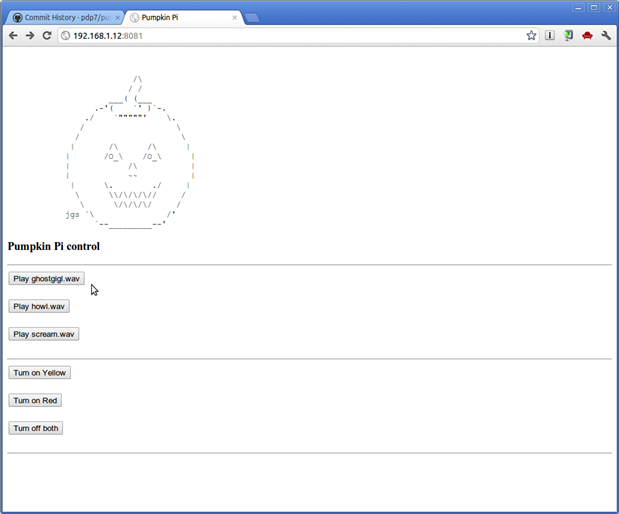
In my last post, I introduced the Pumpkin Pi: a Raspberry Pi project for Halloween.  It puts a Raspberry Pi inside a jack-o'-latern to provide web-controlled lights and sound:
image

(click to enlarge; screenshot of latest version as of 2012-Oct-26)


The Pumpkin Pi software was written in Python with generous assistance from Bonnie King and can be found on GitHub under my account "pdp7" in the punkin_pi repository.


Install dependencies:

To run punkin_pi on your Rasperry Pi, you'll first need to install these dependencies.  The following commands were run on the current Raspbian 2012-Sept-18 image:

sudo apt-get update


sudo apt-get install git-core mplayer python-setuptools


sudo easy_install bottle


sudo easy_install RPi.GPIO

If running an earlier image, then you may encounter an error on when installing the RPi.GPIO in that last step ("couldn't find Python.h").  To resolve the error, run this command:  sudo apt-get install python-dev and then sudo easy_install RPi.GPIO again.  Thanks to Joel Dunn for the advice!


Install sound clips:

Next, sounds clips that the pumpkin will play need to be installed.  I downloaded a few .wav files from a site with a nice collection of Halloween sound clips and placed in /home/pi/files as punkin_pi expects:

pi@raspberrypi ~ $ mkdir files


pi@raspberrypi ~ $ cd files


pi@raspberrypi ~/files $ wget http://www.countessbloodshalloweenhorror.com/sounds/howl.wav


pi@raspberrypi ~/files $ wget http://www.countessbloodshalloweenhorror.com/sounds/scream.wav


pi@raspberrypi ~/files $ wget http://www.countessbloodshalloweenhorror.com/sounds/ghostgigl.wav


Any files that mplayer can play can be put into /home/pi/files such as .wav, .mp3 & .ogg.


Install & run punkin_pi:

Next, I installed the punkin_pi software project via git:

pi@raspberrypi ~ $ git clone https://github.com/pdp7/punkin_pi.git


The web server (built on the bottle framework) can be started via:

pi@raspberrypi ~ $ cd punkin_pi


pi@raspberrypi ~/punkin_pi $ sudo python ./control.py


It will be available at the Pi's IP address on port 8081.  Here is a video of the web interface in action:


You don't have permission to edit metadata of this video.
Edit media
x
image
Upload Preview
image


(The LEDs happen to be connected to the Raspberry Pi via the Adafruit Pi Cobbler in this video clip as my Adafruit Pi Plate featured in my previous post wasn't handy at the time)


Audio troubleshooting:

If you want to check if punkin_pi will be able to play a particular file in /home/pi/files, then try to play it with mplayer:

mplayer /home/pi/files/howl.wav

Sometimes the sound system may become unstable and produce errors. Restarting ALSA should resolve this:

sudo /etc/init.d/alsa-utils restart

If your speakers lack a volume control, then the ALSA mixer can be used to adjust volume:

alsamixer


Cheers,

Drew


element14
Product Name*DescriptionBuy All Parts
Raspberry Pi Model B with SD Card Raspberry Pi model B and 8GB SD Card with NOOBS preinstalled
Optical mouse Basic USB optical mouse
Keyboard Basic USB keyboard
Adafruit Pi Plate Breakout and expansion board for Raspberry Pi
Tiny Breadboard Small breadboard sized to fit Pi Plate
Adafruit Pi Box Clear acrylic enclosure for Raspberry Pi
(2) NPN BJT NPN bipolar transistor
(2) 1k ohm resistor 1k ohm, 250mW carbon film resistor
(4) Red LED 5mm red LED
(4) 220 ohm resistor 220 ohm, 250mW carbon film resistor
(4) 180 ohm resistor 180 ohm, 250mW carbon film resistor
(4) Yellow LED 5mm yellow LED
20AWG Red Hook Up Wire 20AWG solid copper hook up wire - red
20AWG White Hook Up Wire 20AWG solid copper hook up wire – white
Additional Parts
Product Name*Description
Rechargeable USB Battery Pack4000 mAh Li-Ion battery pack with USB outputs and included cables
Mini SpeakerSmall rechargeable mono speaker with integrated amplifier


*Products and resources listed are listed to help members build their own Pi Projects. They are suggestions and listed for educational purposes. For substitutions of any parts, please post a question asking the original author.
  • Sign in to reply

Top Comments

  • Former Member
    Former Member over 13 years ago +2
    I am running an August 2012 Raspbian image. When I went to install the software for this, I found that when I got to the step to install "RPi.GPIO" the compile failed (couldn't find Python.h). I'm not…
  • fustini
    fustini over 13 years ago in reply to Former Member +1
    Thanks for the tip! I'll add it to the instructions above and to the readme in the github repository.
  • Former Member
    Former Member over 13 years ago +1
    Well, my soldering skills are suspect ;-), and I've not been able to blink a light yet. Guess the two us need to put our Pi's in the same pumpkin...I have sound and no lights, and you have lights and no…
  • Former Member
    Former Member over 13 years ago in reply to fustini

    Drew,


    My issue does appear to be a problem when using an HDMI connected monitor. I tried a small TFT monitor, and was able to trigger the sound with the lights, but now I get a nasty static-like pop at the beginning and end of the audio clips.


    I'm hoping there's something that I can add to the config.txt. I'll let you know what I discover.


    Thanks again!

    • Cancel
    • Vote Up 0 Vote Down
    • Sign in to reply
    • More
    • Cancel
  • Former Member
    Former Member over 13 years ago in reply to fustini

    Hi Drew,


    I did perform the sound check using your recommendation. I did hear the siren. No problems.

    I'm using the latest 2012-09-18-wheezy-raspbian. I followed your instructions installing the dependencies.

    I thought about the HDMI. I disconnected and tested without any luck, but I should reboot without using HDMI and test again.

    Thanks!

    • Cancel
    • Vote Up 0 Vote Down
    • Sign in to reply
    • More
    • Cancel
  • fustini
    fustini over 13 years ago in reply to Former Member

    Hi Richard, sorry to hear sound isn't working.  What image do you have on your SD card?


    There is a demo audio program from Broadcom located in /opt/vc/src/hello_pi/hello_audio that would be good to check if you can hear it.  It's possible that your system is sending audio over HDMI instead of the analog jack.  There's instructions on the eLinux wiki on how to check: http://elinux.org/R-Pi_Troubleshooting#Sound


    Also, I did have a weird problem where mplayer (and also aplay) produced no sound with headphones connected even though mixer was turned up (checked via "alsamixer") and the hello_audio did play.  It wasn't until I switched back to amplified speakers that I could hear the output of mplayer and aplay.

    • Cancel
    • Vote Up 0 Vote Down
    • Sign in to reply
    • More
    • Cancel
  • fustini
    fustini over 13 years ago in reply to Former Member

    Hi Joel, sorry to hear the LEDs are working.  Could you post a photo of your board? 


    If you have a DMM handy, then you should be able to first check if the IO pins are going high (should be about 3.3V when it's on).


    Also if you have a breadboard handy, then you can make a simple circuit from one of the IO pins with a LED and resistor (I'd recommed 220 Ohm or more to be safe) in series to ground.  For reference, check out the "Wire LEDs"  section in this Adafruit tutorial: http://learn.adafruit.com/raspberry-pi-e-mail-notifier-using-leds/wire-leds

    • Cancel
    • Vote Up 0 Vote Down
    • Sign in to reply
    • More
    • Cancel
  • Former Member
    Former Member over 13 years ago in reply to Former Member

    JD,

    Yes. The speaker works fine when connected to other devices. I've tried multiple speakers.

    I have a second RaspberryPi that I'm setting up now. Hopefully the new one will work.

    Good luck with yours.

    • Cancel
    • Vote Up 0 Vote Down
    • Sign in to reply
    • More
    • Cancel
<>
element14 Community

element14 is the first online community specifically for engineers. Connect with your peers and get expert answers to your questions.

  • Members
  • Learn
  • Technologies
  • Challenges & Projects
  • Products
  • Store
  • About Us
  • Feedback & Support
  • FAQs
  • Terms of Use
  • Privacy Policy
  • Legal and Copyright Notices
  • Sitemap
  • Cookies

An Avnet Company © 2026 Premier Farnell Limited. All Rights Reserved.

Premier Farnell Ltd, registered in England and Wales (no 00876412), registered office: Farnell House, Forge Lane, Leeds LS12 2NE.

ICP 备案号 10220084.

Follow element14

  • X
  • Facebook
  • linkedin
  • YouTube