



element14 Community
element14 Community
    Register Log In
  • Site
  • Search
  • Log In Register
  • Community Hub
    Community Hub
    • What's New on element14
    • Feedback and Support
    • Benefits of Membership
    • Personal Blogs
    • Members Area
    • Achievement Levels
  • Learn
    Learn
    • Ask an Expert
    • eBooks
    • element14 presents
    • Learning Center
    • Tech Spotlight
    • STEM Academy
    • Webinars, Training and Events
    • Learning Groups
  • Technologies
    Technologies
    • 3D Printing
    • FPGA
    • Industrial Automation
    • Internet of Things
    • Power & Energy
    • Sensors
    • Technology Groups
  • Challenges & Projects
    Challenges & Projects
    • Design Challenges
    • element14 presents Projects
    • Project14
    • Arduino Projects
    • Raspberry Pi Projects
    • Project Groups
  • Products
    Products
    • Arduino
    • Avnet & Tria Boards Community
    • Dev Tools
    • Manufacturers
    • Multicomp Pro
    • Product Groups
    • Raspberry Pi
    • RoadTests & Reviews
  • About Us
    About the element14 Community
  • Store
    Store
    • Visit Your Store
    • Choose another store...
      • Europe
      •  Austria (German)
      •  Belgium (Dutch, French)
      •  Bulgaria (Bulgarian)
      •  Czech Republic (Czech)
      •  Denmark (Danish)
      •  Estonia (Estonian)
      •  Finland (Finnish)
      •  France (French)
      •  Germany (German)
      •  Hungary (Hungarian)
      •  Ireland
      •  Israel
      •  Italy (Italian)
      •  Latvia (Latvian)
      •  
      •  Lithuania (Lithuanian)
      •  Netherlands (Dutch)
      •  Norway (Norwegian)
      •  Poland (Polish)
      •  Portugal (Portuguese)
      •  Romania (Romanian)
      •  Russia (Russian)
      •  Slovakia (Slovak)
      •  Slovenia (Slovenian)
      •  Spain (Spanish)
      •  Sweden (Swedish)
      •  Switzerland(German, French)
      •  Turkey (Turkish)
      •  United Kingdom
      • Asia Pacific
      •  Australia
      •  China
      •  Hong Kong
      •  India
      •  Japan
      •  Korea (Korean)
      •  Malaysia
      •  New Zealand
      •  Philippines
      •  Singapore
      •  Taiwan
      •  Thailand (Thai)
      •  Vietnam
      • Americas
      •  Brazil (Portuguese)
      •  Canada
      •  Mexico (Spanish)
      •  United States
      Can't find the country/region you're looking for? Visit our export site or find a local distributor.
  • Translate
  • Profile
  • Settings
Raspberry Pi
  • Products
  • More
Raspberry Pi
Blog PiCade Build and Test
  • Blog
  • Forum
  • Documents
  • Quiz
  • Events
  • Polls
  • Files
  • Members
  • Mentions
  • Sub-Groups
  • Tags
  • More
  • Cancel
  • New
Join Raspberry Pi to participate - click to join for free!
Featured Articles
Announcing Pi
Technical Specifications
Raspberry Pi FAQs
Win a Pi
GPIO Pinout
Raspberry Pi Wishlist
Comparison Chart
Quiz
  • Share
  • More
  • Cancel
Group Actions
  • Group RSS
  • More
  • Cancel
Engagement
  • Author Author: dougw
  • Date Created: 2 Sep 2019 3:31 AM Date Created
  • Views 4673 views
  • Likes 7 likes
  • Comments 12 comments
Related
Recommended
  • doug wong
  • picasso
  • picassotizer
  • pimoroni
  • picade
  • picasso design challenge

PiCade Build and Test

dougw
dougw
2 Sep 2019

image

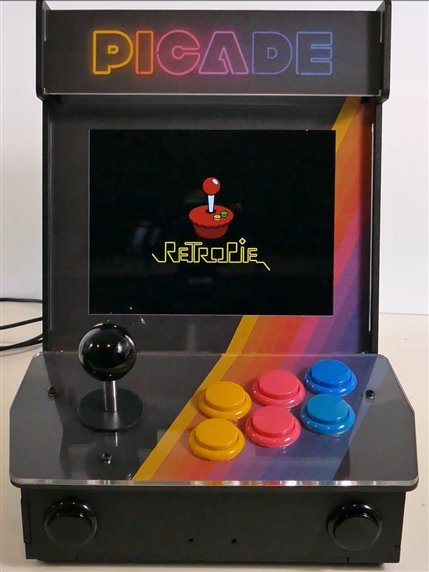
As a finisher prize in the PiCasso Design Challenge I received a Pimoroni PiCade and a Raspberry Pi 3B+ to power it.

This blog is is an unboxing / build / test of that system.

The build actually took several hours and getting the software properly configured took a bunch more hours.

You don't have permission to edit metadata of this video.
Edit media
x
image
Upload Preview
image

The kit is complete (except for the Raspberry Pi and a power supply) and there were even some spare parts left over (I assume they are spare parts image)

Every thing fit without being forced and it seems solidly designed.

The only mechanical issue I had was the spade terminals connecting to the power switch LED were too tight - they need to be carefully opened up a bit.

The buttons don't snap into place because the panels are too thick for the switch design, but they are a tight enough fit that I don't expect them to pop out. If the do get too loose, a dab of glue would solve it.

The display is much higher resolution and quality than the TVs these games were originally developed for, so in some ways it has a modern look and feel to it, right down to longer boot times.

I found it was possible to hang the system up in a state where no button does anything - even the power button. Part of the problem might be that when setting up the button preferences, I couldn't set the Hot key - it wouldn't accept any buttons I wanted, so it defaulted to the Select button. The Hot key sort of exits from the current program when pushed. However in some menus this prevents selecting a menu choice and jumps back to another menu in an endless cycle.  In particular I cannot "select" to change the Hot key. Hopefully there is a file or something I can edit to fix it.

You don't have permission to edit metadata of this video.
Edit media
x
image
Upload Preview
image

If you are building one in North America, beware that the keyboard default is set for the UK and you will have to set the keyboard to "US" before you can follow the installation instructions.

There is a pretty good guide to building here:

https://learn.pimoroni.com/tutorial/sandyj/assembling-your-picade

It is pretty impressive that games developed for multiple platforms can run on this system and it is a very nice scale to enjoy the gaming experience, but it is quite a bit more complex than your average game box. Just the assembly alone is quite a project, and you pretty much need a a keyboard and another computer to get everything working properly.

Overall, the PiCade is a pretty solid system that can take the kind of pounding typically encountered in action games, so although you can run Retropie on any Raspberry Pi, if you want the console and arcade experience you will have to build something like this.

  • Sign in to reply

Top Comments

  • balearicdynamics
    balearicdynamics over 6 years ago in reply to ntewinkel +6
    Nico, without any other help than the poster with the assembly instructions I spent about one hour and a half to set up all the stuff until the boot worked. It is true that there is not a micro SD but…
  • dougw
    dougw over 6 years ago in reply to balearicdynamics +4
    It would be great if I could somehow get all my Amiga software running on it.
  • ntewinkel
    ntewinkel over 6 years ago +4
    I just watched your videos this morning on YouTube, Doug Maybe it took longer because your little furry friend wasn't there to lend a paw? Looks like a very nice unit, with some pretty solid looking parts…
  • shabaz
    shabaz over 6 years ago

    Hi Doug,


    That looks really great! The image quality looks excellent - better that old arcade games systems : )

    Also it's very cool they've used arcade-game-like controls, and that the computer just blends away, so that it's like a real arcade system.

    • Cancel
    • Vote Up +2 Vote Down
    • Sign in to reply
    • More
    • Cancel
  • balearicdynamics
    balearicdynamics over 6 years ago in reply to ntewinkel

    Nico, without any other help than the poster with the assembly instructions I spent about one hour and a half to set up all the stuff until the boot worked. It is true that there is not a micro SD but it has the sense as you could see the PiCade just like a common HAT, as well as an Arduino shield. The point is that the kit does not include the Raspberry Pi. So, it is expected - as a normal user, not a victim of the generosity of Element14 image - that you already own your Raspberry PI or you bought one by yourself.

    With this scenario, the workflow IMHO is the following:


    1. I am fa an of retro games and in some way, I approached the Raspberry PI.
    2. I decided to install the RetroPie version of Raspbian, that is almost all set to run
    3. Then I am happy with my new tool but I should consider to buy or adapt or I already own a sort of a controller, or playing my games with issues directly with the keyboard
    4. The next step is buying (maybe together with the PI but from a different marketing environment) the PiCade kit.
    5. I assemble it, spending less than two hours or about half a day if I am a beginner.


    And until this point, I don't see anything special or difficult, I think.


    Then there are a couples issues, related to the legal problems of the ROM you should learn how to manage them correctly (I have not yet understood very clear how-to). And this is the problem suffering any fan of the retro games on PI; I experienced the same problem a few years ago when I road tested a previous model of the Raspberry Pi just here (maybe 2016?) But the fan, better than me, count on a lot of forums pointing the right way to solve these problems.


    Enrico

    • Cancel
    • Vote Up +6 Vote Down
    • Sign in to reply
    • More
    • Cancel
  • ntewinkel
    ntewinkel over 6 years ago

    I just watched your videos this morning on YouTube, Doug image

    Maybe it took longer because your little furry friend wasn't there to lend a paw?


    Looks like a very nice unit, with some pretty solid looking parts. Thanks for stepping us through the process.


    I was a little disappointed to see that the kit didn't come with a pre-built ready-to-go SD card, as that would have removed all the hours of fiddling around configuring it all.


    Cheers,

    -Nico

    • Cancel
    • Vote Up +4 Vote Down
    • Sign in to reply
    • More
    • Cancel
  • balearicdynamics
    balearicdynamics over 6 years ago in reply to dougw

    Do you mean just games or the entire Amiga software? I have tried to install some Amiga games but I was unluunluckyck and the ones I downloaded are not working with the emulator (Mame).


    Enrico

    • Cancel
    • Vote Up +2 Vote Down
    • Sign in to reply
    • More
    • Cancel
  • dougw
    dougw over 6 years ago in reply to balearicdynamics

    It would be great if I could somehow get all my Amiga software running on it.

    • Cancel
    • Vote Up +4 Vote Down
    • Sign in to reply
    • More
    • Cancel
<>
element14 Community

element14 is the first online community specifically for engineers. Connect with your peers and get expert answers to your questions.

  • Members
  • Learn
  • Technologies
  • Challenges & Projects
  • Products
  • Store
  • About Us
  • Feedback & Support
  • FAQs
  • Terms of Use
  • Privacy Policy
  • Legal and Copyright Notices
  • Sitemap
  • Cookies

An Avnet Company © 2026 Premier Farnell Limited. All Rights Reserved.

Premier Farnell Ltd, registered in England and Wales (no 00876412), registered office: Farnell House, Forge Lane, Leeds LS12 2NE.

ICP 备案号 10220084.

Follow element14

  • X
  • Facebook
  • linkedin
  • YouTube