



element14 Community
element14 Community
    Register Log In
  • Site
  • Search
  • Log In Register
  • Community Hub
    Community Hub
    • What's New on element14
    • Feedback and Support
    • Benefits of Membership
    • Personal Blogs
    • Members Area
    • Achievement Levels
  • Learn
    Learn
    • Ask an Expert
    • eBooks
    • element14 presents
    • Learning Center
    • Tech Spotlight
    • STEM Academy
    • Webinars, Training and Events
    • Learning Groups
  • Technologies
    Technologies
    • 3D Printing
    • FPGA
    • Industrial Automation
    • Internet of Things
    • Power & Energy
    • Sensors
    • Technology Groups
  • Challenges & Projects
    Challenges & Projects
    • Design Challenges
    • element14 presents Projects
    • Project14
    • Arduino Projects
    • Raspberry Pi Projects
    • Project Groups
  • Products
    Products
    • Arduino
    • Avnet & Tria Boards Community
    • Dev Tools
    • Manufacturers
    • Multicomp Pro
    • Product Groups
    • Raspberry Pi
    • RoadTests & Reviews
  • About Us
    About the element14 Community
  • Store
    Store
    • Visit Your Store
    • Choose another store...
      • Europe
      •  Austria (German)
      •  Belgium (Dutch, French)
      •  Bulgaria (Bulgarian)
      •  Czech Republic (Czech)
      •  Denmark (Danish)
      •  Estonia (Estonian)
      •  Finland (Finnish)
      •  France (French)
      •  Germany (German)
      •  Hungary (Hungarian)
      •  Ireland
      •  Israel
      •  Italy (Italian)
      •  Latvia (Latvian)
      •  
      •  Lithuania (Lithuanian)
      •  Netherlands (Dutch)
      •  Norway (Norwegian)
      •  Poland (Polish)
      •  Portugal (Portuguese)
      •  Romania (Romanian)
      •  Russia (Russian)
      •  Slovakia (Slovak)
      •  Slovenia (Slovenian)
      •  Spain (Spanish)
      •  Sweden (Swedish)
      •  Switzerland(German, French)
      •  Turkey (Turkish)
      •  United Kingdom
      • Asia Pacific
      •  Australia
      •  China
      •  Hong Kong
      •  India
      •  Japan
      •  Korea (Korean)
      •  Malaysia
      •  New Zealand
      •  Philippines
      •  Singapore
      •  Taiwan
      •  Thailand (Thai)
      •  Vietnam
      • Americas
      •  Brazil (Portuguese)
      •  Canada
      •  Mexico (Spanish)
      •  United States
      Can't find the country/region you're looking for? Visit our export site or find a local distributor.
  • Translate
  • Profile
  • Settings
Raspberry Pi
  • Products
  • More
Raspberry Pi
Blog Raspberry Pi Pico W Mecanum Wheel Car Kit
  • Blog
  • Forum
  • Documents
  • Quiz
  • Events
  • Polls
  • Files
  • Members
  • Mentions
  • Sub-Groups
  • Tags
  • More
  • Cancel
  • New
Join Raspberry Pi to participate - click to join for free!
Featured Articles
Announcing Pi
Technical Specifications
Raspberry Pi FAQs
Win a Pi
GPIO Pinout
Raspberry Pi Wishlist
Comparison Chart
Quiz
  • Share
  • More
  • Cancel
Group Actions
  • Group RSS
  • More
  • Cancel
Engagement
  • Author Author: ralphjy
  • Date Created: 22 Oct 2024 10:35 PM Date Created
  • Views 6199 views
  • Likes 13 likes
  • Comments 12 comments
Related
Recommended
  • mecanum wheels
  • rpi pico w car
  • rpi pico w

Raspberry Pi Pico W Mecanum Wheel Car Kit

ralphjy
ralphjy
22 Oct 2024

Prime Day rolled around again two weeks ago and it was a good opportunity to find a toy that I could build for my grandson.

I bought a Freenove Mecanum Wheel 4WD Car Kit for the Raspberry Pi Pico.  I was able to get it for $39.96 since I already have an RPi Pico W that I can use with it.  It does not come with the Lithium batteries (requires 2 18650s) but I also have those.

I have a Freenove 4WD Car Kit with regular wheels that I use with a RPi 3B+ but I wanted something simpler and lower power plus I wanted to get the mecanum wheels for lateral movement. 
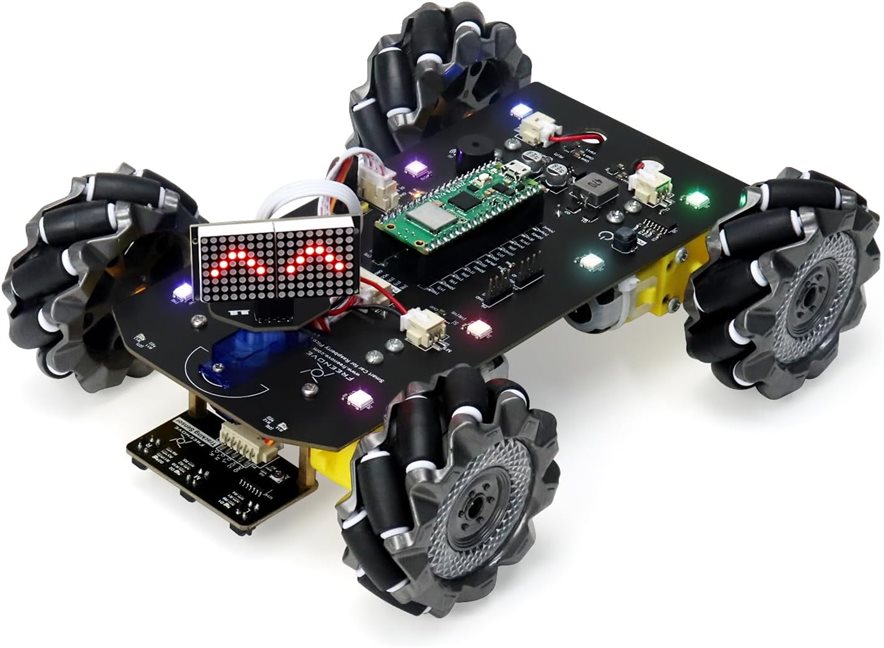
image

The documentation that is available for the car is very good.  There is a 170 page Tutorial.pdf that covers the features description and build and assembly of the car.  It also contains detailed descriptions of the 18 example Arduino IDE programs that exercise the various car features.  These programs are available in the github repo.

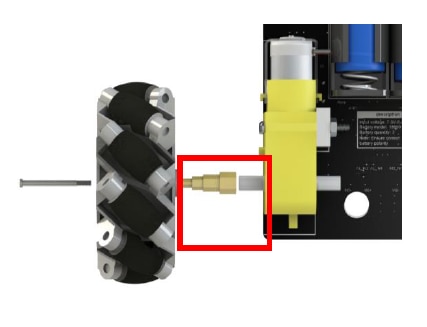
The assembly went smoothly as the instructions and accompanying pictures are very clear.  I only encountered two problems both related to mounting the mecanum wheels.  The first was obvious as one of the 4 wheel coupling adapters shown below did not have sufficient hole clearance to allow the screw to go through and I had to drill it out.
image

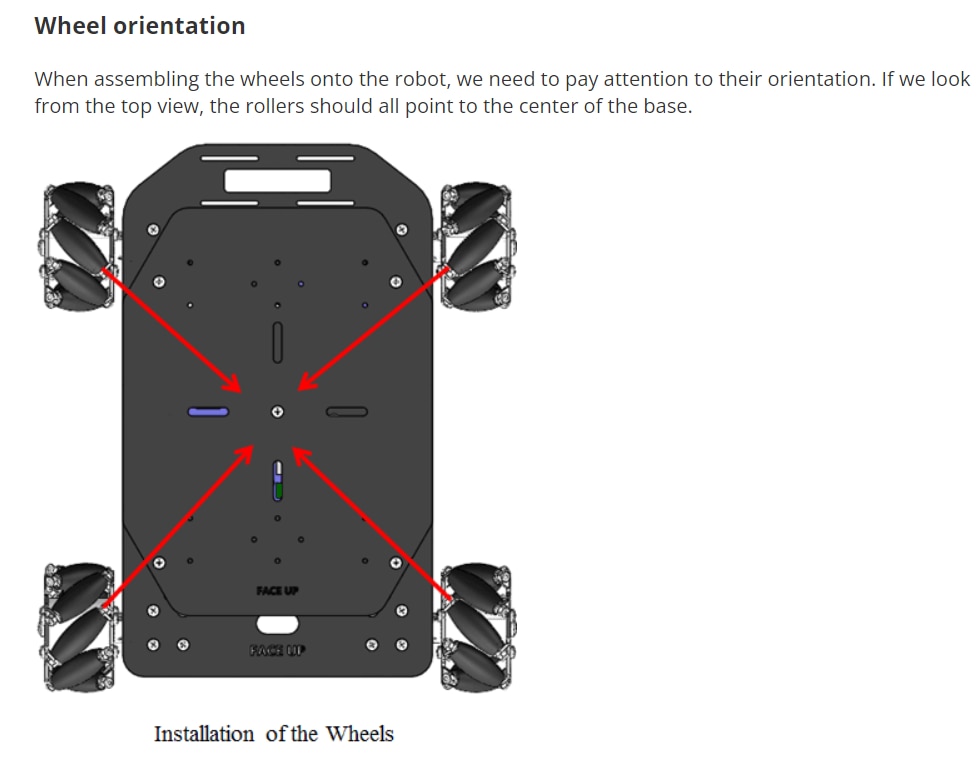
The second problem was less obvious.  Mecanum wheels require a particular orientation where the axes of the 45 degree rollers on the wheels want form an "X" when viewed from the top of the car as shown in the following diagram.
image

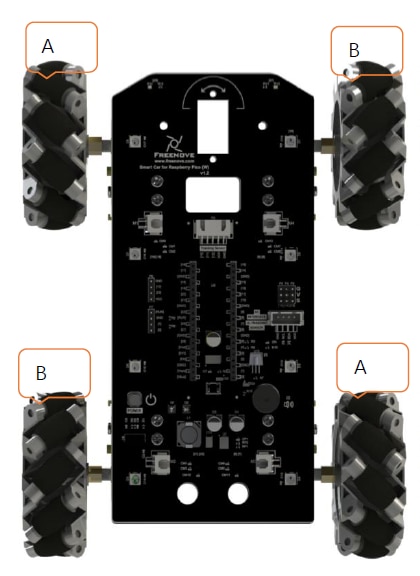
During my initial motion tests the car was not moving correctly in diagonal directions.  When I rechecked my assembly I realized that I had assembled the opposing wheels incorrectly.  You can see that the orientation in the assembly picture below is correct.
image

What had confused me is that the plastic wheel hubs are marked A-A and B-B but A-A corresponds to the B wheel and B-B corresponds to A wheel in the assembly picture.  Just had to remount all of the wheels.

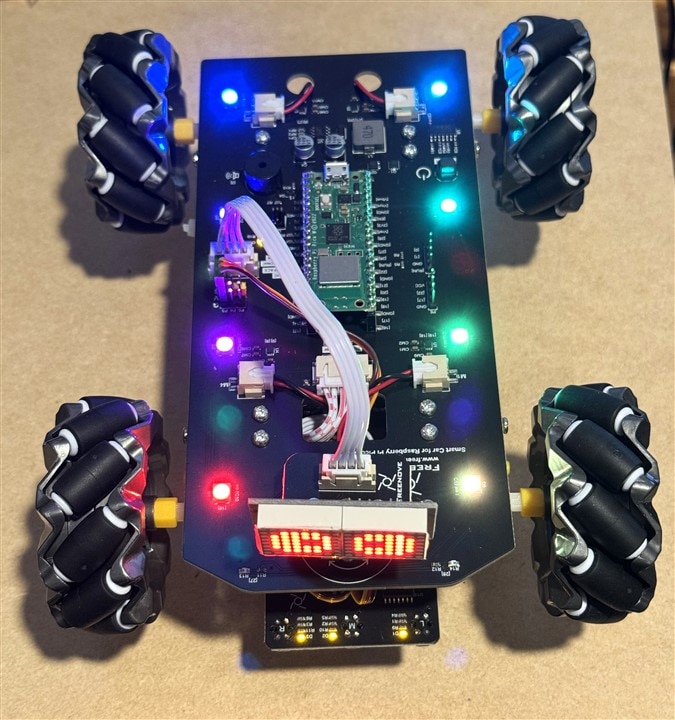
A picture of the completed assembly.
image

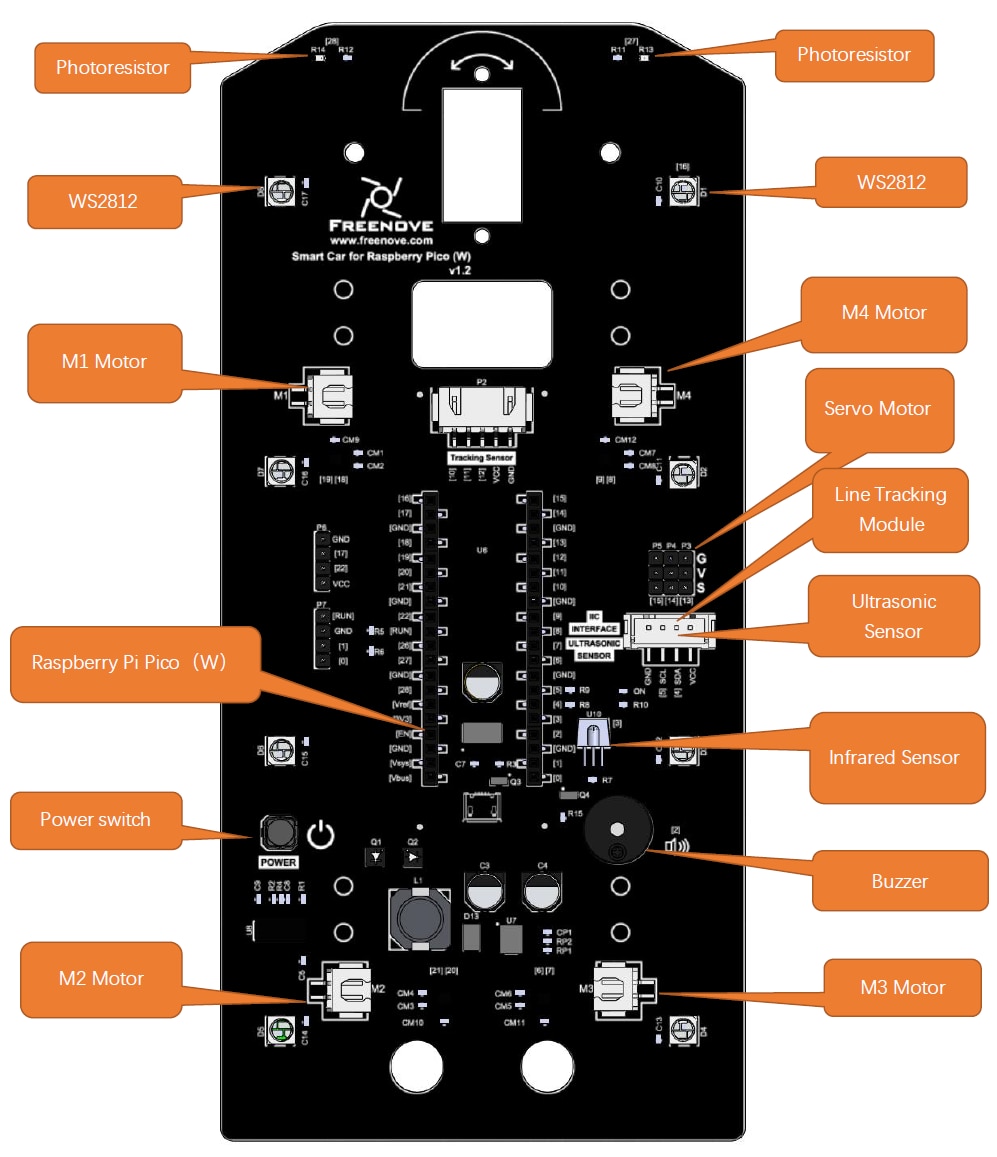
The car has a lot of nice features:

  • 8 Neopixels along the sides
  • LED Dot Matrix Panel mounted on a front servo (can be swapped for ultrasonic detector)
  • 2 Photoresistors in the front for light following
  • Line Tracking Module on lower front
  • Infrared Sensor for remote control
  • Buzzer
  • Power switch
  • Holder for 2 18650 Lithium batteries underneath between the motors
image

I wish the IR sensor was in a less obstructed location as I have experienced signal loss when the car is beyond 5 feet or so.

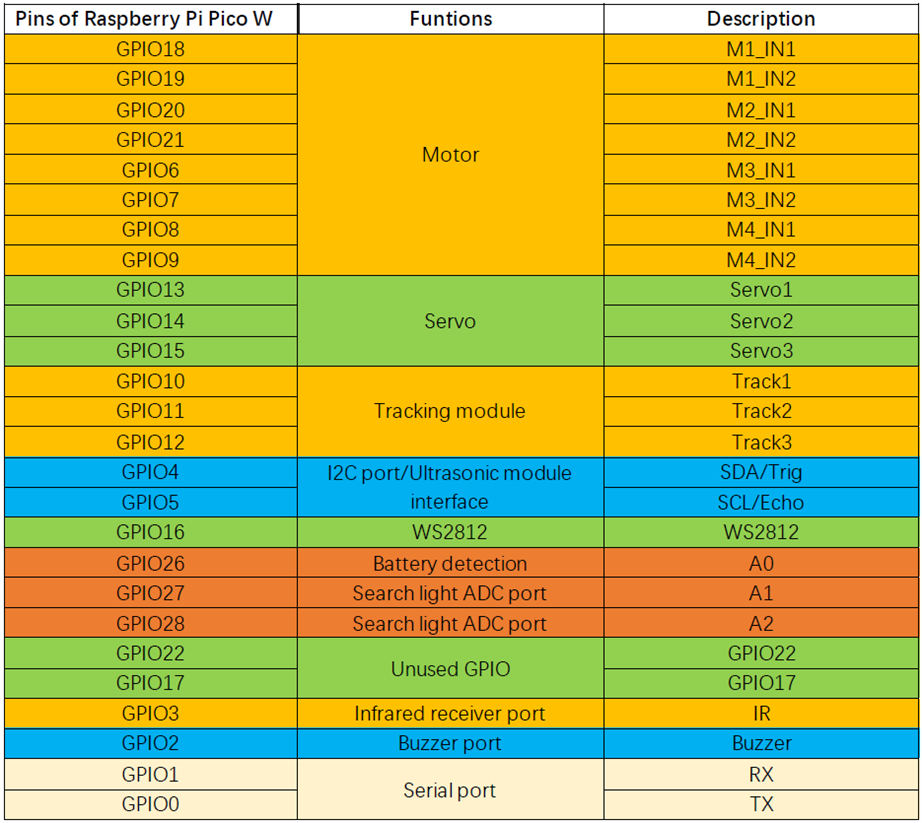
And an expandability issue is that there are only 4 free GPIO pins.
image

Testing

Mecanum wheel slippage

There is an example program that checks the movement control of the car.

It runs the following sequence of movement with a stop between each move.

Forward
Backward
Turn left
Turn right
Move left
Move right
Move diagonally upward to the left
Move diagonally downward to the right
Move diagonally upward to the right
Move diagonally downward to the left

I tried it first on a hardwood floor and there is considerable wheel slippage visible:

You don't have permission to edit metadata of this video.
Edit media
x
image
Upload Preview
image

I reran the test on carpet and the results were much better:

You don't have permission to edit metadata of this video.
Edit media
x
image
Upload Preview
image

I was somewhat surprised that "Move diagonally upward to the left" appeared to be the same as "Move left" and I discovered that was an error in the example program.


Infrared Control

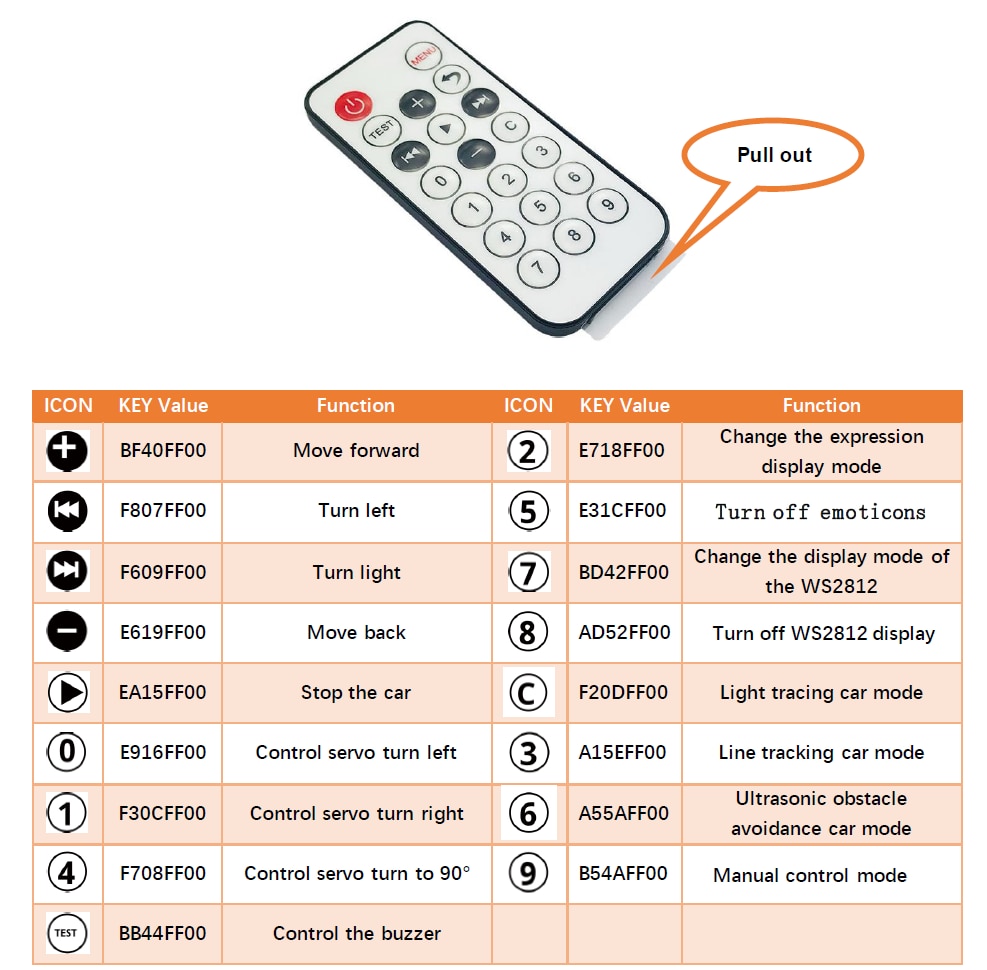
The infrared controller has the following functions:
image

It was reasonably responsive but I did have some issues with missing commands when the car was further away than 5 feet and pointed toward me due to obstruction of the IR sensor with is mounted adjacent to the Pico socket.  I did not video the test.


WiFi Control

Because I am using a Pico W I also have WiFi and BLE connectivity available.

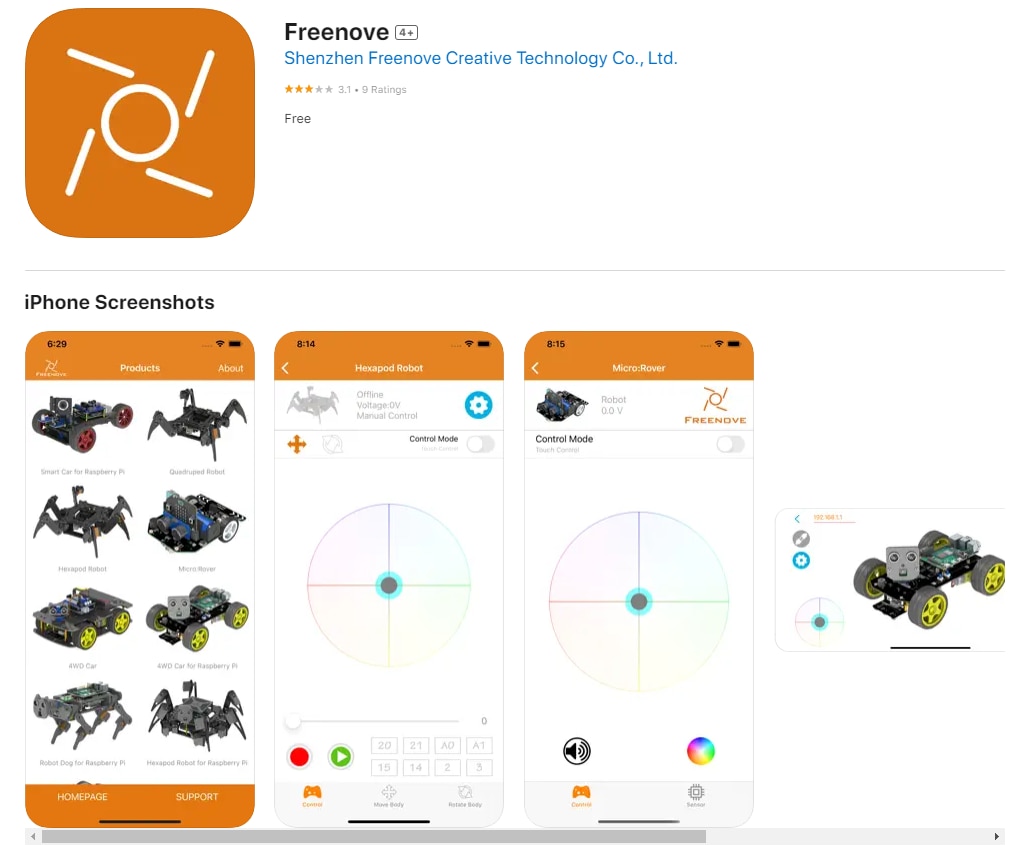
There is a WiFi multifunction example that interacts with an app on a mobile device.  The Car can be programmed to be in either AP or station mode.  I am using my iPhone so I installed the Freenove iOS app.  This app can be used with many different Freenove RC cars.
image

I am using it in station mode so it acquires an ipaddr on my network.

image

It works fine but I need to get used to the on screen "joysticks".  I'll do a video when I have more time.


BLE Joystick

Since my grandson is only 2 1/2 years old using the IR remote or mobile app are going to be too difficult for him.  What I'd really like is a simple joystick controller that could pair over BLE.

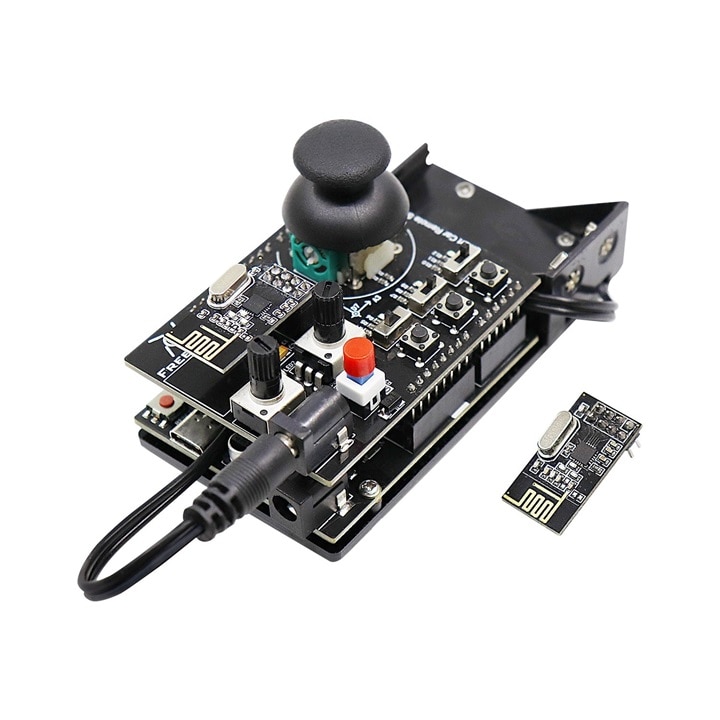
There aren't any BLE examples or BLE app included for this car but Freenove has a joystick controller (FNK0028) that is used for a different car.  This controller uses an nRF24L01 BLE module.
image

Unfortunately these are currently unavailable.  So I'm going to try a different solution.  There are Arduino IDE compatible libraries for PS3 controllers and I'm going to try using a clone controller with the car.  Just ordered a couple...

image

  • Sign in to reply
  • genebren
    genebren over 1 year ago

    Very cool!  I have bought a couple of nice robot kits (with Mecanum wheels) that I have waiting on the shelf to build and play with (with the Grandkids of course).

    • Cancel
    • Vote Up 0 Vote Down
    • Sign in to reply
    • More
    • Cancel
  • ralphjy
    ralphjy over 1 year ago in reply to kmikemoo

    I was considering how to use the joysticks to control the mecanum wheels and think I’ll probably just use a single stick initially and limit the speed.  He currently has a toy fire truck with just two buttons - forward and reverse right turn.  It is amazing how fast kids figure things out.

    • Cancel
    • Vote Up 0 Vote Down
    • Sign in to reply
    • More
    • Cancel
  • ralphjy
    ralphjy over 1 year ago in reply to mp2100

    It has a lot of features so it will be great to interact with him to customize it’s behavior.  Endless possibilities just modifying firmware.

    • Cancel
    • Vote Up 0 Vote Down
    • Sign in to reply
    • More
    • Cancel
  • ralphjy
    ralphjy over 1 year ago in reply to beacon_dave

    That’s pretty impressive!  I’ll need to record that and show it to him when he’s older.  I’m afraid to show him now because he loves construction equipment toys Smile…

    • Cancel
    • Vote Up 0 Vote Down
    • Sign in to reply
    • More
    • Cancel
  • beacon_dave
    beacon_dave over 1 year ago in reply to kmikemoo

    "...he'll have it doing things even the designers didn't think of before you know it..."

    Like adding tracks to it ? Slight smile

    https://www.youtube.com/watch?v=mAMSd8paMsU

    • Cancel
    • Vote Up 0 Vote Down
    • Sign in to reply
    • More
    • Cancel
<>
element14 Community

element14 is the first online community specifically for engineers. Connect with your peers and get expert answers to your questions.

  • Members
  • Learn
  • Technologies
  • Challenges & Projects
  • Products
  • Store
  • About Us
  • Feedback & Support
  • FAQs
  • Terms of Use
  • Privacy Policy
  • Legal and Copyright Notices
  • Sitemap
  • Cookies

An Avnet Company © 2026 Premier Farnell Limited. All Rights Reserved.

Premier Farnell Ltd, registered in England and Wales (no 00876412), registered office: Farnell House, Forge Lane, Leeds LS12 2NE.

Follow element14

  • X
  • Facebook
  • linkedin
  • YouTube