



element14 Community
element14 Community
    Register Log In
  • Site
  • Search
  • Log In Register
  • Community Hub
    Community Hub
    • What's New on element14
    • Feedback and Support
    • Benefits of Membership
    • Personal Blogs
    • Members Area
    • Achievement Levels
  • Learn
    Learn
    • Ask an Expert
    • eBooks
    • element14 presents
    • Learning Center
    • Tech Spotlight
    • STEM Academy
    • Webinars, Training and Events
    • Learning Groups
  • Technologies
    Technologies
    • 3D Printing
    • FPGA
    • Industrial Automation
    • Internet of Things
    • Power & Energy
    • Sensors
    • Technology Groups
  • Challenges & Projects
    Challenges & Projects
    • Design Challenges
    • element14 presents Projects
    • Project14
    • Arduino Projects
    • Raspberry Pi Projects
    • Project Groups
  • Products
    Products
    • Arduino
    • Avnet & Tria Boards Community
    • Dev Tools
    • Manufacturers
    • Multicomp Pro
    • Product Groups
    • Raspberry Pi
    • RoadTests & Reviews
  • About Us
  • Store
    Store
    • Visit Your Store
    • Choose another store...
      • Europe
      •  Austria (German)
      •  Belgium (Dutch, French)
      •  Bulgaria (Bulgarian)
      •  Czech Republic (Czech)
      •  Denmark (Danish)
      •  Estonia (Estonian)
      •  Finland (Finnish)
      •  France (French)
      •  Germany (German)
      •  Hungary (Hungarian)
      •  Ireland
      •  Israel
      •  Italy (Italian)
      •  Latvia (Latvian)
      •  
      •  Lithuania (Lithuanian)
      •  Netherlands (Dutch)
      •  Norway (Norwegian)
      •  Poland (Polish)
      •  Portugal (Portuguese)
      •  Romania (Romanian)
      •  Russia (Russian)
      •  Slovakia (Slovak)
      •  Slovenia (Slovenian)
      •  Spain (Spanish)
      •  Sweden (Swedish)
      •  Switzerland(German, French)
      •  Turkey (Turkish)
      •  United Kingdom
      • Asia Pacific
      •  Australia
      •  China
      •  Hong Kong
      •  India
      • Japan
      •  Korea (Korean)
      •  Malaysia
      •  New Zealand
      •  Philippines
      •  Singapore
      •  Taiwan
      •  Thailand (Thai)
      • Vietnam
      • Americas
      •  Brazil (Portuguese)
      •  Canada
      •  Mexico (Spanish)
      •  United States
      Can't find the country/region you're looking for? Visit our export site or find a local distributor.
  • Translate
  • Profile
  • Settings
Raspberry Pi
  • Products
  • More
Raspberry Pi
Blog Raspberry Pi Sense Hat - Enabling The Joystick
  • Blog
  • Forum
  • Documents
  • Quiz
  • Events
  • Polls
  • Files
  • Members
  • Mentions
  • Sub-Groups
  • Tags
  • More
  • Cancel
  • New
Join Raspberry Pi to participate - click to join for free!
Featured Articles
Announcing Pi
Technical Specifications
Raspberry Pi FAQs
Win a Pi
GPIO Pinout
Raspberry Pi Wishlist
Comparison Chart
Quiz
  • Share
  • More
  • Cancel
Group Actions
  • Group RSS
  • More
  • Cancel
Engagement
  • Author Author: Former Member
  • Date Created: 23 Jan 2017 5:00 PM Date Created
  • Views 3161 views
  • Likes 9 likes
  • Comments 8 comments
Related
Recommended
  • sense hat
  • sense_hat
  • raspberry_pi sense_hat
  • raspberry_pi
  • raspberry pi sense hat

Raspberry Pi Sense Hat - Enabling The Joystick

Former Member
Former Member
23 Jan 2017

Having had some fun playing with the display on the Sense Hat I moved on to trying to utilise the Joystick. However copying the examples set out in the Sense Hat API results in the following error


AttributeError: 'SenseHat' object has no attribute 'stick'


Upon further investigation it turns out that the sense_hat.py library doesn't include any functionality for the joystick, trying to run sudo apt remove --purge sense-hat then sudo apt-get update and sudo apt-get install sense-hat only installs the same version without the joystick functions.


Navigating to the github repositories shows that there is an updated version that does include the joystick functions, to get the updates were going to have to manually install them.


Time to implement the update!!


Step 1.


Open up a terminal on the Raspberry Pi (or if your going over ssh just use the terminal your already in).


Navigate to the sense_hat python directory

cd /usr/lib/python2.7/dist-packages/sense_hat


delete the existing files

sudo rm __init__.py sense_hat.py __init__.pyc sense_hat.pyc


Step 2.


Download the new files straight from github


sudo wget https://raw.githubusercontent.com/RPi-Distro/python-sense-hat/master/sense_hat/__init__.py 
sudo wget https://raw.githubusercontent.com/RPi-Distro/python-sense-hat/master/sense_hat/sense_hat.py 
sudo wget https://raw.githubusercontent.com/RPi-Distro/python-sense-hat/master/sense_hat/stick.py


Step 3.


We just need to make a slight alteration to the sense_hat.py file that was downloaded, open the file using nano:

sudo nano sense_hat.py


Line 17 (highlighted in the picture below) reads


from .stick import SenseStick


the .  needs deleting from in front of the work stick so it reads:

from stick import SenseStick


Press ctrl+o then enter to save changes and ctrl+x to exit nano.
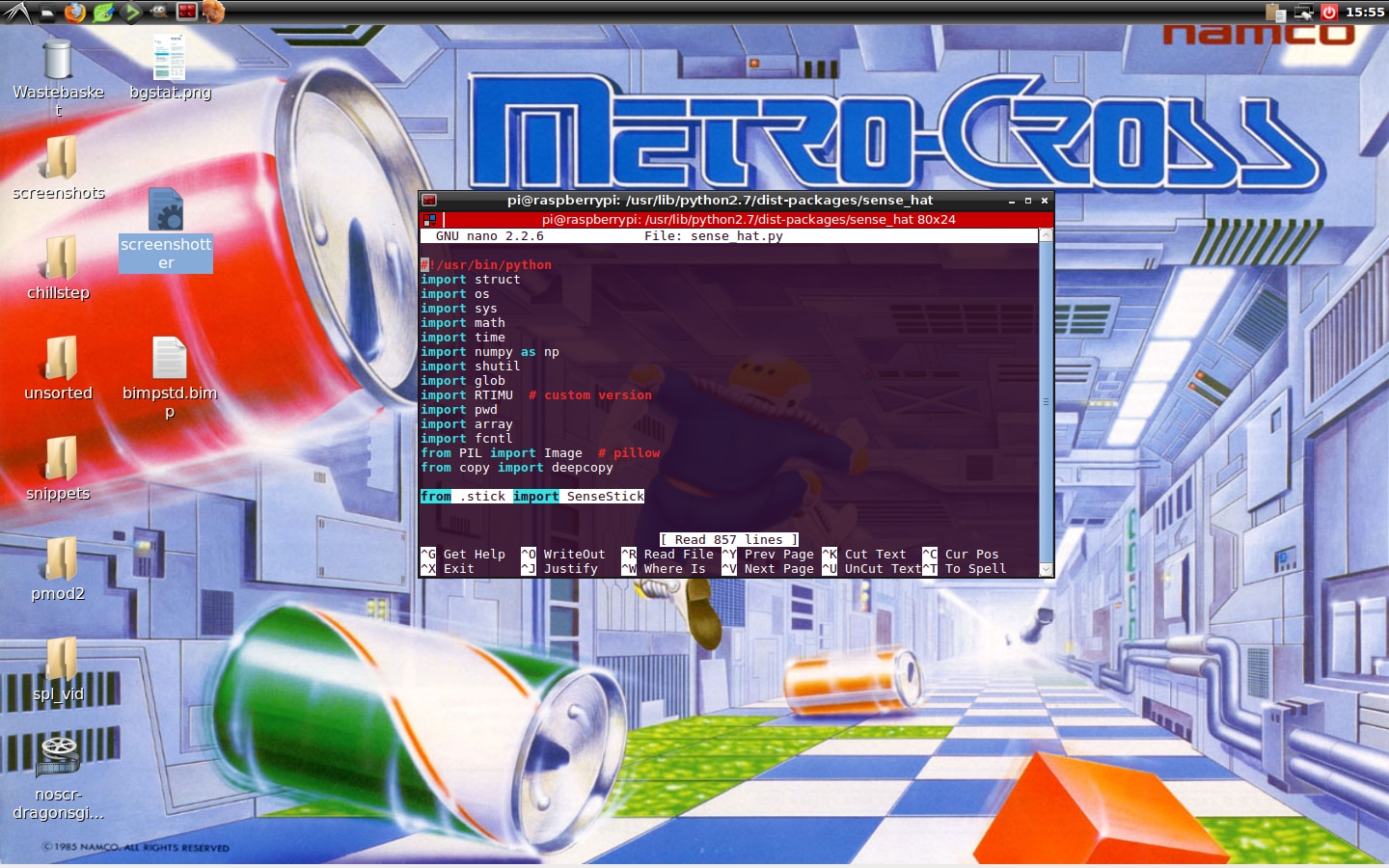
 

image


Thats it! happy playing!!


Here's an example code and video showing how to move a pixel around using the joystick:


from sense_hat import SenseHat
sense = SenseHat()

x = 3
y = 3

def draw_dot():
 sense.clear()
 sense.set_pixel(x,y,255,90,90)

def pushed_up():
 global y
 y = y - 1
 if y < 0:
  y = 0
 draw_dot()

def pushed_down():
 global y
 y = y + 1
 if y > 7:
  y = 7
 draw_dot()

def pushed_left():
 global x
 x = x - 1
 if x < 0:
  x = 0
 draw_dot()

def pushed_right():
 global x
 x = x + 1
 if x > 7:
  x = 7
 draw_dot()

sense.stick.direction_up = pushed_up
sense.stick.direction_down = pushed_down
sense.stick.direction_left = pushed_left
sense.stick.direction_right = pushed_right

draw_dot()


This video is unavailable.
You don't have permission to edit metadata of this video.

  • Sign in to reply

Top Comments

  • Former Member
    Former Member over 9 years ago in reply to Jan Cumps +3
    Music
  • Former Member
    Former Member over 9 years ago in reply to spannerspencer +2
    When I found that wall paper I immediately went looking for emulator roms, by far the best is the arcade version all round. The early computers couldn't compete with the graphics, rich sound and responsiveness…
  • spannerspencer
    spannerspencer over 9 years ago +1
    Excellent work Lucie -- really useful. Thanks for this! And check out that Metro Cross wallpaper!! I LOVE that game -- not played it in soooo long Had it on the Speccy and Amiga!
  • spannerspencer
    spannerspencer over 9 years ago

    Excellent work Lucie -- really useful. Thanks for this!


    And check out that Metro Cross wallpaper!! I LOVE that game -- not played it in soooo long image  Had it on the Speccy and Amiga!

    • Cancel
    • Vote Up +1 Vote Down
    • Sign in to reply
    • More
    • Cancel
  • Former Member
    Former Member over 9 years ago in reply to Jan Cumps

    Music image

    • Cancel
    • Vote Up +3 Vote Down
    • Sign in to reply
    • More
    • Cancel
  • Jan Cumps
    Jan Cumps over 9 years ago

    what's in the chillstep folder on your desktop?

    • Cancel
    • Vote Up 0 Vote Down
    • Sign in to reply
    • More
    • Cancel
<
element14 Community

element14 is the first online community specifically for engineers. Connect with your peers and get expert answers to your questions.

  • Members
  • Learn
  • Technologies
  • Challenges & Projects
  • Products
  • Store
  • About Us
  • Feedback & Support
  • FAQs
  • Terms of Use
  • Privacy Policy
  • Legal and Copyright Notices
  • Sitemap
  • Cookies

An Avnet Company © 2026 Premier Farnell Limited. All Rights Reserved.

Premier Farnell Ltd, registered in England and Wales (no 00876412), registered office: Farnell House, Forge Lane, Leeds LS12 2NE.

ICP 备案号 10220084.

Follow element14

  • X
  • Facebook
  • linkedin
  • YouTube