



element14 Community
element14 Community
    Register Log In
  • Site
  • Search
  • Log In Register
  • Community Hub
    Community Hub
    • What's New on element14
    • Feedback and Support
    • Benefits of Membership
    • Personal Blogs
    • Members Area
    • Achievement Levels
  • Learn
    Learn
    • Ask an Expert
    • eBooks
    • element14 presents
    • Learning Center
    • Tech Spotlight
    • STEM Academy
    • Webinars, Training and Events
    • Learning Groups
  • Technologies
    Technologies
    • 3D Printing
    • FPGA
    • Industrial Automation
    • Internet of Things
    • Power & Energy
    • Sensors
    • Technology Groups
  • Challenges & Projects
    Challenges & Projects
    • Design Challenges
    • element14 presents Projects
    • Project14
    • Arduino Projects
    • Raspberry Pi Projects
    • Project Groups
  • Products
    Products
    • Arduino
    • Avnet & Tria Boards Community
    • Dev Tools
    • Manufacturers
    • Multicomp Pro
    • Product Groups
    • Raspberry Pi
    • RoadTests & Reviews
  • About Us
    About the element14 Community
  • Store
    Store
    • Visit Your Store
    • Choose another store...
      • Europe
      •  Austria (German)
      •  Belgium (Dutch, French)
      •  Bulgaria (Bulgarian)
      •  Czech Republic (Czech)
      •  Denmark (Danish)
      •  Estonia (Estonian)
      •  Finland (Finnish)
      •  France (French)
      •  Germany (German)
      •  Hungary (Hungarian)
      •  Ireland
      •  Israel
      •  Italy (Italian)
      •  Latvia (Latvian)
      •  
      •  Lithuania (Lithuanian)
      •  Netherlands (Dutch)
      •  Norway (Norwegian)
      •  Poland (Polish)
      •  Portugal (Portuguese)
      •  Romania (Romanian)
      •  Russia (Russian)
      •  Slovakia (Slovak)
      •  Slovenia (Slovenian)
      •  Spain (Spanish)
      •  Sweden (Swedish)
      •  Switzerland(German, French)
      •  Turkey (Turkish)
      •  United Kingdom
      • Asia Pacific
      •  Australia
      •  China
      •  Hong Kong
      •  India
      •  Japan
      •  Korea (Korean)
      •  Malaysia
      •  New Zealand
      •  Philippines
      •  Singapore
      •  Taiwan
      •  Thailand (Thai)
      •  Vietnam
      • Americas
      •  Brazil (Portuguese)
      •  Canada
      •  Mexico (Spanish)
      •  United States
      Can't find the country/region you're looking for? Visit our export site or find a local distributor.
  • Translate
  • Profile
  • Settings
Raspberry Pi
  • Products
  • More
Raspberry Pi
Blog WizFi360-EVB-Pico
  • Blog
  • Forum
  • Documents
  • Quiz
  • Events
  • Polls
  • Files
  • Members
  • Mentions
  • Sub-Groups
  • Tags
  • More
  • Cancel
  • New
Join Raspberry Pi to participate - click to join for free!
Featured Articles
Announcing Pi
Technical Specifications
Raspberry Pi FAQs
Win a Pi
GPIO Pinout
Raspberry Pi Wishlist
Comparison Chart
Quiz
  • Share
  • More
  • Cancel
Group Actions
  • Group RSS
  • More
  • Cancel
Engagement
  • Author Author: ralphjy
  • Date Created: 9 Aug 2022 11:42 PM Date Created
  • Views 2990 views
  • Likes 8 likes
  • Comments 17 comments
Related
Recommended
  • WizFi360
  • WizFi360-EVB-Pico
  • rp2040

WizFi360-EVB-Pico

ralphjy
ralphjy
9 Aug 2022

When the RPi Pico W was announced in June I was very happy as I've wanted to get an inexpensive WiFi version of the RP2040.  Unfortunately, to date, I haven't been able to get one. 

fmilburn mentioned in a Comment on New Pico W that "Wiznet has RP2040 boards for both ethernet and WiFi."

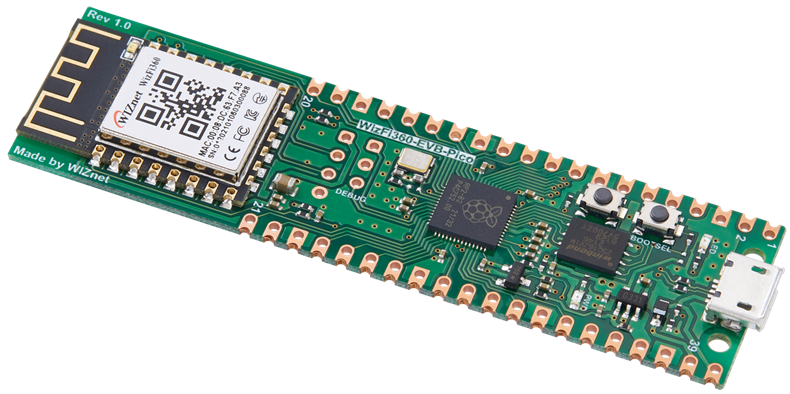
I noticed that the WizFi360 EVB Pico is available in distribution (Digikey less than $7).
image

And more recently I noticed on Hackster that Wiznet was having a design contest and giving away free samples for projects (3 different modules including the one with the Pico).

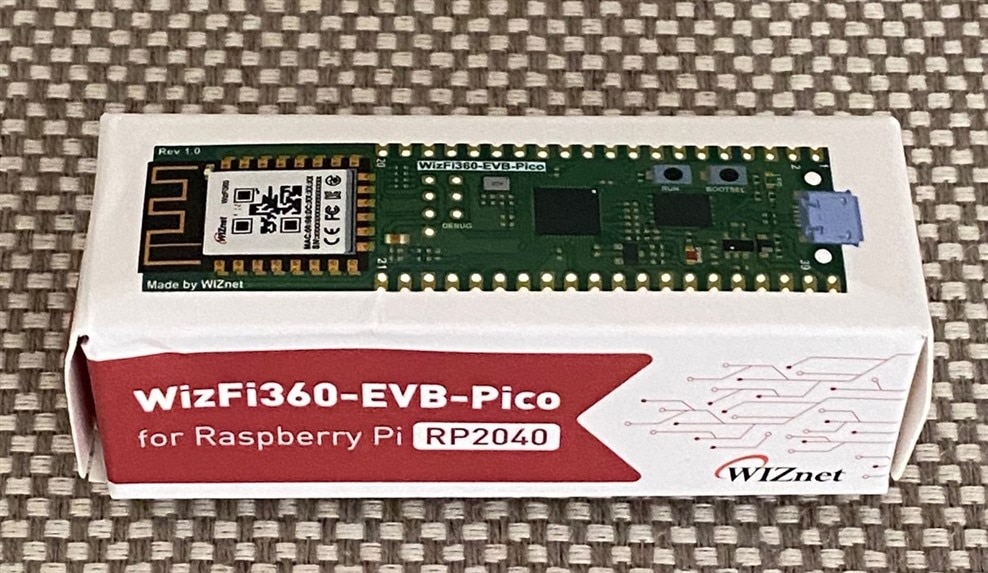
I applied and received a free sample.  It arrived this weekend, slightly worse for shipping - the exterior box was crushed (I plumped it up a bit), but luckily the board was not (love those padded envelopes).
image

The WizFi board has a couple of shortcomings relative to the Pico W.  It retains the Pico footprint/pinout, but is longer because the WiFi module is just tacked on the end.  And it only does WiFi, while the Pico W uses an Infineon CYW43439 chipset capable of WiFi/BLE (although to be fair - BLE has not been implemented in the firmware yet).

I have a number of sensors that I use WiFi only, so I'll probably make good use of the WiZFi board and best of all it's available...

  • Sign in to reply

Top Comments

  • ralphjy
    ralphjy over 3 years ago in reply to ntewinkel +1
    Hi Nico , The person that created the WizFi360_arduino_library had posted a project on Hackster using the wizfi360-evb-pico-in-arduino . I noticed that they had used version 2.2.2 of the RP2040 board…
  • ntewinkel
    ntewinkel over 3 years ago in reply to ralphjy

    Hi Ralph,

    I ran into the issue of libraries stepping on each other too. That's been cleared up now.

    The trouble I ran into was just using their basic sample "WebClientRepeating" that fetches the ascii logo from the arduino website. Turns out, the issue was with call that was used for printing out the IP address to the console. So I took that out and that sample works now. Disappointed relieved

    So I thought I was home free after that, but now it won't connect to my node-red at port 1880... I suspect it doesn't like the port being anything other than 80. ugh. I might try duplicating their sample and just changing the server/url/port/etc to mine to see make sure it's not something else I typo'd in my own code.

    This board is soooo not ready for market! I think their competition might be so that we fix their issues Laughing

    • Cancel
    • Vote Up 0 Vote Down
    • Sign in to reply
    • More
    • Cancel
  • ralphjy
    ralphjy over 3 years ago in reply to ntewinkel

    Hi Nico,

    I've run into some issues due to the fact that I have some conflicts with the board libraries that I have installed for RP2040 boards (unfortunately I use many different variants).  I have run into these type of issues before. I may have to isolate the different libraries.  Have you used the Arduino IDE previously with other RP2040 boards?

    I assume that for the WizFi board that you are just following their instructions and using the earlephilhower board library which covers a lot of the RP2040 variants.  I've had conflicts with that library and the Arducam library that supports the Pico4ML.  And I've been trying some other board and software libraries that may be causing problems that are specific to my setup.

    What kind of problems are you having?

    I haven't really done anything useful with WiFi because of these other issues.  I have been connected to my WiFi router and obtained an IP address, but have had some issues with some of the WiFi library functions (haven't figured this out yet).  I suspect that there might be some version incompatibility with the WizFi360 library.  

    I've kind of gotten derailed because of work being done on my house, but hopefully will be able to get back to it in about a week or so.

    Ralph

    • Cancel
    • Vote Up 0 Vote Down
    • Sign in to reply
    • More
    • Cancel
  • ntewinkel
    ntewinkel over 3 years ago

    Hi ralphjy, have you used this WizFi Pico board yet?

    So far I'm not at all impressed - I can't even get the basic WiFi samples to work Disappointed And WiFi is kind of their whole point Laughing
    I'm using the Arduino IDE with their library.

    I noticed two project submissions so far, but they both use AT commands directly. sigh.

    I've posted questions on their board, so I hope they'll get that sorted out soon.

    • Cancel
    • Vote Up 0 Vote Down
    • Sign in to reply
    • More
    • Cancel
  • ntewinkel
    ntewinkel over 3 years ago in reply to ntewinkel

    update: BME280 works with SPI :) I did also notice in the Adafruit example that there is a way to set custom I2C pins, but as it's working nicely now I think I'll just leave it using SPI Laughing

    • Cancel
    • Vote Up 0 Vote Down
    • Sign in to reply
    • More
    • Cancel
  • ntewinkel
    ntewinkel over 3 years ago

    That's great! Good luck on the contest!

    I received one too Slight smile They look like very interesting boards (like the Pi Pico).
    My plan is to see how it compares to my Wemos D1 mini as an outdoor temperature sensor.

    I've already run into a few limiting issues, sadly - mostly because they do not support WiFi in MicroPython yet so I have to use the Arduino IDE.
    The Arduino IDE supports the RP2040, but with every library I try to use there seem to be incompatibilities - the OneWire library is a key one I was using for the DS18B20 temperature sensors, but it hangs the board (just hold the bootsel and upload a new sketch when that happens). I was also having issues with the BME280 on I2C, as I can't figure out which pins to use for I2C, so my next step is to try SPI so I can define the pins myself.

    Funnily enough, I will most likely have to combine the element14 thermistors challenge with the Wiznet challenge, and use thermistors for that sensor!

    Hope your project goes more smoothly!

    • Cancel
    • Vote Up 0 Vote Down
    • Sign in to reply
    • More
    • Cancel
<>
element14 Community

element14 is the first online community specifically for engineers. Connect with your peers and get expert answers to your questions.

  • Members
  • Learn
  • Technologies
  • Challenges & Projects
  • Products
  • Store
  • About Us
  • Feedback & Support
  • FAQs
  • Terms of Use
  • Privacy Policy
  • Legal and Copyright Notices
  • Sitemap
  • Cookies

An Avnet Company © 2026 Premier Farnell Limited. All Rights Reserved.

Premier Farnell Ltd, registered in England and Wales (no 00876412), registered office: Farnell House, Forge Lane, Leeds LS12 2NE.

ICP 备案号 10220084.

Follow element14

  • X
  • Facebook
  • linkedin
  • YouTube