element14 Community
element14 Community
    Register Log In
  • Site
  • Search
  • Log In Register
  • Community Hub
    Community Hub
    • What's New on element14
    • Feedback and Support
    • Benefits of Membership
    • Personal Blogs
    • Members Area
    • Achievement Levels
  • Learn
    Learn
    • Ask an Expert
    • eBooks
    • element14 presents
    • Learning Center
    • Tech Spotlight
    • STEM Academy
    • Webinars, Training and Events
    • Learning Groups
  • Technologies
    Technologies
    • 3D Printing
    • FPGA
    • Industrial Automation
    • Internet of Things
    • Power & Energy
    • Sensors
    • Technology Groups
  • Challenges & Projects
    Challenges & Projects
    • Design Challenges
    • element14 presents Projects
    • Project14
    • Arduino Projects
    • Raspberry Pi Projects
    • Project Groups
  • Products
    Products
    • Arduino
    • Avnet & Tria Boards Community
    • Dev Tools
    • Manufacturers
    • Multicomp Pro
    • Product Groups
    • Raspberry Pi
    • RoadTests & Reviews
  • About Us
  • Store
    Store
    • Visit Your Store
    • Choose another store...
      • Europe
      •  Austria (German)
      •  Belgium (Dutch, French)
      •  Bulgaria (Bulgarian)
      •  Czech Republic (Czech)
      •  Denmark (Danish)
      •  Estonia (Estonian)
      •  Finland (Finnish)
      •  France (French)
      •  Germany (German)
      •  Hungary (Hungarian)
      •  Ireland
      •  Israel
      •  Italy (Italian)
      •  Latvia (Latvian)
      •  
      •  Lithuania (Lithuanian)
      •  Netherlands (Dutch)
      •  Norway (Norwegian)
      •  Poland (Polish)
      •  Portugal (Portuguese)
      •  Romania (Romanian)
      •  Russia (Russian)
      •  Slovakia (Slovak)
      •  Slovenia (Slovenian)
      •  Spain (Spanish)
      •  Sweden (Swedish)
      •  Switzerland(German, French)
      •  Turkey (Turkish)
      •  United Kingdom
      • Asia Pacific
      •  Australia
      •  China
      •  Hong Kong
      •  India
      • Japan
      •  Korea (Korean)
      •  Malaysia
      •  New Zealand
      •  Philippines
      •  Singapore
      •  Taiwan
      •  Thailand (Thai)
      • Vietnam
      • Americas
      •  Brazil (Portuguese)
      •  Canada
      •  Mexico (Spanish)
      •  United States
      Can't find the country/region you're looking for? Visit our export site or find a local distributor.
  • Translate
  • Profile
  • Settings
Raspberry Pi
  • Products
  • More
Raspberry Pi
Raspberry Pi Forum Play MAME on a virtual Raspberry Pi
  • Blog
  • Forum
  • Documents
  • Quiz
  • Events
  • Polls
  • Files
  • Members
  • Mentions
  • Sub-Groups
  • Tags
  • More
  • Cancel
  • New
Join Raspberry Pi to participate - click to join for free!
Featured Articles
Announcing Pi
Technical Specifications
Raspberry Pi FAQs
Win a Pi
Raspberry Pi Wishlist
Actions
  • Share
  • More
  • Cancel
Forum Thread Details
  • Replies 13 replies
  • Subscribers 677 subscribers
  • Views 2467 views
  • Users 0 members are here
  • mame
  • qemu
  • virtualbox
  • raspberry_pi
Related

Play MAME on a virtual Raspberry Pi

fustini
fustini over 13 years ago

I just came across this intriguing post on Hackaday:
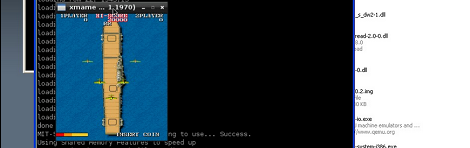
     http://hackadaycom.files.wordpress.com/2012/03/mame.png

The first Raspberry Pi build is a MAME machine

http://hackaday.com/2012/03/22/the-first-raspberry-pi-build-is-a-mame-machine/

[Nick] figured he should hit the ground running, so he emulated a Raspberry Pi to get everything ready for the MAME machine he’ll build when his new toy arrives.


The full details are in this blog post:


Compiling xmame .106 on the Rasberry Pi

http://1337technophile.blogspot.com/2012/03/compiling-xmame-106-on-rasberry-pi.html


I had played around with the Raspberry Pi Developer VM that Russell Davis created a couple weeks ago which made it easy to cross-compile for the Pi.  This looks like a step beyond as it appears to allow you to run Pi executables in an emulator (QEMU I think).


I think I'll be giving this a try soon.  Anyone else?


Cheers,

Drew

  • Sign in to reply
  • Cancel
Parents
  • fustini
    fustini over 13 years ago

    So far I've downloaded the VirtualBox VM file from here:


    http://www.rpiforum.net/forum/files/file/8-raspberry-pi-virtualbox/


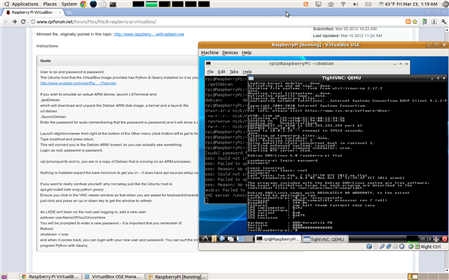
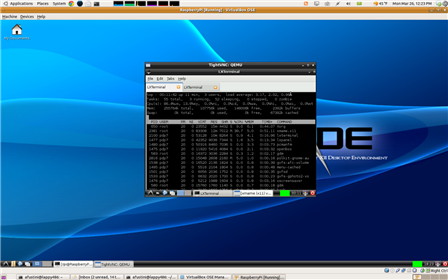
    and have run through the instruction on that page.  I have the debian install of Raspberry Pi running which is emulated with QEMU:

    image

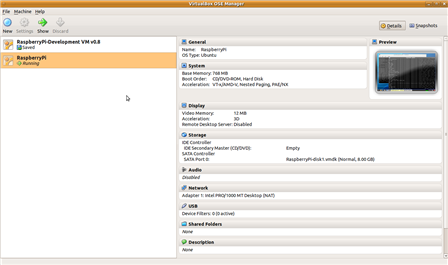
    When I first launched the VM, I was having horrible response time with high load along with swap increasing.  The VM from Russell Davis ran well so I modified the settings for this VM to match, including knocking the memory down from 1024MB to 768MB:

    image

    I've started going through the MAME instructions (http://1337technophile.blogspot.com/2012/03/compiling-xmame-106-on-rasberry-pi.html) and am waiting for apt-get to finish downloading the needed packages.


    Cheers,

    Drew

    • Cancel
    • Vote Up 0 Vote Down
    • Sign in to reply
    • Cancel
  • Former Member
    Former Member over 13 years ago in reply to fustini

    Pi MAME would be fantastic - Thanks for the hard work so far !

    image

    • Cancel
    • Vote Up 0 Vote Down
    • Sign in to reply
    • Cancel
  • fustini
    fustini over 13 years ago in reply to Former Member

    I think have to thank the guy who created the VM and instructions - it's been easy sailing for me so far.  Ironically, having resumed the VM just now since last night, I'm waiting for the emulated Raspberry Pi ARM environment to finish installing its namesake, Python image

    • Cancel
    • Vote Up 0 Vote Down
    • Sign in to reply
    • Cancel
Reply
  • fustini
    fustini over 13 years ago in reply to Former Member

    I think have to thank the guy who created the VM and instructions - it's been easy sailing for me so far.  Ironically, having resumed the VM just now since last night, I'm waiting for the emulated Raspberry Pi ARM environment to finish installing its namesake, Python image

    • Cancel
    • Vote Up 0 Vote Down
    • Sign in to reply
    • Cancel
Children
  • fustini
    fustini over 13 years ago in reply to fustini

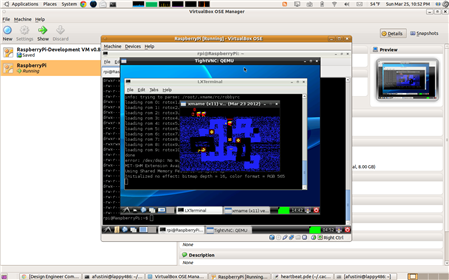
    Alrighty!  xmame finished compiling over night and I finally got a chance to take it for a spin.  Here is a screenshot of playing the game robby (http://mamedev.org/roms/robby/):


    image


    And here's a short video clip of the gameplay:

    You don't have permission to edit metadata of this video.
    Edit media
    x
    image
    Upload Preview
    image


    Cheers,

    Drew

    • Cancel
    • Vote Up 0 Vote Down
    • Sign in to reply
    • Cancel
  • Former Member
    Former Member over 13 years ago in reply to fustini

    That emulator uses the same ammount of memory that the raspberry uses?


    Because as far as remember, LXDE alone costs around 256MB.


    Which modifications you have on this to make it use less memory?

    • Cancel
    • Vote Up 0 Vote Down
    • Sign in to reply
    • Cancel
  • fustini
    fustini over 13 years ago in reply to Former Member

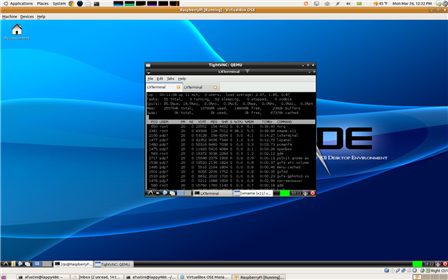
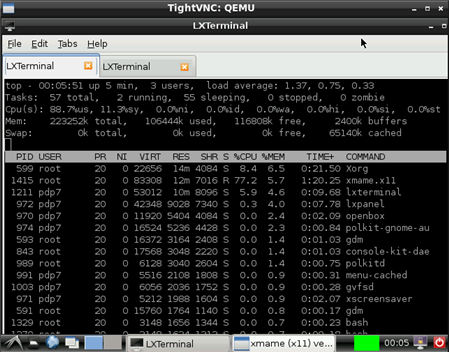
    Hi - that's a very good question.  I fired up the emulator again and ran top with xmame open.  It looks like it is all within the 256MB RAM.


    Here's sorted by resident memory size:

    image


    And sorted by memory % utilization:

    image


    Cheers,

    Drew

    • Cancel
    • Vote Up 0 Vote Down
    • Sign in to reply
    • Cancel
  • mahjongg
    mahjongg over 13 years ago in reply to fustini

    I hope you do realise that the RPI shares its main ram with the GPU, and a minimum of 32MB has to be reserved for the GPU!

    That means that for the ARM only 256-32 = 224MB is actually available.


    Still, I'm sure that MAME can work on the RPI, but maybe not on top of a full desktop OS, but rather as a framebuffer application running directly from the commandline, like MAME for DOS.


    Not saying that its impossible to make MAME run on top of a desktop, but it might be harder to do it that way.

    • Cancel
    • Vote Up 0 Vote Down
    • Sign in to reply
    • Cancel
  • fustini
    fustini over 13 years ago in reply to mahjongg

    Ah, good catch.  I do now remember seeing that on the Wikipedia article which links to various forum posts:

    On the model B beta boards, 128 MB was allocated by default to the GPU, leaving 128 MB for the CPU.[57] On the release model B (and Model A) three different splits are possible: 192 MB (CPU RAM) is the default split. It should be sufficent for standalone 1080p video decoding, or simple 3D (but probably not both together). 224 MB is for Linux only, with just a 1080p framebuffer; likely to fail for any video or 3D. 128 MB is for heavy 3D, possibly also with video decoding (e.g. XBMC).[58]Comparatively the Nokia 701 uses 128 MB for the Broadcom VideoCore IV.[59]


    It seems trade-off's are an inescapable part of life, huh.

    • Cancel
    • Vote Up 0 Vote Down
    • Sign in to reply
    • Cancel
  • fustini
    fustini over 13 years ago in reply to fustini

    I was curious, too, so I modified the launch script for QEMU to allocate just 224MB:

    rpi@RaspberryPi:~/debian$ cat launchDebian_224mb

    #!/bin/bash

    sudo qemu-system-arm -M versatilepb -cpu arm1176 -m 224 -hda debian.qcow2 -kernel zImageDeb -append "root=/dev/sda" -usbdevice tablet


    xmame still did run ok:

    image


    However, I'm not sure how accurate all of this really is - I am emulating the ARM device on an extremely powerful (in comparison) dual core Core i5 laptop.  Well, at least it doesn't seem to be running out of memory.

    • Cancel
    • Vote Up 0 Vote Down
    • Sign in to reply
    • Cancel
  • mahjongg
    mahjongg over 13 years ago in reply to fustini

    Nice to hear MAME runs on a desktop with just 224MB of RAM!

    That means it should run okay, don't worry about running it with a 700MHz ARM, If the compiler it is compiled with is any good, it should run most games well enough. For a slight speed and memory boost you could still choose to create a dedicated MAME machine, not just running MAME on top of a desktop. For comparison, look at the open pandora console, which is an ARM based handheld gaming device with similar specs (for 2D graphics that is, for 3D the RPI is way better).

    • Cancel
    • Vote Up 0 Vote Down
    • Sign in to reply
    • Cancel
element14 Community

element14 is the first online community specifically for engineers. Connect with your peers and get expert answers to your questions.

  • Members
  • Learn
  • Technologies
  • Challenges & Projects
  • Products
  • Store
  • About Us
  • Feedback & Support
  • FAQs
  • Terms of Use
  • Privacy Policy
  • Legal and Copyright Notices
  • Sitemap
  • Cookies

An Avnet Company © 2025 Premier Farnell Limited. All Rights Reserved.

Premier Farnell Ltd, registered in England and Wales (no 00876412), registered office: Farnell House, Forge Lane, Leeds LS12 2NE.

ICP 备案号 10220084.

Follow element14

  • X
  • Facebook
  • linkedin
  • YouTube