element14 Community
element14 Community
    Register Log In
  • Site
  • Search
  • Log In Register
  • Community Hub
    Community Hub
    • What's New on element14
    • Feedback and Support
    • Benefits of Membership
    • Personal Blogs
    • Members Area
    • Achievement Levels
  • Learn
    Learn
    • Ask an Expert
    • eBooks
    • element14 presents
    • Learning Center
    • Tech Spotlight
    • STEM Academy
    • Webinars, Training and Events
    • Learning Groups
  • Technologies
    Technologies
    • 3D Printing
    • FPGA
    • Industrial Automation
    • Internet of Things
    • Power & Energy
    • Sensors
    • Technology Groups
  • Challenges & Projects
    Challenges & Projects
    • Design Challenges
    • element14 presents Projects
    • Project14
    • Arduino Projects
    • Raspberry Pi Projects
    • Project Groups
  • Products
    Products
    • Arduino
    • Avnet & Tria Boards Community
    • Dev Tools
    • Manufacturers
    • Multicomp Pro
    • Product Groups
    • Raspberry Pi
    • RoadTests & Reviews
  • About Us
    About the element14 Community
  • Store
    Store
    • Visit Your Store
    • Choose another store...
      • Europe
      •  Austria (German)
      •  Belgium (Dutch, French)
      •  Bulgaria (Bulgarian)
      •  Czech Republic (Czech)
      •  Denmark (Danish)
      •  Estonia (Estonian)
      •  Finland (Finnish)
      •  France (French)
      •  Germany (German)
      •  Hungary (Hungarian)
      •  Ireland
      •  Israel
      •  Italy (Italian)
      •  Latvia (Latvian)
      •  
      •  Lithuania (Lithuanian)
      •  Netherlands (Dutch)
      •  Norway (Norwegian)
      •  Poland (Polish)
      •  Portugal (Portuguese)
      •  Romania (Romanian)
      •  Russia (Russian)
      •  Slovakia (Slovak)
      •  Slovenia (Slovenian)
      •  Spain (Spanish)
      •  Sweden (Swedish)
      •  Switzerland(German, French)
      •  Turkey (Turkish)
      •  United Kingdom
      • Asia Pacific
      •  Australia
      •  China
      •  Hong Kong
      •  India
      •  Japan
      •  Korea (Korean)
      •  Malaysia
      •  New Zealand
      •  Philippines
      •  Singapore
      •  Taiwan
      •  Thailand (Thai)
      •  Vietnam
      • Americas
      •  Brazil (Portuguese)
      •  Canada
      •  Mexico (Spanish)
      •  United States
      Can't find the country/region you're looking for? Visit our export site or find a local distributor.
  • Translate
  • Profile
  • Settings
Raspberry Pi
  • Products
  • More
Raspberry Pi
Raspberry Pi Forum First unboxing pictures... maybe?
  • Blog
  • Forum
  • Documents
  • Quiz
  • Events
  • Polls
  • Files
  • Members
  • Mentions
  • Sub-Groups
  • Tags
  • More
  • Cancel
  • New
Join Raspberry Pi to participate - click to join for free!
Featured Articles
Announcing Pi
Technical Specifications
Raspberry Pi FAQs
Win a Pi
Raspberry Pi Wishlist
Actions
  • Share
  • More
  • Cancel
Forum Thread Details
  • Replies 42 replies
  • Subscribers 711 subscribers
  • Views 6122 views
  • Users 0 members are here
  • raspberry_pi
Related

First unboxing pictures... maybe?

e14 Contributor
e14 Contributor over 14 years ago

I am not sure if this counts as a first unboxing, but I thought I would share it with you all anyway.


I was extremely lucky to be one of the Element14 Road Test winners and this morning and was very surprised and excited to receive a box from Farnell/Element14 via UPS.


I should say that it did come with a disclaimer that says it is an R&D Prototype and that it is not necessarily in the form that the final, finished product will be made available.  I guess that is in case any changes are required as a consequence of the compliance testing.


At the risk of being deluged with questions that I cannot answer yet, or hate mail from the angry and frustrated (please don't hate me) I thought I would share a few pics before I get back to my day job.


Sorry, I just had to rip the box open before I got the camera out.
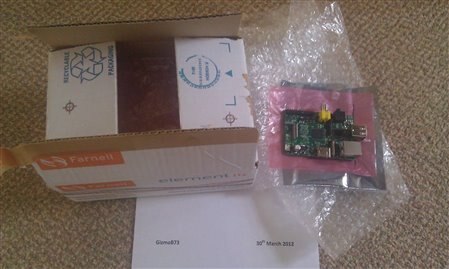
imageimage


It really is very neat and small, but the really exciting part should hopefully come this evening when I get chance to power it up!


Here it is inside my first box.  It is a plastic business card box that has now been recycled and put to a better use.  This really brings home to me how small the R-Pi really is.
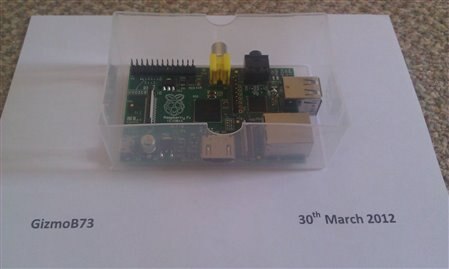
 

image


I still have to cut the holes when I get time.


I have a lot to learn and a lot of work before my Road Test Review, but I hope you like the pics...

  • Sign in to reply
  • Cancel
Parents
  • Montala
    Montala over 14 years ago

    That last post should have given you a few ideas Gizmo... assuming that you needed some, that is!


    Anyway, it's getting a bit late now here in the U.K., and I'm off to bed.


    I am sure though that you will be working all night with your new 'baby', and I will look forward to reading a full report in the morning! image

    • Cancel
    • Vote Up 0 Vote Down
    • Sign in to reply
    • Cancel
  • e14 Contributor
    e14 Contributor over 14 years ago in reply to Montala

    Ideas are always welcome, time permitting.  Most of this Linux is new to me, closest for me was a DRS6000 about 12 years ago, and I was only writing code on it. You'll need to be patient and type S-L-O-W-L-Y for me, but glad to answer what/when I can.


    My SD Card is:

    Samsung 8GB Class 6

    MB-SP8G


    Running the "debian6-17-02-2012" image.


    From plug to terminal login prompt (not into LXDE), whilst connected to Ethernet, startup time is about 36 seconds.


    Screen resolution using xrandr

    1920x1080


    Memory using free -m

    total 186

    used 37

    free 148

    shared 0

    buffers 4

    cached 20


    hdparm -Tt /dev/mmcblk0p1

    Timing Cached reads:  306MB in 2.00 seconds = 152.92 MB/sec

    Timing buffered disk reads: 32MB in 3.07 seconds = 10.42 MB/sec


    My very preliminary thoughts are:


    Overall response feels capable, but not blisteringly fast when running LXDE.  As the first Debian image, I would imagine there is scope for improvement with future tweaks and builds, but certainly not dissapointing for something so small and cheap.


    So far the only real indication to me that this is such a low cost device, is the quality of the SD Card socket.  Having been used to the slick metal spring loaded versions in the past, this is a rather simple plastic friction affair.  If I find myself swapping cards a lot, I might decide to invest in an SD Card extender.  Otherwise, the only other weak point is the micro USB socket, but that should be no surprise to anybody that has used a device with one of these before.  Best to avoid heavy hands and if unplugging a lot (to disconnect the power), then use the other end of the cable, or a power switch.  A careful blob of epoxy glue over the socket and surrounding board would probably strengthen things up too, but I won't be putting any near mine.


    I haven't even scratched the surface, but what I like best so far is it's multiple personalities.  It is just a matter of swapping the SD Card and in a few seconds it does something different.  I am keeping plenty of card backups at regular intervals, it is a simple task and makes it so easy to roll back if something goes wrong.  It is such a simple and obvious thing, but I hadn't anticipated how useful/empowering that would be as a linux noob.


    I don't feel like I have done very much this evening, but really need some sleep now.  Well, I will try anyway. image

    • Cancel
    • Vote Up +1 Vote Down
    • Sign in to reply
    • Cancel
  • morgaine
    morgaine over 14 years ago in reply to e14 Contributor

    Great stuff GizmoB73, it's very cool to read your experiences.


    And I echo what jacques_nil said, nobody here will get annoyed at anything you write, good or bad, newbie or expert, it's all useful input on the Pi experience and interesting.  All the people who have the pettiness to get annoyed are on the official forum, which encourages intolerance.


    I ran up the Fedora 14 Remix distro for the Raspberry Pi under QEMU emulation a little while back, and reported on the info revealed by running some standard commands, see here:


        http://www.raspberrymod.com/viewtopic.php?f=48&t=511&p=997#p997


    If you have a moment to run the same commands on your live hardware and paste the result, it would be interesting to see how it compares with the emulation.  The fact that mine was Fedora and yours is Debian will make some difference, but most things should be identical.


    Morgaine.

    • Cancel
    • Vote Up 0 Vote Down
    • Sign in to reply
    • Cancel
  • bodgy
    bodgy over 14 years ago in reply to e14 Contributor

    what I like best so far is it's multiple personalities. It is just a matter of swapping the SD Card and in a few seconds it does something different.


    Many moons ago there was a terminal type PC called an Einstein, it didn't have an OS, one purchased - 51/4" floppies that contained the emulated OS (such as they were) of your choice.

    • Cancel
    • Vote Up 0 Vote Down
    • Sign in to reply
    • Cancel
  • e14 Contributor
    e14 Contributor over 14 years ago in reply to e14 Contributor

    Thank you for he post Gizmo, that is interesting.


    10.4 MB/s for the disk read speed looks quite low for a class 6. Should be around 20MB/s

    Do you have the write speed ?


    Another nice and simple test would be to try some HD video steamig over the network,

    this would invalidate (or validate) the therory that the shared ethernet over usb is a huge bottleneck.

    • Cancel
    • Vote Up 0 Vote Down
    • Sign in to reply
    • Cancel
  • e14 Contributor
    e14 Contributor over 14 years ago in reply to morgaine

    Thanks Morgaine, I will try to get around to this for you.


    Jacques_nil: here is the full Bonnie output for that card:


    Version  1.96   ------Sequential Output------ --Sequential Input- --Random-
    Concurrency   1 -Per Chr- --Block-- -Rewrite- -Per Chr- --Block-- --Seeks--
    Machine    Size K/sec %CP K/sec %CP K/sec %CP K/sec %CP K/sec %CP  /sec %CP
    raspberrypi368M23  99  8722  25  4698  14   360  99 13419  13 119.8  18
    Latency           830ms3339ms 940ms   30000us   69999us 610ms
    Version  1.96   ------Sequential Create------ --------Random Create--------
    raspberrypi     -Create-- --Read--- -Delete-- -Create-- --Read--- -Delete--
              files  /sec %CP  /sec %CP  /sec %CP  /sec %CP  /sec %CP  /sec %CP
                 16  1654  61 +++++ +++  2739  66  1847  67 +++++ +++  2080  50
    Latency           989ms   10000us   10000us1069ms   10000us2014ms

    1.96,1.96,raspberrypi,1,1333224324,368M,,23,99,8722,25,4698,14,360,99,13419,13,119.8,18,16,,,,,1654,61,+++++,+++,2739,66,1847,67,+++++,+++,2080,50,830ms,3339ms,940ms,30000us,69999us,610ms,989ms,10000us,10000us,1069ms,10000us,2014ms


    As for the HD Video streaming... easier said than done.

    I am currently chasing my tail trying to get something to work.  VLC doesn't work because it needs a specific version of alsa-lib.  It would appear that on debian this is called libasound2 and is the latest version when I checked, so not sure how to get that working.  I am guessing that I probably need an older version, and that VLC isn't pulling that in.


    I then thought I would try a different media player, but it looks like "debian-multimedia-keyring" is pretty fundamental and I cannot find a source for it that works on the Pi.


    I guess these are just noob issues on my part, and I am learning loads each time I hit another dead-end.

    • Cancel
    • Vote Up 0 Vote Down
    • Sign in to reply
    • Cancel
  • e14 Contributor
    e14 Contributor over 14 years ago in reply to e14 Contributor

    OK, got "debian-multimedia-keyring" to install manually by downloading the .deb file and installing with dpkg -i.


    I then installed SMPlayer and Gnome MPlayer.  Tested with a standard definition file streaming from my NAS over my Gigabit backbone.  Playback had no audio and was at best running at one third of the frame rate it should have been.  I have no doubt that the R-Pi is capable of better than that, but something is obviously not right.


    I wonder if it is the debian build?

    • Cancel
    • Vote Up 0 Vote Down
    • Sign in to reply
    • Cancel
  • e14 Contributor
    e14 Contributor over 14 years ago in reply to e14 Contributor

    Once again, thank you


    reordered

    Sequential disk write:

    with putc() : 23Kbytes/sec, cpu overhead 99%          <- horrible, but this is due to SD card that do not like small writes

    with write() : 8.72MB/sec, cpu overhead 25%

    read,seek,write : 4.7MB/sec, cpu overhead 14%

    Sequential disk read:

    with getc(): 360Kbytes/sec, cpu overhead 99%

    Block read: 13.4MB,, cpu overhead 13%                   <- better than your first test

    Seek time: 8.3ms ( = 1 / 119.8)


    Read perfs. are not bad, but the poor write perfs.are for sure 100% due to the SD, wich are optimized for writing big block of data.

    That should have no effect on applications that read a lot and write few, but when running multiple tasks, if the OS start swapping to the SD it could feel like snail driving.

    I wonder if the results will be better with a SSD attached to the USB port, but is it possible to boot from usb ?

    • Cancel
    • Vote Up 0 Vote Down
    • Sign in to reply
    • Cancel
  • e14 Contributor
    e14 Contributor over 14 years ago in reply to e14 Contributor

    It's not possible to boot from USB.  But, a cheap SD card can be your "boot disk" and then load the rest and run from the USB HDD.  (Kinda like the olden days of booting Linux from a floppy.)

    • Cancel
    • Vote Up 0 Vote Down
    • Sign in to reply
    • Cancel
  • e14 Contributor
    e14 Contributor over 14 years ago in reply to e14 Contributor

    Hi Gizmo,

    Instead of mplayer, you might have better luck with ilplayer.

    It is apparently a custom player supplied with the RPi that Paul Maunders

    used (he bought beta board #8 at the January eBay auction) and blogged

    about it at:

    http://www.reddit.com/r/raspberry_pi/comments/oicyr/i_have_a_raspberry_pi_beta_board_ama/

    and

    http://www.pyrosoft.co.uk/blog/2012/01/15/raspberry-pi-playing-a-1080p-video/


    He found ilplayer to be much faster than mplayer, but also had some trouble with audio.

    He was able to get sound using

      http://www.808.dk/pics/video/gizmo.mp4


    He disappeared after being asked about watching videos from hulu at 1080p,

    so don't try that.  image

    • Cancel
    • Vote Up 0 Vote Down
    • Sign in to reply
    • Cancel
  • e14 Contributor
    e14 Contributor over 14 years ago in reply to e14 Contributor

    "Playback had no audio and was at best running at one third of the frame rate it should have been."


    sounds like it might not be using any hardware accelleration (GPU) at all ?  If it can play 1080p MP4 files, SD should be easy...

    • Cancel
    • Vote Up 0 Vote Down
    • Sign in to reply
    • Cancel
Reply
  • e14 Contributor
    e14 Contributor over 14 years ago in reply to e14 Contributor

    "Playback had no audio and was at best running at one third of the frame rate it should have been."


    sounds like it might not be using any hardware accelleration (GPU) at all ?  If it can play 1080p MP4 files, SD should be easy...

    • Cancel
    • Vote Up 0 Vote Down
    • Sign in to reply
    • Cancel
Children
  • e14 Contributor
    e14 Contributor over 14 years ago in reply to e14 Contributor

    apparently none of the standard debian packages are accelerated,

    only ilplayer.   Paul got VLC to load, but it was too slow.

    Apparently AAC sound is supported, but not AC3.

    • Cancel
    • Vote Up 0 Vote Down
    • Sign in to reply
    • Cancel
element14 Community

element14 is the first online community specifically for engineers. Connect with your peers and get expert answers to your questions.

  • Members
  • Learn
  • Technologies
  • Challenges & Projects
  • Products
  • Store
  • About Us
  • Feedback & Support
  • FAQs
  • Terms of Use
  • Privacy Policy
  • Legal and Copyright Notices
  • Sitemap
  • Cookies

An Avnet Company © 2026 Premier Farnell Limited. All Rights Reserved.

Premier Farnell Ltd, registered in England and Wales (no 00876412), registered office: Farnell House, Forge Lane, Leeds LS12 2NE.

Follow element14

  • X
  • Facebook
  • linkedin
  • YouTube