element14 Community
element14 Community
    Register Log In
  • Site
  • Search
  • Log In Register
  • Community Hub
    Community Hub
    • What's New on element14
    • Feedback and Support
    • Benefits of Membership
    • Personal Blogs
    • Members Area
    • Achievement Levels
  • Learn
    Learn
    • Ask an Expert
    • eBooks
    • element14 presents
    • Learning Center
    • Tech Spotlight
    • STEM Academy
    • Webinars, Training and Events
    • Learning Groups
  • Technologies
    Technologies
    • 3D Printing
    • FPGA
    • Industrial Automation
    • Internet of Things
    • Power & Energy
    • Sensors
    • Technology Groups
  • Challenges & Projects
    Challenges & Projects
    • Design Challenges
    • element14 presents Projects
    • Project14
    • Arduino Projects
    • Raspberry Pi Projects
    • Project Groups
  • Products
    Products
    • Arduino
    • Avnet & Tria Boards Community
    • Dev Tools
    • Manufacturers
    • Multicomp Pro
    • Product Groups
    • Raspberry Pi
    • RoadTests & Reviews
  • About Us
  • Store
    Store
    • Visit Your Store
    • Choose another store...
      • Europe
      •  Austria (German)
      •  Belgium (Dutch, French)
      •  Bulgaria (Bulgarian)
      •  Czech Republic (Czech)
      •  Denmark (Danish)
      •  Estonia (Estonian)
      •  Finland (Finnish)
      •  France (French)
      •  Germany (German)
      •  Hungary (Hungarian)
      •  Ireland
      •  Israel
      •  Italy (Italian)
      •  Latvia (Latvian)
      •  
      •  Lithuania (Lithuanian)
      •  Netherlands (Dutch)
      •  Norway (Norwegian)
      •  Poland (Polish)
      •  Portugal (Portuguese)
      •  Romania (Romanian)
      •  Russia (Russian)
      •  Slovakia (Slovak)
      •  Slovenia (Slovenian)
      •  Spain (Spanish)
      •  Sweden (Swedish)
      •  Switzerland(German, French)
      •  Turkey (Turkish)
      •  United Kingdom
      • Asia Pacific
      •  Australia
      •  China
      •  Hong Kong
      •  India
      • Japan
      •  Korea (Korean)
      •  Malaysia
      •  New Zealand
      •  Philippines
      •  Singapore
      •  Taiwan
      •  Thailand (Thai)
      • Vietnam
      • Americas
      •  Brazil (Portuguese)
      •  Canada
      •  Mexico (Spanish)
      •  United States
      Can't find the country/region you're looking for? Visit our export site or find a local distributor.
  • Translate
  • Profile
  • Settings
Raspberry Pi
  • Products
  • More
Raspberry Pi
Raspberry Pi Forum 7" monitor cabling conundrum
  • Blog
  • Forum
  • Documents
  • Quiz
  • Events
  • Polls
  • Files
  • Members
  • Mentions
  • Sub-Groups
  • Tags
  • More
  • Cancel
  • New
Join Raspberry Pi to participate - click to join for free!
Featured Articles
Announcing Pi
Technical Specifications
Raspberry Pi FAQs
Win a Pi
Raspberry Pi Wishlist
Actions
  • Share
  • More
  • Cancel
Forum Thread Details
  • Replies 4 replies
  • Subscribers 677 subscribers
  • Views 660 views
  • Users 0 members are here
  • raspberry_pi
Related

7" monitor cabling conundrum

recantha
recantha over 13 years ago

Just a quick repost from something I posted on the Foundation forum as I reckon there's more technical knowledge over here!


I need some help with adapting some wiring.


I bought an item off eBay http://www.ebay.co.uk/itm/110940093247.


Now, I probably should have known better when I saw the HDMI label on it... I'm hoping that it is still decent definition, but I have a bit of a cable problem.


Here's a picture of the whole package:

Image


Here's a couple of close-ups of the cable that attaches to the cable that comes out of the bottom of the screen. It's got 6 pins and looks a bit like a PS/2 cable. I _think_ it's a 6-pin DIN, but I could be talking out of my bum.

Image

Image


and one of the cable pack that comes with it.

Image


I know, I know... Doesn't look promising.


So, there's a ground wire (black) and a 12V wire. Now, obviously it's a car rear view screen, so it's expected that the 12V wire is supposed to be connected to the rear tail light and then another wire goes back to power the tail light.


What I really want it to run it off the mains.


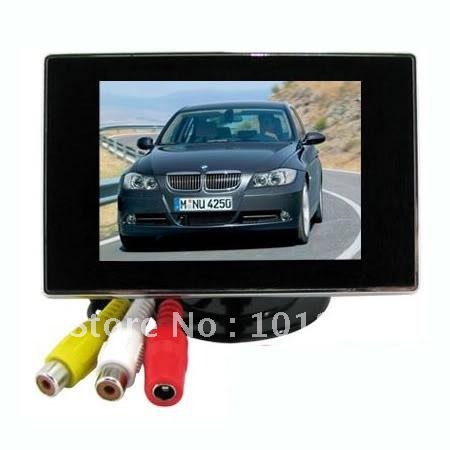
I have another screen that is _very_ similar, but has an adapter on the end for a 12V mains power supply (which I've got). Here's the display:

Image

Another similar one:

Image

And a close-up of the cable ends that I want to have for the new screen:
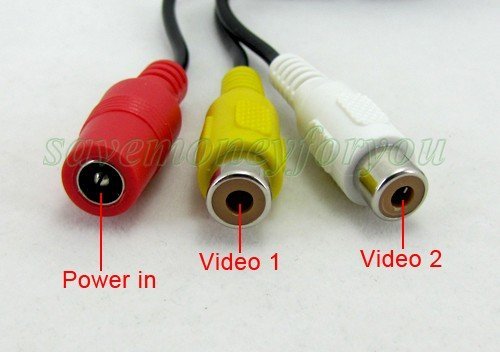
Image

And this shows what the whole cable looks like on mine - note the little gadget that is on the live wire (which has a fuse inside it):

Image


What I've done so far is to take the connector off the end of the 3.5" cable (the end that goes into the screen box) to reveal a red (live) wire, a ground and a yellow and a white (which must be the two composite inputs).


Now, what I think I have to do is to cut open the new input cable (with the 6 pin male connector), separate the wires and solder them to their equivalents on the 3.5" cable.


Does this sound right? I'd rather not a) blow the mains b) blow my head off c) blow the screen up d) blow the Pi up.


Hope someone can help.

--

Mike

  • Sign in to reply
  • Cancel
Parents
  • Former Member
    Former Member over 13 years ago

    the plug you show looks like it may be an svideo plug, i use a similar screen to last photo and just use the yellow 3.5 plugged into pi and a 12volt mains plug came with mine but i also bought a battery pack with the right connector for that screen i will post link when i find it

    mine worked straight out the box if i can figure out how to photo and upload ill try to show you how mine connects


    avaiaable from ebay contact mypro.ebee@gmail.com listed at £4.26 free delivery listed under laptop power adapters and chargersimage

    • Cancel
    • Vote Up 0 Vote Down
    • Sign in to reply
    • Cancel
  • johnbeetem
    johnbeetem over 13 years ago in reply to Former Member

    Phill Rymer wrote:


    the plug you show looks like it may be an svideo plug...

    S-Video does use a mini-DIN, but according to Wikipedia it's a 4-pin plug, not a 6-pin plug: http://en.wikipedia.org/wiki/S-Video.


    My guess is that they're just using the 6-pin mini-DIN to carry power (2 wires) and two composite video (2 wires each), with each pair of wires isolated from each other, i.e., no common grounds in the cable.  I recommend seeing if this is the case using an Ohmmeter to determine which DIN pins are connected to the RCA jacks.  Then figure out what the power supply block does by reading any labels on it and hooking it up to a +12V source.  The block probably converts automobile +12V (which is very ugly electrically) into a clean +V which you can measure with a voltmeter.

    • Cancel
    • Vote Up 0 Vote Down
    • Sign in to reply
    • Cancel
Reply
  • johnbeetem
    johnbeetem over 13 years ago in reply to Former Member

    Phill Rymer wrote:


    the plug you show looks like it may be an svideo plug...

    S-Video does use a mini-DIN, but according to Wikipedia it's a 4-pin plug, not a 6-pin plug: http://en.wikipedia.org/wiki/S-Video.


    My guess is that they're just using the 6-pin mini-DIN to carry power (2 wires) and two composite video (2 wires each), with each pair of wires isolated from each other, i.e., no common grounds in the cable.  I recommend seeing if this is the case using an Ohmmeter to determine which DIN pins are connected to the RCA jacks.  Then figure out what the power supply block does by reading any labels on it and hooking it up to a +12V source.  The block probably converts automobile +12V (which is very ugly electrically) into a clean +V which you can measure with a voltmeter.

    • Cancel
    • Vote Up 0 Vote Down
    • Sign in to reply
    • Cancel
Children
No Data
element14 Community

element14 is the first online community specifically for engineers. Connect with your peers and get expert answers to your questions.

  • Members
  • Learn
  • Technologies
  • Challenges & Projects
  • Products
  • Store
  • About Us
  • Feedback & Support
  • FAQs
  • Terms of Use
  • Privacy Policy
  • Legal and Copyright Notices
  • Sitemap
  • Cookies

An Avnet Company © 2025 Premier Farnell Limited. All Rights Reserved.

Premier Farnell Ltd, registered in England and Wales (no 00876412), registered office: Farnell House, Forge Lane, Leeds LS12 2NE.

ICP 备案号 10220084.

Follow element14

  • X
  • Facebook
  • linkedin
  • YouTube