element14 Community
element14 Community
    Register Log In
  • Site
  • Search
  • Log In Register
  • Community Hub
    Community Hub
    • What's New on element14
    • Feedback and Support
    • Benefits of Membership
    • Personal Blogs
    • Members Area
    • Achievement Levels
  • Learn
    Learn
    • Ask an Expert
    • eBooks
    • element14 presents
    • Learning Center
    • Tech Spotlight
    • STEM Academy
    • Webinars, Training and Events
    • Learning Groups
  • Technologies
    Technologies
    • 3D Printing
    • FPGA
    • Industrial Automation
    • Internet of Things
    • Power & Energy
    • Sensors
    • Technology Groups
  • Challenges & Projects
    Challenges & Projects
    • Design Challenges
    • element14 presents Projects
    • Project14
    • Arduino Projects
    • Raspberry Pi Projects
    • Project Groups
  • Products
    Products
    • Arduino
    • Avnet & Tria Boards Community
    • Dev Tools
    • Manufacturers
    • Multicomp Pro
    • Product Groups
    • Raspberry Pi
    • RoadTests & Reviews
  • About Us
  • Store
    Store
    • Visit Your Store
    • Choose another store...
      • Europe
      •  Austria (German)
      •  Belgium (Dutch, French)
      •  Bulgaria (Bulgarian)
      •  Czech Republic (Czech)
      •  Denmark (Danish)
      •  Estonia (Estonian)
      •  Finland (Finnish)
      •  France (French)
      •  Germany (German)
      •  Hungary (Hungarian)
      •  Ireland
      •  Israel
      •  Italy (Italian)
      •  Latvia (Latvian)
      •  
      •  Lithuania (Lithuanian)
      •  Netherlands (Dutch)
      •  Norway (Norwegian)
      •  Poland (Polish)
      •  Portugal (Portuguese)
      •  Romania (Romanian)
      •  Russia (Russian)
      •  Slovakia (Slovak)
      •  Slovenia (Slovenian)
      •  Spain (Spanish)
      •  Sweden (Swedish)
      •  Switzerland(German, French)
      •  Turkey (Turkish)
      •  United Kingdom
      • Asia Pacific
      •  Australia
      •  China
      •  Hong Kong
      •  India
      • Japan
      •  Korea (Korean)
      •  Malaysia
      •  New Zealand
      •  Philippines
      •  Singapore
      •  Taiwan
      •  Thailand (Thai)
      • Vietnam
      • Americas
      •  Brazil (Portuguese)
      •  Canada
      •  Mexico (Spanish)
      •  United States
      Can't find the country/region you're looking for? Visit our export site or find a local distributor.
  • Translate
  • Profile
  • Settings
Raspberry Pi
  • Products
  • More
Raspberry Pi
Raspberry Pi Forum Upgrade your Raspberry Pi to turbo mode
  • Blog
  • Forum
  • Documents
  • Quiz
  • Events
  • Polls
  • Files
  • Members
  • Mentions
  • Sub-Groups
  • Tags
  • More
  • Cancel
  • New
Join Raspberry Pi to participate - click to join for free!
Featured Articles
Announcing Pi
Technical Specifications
Raspberry Pi FAQs
Win a Pi
Raspberry Pi Wishlist
Actions
  • Share
  • More
  • Cancel
Forum Thread Details
  • Replies 8 replies
  • Subscribers 676 subscribers
  • Views 2091 views
  • Users 0 members are here
Related

Upgrade your Raspberry Pi to turbo mode

bluescreen
bluescreen over 13 years ago

Hi Everyone.


We're pleased to let you know that a new distro of Wheezy is available which boosts performance from your Raspberry Pi. Some of you might have already taken advantage of overclocking, and this update incorporates some of the collective experiences users have had since the Raspberry Pi first launched. element14's Drew Fustini posted a great blog entry which explains how to update your unit right from apt-get instead of having to reflash your SD card with the new download. Our friends at the Raspberry Pi Foundation report that the new update can boost performance by around 50%. The new update also includes:


  • Better support for wifi
  • Better audio quality
  • New pre-installed software like SmartSim and PenguinsPuzzle


Did we mention the update is totally free? image


Drew's post explains in detail how to update to the new version. Check it out + let us know what you think of it! I'm off to update my R Pi now...


Sagar

  • Sign in to reply
  • Cancel
Parents
  • wallarug
    wallarug over 13 years ago

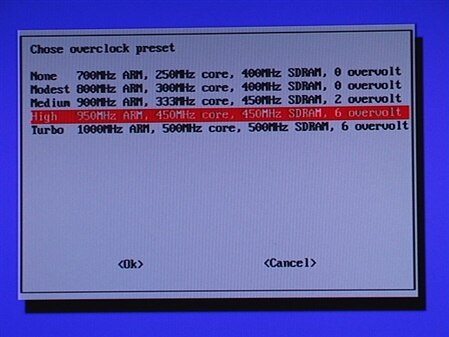
    What is wrong here?

    image

    Overvolting is said to VOID WARRENTY! 


    Also, How can you overvolt by 2 volts?


    Or 6 volts with a 5 volt power supply?


    HELP BEFORE I KILL RPi!!!


    We’ve been doing a lot of work to understand the impact of voltage and temperature on lifetime, and are now able to offer a “turbo mode”, which dynamically enables overclock and overvolt under the control of a cpufreq driver, without affecting your warranty.

    • Cancel
    • Vote Up 0 Vote Down
    • Sign in to reply
    • Cancel
Reply
  • wallarug
    wallarug over 13 years ago

    What is wrong here?

    image

    Overvolting is said to VOID WARRENTY! 


    Also, How can you overvolt by 2 volts?


    Or 6 volts with a 5 volt power supply?


    HELP BEFORE I KILL RPi!!!


    We’ve been doing a lot of work to understand the impact of voltage and temperature on lifetime, and are now able to offer a “turbo mode”, which dynamically enables overclock and overvolt under the control of a cpufreq driver, without affecting your warranty.

    • Cancel
    • Vote Up 0 Vote Down
    • Sign in to reply
    • Cancel
Children
  • shabaz
    shabaz over 13 years ago in reply to wallarug

    I saw some post somewhere that said these numbers do not correspond to volts, but to some other 'level', i.e. it is some additional fraction of a volt if you select level 6. Bad screen I know! It should either be fully technical and specify the voltage correctly, or be non-technical and just say high (may affect some programs but won't affect warranty) / Low (normal setting, always works)

    -or something similar.


    (I've not tried this, I still need to download the latest release).

    • Cancel
    • Vote Up 0 Vote Down
    • Sign in to reply
    • Cancel
  • wallarug
    wallarug over 13 years ago in reply to shabaz

    All good.  I have it running on the Fastest setting but I am looking forward to someone letting me know if you can do the same thing with RAM?

    • Cancel
    • Vote Up 0 Vote Down
    • Sign in to reply
    • Cancel
  • fustini
    fustini over 13 years ago in reply to wallarug

    Overclock the RAM?  I think this new dynamic overclocking will do that for CPU, GPU and RAM.  I found I had to run something "intense" to actually see the CPU throttle up.  Quake did the trick with 1024x768 resolution.  I ran in "Turbo" mode with no problems.

    • Cancel
    • Vote Up 0 Vote Down
    • Sign in to reply
    • Cancel
  • wallarug
    wallarug over 13 years ago in reply to fustini

    No settings are in config.txt when Turbo mode is on to enable RAM overclocking/overvolting?

    • Cancel
    • Vote Up 0 Vote Down
    • Sign in to reply
    • Cancel
  • fustini
    fustini over 13 years ago in reply to wallarug

    With Turbo mode set via raspi-config, I have these settings in config.txt:

    arm_freq=1000

    core_freq=500

    sdram_freq=500

    over_voltage=6

    So I believe it will overclock the SDRAM.  However, I'm not sure if it will overvolt the SDRAM.  The wiki shows that over_voltage is just "ARM/GPU core voltage adjust."  There's seems to be seperate settings for SDRAM overvolt:


    over_voltage_sdramSets over_voltage_sdram_c, over_voltage_sdram_i, over_voltage_sdram_p together
    over_voltage_sdram_cSDRAM controller voltage adjust. [-16,8] equates to [0.8V,1.4V] with 0.025V steps. Default 0 (1.2V) [5]
    over_voltage_sdram_iSDRAM I/O voltage adjust. [-16,8] equates to [0.8V,1.4V] with 0.025V steps. Default 0 (1.2V)[5]
    over_voltage_sdram_pSDRAM phy voltage adjust. [-16,8] equates to [0.8V,1.4V] with 0.025V steps. Default 0 (1.2V)[5]
    • Cancel
    • Vote Up 0 Vote Down
    • Sign in to reply
    • Cancel
  • wallarug
    wallarug over 13 years ago in reply to fustini

    That's what I am saying.  Mine also has the same settings as your config.txt - none for sram overvolting/clocking. 


    Anyone know if it is safe to overvolt Ram without melting the little 'blob' in the ARM processor?

    • Cancel
    • Vote Up 0 Vote Down
    • Sign in to reply
    • Cancel
  • rew
    rew over 13 years ago in reply to wallarug

    As far as I can tell, the new "overclocking" is done by a module in the kernel. This allows the module to monitor the temperature of the chip and switch back when the chip gets too hot. Overclocking and overvolting a chip is actually OK (within limits) as long as the chip doesn't overheat. So when the kernel module keeps a tab on the temperature there is not much that can go wrong.


    On the other hand, if you use the old firmware and set "overvolt=6", you're not using the module that uses the live temperature monitoring to keep the temperature in check and the chip might overheat. This mode was said to trigger the "no warranty, you blew up your chip yourself" fuse.


    In fact modern desktop PCs work in a very similar way. The hardware allows for dynamically changing the voltage and speed of the processor.

    • Cancel
    • Vote Up +1 Vote Down
    • Sign in to reply
    • Cancel
element14 Community

element14 is the first online community specifically for engineers. Connect with your peers and get expert answers to your questions.

  • Members
  • Learn
  • Technologies
  • Challenges & Projects
  • Products
  • Store
  • About Us
  • Feedback & Support
  • FAQs
  • Terms of Use
  • Privacy Policy
  • Legal and Copyright Notices
  • Sitemap
  • Cookies

An Avnet Company © 2025 Premier Farnell Limited. All Rights Reserved.

Premier Farnell Ltd, registered in England and Wales (no 00876412), registered office: Farnell House, Forge Lane, Leeds LS12 2NE.

ICP 备案号 10220084.

Follow element14

  • X
  • Facebook
  • linkedin
  • YouTube