Hello im new to the raspberry pi but have HAD one for quite a while now and was wondering if i could use it to do my graphic design on a book im writing
Thank you
Edward Harris

Hello im new to the raspberry pi but have HAD one for quite a while now and was wondering if i could use it to do my graphic design on a book im writing
Thank you
Edward Harris

It is my understanding that the MagPi team create the magazine entirely on the Raspberry Pi using this:
http://www.scribus.net/canvas/Scribus
I used it to write an article for them in issue 14:
http://www.themagpi.com/en/issue/14 (mine's the one on the Guzunty programmable logic add on)
I'd definitely recommend a 512MB Pi to run it on, but Scribus definitely works.
It is more aimed at desktop publishing than graphics design, but you did say you wanted to use it on a book.
Derek Campbell wrote:
I used it to write an article for them in issue 14:
http://www.themagpi.com/en/issue/14 (mine's the one on the Guzunty programmable logic add on)
That's a great article, Derek! I hope it attracts some inquisitive youngsters to programmable logic, that would be quite awesome.
The concept of providing a range of ready downloadable cores should make the subject much more approachable than if everyone had to program their own on day 1, which could be intimidating for those just dipping a first toe in the water. This makes it a valuable resource for EE education among other things, allowing progression in complexity as skills increase.
Well done! I'll continue reading your Guzunty wiki resources as time allows.
Morgaine.
Back reference: Derek first described his Guzunty project to us in January 2013 in the "Role for FPGA or CPLD with Raspberry Pi" thread.
Morgaine,
Thank you for the encouragement! Yes, we are building up a nice little set of educational materials there.
There is new stuff continuing to become available too, like this:
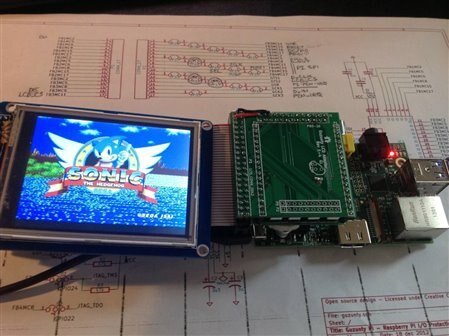
Here, the CPLD converts framebuffer output arriving on SPI into a parallel form suitable for writing to the LCD and activates the chip select and write signals as required. The frame buffer drivers are Notro's excellent work here:
https://github.com/notro/fbtft
and the megadrive simulator came from here:
http://sourceforge.net/p/dgen/dgen/ci/master/tree/
Sonic of course came from Sega Inc. Sonic may not be educational in itself, but if it entices even one youngster to start playing with programmable logic it's done its job.
In case anyone is wondering, I own not one, but 3 original copies of Sonic the Hedgehog. Please do not download games you do not own (and please don't ask me where to find them, I will ignore your message*). Gameplay is smooth, sound is surprisingly good too.
* I should add that this is the only kind of message I will ignore. Any other questions are encouraged and will be most enthusiastically answered. :-)
wow that so cool i never knew that you could even do that with the pi
Yup, with a little extra hardware.
In fact, you can do this without a Guzunty. It is possible to do it using discrete logic (a ripple counter and two shift registers), but I think it is cooler to use the CPLD, since you don't need a breadboard.
The LCD is only $15 plus shipping (and so is the Guzunty for that matter).
Yup, with a little extra hardware.
In fact, you can do this without a Guzunty. It is possible to do it using discrete logic (a ripple counter and two shift registers), but I think it is cooler to use the CPLD, since you don't need a breadboard.
The LCD is only $15 plus shipping (and so is the Guzunty for that matter).