You may have seen this Raspberry Pi Project.
This 1.8 TFT LCD seems to be a very nice display for Raspberry Pi.
Does this hook right up to the GPIO pins?
How hard would it be for someone like me who knows nothing about electronics?
You may have seen this Raspberry Pi Project.
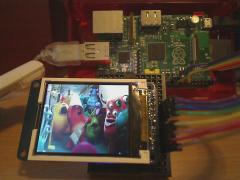
This 1.8 TFT LCD seems to be a very nice display for Raspberry Pi.
Does this hook right up to the GPIO pins?
How hard would it be for someone like me who knows nothing about electronics?

I have had that display running on a pi (the sainsmart version). Both command line and a very, very small desktop.
If you get one, take note of the colour of the tab on the screen protector. Believe it or not this is your only clue as to which implementation is inside.
I found it too small for my intended purpose, but it is cute.
Wiring it up is trivial, but you will need to recompile your kernel with support for tft lcd framebuffers. Building a module is not sufficient -- the stock rasbian kernels don't know what to do with it. Instructions are googlable.
This assumes you want to use it as a standard screen. For dedicated purposes you could always drive it directly.
I'm saving mine for an arduino project.
I have had that display running on a pi (the sainsmart version). Both command line and a very, very small desktop.
If you get one, take note of the colour of the tab on the screen protector. Believe it or not this is your only clue as to which implementation is inside.
I found it too small for my intended purpose, but it is cute.
Wiring it up is trivial, but you will need to recompile your kernel with support for tft lcd framebuffers. Building a module is not sufficient -- the stock rasbian kernels don't know what to do with it. Instructions are googlable.
This assumes you want to use it as a standard screen. For dedicated purposes you could always drive it directly.
I'm saving mine for an arduino project.


